TP-Link TL-SX105 Review: Five Copper 10G Ports for $200
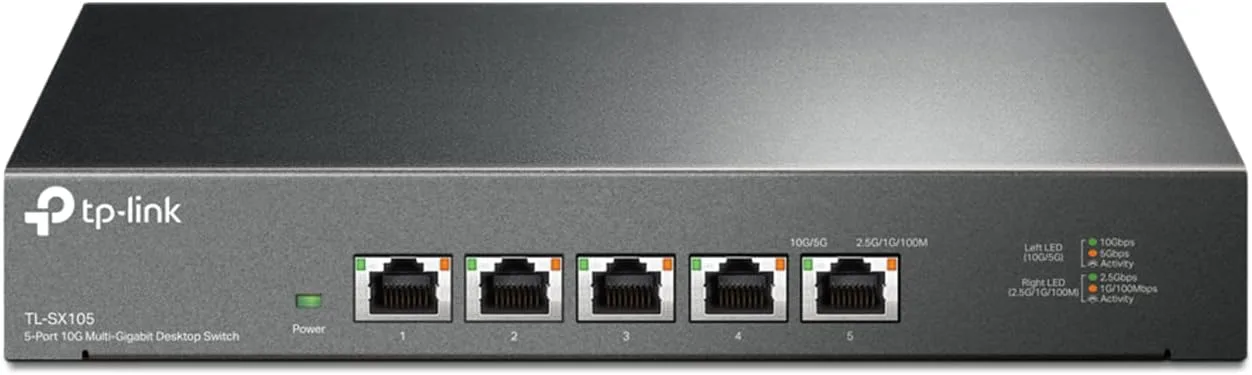
The TL-SX105 is the cheapest honest way to put five copper 10G ports in your house, and at $199.99 it finally costs what it should. That's about $40 per 10GBASE-T port from a major brand with a US lifetime warranty — the same box was listing near $400 when it launched, and it still sells for over $300 at some retailers. Every port auto-negotiates the full ladder from 100 Mbps through 10 Gbps, so nothing you own gets stranded, and the fanless metal chassis makes it genuinely silent. The catch is that it is exactly one thing: a dumb, fast, five-port copper switch. There is no management interface, no VLAN configuration, no link aggregation, no SFP+ cage, and no PoE. It draws up to 24W and runs warm, because that is what 10GBASE-T over copper costs. Buy it if you have three or more devices that will actually saturate 10G. If what you really need is 2.5G fanout with a couple of 10G uplinks, the QNAP QSW-M2108-2C is cheaper, managed, and the smarter buy.
✅ Pros
- +Five true 10GBASE-T ports at roughly $40 per port — the cheapest copper 10G fanout from a major brand
- +Every port steps down cleanly through 5G, 2.5G, 1G, and 100M, so nothing gets stranded
- +Completely silent, fanless, with a thick steel chassis and serious heatsinking
- +Wire-speed in practice — independent testing measured near line rate on iPerf3
- +Dual per-port LEDs let you verify negotiated speed without a management interface
- +IGMP snooping and QoS enabled by default, which is unusual at this price
- +US limited lifetime warranty
- +Desktop or wall mountable
❌ Cons
- −Unmanaged: no VLANs, no link aggregation, no monitoring, no configurable loop protection
- −Only five ports — one becomes your uplink, leaving four devices
- −No PoE output and no SFP+ cage, so no powering APs and no fiber
- −Up to 24W draw and a chassis that runs warm; needs clearance
- −Requires Cat6a for full 100 m 10G runs; Cat5e caps at 5 Gbps
- −10G NICs are an extra $80–$100 per machine
- −TP-Link's own product page and V4.0 datasheet disagree on four specs, and the listing doesn't disclose hardware revision
- −Overkill if your storage can't actually feed a 10G link
Key Specs at a Glance
| Spec | TP-Link TL-SX105 |
|---|---|
| Ports | 5 × RJ45, all 100M/1G/2.5G/5G/10G |
| Standards | 802.3an (10GBASE-T), 802.3bz (2.5G/5G), 802.3ab, 802.3u, 802.3x |
| Switching capacity | 100 Gbps |
| Forwarding rate | 74.4 Mpps |
| Switching method | Store-and-forward |
| Management | None — unmanaged, plug and play |
| Fixed features | 802.3x flow control, 802.1p/DSCP QoS, IGMP snooping v1/v2/v3 |
| Cooling | Fanless, metal chassis |
| Power | External 12 VDC / 2.0 A adapter |
| Max power draw | 21.4 W (product page) / 24.44 W (V4.0 datasheet) |
| Dimensions | 8.9 × 5.2 × 1.4 in (226 × 131.2 × 35 mm) |
| Mounting | Desktop or wall mount |
| Operating temperature | 0–40 °C (32–104 °F) |
| PoE output | None |
| SFP+ cage | None |
| Warranty | US limited lifetime |
| Price | $199.99 |
What It Is
The TL-SX105 is an unmanaged switch with five 10GBASE-T ports and nothing else. You plug it in, you plug things into it, and it moves frames. There is no web interface to log into, no app, no cloud account, and no firmware you will ever meaningfully interact with.
What makes it interesting is that all five ports are true multi-gig. Each one negotiates 100 Mbps, 1 Gbps, 2.5 Gbps, 5 Gbps, or 10 Gbps depending on what you connect, which is a meaningfully different proposition from the mixed-speed switches that dominate this price bracket. Most "10G" switches for home use are really 2.5G switches with one or two 10G uplinks. This one is 10G everywhere, and it will happily run a 1 Gbps printer on port 4 while port 1 is pushing a NAS at line rate.
The switching fabric is rated at 100 Gbps with a 74.4 Mpps forwarding rate — that's full wire speed for five 10G ports in both directions simultaneously, with margin. In practice you will never be the bottleneck here; your NICs, your drives, and your cabling will run out first.
The Price Is the Story
Copper 10G has been "almost affordable" for about five years. The TL-SX105 is where it stops being almost.
At $199.99, you're paying roughly $40 per 10GBASE-T port. For context, this same switch carried a list price near $400 when it arrived, one hands-on reviewer called it compelling value at that price, and it still sells above $300 at B&H and other retailers today. The Amazon price is where the value case actually closes.
Compare that to how you'd otherwise get five copper 10G ports: enterprise pulls off eBay with screaming 40mm fans, or a $600+ managed switch, or an SFP+ switch plus five 10GBASE-T transceivers that each cost $40 and run hot enough to need their own airflow. A silent, warrantied, brand-new desktop box at $200 is a genuinely new option.
That said — the price only makes sense if you need the port count. Five 10G ports where you only use two is $200 spent to solve a $150 problem. The section below on alternatives is the one to read before you buy.
Build, Noise, and Heat
The chassis is thick matte-black steel, not the flexing plastic you get on cheap unmanaged switches, and it's wall-mountable. Internally, the switching silicon is a Realtek RTL9303 sitting under two large heatsinks with a metal backing plate doing double duty as a thermal mass. An independent teardown described the power delivery as "overkill" for the load.
There is no fan, and that is the single best thing about this switch. It is completely silent, which matters because a 10G switch tends to live next to your desk or in an AV rack, not in a closet.
The trade for silence is heat. TP-Link's V4.0 datasheet rates maximum heat dissipation at 83.10 BTU/h, and the chassis gets warm to the touch under sustained load — warm, not alarming. This is normal for 10GBASE-T: pushing 10 Gbps over twisted pair takes real signal processing power, which is exactly why it draws up to 24W while a comparable 8-port 2.5G switch like the TL-SG108-M2 sips a few watts. Give it a few inches of clearance, don't stack a receiver on top of it, and it will be fine.
Worth noting: 24W running 24/7 is roughly 17 kWh a month. At average US rates that's a couple of dollars a month — not nothing, but not a reason to avoid it either.
Performance
There isn't much to say about the throughput of a wire-speed unmanaged switch, which is the point. Independent hands-on testing using two ASUS XG-C100C 10G NICs over Cat 7 cable measured near 10 Gbps on iPerf3 — essentially line rate — and saw real-file transfers of a 103 GB library start above 1 GB/s before settling back to whatever the source SSD's cache could sustain.
That last detail is the important one, and it generalizes: on a 10G link, your storage becomes the bottleneck almost immediately. 10 Gbps is about 1.25 GB/s, which is faster than any spinning disk, faster than most SATA SSDs, and faster than a lot of consumer NAS units can read from their own arrays. If you're wiring a NAS like the Synology DS225+ into this switch, understand that a two-bay NAS with hard drives will deliver somewhere around 2 Gbps of real throughput, not 10. The switch is not the limit. That's an argument for buying a 2.5G switch, not a 10G one, unless you know your endpoints can feed the pipe.
The devices that genuinely saturate 10G in a home are a short list: NVMe-backed NAS or all-flash arrays, direct workstation-to-workstation transfers, video editing off shared storage, and virtualization hosts moving VM images. If you're on that list, this switch does its job invisibly. If you're not, you're buying headroom.
Cabling: Read This Before You Order
10GBASE-T is the most cable-sensitive thing most people will ever run at home, and the spec sheet is blunt about it:
- Cat6a or better gets you 10 Gbps at the full 100 m run length.
- Cat6 will typically do 10 Gbps up to around 55 m, less in a noisy bundle.
- Cat5e is officially good for 5 Gbps on this switch, not 10.
If your house is already wired with Cat5e, that's not a disaster — the switch will negotiate 5 Gbps and keep going, which is still five times gigabit. But don't buy a 10G switch expecting your existing Cat5e to deliver 10G, because it usually won't. Our Cat6 vs Cat6a vs Cat7 vs Cat8 guide covers what actually matters here, and if you're pulling new runs, the run Ethernet through walls and terminate Cat6 keystone jacks guides cover doing it properly. Terminations matter more at 10G than at any lower speed — a sloppy punchdown that passes at gigabit will fail to negotiate 10G.
One more cost people forget: 10G NICs aren't free. A copper 10G card runs $80–$100, and most desktops and every laptop will need one. Budget for the NICs before you budget for the switch.
The Spec Sheet Problem
Here's the finding that surprised us, and it's the kind of thing worth knowing before you spend $200.
TP-Link publishes a V4.0 datasheet (dated November 2024) for the TL-SX105, and it disagrees with the unversioned spec table on TP-Link's own US product page in four places:
| Spec | US product page | V4.0 datasheet |
|---|---|---|
| Max power consumption | 21.4 W | 24.44 W |
| MAC address table | 32 K | 16 K |
| Packet buffer | 2 Mb | 12 Mbit |
| Jumbo frame | 10 KB | 12 KB |
None of these will change your life. A 16 K MAC table is still vastly more than a home network needs, and a bigger packet buffer is a good thing. But it means the published specs for this product depend on which document you read, and Amazon doesn't tell you which hardware revision is in the box. If you're buying for a specific spec — a jumbo frame size, a power budget — verify against the revision you actually receive rather than the marketing page.
We've flagged similar documentation mismatches on TP-Link gear before, including in our Omada EAP773 review, where retailer listings and the official spec sheet disagreed on PoE class. The lesson is the same: trust the version-stamped datasheet over the product page.
What You Give Up by Going Unmanaged
This is an unmanaged switch, and the word does real work. You do not get:
- VLANs. No network segmentation, no isolating IoT gear or a guest network at the switch. If that's what you're after, you want a managed switch — our managed vs unmanaged switches explainer covers where the line falls.
- Link aggregation. You can't bond two ports for a 20G trunk to a NAS.
- Port mirroring, SNMP, or any monitoring. You cannot see what's happening on this switch. It has no idea it exists.
- Loop protection you can configure. Plug both ends of a cable into it and you'll broadcast-storm your network.
- PoE. Nothing gets powered from this switch. If you're feeding access points, you need a separate PoE switch or injectors — the Omada SG3210XHP-M2 is the obvious companion.
- An SFP+ cage. Copper only. No fiber runs between floors or buildings, and no cheap DAC cables to a nearby NAS.
What you do get, in fixed configuration, is 802.3x flow control, 802.1p/DSCP QoS honoring, and IGMP snooping v1/v2/v3 enabled by default — that last one is genuinely useful and often missing at this price. Without IGMP snooping, multicast traffic from things like IPTV set-top boxes or multi-room audio gets flooded to every port. It's on here, and you don't have to do anything.
The other quiet compensation for the missing management UI is the faceplate. Each port has two LEDs with a printed legend: the left LED covers 10G and 5G, the right covers 2.5G, 1G, and 100M. That means you can walk up to the switch and confirm at a glance that a link actually came up at 10 Gbps — which, given how often marginal cabling silently negotiates down, is the single diagnostic you'll want most. On an unmanaged switch that's not a nicety, it's the only troubleshooting tool you have.
Pros and Cons
Pros
- Five true 10GBASE-T ports at roughly $40 per port — the cheapest copper 10G fanout from a major brand
- Every port steps down cleanly through 5G, 2.5G, 1G, and 100M, so nothing gets stranded
- Completely silent, fanless, with a thick steel chassis and serious heatsinking
- Wire-speed in practice — independent testing measured near line rate on iPerf3
- Dual per-port LEDs let you verify negotiated speed without a management interface
- IGMP snooping and QoS enabled by default, which is unusual at this price
- US limited lifetime warranty
- Desktop or wall mountable
Cons
- Unmanaged: no VLANs, no link aggregation, no monitoring, no configurable loop protection
- Only five ports — one becomes your uplink, leaving four devices
- No PoE output and no SFP+ cage, so no powering APs and no fiber
- Up to 24W draw and a chassis that runs warm; needs clearance
- Requires Cat6a for full 100 m 10G runs; Cat5e caps at 5 Gbps
- 10G NICs are an extra $80–$100 per machine
- TP-Link's own product page and V4.0 datasheet disagree on four specs, and the listing doesn't disclose hardware revision
- Overkill if your storage can't actually feed a 10G link
How It Compares
| TL-SX105 | QNAP QSW-M2108-2C | TL-SG108-M2 | Omada SG3210XHP-M2 | |
|---|---|---|---|---|
| 10G ports | 5 × RJ45 | 2 × combo (RJ45/SFP+) | None | 2 × SFP+ |
| 2.5G ports | 5 (same ports) | 8 | 8 | 8 |
| Managed | No | Yes (web) | No | Yes (Omada SDN) |
| PoE | None | None | None | PoE+, 240W |
| Fanless | Yes | Yes | Yes | Yes |
| Price at review | $199.99 | $149.99 | $129.99 | $399.99 |
The honest read: the TL-SX105 wins on exactly one axis, and it's the axis most people don't need. If you have three or more devices that genuinely saturate copper 10G — an all-flash NAS, a workstation, an editing machine — nothing else here can feed them, and the SX105 is the cheapest thing that can.
For everyone else, the QNAP QSW-M2108-2C is the better switch and $50 cheaper. Eight 2.5G ports plus two 10G combo ports matches the actual shape of a modern home network — lots of devices that benefit from 2.5G, one or two that want 10G — and it's web-managed, so you get VLANs. If you don't need 10G at all and just want to get off gigabit, the TL-SG108-M2 does that for $129.99. And if your problem is powering access points rather than moving bulk data, the SG3210XHP-M2 is the one to buy.
There's also the question of what's upstream. A 10G switch is most useful hanging off a router that has a 10G port to give it — the Nighthawk RS700S with dual 10G, the Archer BE800, or the RT-BE88U. If your router tops out at 2.5G, the SX105 still works fine as an internal high-speed segment between your NAS and your desktop, but your internet traffic won't see any of it. Our 2.5GbE vs 10GbE breakdown is the piece to read if you're still deciding which speed tier to build toward.
Who Should Buy It
Buy it if:
- You have three or more devices with copper 10G NICs and storage fast enough to use them
- You're editing video or moving large files off shared NVMe storage
- You want silence — this is going next to a desk or in an AV rack
- You already own a router with a 10G port and need to fan it out
- Your runs are Cat6a, or short enough Cat6
Skip it if:
- You need VLANs or any network segmentation — buy managed
- You need to power access points or cameras — buy a PoE switch
- Your fastest storage is a two-bay NAS with spinning disks — 2.5G is plenty and much cheaper
- You only need two 10G ports — the QNAP does that for $50 less, with management
- Your house is wired with Cat5e and you're not re-running it
Bottom Line
The TL-SX105 does one narrow thing extremely well and makes no attempt at anything else. Five wire-speed copper 10G ports, silent, in a metal box with a lifetime warranty, for $199.99 — that combination didn't exist at a sane price until recently, and if you're one of the people who needs it, there isn't really a competitor.
Just be honest with yourself about whether you're that person. The gravitational pull of a spec sheet is strong, and 10G is the most seductive number in home networking. But most homes are better served by 2.5G everywhere than by 10G in a couple of places, and a managed 2.5G switch with a pair of 10G uplinks covers more real situations for less money. The test is simple: count the devices in your house that can actually read and write faster than 1.25 GB/s. If the answer is three or more, buy this. If it's one or two, buy the QNAP. If it's zero, buy the TL-SG108-M2 and spend the difference on something you'll notice.
Rating: 4.3 / 5
Our Verdict
The TL-SX105 is the cheapest honest way to put five copper 10G ports in your house, and at $199.99 it finally costs what it should. That's about $40 per 10GBASE-T port from a major brand with a US lifetime warranty — the same box was listing near $400 when it launched, and it still sells for over $300 at some retailers. Every port auto-negotiates the full ladder from 100 Mbps through 10 Gbps, so nothing you own gets stranded, and the fanless metal chassis makes it genuinely silent. The catch is that it is exactly one thing: a dumb, fast, five-port copper switch. There is no management interface, no VLAN configuration, no link aggregation, no SFP+ cage, and no PoE. It draws up to 24W and runs warm, because that is what 10GBASE-T over copper costs. Buy it if you have three or more devices that will actually saturate 10G. If what you really need is 2.5G fanout with a couple of 10G uplinks, the QNAP QSW-M2108-2C is cheaper, managed, and the smarter buy.
Ready to buy the TP-Link TL-SX105?
Buy on Amazon →Affiliate link — we may earn a commission at no extra cost to you.