Synology DS225+ Review: The Home NAS Most People Should Actually Buy
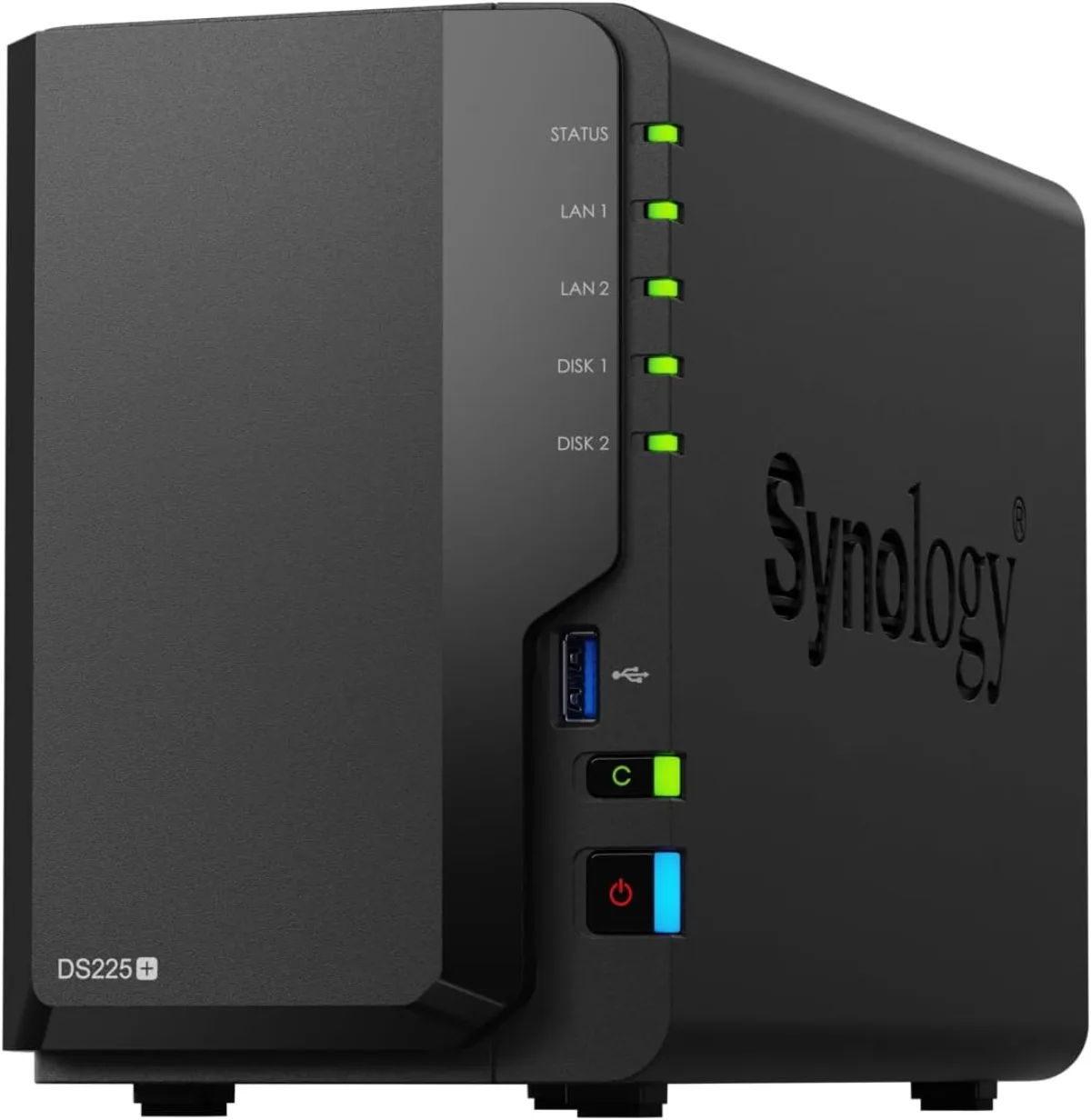
The Synology DS225+ is a 2-bay NAS with a quad-core Intel Celeron, 2.5GbE, and Synology's polished DSM software — around $365 diskless. Here's the honest breakdown, including the 2025 drive-compatibility saga.
✅ Pros
- +DSM 7.3 — the most polished, most capable NAS operating system, with first-party apps for photos, backup, sync, media, containers, and surveillance
- +2.5GbE port lifts the transfer ceiling from ~110 MB/s to ~280 MB/s versus the gigabit DS224+
- +Hardware transcoding via Intel Quick Sync handles a 4K Plex/Jellyfin stream or two
- +Easiest setup in the category; SHR lets you mix and grow drives
- +Quiet, low-power, and unobtrusive enough for a living space
- +Third-party WD/Seagate drive support restored in DSM 7.3
❌ Cons
- −Aging Celeron J4125 (2019-era) and a 6GB RAM ceiling limit heavy workloads
- −No M.2 / NVMe cache slots
- −Only one port is 2.5GbE; the second stays at 1GbE
- −Synology's 2025 drive-lock controversy is resolved but a fair trust concern
- −More expensive per spec than UGREEN/TerraMaster rivals — you pay for the software
- −2GB base RAM realistically needs the 4GB upgrade for serious Docker use
The DS225+ is the home NAS most people should actually buy — as long as you go in knowing the hardware is deliberately modest. For around $365 without drives, you get Synology's DSM 7.3 software (still the best NAS operating system there is), a proven quad-core Celeron with hardware transcoding, and — the real reason to pick this over the outgoing DS224+ — a 2.5GbE port. It is the easiest NAS to set up, the easiest to live with, and the safest bet for a first-time buyer who wants a Plex server, a Time Machine target, and an off-cloud photo backup without becoming a part-time sysadmin. What holds it back from a higher score is entirely Synology's own doing: an aging CPU, a 6GB RAM ceiling, no NVMe cache slots, and a rough year of drive-lock controversy that DSM 7.3 has only just walked back.
The Synology DS225+ is available on Amazon.
Key Specs at a Glance
The DS225+ is a 2-bay desktop NAS sold diskless. It runs a quad-core Intel Celeron J4125 (4 cores / 4 threads, 2.0 GHz base, 2.7 GHz burst) with 2GB of non-ECC DDR4, expandable to 6GB via a single D4NS01-4G module. Its two hot-swappable bays take 3.5-inch SATA HDDs or 2.5-inch SATA SSDs for up to 40TB raw (2× 20TB), with SHR, RAID 0/1, JBOD, and Basic supported — there are no M.2 slots and no SSD cache. Networking is one 2.5GbE port plus one 1GbE port (link aggregation or failover), and there are two USB 3.2 Gen 1 ports plus a USB Copy button. It runs DSM 7.3, does hardware transcoding through Intel Quick Sync (H.264/H.265), stays near-silent on a single quiet 92mm fan once HDDs are installed, and ships with a 3-year Synology US warranty at around $365 street.
What It Is: The Default First NAS
A NAS — network-attached storage — is a small always-on box of hard drives that lives on your network instead of plugging into one computer. It is where you put the things you don't want trapped on a laptop or renting space in someone else's cloud: your photo library, your movie and music collection, laptop backups for the whole house, and — increasingly — a private replacement for Dropbox and Google Photos.
The DS225+ is the 2025-generation refresh of Synology's most popular home model, the "plus" two-bay line that has been the default recommendation for a first NAS for years running. It slots directly above the entry-level "j" and "play" models and below the four-bay DS425+. If you have looked at a NAS buying guide in the last five years, the DS220+ or DS224+ was almost certainly the pick — the DS225+ is that same box, brought forward.
The reason it earns the recommendation isn't the hardware. It's DSM — DiskStation Manager, Synology's operating system — which is genuinely years ahead of every competitor on polish, app maturity, and "it just works" reliability. You manage the whole thing from a desktop-style web interface or a set of clean mobile apps, and the setup wizard walks a first-timer from unboxing to a working RAID array in about fifteen minutes.
The Headline Upgrade: 2.5GbE
The single most important change from the DS224+ is the network port. The old model shipped with two gigabit ports; the DS225+ replaces one of them with a 2.5GbE port (the second port stays at 1GbE, for link aggregation or failover).
This matters more than it sounds. Gigabit Ethernet caps real-world transfers at roughly 110 MB/s — slower than a single modern hard drive can read, and dramatically slower than an SSD. Every large transfer to or from a gigabit NAS is bottlenecked by the network, not the disks. The jump to 2.5GbE lifts that ceiling to around 280 MB/s, which is enough for a single client to nearly saturate a two-drive array or pull a large 4K video file without the copy dragging.
To actually use it you need the other end to be 2.5G too — a 2.5GbE port on your PC (many modern motherboards have one, or a cheap USB adapter adds one) and a 2.5G switch between them. If your network is still all-gigabit, this is the nudge to upgrade the one link that matters; a compact fanless multi-gig switch is inexpensive and does the job.
Software: Why People Buy Synology
Everything good about the DS225+ traces back to DSM 7.3. A short tour of what you actually get: Synology Photos is a legitimate Google Photos replacement — automatic phone backup, face and subject recognition, shared albums, and a map view, all running on hardware you own with no monthly fee. Synology Drive does the same for files: a Dropbox-style sync client for every computer in the house. Active Backup for Business (free) images entire Windows PCs and Macs, and Hyper Backup copies the NAS itself off-site or to a second drive so a single failure never means data loss.
For a media server, this box is a natural Plex or Jellyfin host. The Celeron J4125 includes Intel Quick Sync, so it can hardware-transcode H.264 and H.265 streams — meaning it can reshape a 4K file on the fly for a phone or an older TV without the CPU falling over. It is not a transcoding monster, but for one or two simultaneous streams on a home network it is more than adequate.
Container Manager (Synology's Docker) opens the door to the wider self-hosting world — Pi-hole, Home Assistant, a personal wiki, dozens of others — and Surveillance Station turns the NAS into a capable network-video recorder for IP cameras (two camera licenses are included). This is the depth no competitor matches: whatever you decide you want a NAS to do a year from now, DSM probably already has a first-party app for it.
The Honest Caveats: Aging Hardware and a Rough Year
Now the other side, stated plainly, because this is where the DS225+ loses points.
The CPU is old. The Celeron J4125 first shipped in 2019. It is perfectly capable for file serving, backups, photo indexing, and light transcoding — but it is the same chip Synology has used across this line for years, and buyers comparing spec sheets against newer competitors will notice. This is a "reliable and proven," not "fast," processor.
RAM tops out at 6GB. The unit ships with 2GB of DDR4 and takes a single 4GB module (Synology's D4NS01-4G) for a 6GB maximum. That is fine for the core apps and a handful of Docker containers, but it is a hard ceiling if you dream of running several virtual machines or a dozen heavy containers. Budget for the 4GB upgrade if you plan to lean on Container Manager — it is the cheapest, highest-impact thing you can add.
There are no M.2 slots. Some competitors and higher Synology models accept NVMe SSDs for read/write caching or even as a storage pool. The DS225+ does not — what you get is the two SATA bays, full stop.
And then there's the drive saga. For much of 2025, Synology tried to restrict its 2025-generation "plus" NAS units — the DS225+ included — so that only Synology-branded (or a short list of Synology-certified) drives got full functionality: storage pool creation, health monitoring, deduplication, and firmware updates. It was deeply unpopular, and Synology reversed course: DSM 7.3, released October 7, 2025, restored support for third-party drives from Western Digital, Seagate, and others. So as of this writing you can once again put standard NAS drives (WD Red Plus, Seagate IronWolf) in a DS225+ and get the full feature set. The practical advice: update to DSM 7.3 or later before you build your array, and check Synology's current compatibility list for your specific drive model. The episode is resolved, but it is a fair reason to weigh how much you want to tie your data to one vendor's shifting policies.
Noise, Power, and Living With It
Physically the DS225+ is a small, quiet, unobtrusive box. A single 92mm fan handles cooling, and with spinning drives installed the drives themselves are the loudest thing — this is a NAS you can comfortably keep on a shelf in a living room or home office without it intruding. Idle power draw is low (in the low-teens of watts with drives spun down), and DSM's scheduled drive hibernation keeps the running cost negligible for a device that's on 24/7.
Setup is genuinely the easiest in the category: slot the drives (no tools for 3.5" disks — the trays are toolless), plug in network and power, and the web wizard finds the unit, installs DSM, and creates a Synology Hybrid RAID (SHR) volume that you can later expand. SHR is worth calling out — it lets you mix drive sizes and grow capacity over time without the rigidity of traditional RAID, which is exactly the flexibility a first-time buyer wants.
Who Should Buy the DS225+
Buy it if you want your first NAS and value ease of setup and rock-solid software over raw specs; if you need a private Google Photos / Dropbox replacement, a Time Machine and Windows backup target, and a Plex or Jellyfin server for one or two streams; if you have (or will add) a 2.5GbE link on at least one computer and a multi-gig switch, so the faster port isn't wasted; and if you want a device you can grow into with Docker containers and first-party apps.
Skip it if you need serious virtualization, heavy multi-container workloads, or NVMe caching — the 6GB RAM ceiling and lack of M.2 slots will frustrate you, and you should look at a four-bay or higher-tier model. Skip it too if you care most about price-to-performance on paper and don't need DSM, since competitors like UGREEN and TerraMaster give you more CPU and RAM per dollar (with less mature software); if you want to guarantee unrestricted third-party drive freedom for the life of the box and are uneasy about a vendor that spent 2025 trying to lock it down; or if you only need two gigabit ports and already own a DS224+, where the 2.5GbE port is the sole meaningful upgrade and may not be worth replacing a working unit.
DS225+ vs. DS224+ vs. the Value Rivals
The DS225+ and the outgoing DS224+ are hardware twins on paper: both run the quad-core Celeron J4125 with 2GB of RAM expandable to 6GB, neither has M.2 slots, and both run DSM. The one difference is the network — the DS225+ gives you one 2.5GbE plus one 1GbE port, where the DS224+ has two 1GbE ports. The value rival, UGREEN's NASync DXP2800, wins the spec sheet hands-down: a newer 4-core Intel N100, 8GB of RAM expandable to 16GB, a 2.5GbE port, and two NVMe slots, at around $400 diskless — but it runs UGOS, an improving but still work-in-progress OS, not the years-proven DSM.
The read: the DS224+ is the same box a generation back — if you find one cheap (around $300, outgoing) and don't care about 2.5G, it still runs the same DSM. The DS225+ is the one to buy new, and the 2.5GbE port is the reason. The UGREEN (and TerraMaster's similar models) win the spec sheet, but their software is a work in progress, not the polished, years-proven platform DSM is. Buying Synology in 2026 is explicitly a choice to pay more for the operating system; whether that's worth it is the whole decision.
Bottom Line
The Synology DS225+ is the NAS I'd still hand a friend who has never owned one. The hardware is deliberately modest and a year of drive-compatibility drama put a dent in Synology's goodwill — but DSM 7.3 remains the reason this category has a default answer at all, the 2.5GbE port finally removes the most annoying bottleneck of the old model, and nothing else is this easy to set up and forget. If you want a first home NAS for photos, backups, and Plex, and you're not chasing a spec sheet, this is the safe, sane pick.
Pair it with two WD Red Plus or Seagate IronWolf drives (matched sizes if you can, for a clean SHR mirror), update to DSM 7.3 before you build your volume, and add the 4GB RAM module if Docker is in your future — our Plex on a NAS setup guide walks through the media-server side end to end.
The Synology DS225+ is available on Amazon for around $364.99 diskless at the time of writing.
Our Verdict
The Synology DS225+ is a 2-bay NAS with a quad-core Intel Celeron, 2.5GbE, and Synology's polished DSM software — around $365 diskless. Here's the honest breakdown, including the 2025 drive-compatibility saga.
Ready to buy the Synology DiskStation DS225+?
Buy on Amazon →Affiliate link — we may earn a commission at no extra cost to you.