TP-Link Deco BE85 Review: BE22000 Is Three Different Numbers on TP-Link's Own Site
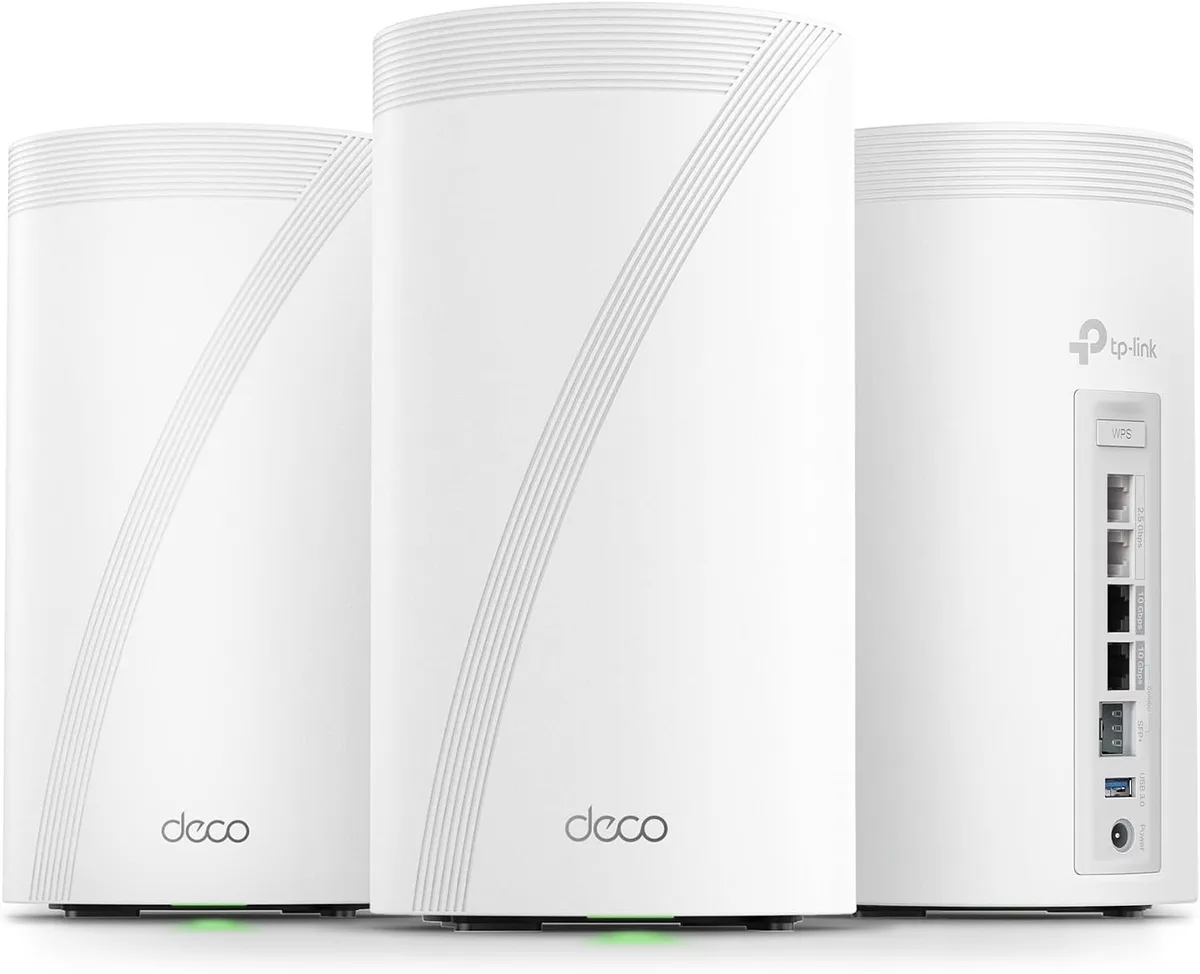
Verdict: the Deco BE85 is excellent hardware wearing a number that does not survive arithmetic. The per-node port set — a 10 Gbps RJ45, a 10 Gbps SFP+/RJ45 combo, two 2.5 Gbps ports and USB 3.0, on every unit rather than only the router — is genuinely the best in consumer mesh, and it is the reason to consider one. But "BE22000" is not a figure TP-Link can produce from its own specification table, which adds to 21,553. The company publishes two further sets of band rates elsewhere on the same product pages, one of which contradicts the spec table about whether 2.4 GHz uses 4K-QAM. And the 5 GHz component of that sum requires a 240 MHz channel, a width the 802.11be standard does not define for the 5 GHz band at all. Buy it if you have fiber faster than 2.5 Gbps, a house big enough to need three nodes, and Ethernet in the walls for backhaul. Otherwise the Deco BE63 does the same job for half the money.
✅ Pros
- +The best port set in consumer mesh, and it is on every node rather than only the router — 10 Gbps, 10 Gbps combo, two 2.5 Gbps and USB 3.0 per unit
- +An SFP+ cage on a consumer mesh node, which terminates a fiber run to an outbuilding without a media converter
- +Hardware is identical across all three revisions, verified by diffing TP-Link's own spec tables — an older box is not a downgrade
- +16 firmware releases on V2/V2.6 spanning 2023-03 to 2026-08, a 3.4-year record still active this year
- +Full Wi-Fi 7 feature set with no asterisks on the big ones: MLO, 320 MHz on 6 GHz, 4K-QAM, Multi-RUs
- +WAN/LAN auto-sensing on every port, so the node layout does not dictate which box is the router
- +OpenVPN, PPTP and L2TP/IPSec as both server and client, built in
- +Router and Access Point modes, so it can slot behind an existing gateway
- +12 streams and 4×4 on all three bands, where most tri-band mesh is 2×2 on at least one
❌ Cons
- −The BE22000 label is not reproducible from TP-Link's own spec table, which sums to 21,553
- −TP-Link publishes three different sets of band rates for one product, two of which disagree about whether 2.4 GHz uses 4K-QAM
- −The 8,647 Mbps 5 GHz figure requires a 240 MHz channel, a width 802.11be does not define for 5 GHz; at the standard 160 MHz the radio yields 5,765 Mbps
- −The US support site publishes no firmware at all for hardware revision V1.6, while V2/V2.6 have sixteen releases
- −Support-site version labels (V1.60 / V2 / V2.60) do not match product-page labels (V1 / V2 / V3)
- −Two usable 10 Gbps links per node, not three — the second RJ45 is a combo sharing a lane with the SFP+ cage
- −51 W maximum per unit, 153 W for a 3-pack, a running cost no mesh review quotes
- −Owner ratings are bimodal: 64% five-star against 19% one-star, on a $999.99 product
- −The 3-pack saves only about $17 a unit over three 1-packs, so the multi-pack discount barely exists
- −No published typical-power figure, only the maximum
- −The "9,600 sq ft" coverage claim is a vendor estimate against no standard, and is not comparable to any rival's number
Verdict: the Deco BE85 is excellent hardware wearing a number that does not survive arithmetic. The per-node port set — a 10 Gbps RJ45, a 10 Gbps SFP+/RJ45 combo, two 2.5 Gbps ports and USB 3.0, on every unit rather than only the router — is genuinely the best in consumer mesh, and it is the reason to consider one. But "BE22000" is not a figure TP-Link can produce from its own specification table, which adds to 21,553. The company publishes two further sets of band rates elsewhere on the same product pages, one of which contradicts the spec table about whether 2.4 GHz uses 4K-QAM. And the 5 GHz component of that sum requires a 240 MHz channel, a width the 802.11be standard does not define for the 5 GHz band at all. Buy it if you have fiber faster than 2.5 Gbps, a house big enough to need three nodes, and Ethernet in the walls for backhaul. Otherwise the Deco BE63 does the same job for half the money.
Check the current price on Amazon →
Key Specs at a Glance
| Spec | TP-Link Deco BE85 |
|---|---|
| Class | BE22000 tri-band Wi-Fi 7 (802.11be) |
| Marketing name | Deco 7 Elite BE85 (renamed; same product) |
| Signal rate, 6 GHz | 11,530 Mbps (4×4, 320 MHz, 4K-QAM) |
| Signal rate, 5 GHz | 8,647 Mbps (4×4, 240 MHz, 4K-QAM) |
| Signal rate, 2.4 GHz | 1,376 Mbps (4×4, 40 MHz, 4K-QAM) |
| Spec-table sum | 21,553 Mbps — not 22,000 |
| Streams | 12 total, 4×4 MU-MIMO per band |
| Antennas | 8 internal high-gain per unit |
| Ethernet, per unit | 1 × 10 Gbps, 1 × 10 Gbps SFP+/RJ45 combo, 2 × 2.5 Gbps |
| Usable 10 Gbps links | 2 per unit — the combo shares a lane with the SFP+ cage |
| Port roles | WAN/LAN auto-sensing |
| USB | 1 × USB 3.0 (FTP, media and Samba servers) |
| Backhaul | Wireless or optional wired Ethernet |
| Working modes | Router, Access Point |
| Wi-Fi 7 features | MLO, 320 MHz (6 GHz only), 4K-QAM, Multi-RUs |
| VPN server | OpenVPN, PPTP, L2TP/IPSec |
| VPN client | OpenVPN, PPTP, L2TP/IPSec |
| Security | WPA3-Personal, SPI firewall, HomeShield |
| Guest networks | 1 per band (6 GHz, 5 GHz, 2.4 GHz) |
| Max power draw | 51 W per unit, without the power adapter |
| Power adapter | In 100–240 V 50/60 Hz 2 A; out 12 V 4.5 A |
| Buttons | Reset, WPS |
| Dimensions (W × D × H) | 5.04 × 5.04 × 9.29 in (128 × 128 × 236 mm) |
| Vendor coverage claim | Up to 9,600 sq ft (3-pack) |
| Certification | CE, FCC |
| Price | $999.99 (3-pack), $349.99 (1-pack) |
BE22000 Is Three Different Numbers
Every Wi-Fi vendor builds its headline number the same way: add the theoretical peak rate of each radio together and round. Nobody reaches that number, and the industry has agreed to pretend otherwise. That part is not a TP-Link problem.
What is unusual here is that TP-Link publishes three different versions of the sum across its own pages for this one product, and none of them is 22,000.
| Where it appears | 6 GHz | 5 GHz | 2.4 GHz | Sum |
|---|---|---|---|---|
| Specification table (all revisions) | 11,530 | 8,647 | 1,376 | 21,553 |
| Footnote text, V1 and V2 pages | 11,520 | 8,640 | 1,376 | 21,536 |
| Marketing graphic, V2 page | 11,520 | 8,640 | 1,148 | 21,308 |
| On the box | — | — | — | 22,000 |
The first two differ only by rounding, and that is unremarkable. The third is a real contradiction, because the V2 marketing graphic and the V2 specification table sit on the same page and disagree about the same radio.
Each of these figures maps exactly onto a standard PHY rate, which is how you can tell what the marketing department actually meant. At 4×4 with the 0.8 µs guard interval:
- 1,376 Mbps is 40 MHz at 4096-QAM — the Wi-Fi 7 rate. Computed: 344.1 × 4 = 1,376.4.
- 1,148 Mbps is 40 MHz at 1024-QAM — the Wi-Fi 6 rate. Computed: 286.8 × 4 = 1,147.2.
So the two 2.4 GHz figures are not a typo and not rounding. They are an unresolved disagreement about whether the 2.4 GHz radio runs 4K-QAM. This is the second time TP-Link's own documentation has wobbled on exactly this point in a product we have reviewed — the RE653BE advertises 4K-QAM while its own sensitivity table stops at MCS11 on 2.4 GHz. It is a small number either way. It is the consistency that is worth knowing about before you trust the big one.
The 5 GHz Figure Needs a Channel Width the Standard Does Not Define
This is the finding that actually changes the number you should expect.
Run the same arithmetic on the 5 GHz rate and it does not land on 160 MHz. It lands on 240 MHz:
| Width | 4×4, 4K-QAM, 0.8 µs GI | Matches TP-Link's figure? |
|---|---|---|
| 320 MHz | 11,529.6 Mbps | Yes — the 6 GHz figure, 11,530 |
| 240 MHz | 8,647.2 Mbps | Yes — the 5 GHz figure, 8,647 |
| 160 MHz | 5,764.8 Mbps | No |
240 MHz is not a channel width that 802.11be defines for the 5 GHz band. The standard tops out at 160 MHz there, and reserves 320 MHz for 6 GHz — a point TP-Link's own footnote concedes in the same breath: "The 320 MHz bandwidth is only available on the 6 GHz band." The same footnote then adds that "the 160 MHz and 240 MHz bandwidths or the 320 MHz bandwidth might not be available on the 5 GHz band or the 6 GHz band, respectively, in some regions/countries due to regulatory restrictions."
In other words, TP-Link is quoting a vendor-extension width in the headline spec and disclaiming its availability in a footnote.
If your regulatory domain caps 5 GHz at the standard 160 MHz, the honest tri-band total is:
| Band | Vendor sum | At 160 MHz on 5 GHz |
|---|---|---|
| 6 GHz | 11,530 | 11,530 |
| 5 GHz | 8,647 | 5,765 |
| 2.4 GHz | 1,376 | 1,376 |
| Total | 21,553 | 18,671 |
That is roughly 15% below the number on the box, and the gap sits entirely in the band most of your devices actually use. None of this makes the BE85 slow — 5,765 Mbps of theoretical 5 GHz capacity is still more than any home will saturate. It means the comparison you are making against a rival's BE-number is not the comparison you think you are making.
TODO: we have not been able to confirm from a primary regulatory source whether TP-Link enables 240 MHz on 5 GHz in US-region firmware. The arithmetic above and TP-Link's own footnote are verified; the US-specific availability is not. Treat the 18,671 figure as the conditional floor it is labelled as, not as a measured result.
Three Hardware Revisions, One Set of Specs
TP-Link sells the Deco BE85 in three hardware revisions — V1, V2 and V3 — all under the same name and, on Amazon, the same ASIN that has been live since 2023. The product page quietly defaults to V3.
That normally sets off alarms. Hardware revisions are where vendors swap a radio, drop a port or cheapen a chipset while keeping the box art. We have written before about why you should always look up your exact model including hardware revision — ASUS, for instance, lists the ZenWiFi BD4 and the BD4 Outdoor a full year apart on its support calendar.
Here, the news is good. We pulled all three revisions' specification tables and diffed them. The hardware is identical. Across V1, V2 and V3:
- Same radios, same 11,530 / 8,647 / 1,376 rates, same 12 streams, same 4×4 MU-MIMO
- Same eight internal antennas
- Same port set — 1 × 10 G, 1 × 10 G combo, 2 × 2.5 G, 1 × USB 3.0
- Same 128 × 128 × 236 mm body
- Same working modes and certifications
The only spec-table changes between V1 and V3 are additions to the documentation, not to the product. V3 is the first revision to publish a power figure at all (51 W max). V3 also spells out FTP/media/Samba under USB support, upgrades the VPN listing from "L2TP" to "L2TP/IPSec", and adds YouTube Restriction and SafeSearch under parental controls. V2 listed "IoT Network" as an advanced feature and V3 does not, which is a line-item move rather than a capability change.
So: buying an older-revision box off the shelf is not a hardware downgrade. That is a genuinely useful thing to know about a product sold under one ASIN for three years.
The Firmware Record Is Not Symmetrical
The hardware being identical does not mean the support is, and this is where a buyer should be careful.
TP-Link's US support site does not use the same version labels as its product page. The product page says V1 / V2 / V3. The support site's hardware-version selector offers V1.60, V2 and V2.60. Mapping between the two is left as an exercise for the reader.
What the support site shows:
| Hardware version | Firmware releases published | Newest |
|---|---|---|
| V2.60 | 16 | 1.2.4 Build 20260622, published 2026-08-04 |
| V2 | 16 | 1.2.4 Build 20260622, published 2026-08-04 |
| V1.60 | 0 — no firmware section at all | — |
V2 and V2.60 carry an identical, continuous release history running from 2023-03-29 to 2026-08-04. That is a 3.4-year firmware record on a product still being patched this year, and it is a real point in the BE85's favour — the kind of thing that matters more than any speed number, and the subject of our separate piece on how long routers keep getting security updates.
The V1.60 page is not broken. It renders a Manual, a Setup Video, an FAQ and app links — the same supporting sections V2 has. It simply has no firmware downloads, and zero published-date rows, where V2 has sixteen.
Two honest caveats. Deco units normally update over the air through the phone app, so an absent manual download is not proof that V1.6 hardware stopped receiving firmware. And we cannot tell you which revision arrives if you order today. But the published record is the only thing a buyer can actually check before paying $999.99, and within one product it is asymmetric. If you buy one, check the label on the underside and confirm the app offers you a current firmware before the return window closes.
Two 10 Gbps Ports, Not Three
The port column reads, on TP-Link's own spec sheet: 1 × 10 Gbps, 1 × 10 Gbps SFP+/RJ45 combo, 2 × 2.5 Gbps. Counted carelessly — and the product photography invites this, since you can see two RJ45 jacks marked 10 Gbps and an SFP+ cage — that looks like three 10 Gbps connections per node.
It is two. "Combo" means the second 10 Gbps RJ45 and the SFP+ cage are the same port in two physical forms. Populate the SFP+ and you lose that RJ45, and vice versa.
That still leaves the BE85 ahead of essentially everything else in consumer mesh, and the detail that matters most is that this port set is on every node, not just the router. On the Orbi 970 the satellites step down from the router's port complement; here they do not. If you are running wired backhaul — and with this system you should — each node can take a 10 Gbps uplink and still hand out a 10 Gbps and two 2.5 Gbps drops locally.
The SFP+ cage is the quietly valuable part. It means a node can terminate a fiber run directly, without a media converter, which is the clean answer for a detached garage or a second building. If you are building that out, pair it with a 10 Gbps switch such as the TP-Link TL-SX105.
Power: 51 W a Node Is the Number Nobody Quotes
V3 is the first revision to publish it: 51 W maximum per unit, measured without the power adapter.
For a 3-pack that is 153 W at maximum draw. Run continuously, that works out to about 1,340 kWh a year:
| Electricity rate | Annual cost at max draw |
|---|---|
| $0.13 / kWh | ~$174 |
| $0.17 / kWh | ~$228 |
Two things to say plainly about that table. First, 51 W is a maximum, not a typical draw — real-world idle and light-load consumption will be meaningfully lower, and TP-Link does not publish a typical figure, so we are not going to invent one. Treat those numbers as a ceiling. Second, even at the ceiling this is not scandalous for twelve Wi-Fi 7 radios across three boxes; it is simply a running cost that no mesh review mentions and that compounds against a system you will own for five years.
It is worth weighing against the purchase price rather than ignoring: the ceiling-case electricity over five years is in the same order of magnitude as the hardware discount you would get by buying the Deco BE63 instead.
What the 3.9 Rating Actually Says
The Amazon listing carries 3.9 out of 5 across 273 ratings. For a $999.99 flagship from the category leader, that is low — the step-up BE95 sits at 4.2, and every other premium mesh we have reviewed rates higher.
But the average is the least informative thing about it. The distribution is bimodal:
| Stars | Share |
|---|---|
| 5 | 64% |
| 4 | 7% |
| 3 | 3% |
| 2 | 7% |
| 1 | 19% |
Nearly two-thirds of buyers rate it top marks, and roughly one in four rates it one or two stars. There is almost nothing in the middle. That weighted average comes to exactly 3.90, which is a useful check that the histogram and the headline figure describe the same population.
A distribution like that does not describe a mediocre product. It describes a product that either works very well or fails outright for a given buyer — the signature of a deployment-dependent device rather than a quality-control problem, though we cannot distinguish those two from ratings alone and will not pretend otherwise. What we can say is that "3.9 stars" read as "a bit above average" would be the wrong takeaway. The realistic expectation is a strong result or a bad one, and your odds are better if your situation matches the one this system is designed for — which is the subject of the two sections below.
Pros and Cons
Pros
- The best port set in consumer mesh, and it is on every node rather than only the router — 10 Gbps, 10 Gbps combo, two 2.5 Gbps and USB 3.0 per unit
- An SFP+ cage on a consumer mesh node, which terminates a fiber run to an outbuilding without a media converter
- Hardware is identical across all three revisions, verified by diffing TP-Link's own spec tables — an older box is not a downgrade
- 16 firmware releases on V2/V2.6 spanning 2023-03 to 2026-08, a 3.4-year record still active this year
- Full Wi-Fi 7 feature set with no asterisks on the big ones: MLO, 320 MHz on 6 GHz, 4K-QAM, Multi-RUs
- WAN/LAN auto-sensing on every port, so the node layout does not dictate which box is the router
- OpenVPN, PPTP and L2TP/IPSec as both server and client, built in
- Router and Access Point modes, so it can slot behind an existing gateway
- 12 streams and 4×4 on all three bands, where most tri-band mesh is 2×2 on at least one
Cons
- The BE22000 label is not reproducible from TP-Link's own spec table, which sums to 21,553
- TP-Link publishes three different sets of band rates for one product, two of which disagree about whether 2.4 GHz uses 4K-QAM
- The 8,647 Mbps 5 GHz figure requires a 240 MHz channel, a width 802.11be does not define for 5 GHz; at the standard 160 MHz the radio yields 5,765 Mbps
- The US support site publishes no firmware at all for hardware revision V1.6, while V2/V2.6 have sixteen releases
- Support-site version labels (V1.60 / V2 / V2.60) do not match product-page labels (V1 / V2 / V3)
- Two usable 10 Gbps links per node, not three — the second RJ45 is a combo sharing a lane with the SFP+ cage
- 51 W maximum per unit, 153 W for a 3-pack, a running cost no mesh review quotes
- Owner ratings are bimodal: 64% five-star against 19% one-star, on a $999.99 product
- The 3-pack saves only about $17 a unit over three 1-packs, so the multi-pack discount barely exists
- No published typical-power figure, only the maximum
- The "9,600 sq ft" coverage claim is a vendor estimate against no standard, and is not comparable to any rival's number
How It Compares
| Product | Price | Bands | Per-node ports | Rating |
|---|---|---|---|---|
| TP-Link Deco BE85 (3-pack) | $999.99 | Tri-band BE22000 | 2 × 10G (one combo/SFP+), 2 × 2.5G, USB 3.0 | 3.9 |
| Netgear Orbi 970 | $2,299.99 | Quad-band, dedicated backhaul | Router 2 × 10G; satellites step down | 4.5 |
| Eero Max 7 | $599.99 | Tri-band BE9400 | 2 × 10G on every node | 4.6 |
| TP-Link Deco BE63 | $499.99 | Tri-band Wi-Fi 7 | 2.5G per node | 4.4 |
| TP-Link Archer BE800 | $599.99 | Tri-band BE19000, single router | 2 × 10G + 4 × 2.5G | 4.5 |
| Eero 7 | $349.99 | Tri-band, entry Wi-Fi 7 | 2.5G | 4.4 |
Three conclusions fall out of that table.
The Eero Max 7 is the uncomfortable comparison. It is $400 cheaper, also puts two 10 Gbps ports on every node, adds Thread/Matter/Zigbee radios the BE85 does not have, and rates 4.6 against 3.9. What the BE85 gives you for the extra money is a much higher band rate ceiling, 4×4 across all three bands against the Max 7's lower stream count, the SFP+ cage, and a USB 3.0 port. If you are not going to use the stream count or the fiber termination, the Max 7 is the better buy and it is not close.
A single router may beat a three-node mesh. The Archer BE800 is $599.99 with two 10 Gbps ports and four 2.5 Gbps ports. In an apartment or a single-storey house, one well-placed router outperforms a mesh that is spending airtime on backhaul — see router placement before you assume you need three boxes.
The Orbi 970 is the only thing above it, and it costs 2.3×. Quad-band with a radio dedicated to backhaul is a genuinely different architecture, which we covered in dedicated backhaul explained. If you are running the BE85 on wired backhaul — and you should — you get most of that benefit without paying for the fourth radio.
The Pack Math Barely Favours the Pack
Worth checking before you reflexively buy the 3-pack:
| Configuration | Price | Per unit |
|---|---|---|
| 1-pack | $349.99 (list $449.99) | $349.99 |
| 2-pack | $649.99 (no list price shown) | $325.00 |
| 3-pack | $999.99 (list $1,199.99) | $333.33 |
| A 2-pack plus a 1-pack | $999.98 | $333.33 |
| Three separate 1-packs | $1,049.97 | $349.99 |
Against three separate 1-packs the 3-pack saves $49.98 in total, about $17 a unit, or roughly 5%. That is already unusually thin for a multi-pack, and the 2-pack makes it thinner: at $649.99 it works out to $325.00 a unit — the lowest per-node price of the three pack sizes, undercutting the 3-pack that is supposed to sit above it in value. Buy a 2-pack and a 1-pack and you pay $999.98 for the same three nodes, one cent less than the 3-pack costs.
So staging the purchase is free. Start with the 2-pack, confirm the system actually fixes your coverage problem, and add the third node later at no penalty at all. Given a 19% one-star rate, that is the sensible way to de-risk this particular purchase.
Who Should Buy It
Buy the Deco BE85 if:
- Your internet plan is faster than 2.5 Gbps and you need 10 Gbps WAN termination
- You have Ethernet in the walls and will run wired backhaul, which is what makes this system worth its price
- You need to terminate fiber at a node — the SFP+ cage is close to unique in consumer mesh
- You have a large multi-storey house and genuinely need three nodes
- You want multi-gig wired drops in more than one room, not just beside the router
Buy something else if:
- Your plan is 1 Gbps or slower — the Eero 7 at $349.99 will saturate it
- You want the best value in Wi-Fi 7 mesh — the Deco BE63 is half the price
- Two 10 Gbps ports per node is the only feature you want — the Eero Max 7 has them for $400 less
- You live in an apartment or a single-storey house — buy one Archer BE800 and place it properly
- You want smart-home hub radios built in — the BE85 has none
Setup Notes
Setup is the Deco app, and it is the genuinely easy part: scan, name the network, place the nodes, done in about ten minutes for three units.
Four things worth doing afterwards:
- Turn on wired backhaul properly. Cable the nodes and the app detects it automatically, but confirm in the app that each node reports an Ethernet rather than wireless connection. This is the single biggest performance variable in the system.
- Check the MLO settings. Multi-Link Operation usually creates a separate SSID for Wi-Fi 7 clients. Our Wi-Fi 7 setup guide covers where TP-Link hides the toggle and why you want a distinctly named MLO SSID.
- Confirm your hardware revision and firmware. Check the label on the underside, then confirm the app offers a current firmware build. Given the V1.6 gap above, do this inside the return window.
- Decide about HomeShield early. The useful security and parental-control features sit behind a subscription. Work out whether you are paying for it before you build your network around it.
Price and Availability
At the time of writing the 3-pack (ASIN B0C4W31L4N) is $999.99, a 17% discount from a $1,199.99 list price, in stock with a new-condition buy box and sold through the standard listing. The 1-pack (B0CR5C4RZN) is $349.99 against a $449.99 list, and the 2-pack (B0C4W1L4B3) is $649.99 with no list price shown, in stock and shipped and sold by Amazon.
The product is current — TP-Link's own pages carry no end-of-life tag — and it has been recently re-marketed as the "Deco 7 Elite BE85", which is a name change rather than a new product. The quad-band BE95 (BE33000) sits above it at $1,499.99 for a 3-pack and shares the same Amazon variant family, so take care which one the listing has selected before you check out.
Bottom Line
The Deco BE85 is a better piece of hardware than its reputation and a worse one than its spec sheet. The port complement on every node — dual 10 Gbps with an SFP+ option, two 2.5 Gbps, USB 3.0 — is the most capable in consumer mesh, the firmware record on current revisions is a genuine 3.4 years and counting, and three hardware revisions have shipped without a single hardware regression between them, which we verified rather than assumed.
What does not hold up is the number on the box. BE22000 cannot be reconstructed from TP-Link's own specification table, the company publishes three mutually inconsistent sets of band rates, and the 5 GHz component depends on a channel width the standard does not define for that band. Correct the 5 GHz figure to the standard 160 MHz and the honest total is around 18,671 — still enormous, still not what you were sold.
At $999.99 that leaves a narrow but real recommendation. If you have multi-gig internet, wire in the walls, and a house big enough to need three nodes, this is the right system and the SFP+ cage may be the thing that decides it. If any one of those three is missing, you are paying flagship money for capacity you cannot reach, and the Deco BE63 or the Eero Max 7 will make you happier for several hundred dollars less.
Our Verdict
Verdict: the Deco BE85 is excellent hardware wearing a number that does not survive arithmetic. The per-node port set — a 10 Gbps RJ45, a 10 Gbps SFP+/RJ45 combo, two 2.5 Gbps ports and USB 3.0, on every unit rather than only the router — is genuinely the best in consumer mesh, and it is the reason to consider one. But "BE22000" is not a figure TP-Link can produce from its own specification table, which adds to 21,553. The company publishes two further sets of band rates elsewhere on the same product pages, one of which contradicts the spec table about whether 2.4 GHz uses 4K-QAM. And the 5 GHz component of that sum requires a 240 MHz channel, a width the 802.11be standard does not define for the 5 GHz band at all. Buy it if you have fiber faster than 2.5 Gbps, a house big enough to need three nodes, and Ethernet in the walls for backhaul. Otherwise the Deco BE63 does the same job for half the money.
Ready to buy the TP-Link Deco BE85?
Buy on Amazon →Affiliate link — we may earn a commission at no extra cost to you.