Managed vs Unmanaged Switches: Which Do You Actually Need at Home?
Published 2026-07-17 · By NetAudioHub Editorial
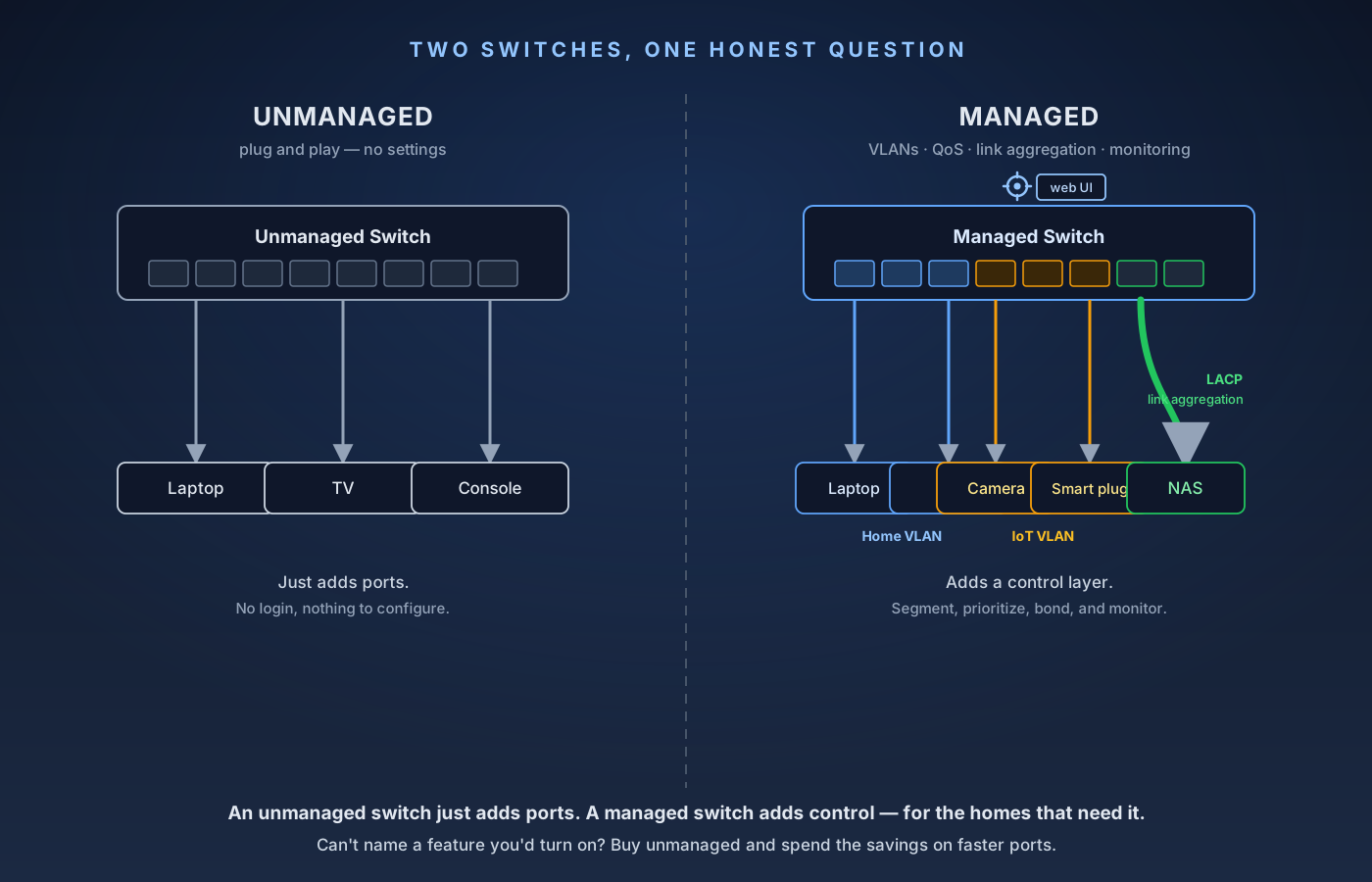
An unmanaged switch is a plug-and-play box that just adds Ethernet ports — and for most homes that's the right answer. A managed (or smart) switch adds VLANs, QoS, link aggregation, and monitoring for the homes that actually need them. Here's how to tell which camp you're in, without paying for features you'll never open.
The verdict up front: an unmanaged switch is a plug-and-play box that just adds Ethernet ports — no setup, no login, nothing to configure, and for most homes that is exactly the right answer. A managed switch adds a control layer on top: VLANs to wall off your IoT junk from your laptops, QoS to prioritize traffic, link aggregation to bond two ports into one fatter pipe for a NAS, and monitoring to see what's actually happening on the wire. In between sits the smart (web-managed) switch — most of the useful managed features behind a simple web page, at a fraction of the price of a full enterprise unit. The honest rule: if you can't name a specific feature you'd turn on, buy unmanaged and spend the savings on faster ports. If you're segmenting a network, running a home lab, feeding a NAS, or wiring cameras and access points, a smart or managed switch earns its keep. Here's how to tell which camp you're in — without paying for features you'll never open.
What a Switch Actually Does (All of Them)
Before the differences, the thing they all have in common: a switch takes one Ethernet connection from your router and splits it into many, so more wired devices can share the network. Unlike a cheap old "hub," a switch is smart about it — it learns which device lives on which port (by MAC address) and sends each packet only to the port that needs it, so devices aren't fighting over the same shared bandwidth.
That core job is identical whether the switch costs $20 or $400. Every switch, managed or not, does line-rate wired forwarding, auto-negotiates each port's speed (2.5G, 1G, 100M) and duplex, and generally "just works" the second you plug it in. *The difference is entirely about whether you can also tell it what to do.*
There are three tiers you'll see on the shelf:
- Unmanaged — no configuration at all. No IP address, no web page, no app. Ports in, ports out.
- Smart / web-managed — a real but limited feature set (VLANs, basic QoS, link aggregation, some monitoring) behind a simple browser interface. This is the sweet spot for most enthusiast homes.
- Fully managed — the full toolbox (CLI, SNMP, advanced spanning-tree, ACLs, deep diagnostics), aimed at IT and serious home labs. More power, more price, more to learn.
Unmanaged Switches: The Default, and Usually the Right One
An unmanaged switch is deliberately dumb, and that's a feature. You plug your router into one port, plug your devices into the rest, and you're done — there is nothing to log into and nothing to break. It's cheaper, runs cooler (often fanless), and there's no configuration you can accidentally lock yourself out of.
For the most common home need — "I ran out of ports" — this is the correct buy. A TV, a game console, a streaming box, and a desktop all clustered behind the entertainment center? A five- or eight-port unmanaged switch handles that perfectly and costs less than a takeout dinner. If you're extending a wired run into another room off a single Ethernet drop, an unmanaged switch at the far end is the standard move (and pairs naturally with a proper backhaul — see our powerline vs. MoCA vs. Ethernet backhaul breakdown for getting the wire there in the first place).
The thing to pay attention to on an unmanaged switch isn't features — there are none — it's port speed. In 2026, plain gigabit switches are dirt cheap, but if any of your devices or your internet plan exceed 1 Gbps, a gigabit switch quietly becomes the bottleneck. That's when you step up to 2.5GbE (or faster). Our 2.5 GbE vs. 10 GbE home network breakdown covers exactly where those speeds do and don't matter, so you don't overspend on ports nothing can fill.
What "Managed" Actually Buys You
A managed (or smart) switch is worth money only if you'll use at least one of these. So here's what each feature really does, in plain terms:
VLANs (virtual LANs, 802.1Q). The headline feature. A VLAN lets you split one physical switch into several isolated networks that can't see each other. In a home, the killer use is segmentation: put your cheap smart plugs, cameras, and no-name IoT gadgets on their own VLAN so that if one of them is compromised, it can't reach your laptops, NAS, or work machine. Same trick isolates a guest network, or keeps a work-from-home setup separate from the family's devices. This is the single most common reason a home network graduates from unmanaged to managed.
QoS (quality of service). Lets the switch prioritize certain traffic when the network is congested — for example, keeping a video call or game latency-sensitive while a big backup or download runs in the background. Genuinely useful on a busy household network, though on many home setups the router's QoS already covers this; the switch's version matters most when heavy traffic flows between wired devices and never touches the router.
Link aggregation (LACP / 802.3ad). Bonds two (or more) Ethernet ports into one logical link with combined bandwidth. The classic home use is feeding a NAS: aggregate two gigabit ports so several devices can pull from it at once without saturating a single link. Both the switch and the device (NAS, server) have to support it. Note this raises aggregate throughput across multiple streams — it does not make a single file transfer faster than one port.
IGMP snooping. Keeps multicast traffic (some IPTV services, certain AV-over-IP and whole-home audio systems) from flooding every port. If you don't run anything multicast-heavy, you'll never notice it; if you do, its absence turns the network into a mess.
Monitoring & diagnostics. Per-port traffic stats, error counters, cable diagnostics, port mirroring (copying traffic to a port for analysis), and SNMP for dashboards. Invaluable when you're troubleshooting which cable or device is misbehaving — and invisible on an unmanaged switch, where a bad run or a chattering device is a guessing game.
Spanning Tree (STP/RSTP) & loop protection. Prevents a network meltdown if someone accidentally plugs a cable in a loop. Matters more as your topology grows and you have multiple switches and paths.
PoE control (on PoE models). If your switch powers cameras or Wi-Fi access points over Ethernet, a managed switch lets you budget power per port, schedule reboots, and monitor draw. (PoE is a separate axis, though — you can get PoE on both unmanaged and managed switches.)
A concrete example of this tier done right for a home: the QNAP QSW-M2108-2C is a web-managed 2.5GbE switch that combines the two things enthusiast homes actually reach for — multi-gig ports and a real management layer (VLANs, link aggregation, monitoring) — without enterprise pricing or a CLI to wrestle. It's a good illustration of where "smart" lands between "dumb and cheap" and "full IT gear."
So Which One Do You Need? A Straight Answer
Buy unmanaged if: you just need more ports; your setup is a flat home network where everything can talk to everything; and you can't name a managed feature you'd actually enable. This is most people. Spend the money you save on faster ports (2.5GbE) instead of features you won't open — the TP-Link TL-SG108-M2 is around $130 for eight ports that are all 2.5GbE, fanless, with nothing to configure and no firmware to maintain. Nothing is lost — you can always add a managed switch later for the part of the network that needs it.
Buy smart / web-managed if: you want to segment IoT or guest devices onto their own VLAN; you're feeding a NAS and want link aggregation; you want to actually see and troubleshoot your traffic; or you're running APs/cameras and want managed PoE. This tier covers ~95% of enthusiast home needs at a sane price, and the web UI means you don't need to learn a command line. Two we've reviewed bracket it: the QNAP QSW-M2108-2C at around $150 gives you VLANs, LACP and QoS across eight 2.5GbE ports plus two 10GbE combo ports but no PoE at all, while the TP-Link Omada SG3210XHP-M2 at around $400 is the one to buy when the APs and cameras need powering — eight 2.5G PoE+ ports on a 240W budget. Both have fans, so neither belongs in a living room.
Buy fully managed if: you're running a home lab, studying for a networking certification, need CLI/SNMP/advanced ACLs, or genuinely want enterprise-grade control. If you're not sure you're in this group, you're not — a smart switch does everything a typical home lab beginner needs, and you can graduate later.
You can also mix tiers, and plenty of good networks do: a managed switch at the core where your router, NAS, and VLAN trunks live, and cheap unmanaged switches out at the TV stand and the desk where all you need is more ports. There's no rule that the whole house has to be one tier.
A Few Things That Trip People Up
A switch doesn't create Wi-Fi or replace your router. It only splits and forwards wired connections. It has no NAT, no DHCP, no firewall of its own (VLANs aside), and no radios. If you want more wireless coverage, that's an access point or mesh node, not a switch.
Unmanaged switches can't do VLANs — even "sort of." VLAN tagging requires the switch to read and honor 802.1Q tags, which unmanaged switches ignore. If segmentation is your goal, you need at least a smart switch; there is no unmanaged workaround.
"Smart" and "fully managed" blur together — read the spec sheet, not the label. Marketing terms vary by brand. Confirm the specific features you care about (802.1Q VLANs, LACP, IGMP snooping) appear in the datasheet, rather than trusting the tier name on the box.
Link aggregation needs support on both ends. Bonding two switch ports does nothing unless the NAS or server on the other side also runs LACP and is configured for it. It also boosts aggregate throughput across multiple transfers, not the speed of a single stream.
Fanless matters if it lives in a living room. Many small unmanaged and smart switches are silent (fanless); higher-port-count and PoE managed switches often have fans. If the switch sits near where you watch movies or work, check for a fanless design before you buy.
Cable still sets the ceiling. A 2.5GbE managed switch does nothing for you over a marginal cable run. Match the wiring to the speed — see Cat6 vs. Cat6a vs. Cat7 vs. Cat8 for what actually carries multi-gig.
The Bottom Line
Three tiers, one honest question: can you name a feature you'd turn on? If not, buy an unmanaged switch — it's cheaper, simpler, silent, and unbreakable, and it does the one thing most homes want (more ports) perfectly. The moment you want to wall off IoT devices, feed a NAS with link aggregation, prioritize traffic, or actually see your network, step up to a smart (web-managed) switch — that tier covers nearly every enthusiast home without enterprise pricing or a command line. Save fully managed switches for home labs and people who genuinely want the deep controls. And whichever tier you pick, spend your budget where it moves the needle for most homes today: port speed first, features second.
Affiliate disclosure: NetAudioHub links to retailers including Amazon. We earn a small commission on qualifying purchases at no extra cost to you.