How to Terminate Cat6 Keystone Jacks and Wall Plates (Punch Down Like a Pro)
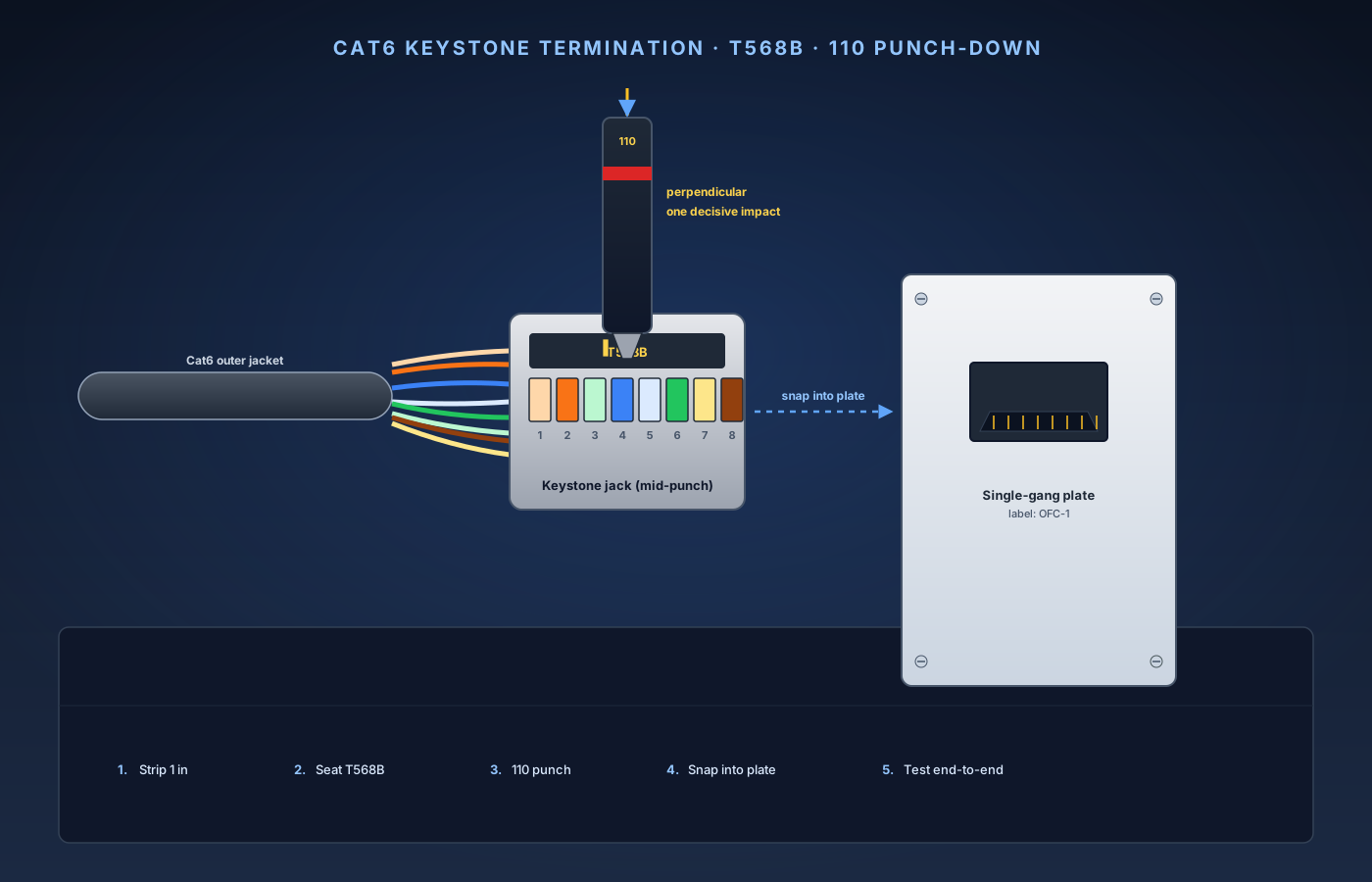
Running Ethernet through your walls is the hard part of structured cabling. Terminating each end is the fast part — but it's also the step where most DIYers fumble, end up with a 100 Mbps link instead of Gigabit, and blame "bad cable" when the real culprit is an untwisted pair or a conductor that never fully seated in the jack. This guide is the step-by-step companion to running Ethernet through your walls. If you've already pulled solid Cat6 cable from a central spot to each room — patch panel in the basement, wall plate in each room — this is the procedure for putting a clean keystone jack on each end and verifying it actually carries Gigabit (or 2.5 GbE) before you screw the plate to the wall. Plan on 30–45 minutes for the first jack while you get the feel for the punch-down tool, and 10–15 minutes each after. The single skill that separates a good install from a flaky one: untwisting each pair as little as humanly possible before it hits the IDC slot. A note on jack rating: this guide is written for Cat6 (and Cat6a) keystone jacks terminated with solid-conductor cable for in-wall drops. If you're trying to terminate stranded cable (the kind used in patch cords), the IDC slots will deform the strands instead of cutting through them, and you'll get an intermittent link. Always use solid Cat6 for in-wall runs and pre-made patch cords for the short hops at each end.
What you’ll need
- Cat6 (or Cat6a) keystone jacks — Klein, Leviton eXtreme, or Monoprice Slim Run AV (Klein VDV826-702 25-pack recommended)
- Single- or dual-gang keystone wall plates (Cable Matters 6-port 1-gang or similar)
- Solid-conductor Cat6 cable, already pulled to each location
- Low-voltage mounting brackets (mud rings) at each wall opening
- 110-style punch-down tool with cut-off blade (Klein VDV427-300)
- Cable jacket stripper (Klein VDV026-211)
- Flush-cut wire snips
- Cable tester with remote unit (Klein VDV526-100 LAN Scout Jr 2)
10-Step Overview
- 1
Stage your tools and parts at the work surface
Set up at the patch panel or central termination point — that's where you'll do most of the punch-downs, and it's easier to bring jacks to the cable than the other way around. Lay out the punch-down tool with the 110 blade installed and the cut-off side facing outward (away from the jack center), the jacket stripper, a pair of flush-cut snips for trimming the spline and any conductors the cut-off blade missed, the keystone jacks (grab one extra — you will misfire on the first one), and both units of the cable tester with a fresh battery confirmed before you start. Working both ends of each drop back-to-back saves the most time. Don't try to terminate every room-side jack first and then loop back for the patch panel — you'll forget which cable is which by the third drop.
- 2
Strip about an inch of outer jacket
The strip is the most critical mechanical step. Strip too short and you can't fan out the pairs; strip too long and the untwisted section exceeds Cat6's specified untwist limit and your link drops to 100 Mbps. The procedure: set the jacket stripper to Cat6 depth (most strippers have a printed dial — for the Klein VDV026-211, position 2 is right for Cat6 with a 24 AWG conductor), slide the stripper over the cable about 1 inch from the end, squeeze gently and rotate one full turn around the cable, then pull the stripper toward the cable end. The jacket sleeve slides off cleanly. Check the stripped section: each conductor insulation should be intact (no copper visible), the four twisted pairs should still be twisted right up to the jacket edge, and the plastic cross-shaped spline (the rip-cord and pair separator) should be visible. If you see copper on any conductor, that conductor is compromised — cut back another 2 inches of cable and re-strip with lighter pressure. Don't try to "tape over" a nicked conductor; it will fail at install or fail intermittently later.
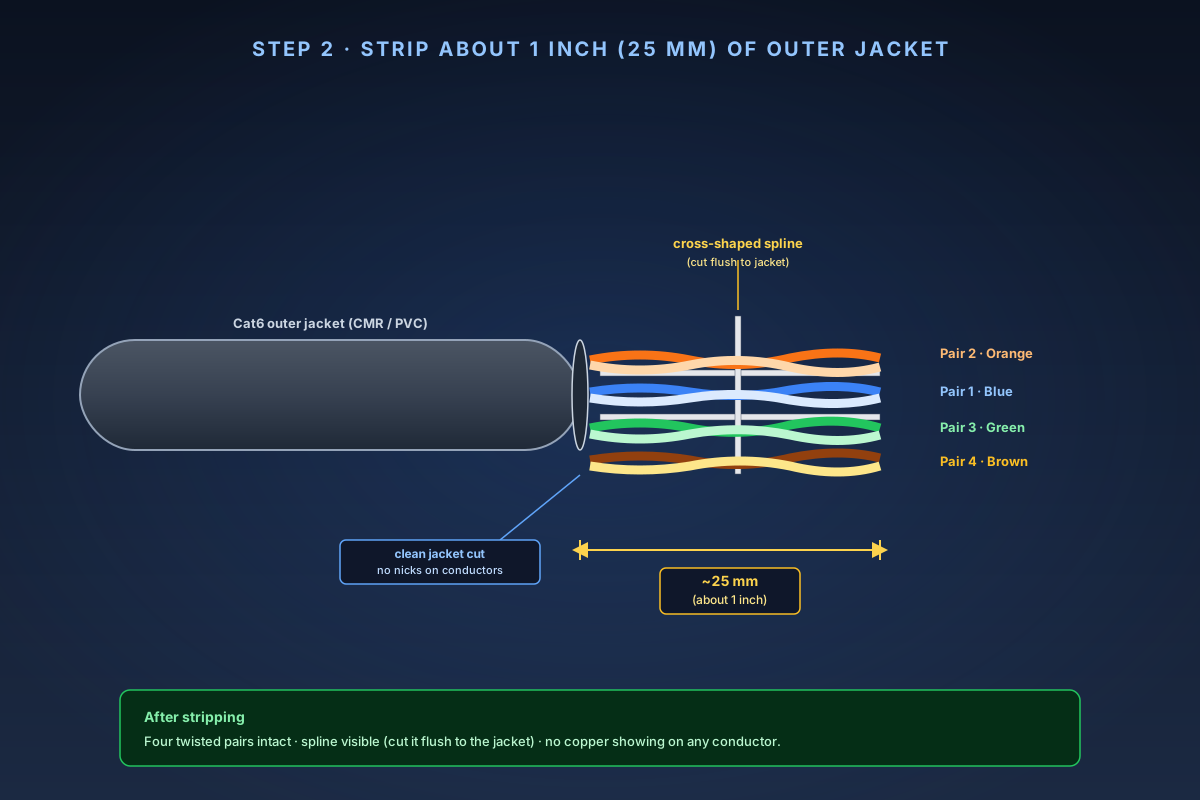
Strip about 1 inch (25 mm) of outer jacket. Pairs should be intact and the spline visible — cut the spline back to the jacket before you fan the pairs. Search on Amazon →Recommended Product
Klein Tools VDV026-211 Coax and Twisted-Pair Cable Jacket Stripper
Adjustable blade depth so you can strip the jacket without nicking the insulation on the twisted pairs underneath. Works with Cat5e, Cat6, and Cat6a. The dollar-store rotary strippers gouge conductors and create intermittent links that pass at install and fail in six months.
- 3
Cut the spline and stage the pairs
The cross-shaped plastic spline in Cat6 cable separates the pairs to reduce crosstalk inside the cable. You don't want it in the jack — it gets in the way of seating the pairs in the IDC slots. Flush-cut the spline back to the jacket using your snips. Don't yet fully untwist the pairs — just fan them out into roughly the orientation they'll sit in the jack. A common mistake here is to enthusiastically untwist all four pairs an inch back from the jacket "to make them easier to work with." Don't. Each pair's twist rate is what cancels crosstalk; the more you untwist, the worse the cable performs at Gigabit speeds. The maximum allowed untwist per pair in Cat6 is 0.5 inch (13 mm). Plan to untwist only what each conductor needs to reach its IDC slot, which on most keystone jacks is well under that limit.
- 4
Match the T568B color code
Most keystone jacks print both the T568A and T568B color codes on the body. Either standard works — they're electrically equivalent for Ethernet — but pick one and use it everywhere. Mixing T568A on one end and T568B on the other creates a crossover cable, which modern gear handles via Auto-MDIX but which will confuse you on the day you need to troubleshoot.
T568B color order (standard for residential):
Pin Color Pair 1 White / Orange stripe Pair 2 2 Solid Orange Pair 2 3 White / Green stripe Pair 3 4 Solid Blue Pair 1 5 White / Blue stripe Pair 1 6 Solid Green Pair 3 7 White / Brown stripe Pair 4 8 Solid Brown Pair 4 On most Cat6 keystone jacks, the IDC slots are arranged with the colors printed next to each slot. Lay each conductor across the top of its labeled slot — don't push it in yet — and confirm the colors against the table above before you reach for the punch tool.
The pair-3 trap: Pins 3 and 6 are both green (white/green and solid green), but pin 4 is blue and pin 5 is white/blue. Pair 3 (green) is split across pins 3 and 6 with pair 1 (blue) sandwiched between them. This is intentional — it's how T568B keeps the orange and green pairs farthest apart for crosstalk — but it trips up first-timers. The green pair gets split; the blue pair sits in the middle. Don't try to "fix" the wiring.
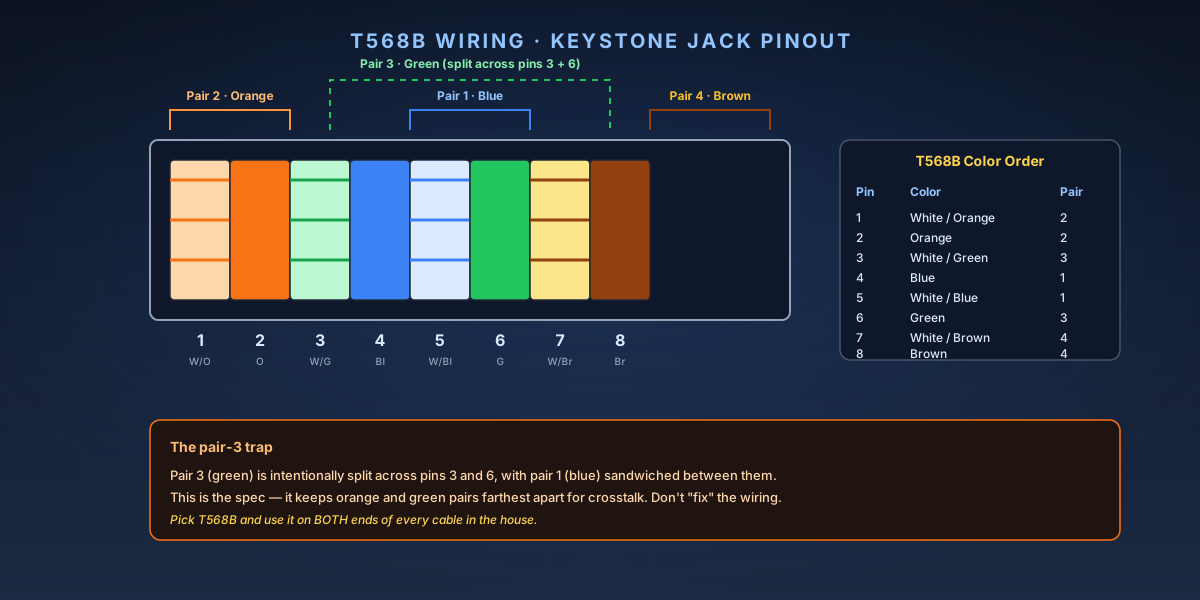
T568B pin assignments. Pair 3 (green) is intentionally split across pins 3 and 6 with pair 1 (blue) in the middle — this is the spec, not a wiring error. - 5
Seat each conductor in its IDC slot
The IDC (insulation displacement contact) slot is the V-shaped gap on each side of the jack. When you punch the tool down, the metal V cuts through the conductor's insulation and grips the copper inside. For this to work cleanly, the conductor needs to be fully seated in the slot before you punch — sitting straight, with insulation intact, with no slack. The procedure for each conductor: with the cable jacket touching the back of the jack (so the untwisted section is as short as possible), lay each conductor over the top of its IDC slot, press it down into the slot with your thumb until it's seated about halfway (enough that it stays in the slot when you let go), and confirm it's sitting straight, not angled. An angled conductor will be cut by the IDC blade at the wrong spot and miss contact. A well-prepped jack looks like all eight conductors emerging straight from the jacket, with each one pressed into its color-coded slot, and roughly equal amounts of conductor extending past each slot. Some keystone jacks are "punch-down style" (separate punches for each conductor) and others are "lacing style" (one larger cap that punches all eight at once when pressed). This guide assumes punch-down style — the most common form factor. Lacing-style jacks have their own procedure (skip Step 6 and substitute the jack-specific lacing instructions printed on the package).
Search on Amazon →Recommended Product
Klein Tools VDV826-702 Cat6 Pass-Thru Keystone Jacks (25-pack)
Clear color-coded T568A/B labels on every jack, IDC slots oriented for one-handed punching, and the slimmer body fits cleanly inside a single-gang low-voltage box. The 25-pack is the right buy because every drop needs two jacks, plus a few spares for the inevitable re-do.
- 6
Punch each conductor with the 110 blade
This is the moment that makes or breaks the termination. Done correctly, each punch is one decisive impact — you'll feel the spring fire and hear a sharp click — and the excess conductor is trimmed flush as the blade fires. The procedure: hold the punch-down tool perpendicular to the jack (90° angle — not at an angle, perpendicular). Position the tool over the first conductor with the cut-off blade facing outward (away from the jack body, toward the loose end of the conductor). Press firmly straight down. The internal spring fires when you reach the trip threshold, drives the blade through the conductor's insulation and into the IDC slot, and the cut-off blade trims the excess in the same motion. Move to the next conductor. Repeat for all eight.
Common punch-down mistakes:
- Tool angled, not perpendicular: the blade goes in crooked, the conductor isn't fully seated, contact fails.
- Cut-off blade facing inward: instead of trimming the loose end, the blade cuts the conductor flush with the jack — the side that should still be making contact. The conductor pulls out the moment the cable is moved.
- Tool tension set too low: some tools have adjustable tension; a low-tension setting may not fully seat the conductor. Use the high-tension setting for Cat6 with 23/24 AWG conductors.
- Punching twice on the same conductor: the second punch typically pushes the conductor out of contact. If a punch felt soft, lift the conductor out of the slot, reseat, and punch once more — don't double-tap.
After all eight conductors are punched, look at the jack from the side. Every conductor should sit fully in its slot, with no insulation pinched above the IDC contacts and no copper extending out the back of the jack.
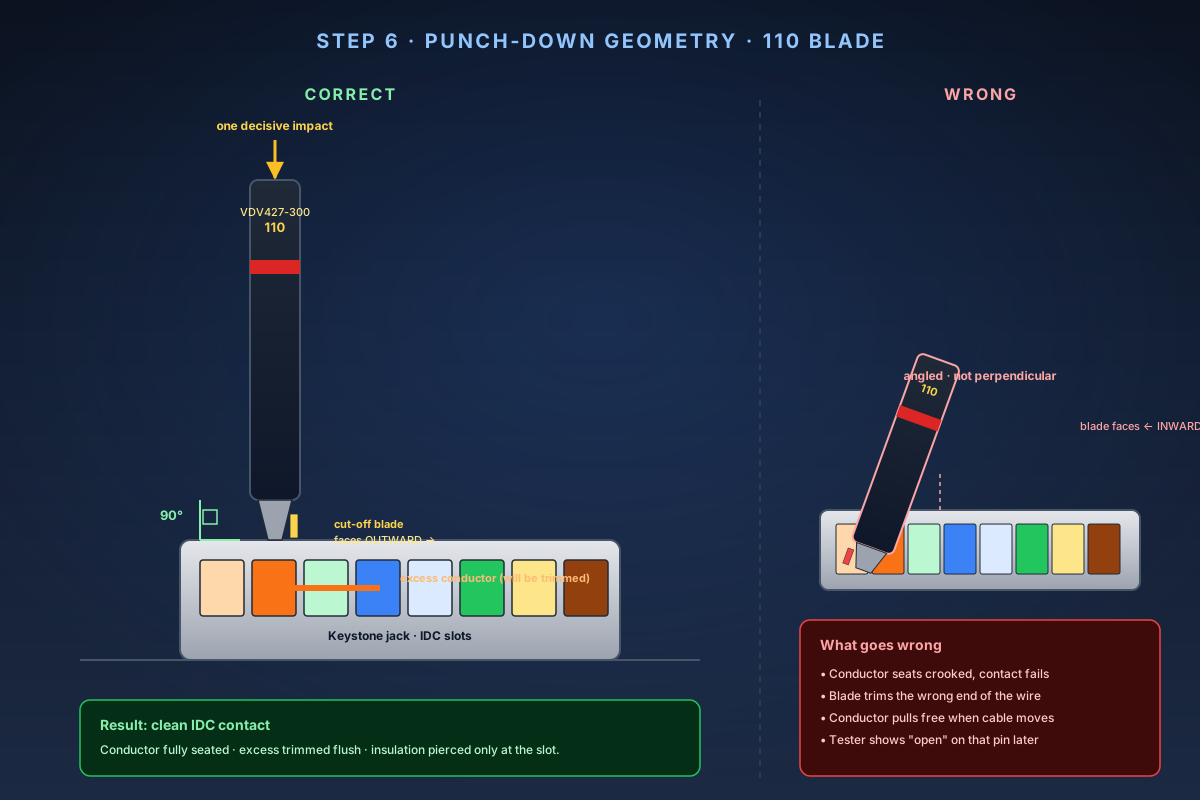
Correct punch-down: tool perpendicular to the jack, cut-off blade facing outward. Wrong: tool angled, blade facing in toward the jack body. Search on Amazon →Recommended Product
Klein Tools VDV427-300 Impact Punch-Down Tool with 110/66 Blade
The reference 110-blade punch tool. Pre-loaded spring tension, snap-in blade with a 110 (data) and 66 (telecom) side, and the cut-off blade trims the excess conductor in the same motion as the punch. Pliers won't do this — IDC slots need impact, not pressure.
- 7
Snap the jack into the wall plate
Most keystone jacks click into the back of a wall plate from the rear (cable side) or front (room side), depending on the plate design. The orientation matters — there's usually a small tab on the top edge of the jack that aligns with a slot on the plate. The procedure: note the up/down orientation on the jack (the label and the IDC slots should sit on the cable side; the RJ45 receptacle should face the room), align the jack with the plate's keystone opening, push firmly until both locking tabs click into the plate, then pull gently on the jack from the room side to confirm it's locked. If the jack only clicks on one side and rocks freely on the other, the orientation is wrong — pull it out and flip it. For multi-port plates with unused keystone openings, fill each empty slot with a blank insert (usually included with the plate). Open keystone slots collect dust and look unfinished. A six-port single-gang plate (search Amazon for Cable Matters keystone wall plate 1-gang) gives room for one Ethernet drop plus future expansion (a second Ethernet, coax, or fiber jack); the unused ports take blank inserts so the plate stays clean.
- 8
Terminate the other end the same way
Walk the cable back to the patch panel or remote wall plate. Repeat Steps 2 through 7. Use the same T568B color code — pin 1 to pin 1, pin 2 to pin 2 — for a straight-through cable. Patch panel terminations use the same 110 IDC slots and the same punch-down tool as keystone jacks. The colors are printed next to each port on the panel. Punch each conductor exactly as you would on a jack. Label everything before you screw anything to the wall. A label maker with vinyl labels (Brother PT-D210 or similar) is the right tool here, but Sharpie on masking tape works. Match labels at both ends: `OFC-1` (office drop 1) at the wall plate, `OFC-1` at the patch panel. Cable that goes into a wall without labels is cable that gets re-pulled in two years when someone forgets which drop goes where.
- 9
Test the link end-to-end with a cable tester
This is the step that catches the punch-down that looked perfect but didn't make contact. The procedure: plug the cable tester's main unit into one end (typically the patch panel end), plug the remote unit into the other end (the wall plate), and press Test. What you want to see: all eight conductors light up green or read "OK" or pass (depending on the tester's display) — no opens (conductor not making contact at one or both ends), no shorts (two conductors touching each other), no split pairs (right pin-to-pin continuity but wrong pair-to-pair grouping — usually a wiring transposition), and no miswires (pin order wrong).
What to do if a test fails:
Failure Most likely cause Fix One conductor open Conductor not fully seated before punch, or cut-off blade trimmed the wrong side Re-strip jacket, re-punch that conductor (and ideally all of them on that end) Two conductors shorted Adjacent IDC slots accidentally bridged by a metal punch tool fragment, or by a frayed conductor strand Inspect jack with a flashlight, clean any debris, re-punch Split pair Wires transposed on one end (e.g., pin 3 and pin 6 swapped, or pin 4 and pin 5) Re-check color code, re-strip and re-terminate that end Multiple conductors fail The cable was damaged during the pull (staple through the jacket, or sharp bend) Trace the cable; if you can't find external damage, re-terminate both ends — if it still fails, the cable itself is bad Re-terminating one end takes about 5 minutes once you've done a few. Always re-strip back to fresh, unpunched cable — don't try to re-punch an already-punched IDC slot, as the blade has already deformed the conductor.
Search on Amazon →Recommended Product
Klein Tools VDV526-100 LAN Scout Jr 2 Cable Tester
Tests all eight conductors end-to-end with a remote unit you plug in at the far jack. Identifies opens, shorts, miswires, and split pairs. Without a tester you're guessing — a jack can look perfect and still fail PoE or Gigabit. The LAN Scout Jr 2 is the cheapest tester with a useful split-pair check.
- 10
Mount the wall plate and finish the install
Once the cable passes the tester, finish the install: service-loop any extra cable inside the wall (if you have 6 inches of slack, fold it into an S-curve inside the box — don't cut it shorter, the service loop is what saves you when a jack fails in three years and needs re-termination). Screw the wall plate to the low-voltage mounting bracket with the two included screws. Label the room-side plate with the drop identifier matching the patch panel label. Connect a known-good patch cord from the wall plate to a laptop, plug a second patch cord from the patch panel to a switch, and confirm a link light at both ends. Run a real-world throughput test — `iperf3 -c <server-IP> -t 30` from the laptop to a wired client on the switch. Expect sustained ~940 Mbps on a 1 GbE port pair, 1.5–2.0 Gbps on a 2.5 GbE port pair. Anything below 800 Mbps on Gigabit gear means the link has dropped to 100 Mbps — almost always a punch-down issue masquerading as a link, with the tester showing "pass" but real-throughput showing "fail." If iperf3 reads 100 Mbps stable, the most common cause is one of pins 3 or 6 (the green pair, split across pins 3 and 6) failing to make contact — Gigabit needs all four pairs, but 100Base-T only needs pairs 2 and 3 (orange and green at pins 1, 2, 3, 6). The link comes up but limits to Fast Ethernet. Re-strip and re-punch the suspect end.