TP-Link TL-PA7017P KIT Review: The Only Powerline Tier Worth Buying
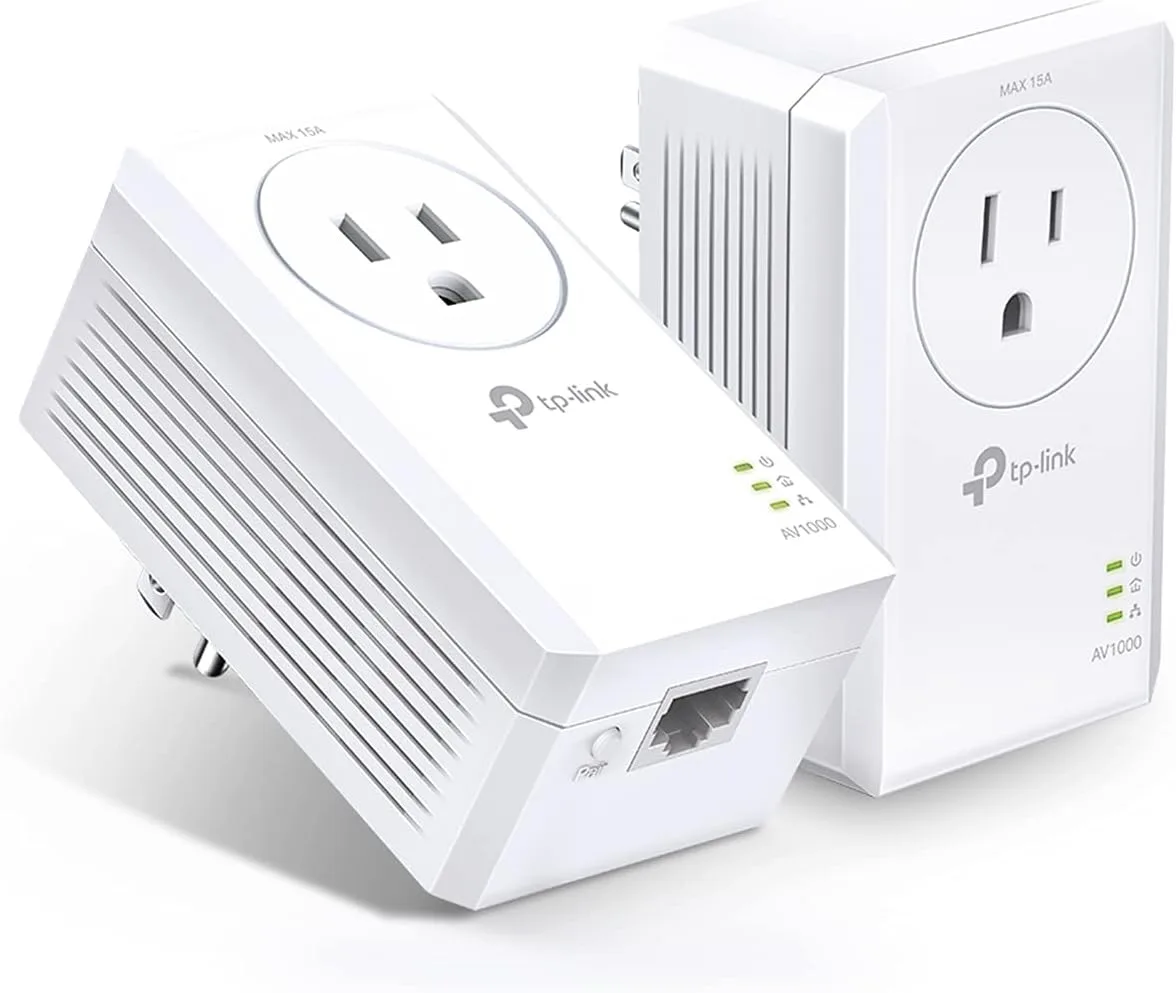
Verdict: AV1000 is the cheapest powerline tier where the adapter's own Ethernet port stops being the bottleneck, and that makes the TL-PA7017P KIT the first powerline kit worth buying — and for almost everyone, the last. Anything rated AV600 or below ships a 10/100 port that caps you at 100 Mbps no matter how clean your wiring is. This kit gives you a real Gigabit port on each end, a 15 A pass-through socket so you do not sacrifice the outlet, and a street price of $59.99 for the pair. What it does not give you is 1000 Mbps. TP-Link's own support documentation states that the number on the box is a physical-layer rate and that real throughput lands at 20–30% of it — call it 200–300 Mbps in a good install and under 130 Mbps across two floors. That is still enough to wire a 4K streamer, a console, or a home-office PC in the one room Wi-Fi cannot reach. It is not enough, and not stable enough, to serve as mesh backhaul. If you have coax in the room, buy MoCA instead. If you can pull a cable, pull a cable.
✅ Pros
- +The cheapest tier where the Gigabit port stops being the bottleneck — everything below AV600 hard-caps at 100 Mbps
- +15 A pass-through socket returns the outlet you occupy, which matters because strips are forbidden
- +$59.99 for a working pair, cables included, with nothing else to buy
- +Genuinely zero configuration: plug in, press Pair, done
- +0.83 W standby and an automatic 85% power-saving mode
- +128-bit AES with a one-touch button, which closes a real shared-wiring exposure
- +4.4 stars across 3,249 Amazon ratings — the best-reviewed tier in TP-Link's powerline range
❌ Cons
- −The 1000 Mbps on the box converts to 20–30% real throughput by the vendor's own admission
- −130 Mbps across two floors in independent testing — plan for that, not for the box figure
- −One Ethernet port per adapter; wiring two devices at the far end needs a switch
- −Performance is wiring-dependent and unpredictable until you physically test it
- −Split-phase US panels can halve throughput with no warning or indication
- −Not interoperable with G.hn, so you are locked into HomePlug AV2 for any expansion
- −Latency and jitter are far worse than Ethernet or MoCA, which rules out competitive gaming
Key Specs at a Glance
| Spec | TP-Link TL-PA7017P KIT |
|---|---|
| Powerline standard | HomePlug AV2 (also HomePlug AV, IEEE 1901) |
| Rated powerline rate | 1000 Mbps (AV1000), physical layer |
| Realistic throughput | 130–300 Mbps, per TP-Link's own 20–30% conversion guidance |
| Modulation | OFDM |
| Ethernet port | 1 × Gigabit per adapter |
| Pass-through socket | Yes, MAX 15 A, with noise filtering |
| Encryption | 128-bit AES, one-touch Pair button |
| Max nodes per network | 16 |
| Rated distance | 300 m / 1,000 ft over the electrical circuit |
| Power draw | 2.54 W max, 2.05 W typical, 0.83 W standby |
| Power saving | Automatic, up to 85% reduction |
| Dimensions (each) | 2.3 × 1.7 × 3.7 in (58 × 42 × 95 mm) |
| In the box | 2 × adapters, 2 × Ethernet cables |
| G.hn compatible | No |
| Certification | FCC, RoHS, UL |
| Price | $59.99 for the pair |
What It Is
A powerline adapter turns the electrical wiring already in your walls into an Ethernet cable. You plug one adapter into a wall outlet near your router and run a short Ethernet cable between them. You plug the second adapter into an outlet in the room that needs a wired connection, and run a cable from it to your console, TV, or PC. The two adapters find each other over the house wiring and bridge the two Ethernet segments.
The TL-PA7017P KIT is the pass-through version of TP-Link's AV1000 kit. The P suffix is the only difference from the plain TL-PA7017 KIT: it adds a 15 A AC socket on the face of each adapter, so the outlet you occupy is handed back to you. That matters more than it sounds, for a reason covered below.
Everything else about it is deliberately minimal. There is no Wi-Fi, no app, no web interface, no configuration. Three LEDs tell you power, powerline link, and Ethernet link. One recessed Pair button sets up 128-bit AES encryption between the adapters. You will interact with this product exactly twice: once to plug it in, and once more if you ever move it.
The Number on the Box Is Not the Speed
Every powerline adapter is sold on a number — AV600, AV1000, AV2000 — and every one of those numbers is a physical-layer rate measured under conditions that do not exist in a house.
What makes this case unusual is that the vendor says so in writing. TP-Link publishes a support article titled "Powerline Adapter Speed vs Actual Speed Explained," and it is blunt: the speed shown on the box or product specification is the maximum powerline rate at the physical layer, not the actual throughput you will experience. It then gives the conversion factor outright — actual throughput is typically 20–30% of the declared powerline rate — and works an example: a link negotiating 1000 Mbps at the PHY delivers roughly 300–350 Mbps of real throughput.
Apply that to AV1000 and the honest range is 200–300 Mbps on a good day. Independent testing on this exact product family lands in the same place. Tech Advisor measured 373 Mbps with the two adapters plugged in side by side — an unrealistic best case that mostly proves the silicon works — and 130 Mbps with the second adapter two floors below the router, which is the number that actually describes a real install. That is 13% of the rated figure.
None of this is unique to TP-Link. Every HomePlug vendor rates the same way. What is notable is that the correction lives in a support FAQ that nobody reads, several clicks away from the product page that says 1000 Mbps in 40-point type.
The Finding That Should Change What You Buy
Buried in that same TP-Link FAQ is a sentence with real purchasing consequences: HomePlug AV2 adapters that use MIMO have a lower conversion rate than standard HomePlug AV products.
This is the opposite of what the product ladder implies. The step up from AV1000 to AV2000 is sold as a doubling, and the AV2000 badge exists precisely because those adapters add 2×2 MIMO — using the ground conductor as a third wire to carry a second data stream. But if the MIMO tier converts PHY rate to throughput less efficiently, then doubling the headline number does not double the delivered throughput. You are paying for a ratio that partly evaporates.
You can see the consequence in the market. TP-Link's AV2000 flagship, the two-port TL-PA9020P KIT, currently sits at 4.1 stars across 8,906 Amazon ratings. This AV1000 kit sits at 4.4 stars across 3,249. The cheaper, lower-rated-on-paper product is the better-reviewed one, and the conversion-rate gap is the most plausible explanation: buyers of the AV2000 expected twice the speed and did not get it.
There is a real caveat here, and it cuts the other way on price. As of this writing the AV2000 TL-PA9020P KIT is listed at $49.99 — ten dollars less than this AV1000 kit — and it carries two Gigabit ports per adapter instead of one. If you need to wire two devices at the far end and you find it in stock, it is a legitimate buy and the second port saves you a switch. But Amazon currently shows only a handful of units left, and TP-Link has not refreshed the line, so treat it as a clearance opportunity rather than the default recommendation.
Check the AV2000 two-port alternative on Amazon →
Why AV1000 Is the Floor
There is a hard technical reason not to buy cheaper than this kit, and it has nothing to do with powerline at all.
AV600-class adapters and below ship a 10/100 Fast Ethernet port. TP-Link's own documentation concedes the consequence: even though an AV600 link could theoretically deliver 150–175 Mbps of throughput, the adapters cap out at 100 Mbps because the Ethernet port cannot pass more. You are throttled by the connector, not the wiring.
AV1000 is the first tier where that stops being true. A Gigabit port on each end means the powerline link is the only limit in the system, so whatever your house wiring can actually deliver is what you get. Every dollar below this tier buys you a guaranteed ceiling; every dollar above it buys you a number that converts worse. That is the entire argument for this specific product.
Installation Rules That Are Not Optional
Powerline is more sensitive to how you install it than any other home networking product. TP-Link's troubleshooting guidance and the physics of US residential wiring produce four rules, and breaking any one of them can halve your throughput or kill the link outright.
Plug directly into the wall. Never a power strip.
TP-Link states it plainly: adapters should always be plugged directly into a wall outlet, because power strips and surge protectors filter or block the powerline signal and significantly reduce the powerline rate. A surge protector's entire job is suppressing high-frequency transients on the line, and a HomePlug AV2 signal is a high-frequency transient on the line. This is the single most common cause of a powerline install that "does not work," and it is why the pass-through socket on the P model is worth the $10 — it gives you the outlet back so you are not tempted to daisy-chain a strip.
Watch the two legs of your panel.
North American homes use split-phase service: two 120 V hot legs feeding the panel, with each breaker landing on one leg or the other. Powerline signal crosses between legs only by coupling across the bus bar, and that coupling is lossy. If your router is on a circuit fed by leg A and the far room is on leg B, expect a substantial hit — sometimes half the throughput, sometimes an intermittent link. Most powerline reviews are written in the UK and Europe, where single-phase domestic service makes this a non-issue, which is why you will rarely see it mentioned. In a US house it is often the dominant variable, and it is invisible until you test. If performance is terrible, try the far adapter in a different room before you conclude the kit is faulty — a different room is often a different leg.
Keep motors and chargers away from the adapters.
TP-Link specifically calls out devices with motors — air conditioners, washing machines, fans, kitchen appliances — as noise sources, and adds that the AC power adapters for phones and laptops inject noise onto the line. Switching-mode power supplies are the quiet killers here. An outlet shared with a laptop brick will measurably underperform a clean one a few feet away.
Understand the distance figure.
The 300 m / 1,000 ft rating is a cable-length figure over the electrical circuit, not a straight-line distance through your house, and TP-Link notes that noise, interference, and line quality reduce the effective range. Wiring does not run in straight lines; a room 40 feet away may be 120 feet of copper by way of the panel.
Security and Scale
The Pair button sets up 128-bit AES encryption between adapters, and you should press it. Powerline signal does not politely stop at your property line — it can propagate past the meter onto shared wiring, which matters in apartments, condos, and duplexes that share a service transformer. Unpaired adapters form an open network by default. This is a 10-second step with real consequences, and it is the powerline equivalent of the PoE filter you install on a MoCA deployment.
On scale: this model supports up to 16 nodes on one powerline network, which is far more than any sane install needs. The rule to know is that mixing models caps the network at the lowest limit present — pair these with an old 8-node adapter and the whole network becomes 8-node. More practically, every additional node shares the same wiring, so the third and fourth adapters degrade the first two. Two adapters is the configuration this technology is good at.
One hard compatibility line: HomePlug AV2 and G.hn are not interoperable. TP-Link says so directly. If you already own G.hn adapters, these will not talk to them, and vice versa. There is no adapter, firmware, or setting that bridges the two.
The Category Is Narrowing
Worth knowing before you invest in powerline as a strategy: TP-Link has marked the Deco PX50 — its whole-home powerline mesh system — End of Life on its own US product page. The PX50 was the ambitious version of this idea, a Wi-Fi 6 mesh that used G.hn powerline as backhaul between nodes, and it is being wound down.
The plain powerline adapters are not going anywhere. TP-Link's US powerline line-up still lists the TL-PA7010, TL-PA7017, and TL-PA9020P families with no EOL tag on any of them. The signal is narrower than "powerline is dead," and it is a useful one: the market has concluded that powerline works as a point-to-point bridge to one stubborn room and does not work as a whole-home backbone. That is exactly the recommendation this review arrives at independently, and it is worth weighing if you were considering buying four adapters instead of two.
Pros and Cons
Pros
- The cheapest tier where the Gigabit port stops being the bottleneck — everything below AV600 hard-caps at 100 Mbps
- 15 A pass-through socket returns the outlet you occupy, which matters because strips are forbidden
- $59.99 for a working pair, cables included, with nothing else to buy
- Genuinely zero configuration: plug in, press Pair, done
- 0.83 W standby and an automatic 85% power-saving mode
- 128-bit AES with a one-touch button, which closes a real shared-wiring exposure
- 4.4 stars across 3,249 Amazon ratings — the best-reviewed tier in TP-Link's powerline range
Cons
- The 1000 Mbps on the box converts to 20–30% real throughput by the vendor's own admission
- 130 Mbps across two floors in independent testing — plan for that, not for the box figure
- One Ethernet port per adapter; wiring two devices at the far end needs a switch
- Performance is wiring-dependent and unpredictable until you physically test it
- Split-phase US panels can halve throughput with no warning or indication
- Not interoperable with G.hn, so you are locked into HomePlug AV2 for any expansion
- Latency and jitter are far worse than Ethernet or MoCA, which rules out competitive gaming
How It Compares
| TL-PA7017P KIT (powerline) | TL-PA9020P KIT (powerline) | goCoax MA2500D (MoCA 2.5) | Cat6 Ethernet | |
|---|---|---|---|---|
| Rated | AV1000 | AV2000 | 2.5 Gbps | 1–10 Gbps |
| Real throughput | 130–300 Mbps | 200–500 Mbps | 1.5–2.0 Gbps | Line rate, always |
| Latency | 5–15 ms, spiky | 5–15 ms, spiky | 3–5 ms | Under 1 ms |
| Ports per unit | 1 × Gigabit | 2 × Gigabit | 1 × 2.5 Gbps | n/a |
| Requires | Any two outlets | Any two outlets | Coax in both rooms | Pulling cable |
| Pass-through socket | Yes, 15 A | Yes, 15 A | n/a | n/a |
| Pair price | $59.99 | $49.99, low stock | About $150 | $90–$120 per 1,000 ft box |
The comparison that matters is the third column. If the room you are trying to wire has a coax outlet on the same run as your router's room, MoCA 2.5 delivers five to ten times the throughput of this kit with better latency and far more consistency, for about $90 more. That is not a close call. Powerline wins only when there is no coax and no realistic cable path — which, to be fair, describes a lot of houses.
Against Ethernet there is no argument at all. If you can get to the room from an attic or crawlspace, running a cable costs less in materials than this kit and delivers line rate for the next twenty years.
Who Should Buy It
Buy it if:
- You have exactly one device in one room that needs a wired connection and there is no coax and no cable path
- That device is a 4K streamer, a smart TV, a printer, a NAS doing overnight backups, or a work laptop on video calls
- You want a reversible, renter-safe, 10-minute fix with no holes in anything
- You have tried Wi-Fi from a well-placed router and it genuinely is not enough
Skip it if:
- You want to feed a mesh node — powerline jitter makes it worse than a decent wireless backhaul, not better
- You play competitive online games; the latency spikes when an appliance cycles will cost you rounds
- You have coax in the room, in which case buy MoCA
- Your service is faster than about 300 Mbps and you actually intend to use it at the far end
- You need two wired devices at the far end and cannot find the two-port AV2000 in stock — though a cheap Gigabit switch solves that for $30
Bottom Line
The TL-PA7017P KIT is a good product in a mediocre category, and it is honest about neither of those things on its packaging. At $59.99 it is the correct powerline purchase: below it the Ethernet port throttles you to 100 Mbps, and above it the MIMO tiers convert their bigger numbers less efficiently, by TP-Link's own account. The pass-through socket is not an upsell — powerline adapters cannot go in a power strip, so without it you simply lose an outlet.
Go in expecting 130–300 Mbps rather than 1000, plug both units straight into the wall, press the Pair button, and accept that your house's wiring gets a vote you cannot predict in advance. Used that way — one bridge, one room, one device — it solves a real problem cheaply and stays solved. Used as network infrastructure, it will disappoint you, and the quiet discontinuation of TP-Link's whole-home powerline mesh suggests the market has already worked that out.
Our Verdict
Verdict: AV1000 is the cheapest powerline tier where the adapter's own Ethernet port stops being the bottleneck, and that makes the TL-PA7017P KIT the first powerline kit worth buying — and for almost everyone, the last. Anything rated AV600 or below ships a 10/100 port that caps you at 100 Mbps no matter how clean your wiring is. This kit gives you a real Gigabit port on each end, a 15 A pass-through socket so you do not sacrifice the outlet, and a street price of $59.99 for the pair. What it does not give you is 1000 Mbps. TP-Link's own support documentation states that the number on the box is a physical-layer rate and that real throughput lands at 20–30% of it — call it 200–300 Mbps in a good install and under 130 Mbps across two floors. That is still enough to wire a 4K streamer, a console, or a home-office PC in the one room Wi-Fi cannot reach. It is not enough, and not stable enough, to serve as mesh backhaul. If you have coax in the room, buy MoCA instead. If you can pull a cable, pull a cable.
Ready to buy the TP-Link TL-PA7017P KIT?
Buy on Amazon →Affiliate link — we may earn a commission at no extra cost to you.