TP-Link Archer BE800 Review: The Mid-Tier WiFi 7 Router That Doesn't Cut Corners on 10 GbE
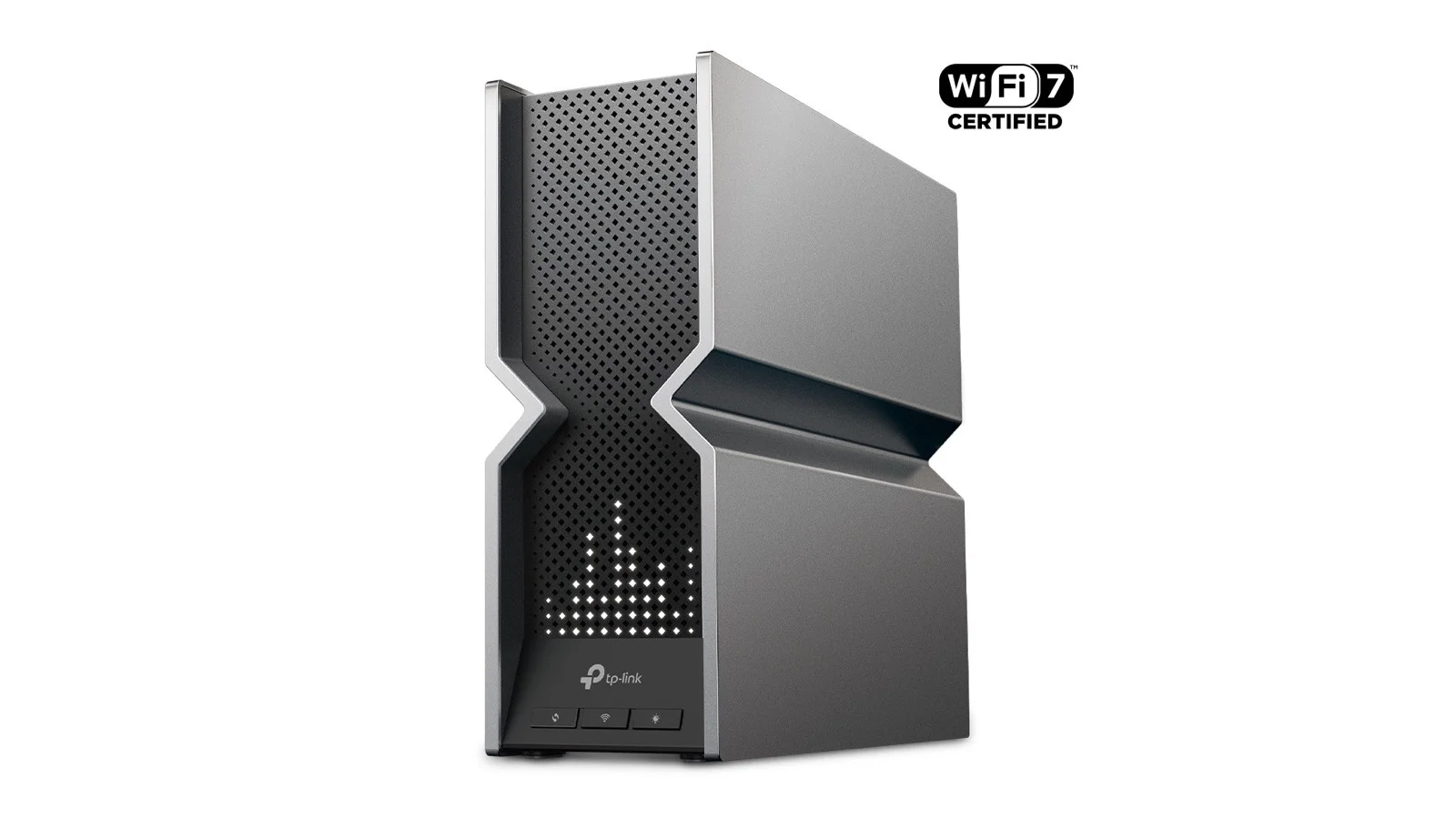
The Archer BE800 is the mid-tier WiFi 7 single-unit router for power users — BE19000 tri-band, dual 10 GbE ports, four 2.5 GbE LAN, and a front-panel LCD without flagship pricing.
✅ Pros
- +Full 4-stream 6 GHz radio at 320 MHz channel width — meaningfully better WiFi 7 client throughput than the BE550's 2-stream 6 GHz
- +Dual 10 GbE ports configurable as WAN or LAN — the cleanest port layout in this price tier
- +Four 2.5 GbE LAN ports — every wired port is multi-gig
- +USB 3.0 for basic file sharing and Time Machine targets
- +Front-panel color LCD with network status, weather, and custom messages
- +WireGuard and OpenVPN server built in, plus full VPN-client mode for routing the whole network
- +TP-Link Tether app is one of the most polished consumer router apps available
- +EasyMesh compatible — drop a compatible TP-Link node in later to extend coverage
❌ Cons
- −Single router — not the right architecture for homes over ~3,500 sq ft or with difficult floor plans
- −No SFP+ cage — 10 GbE is copper RJ45 only
- −No Thread, Matter, Zigbee, or BLE radios — no built-in smart home hub
- −HomeShield Pro security and advanced parental controls are paid subscriptions
- −No full VLAN management or controller-class network segmentation
- −Front-panel LCD is a love-it-or-disable-it design choice
The TP-Link Archer BE800 is the WiFi 7 router for power users who don't want a mesh and don't want to pay flagship money for the ASUS RT-BE96U. Tri-band BE19000 radio, dual 10 GbE ports configurable as WAN or LAN, four 2.5 GbE LAN ports, a USB 3.0 port, and a front-panel LCD that surfaces real network status without opening the app. It's the single-router pick when your fiber plan starts with a "2" or "5" and you want 10 GbE on the LAN side without dropping another $300 on a switch.
What "BE19000 Tri-Band" Actually Means in Practice
BE19000 is the marketing total — sum the theoretical maximums across all three bands and you land near 19 Gbps. No single client will see anything close to that; aggregate class numbers are a comparison tool, not a real-world throughput claim. What matters is what each band can do. The 6 GHz band — the new headroom — runs up to ~11,500 Mbps theoretical with 4 streams at 320 MHz channel width, and it's the band a WiFi 7 client will prefer and where MLO can stitch together multiple links for lower latency and higher resilience. The 5 GHz band — the workhorse — runs up to ~5,800 Mbps theoretical with 4 streams; every device you own that isn't WiFi 7 will live here, including laptops, phones older than late 2024, smart TVs, and game consoles. The 2.4 GHz band — the IoT band — runs up to ~1,400 Mbps theoretical, but in real homes is congested and slow, so you'll only land here for smart plugs, thermostats, and older devices.
What the BE800 does well that step-down WiFi 7 routers like the TP-Link Archer BE550 don't: it gives 6 GHz a full 4-stream configuration. The BE550 is 4-stream on 5 GHz but only 2-stream on 6 GHz, which caps the 6 GHz throughput materially. If you've already bought into WiFi 7 client hardware — a 2024+ iPhone, a recent Galaxy S, a new MacBook Pro — the BE800's full-fat 6 GHz radio is the reason to step up.
Ports and Why They're the Real Story
The Archer BE800's port layout is where it earns its mid-tier price tag. Two 10 GbE ports, both configurable: either port can be set as the WAN, the other becomes a 10 GbE LAN port, and you can also bond them for failover or use one as a dedicated 10 GbE LAN if your modem hands off via a lower-speed port. Four 2.5 GbE LAN ports cover the rest of your wired house — multi-gig on every wired port, no 1 GbE fallback, no "first port is fast, rest are slow" trickery you still see on midrange competitors. One USB 3.0 port handles an external drive for basic file sharing, a Time Machine target, or a Samba share. Not a NAS substitute, but useful for backups and media.
This is the layout that makes the BE800 a complete answer for fiber customers stepping up to multi-gig service. Drop the 10 GbE ONT into the WAN port, drop a 10 GbE NAS or workstation into the second 10 GbE port, and the rest of the wired house lands on 2.5 GbE — all without buying a separate switch. By comparison, the ASUS RT-BE96U also offers dual 10 GbE plus 2.5 GbE LAN, but at a higher street price and with a heavier configuration learning curve. The TP-Link Archer BE550 drops to one 2.5 GbE WAN and four 2.5 GbE LAN — no 10 GbE at all — and is the right call only if you'll never have multi-gig service above 2.5 Gbps.
There's no SFP+ cage. Both 10 GbE ports are copper RJ45. For most homes that's the right choice (Cat6a cabling covers it); if you're running fiber inside the LAN to a homelab, you'll need a media converter.
Performance
Real-world WiFi 7 throughput on the Archer BE800 is among the highest you'll see on a single-unit router. Close-range MLO-capable WiFi 7 clients comfortably exceed 2 Gbps and approach 3 Gbps in the same room as the router. Mid-range performance through one or two interior walls at 20–30 feet typically holds in the 1–1.8 Gbps band. Long-range coverage on the far side of a typical 2,500–3,500 sq ft home will drop to 300–600 Mbps depending on construction.
What that means for real internet plans: on 1 Gbps fiber or cable, the BE800 is over-provisioned — a TP-Link Archer BE550 or even a Netgear Nighthawk RAX50 will saturate it for less. On 2.5 Gbps fiber it's saturated on a single close-range WiFi 7 client — this is the most common reason to buy the BE800. On 5 Gbps fiber it's fully supported: the 10 GbE WAN accepts the full pipe and multiple wireless clients can split full bandwidth. On 10 Gbps fiber it's supported on WAN, and while WiFi 7 clients won't saturate this individually, a 10 GbE wired device on the LAN port will.
Where the BE800 falls short of mesh systems like the Netgear Orbi 970 or the TP-Link Deco BE85 is whole-home coverage in larger floor plans. A single router — no matter how powerful the radio — can't beat physics. If your home is over 3,500 sq ft, has dense interior walls, or has multiple floors, a mesh is the right architecture and the BE800 isn't the right product for you. For a single-floor home, a two-story home with the router placed centrally, or a townhouse, the BE800 has enough radio power to cover the whole footprint without satellites.
The Front-Panel LCD
The BE800's most visible differentiator from every other router in this price tier is the front-panel color LCD. Out of the box it surfaces network status (link active, online), time, weather, and a configurable text message. You can swap modes from the Tether app.
It is, objectively, a small thing. It is also the kind of small thing that nobody else in the consumer router category offers, and once you've had it for a week, you'll find yourself glancing at it during outages: a quick visual check of whether the WAN dropped, without unlocking your phone. You can disable the display entirely if it bothers you, or schedule an off period overnight.
Setup and Software
Setup is via the TP-Link Tether app on iOS or Android, or via the web admin at the router's local IP. Tether is one of the better consumer router apps — clean, fast, and doesn't bury core functions behind premium upsells the way some competitors do.
The free tier covers everything most users need: SSID configuration with 6 GHz band steering controls, a guest network (separate 2.4/5/6 GHz SSIDs supported), per-device bandwidth monitoring, parental controls with time-based limits and content filtering, port forwarding, dynamic DNS, WireGuard and OpenVPN server, DHCP reservation, custom DNS, USB drive sharing (SMB, FTP), and EasyMesh node addition if you later expand.
TP-Link HomeShield Pro is the paid security and parental subscription. It adds advanced parental controls, deeper threat protection, and usage reports. The hardware works fine without it; pricing is roughly $5–7/month or around $54.99/year depending on tier — check current rates in the Tether app before subscribing.
Power-user features the BE800 supports that the Archer BE550 shares: WireGuard server, full VPN client support (you can route the whole router through a VPN), DDNS, and per-device QoS. What the BE800 still doesn't give you — and where the ASUS RT-BE96U or a UniFi U7 Pro Max setup pulls ahead — is full VLAN segmentation with multiple tagged SSIDs across VLANs, advanced firewall rules with custom chains, and per-client DNS overrides. If those matter to you, the BE800 isn't enough — but for 95% of even technically inclined households, it is.
Who Should Buy the Archer BE800
Buy the Archer BE800 if you have a single-floor, two-story, or townhouse-sized home under ~3,500 sq ft, you have 2.5 Gbps+ internet (especially 5 Gbps fiber), and you have at least one 10 GbE wired device — a NAS, workstation, or downstream switch. It's the right pick if you own WiFi 7 client hardware and want a router with a full 4-stream 6 GHz radio, and if you want polished consumer software with real power-user features (WireGuard, QoS, USB sharing) without paying flagship pricing.
Skip it and step down if your internet plan is 1 Gbps or slower — a TP-Link Archer BE550 is the better buy. If you don't have WiFi 7 clients yet, a Netgear Nighthawk RAX50 at a fraction of the price will outlast your devices.
Skip it and step up if your home is over 3,500 sq ft or has multiple floors with dense walls — a mesh like the TP-Link Deco BE85 or Netgear Orbi 970 will outperform any single router. If you want VLANs, multiple tagged SSIDs, or controller-class management, look at a UniFi U7 Pro Max or UniFi E7 setup.
Archer BE800 vs. Archer BE550 vs. RT-BE96U
The three most cross-shopped single-unit WiFi 7 routers in this catalog are not the same product. The Archer BE800 is BE19000 with a 4-stream 6 GHz radio, two 10 GbE ports plus four 2.5 GbE LAN, USB 3.0, a front LCD, and EasyMesh — at $599.99. The Archer BE550 is BE9300 with a 2-stream 6 GHz radio, one 2.5 GbE WAN plus four 2.5 GbE LAN, USB 3.0, no front LCD, and EasyMesh — at $299.99 and nearly half the price. The ASUS RT-BE96U is BE19000 with a 4-stream 6 GHz radio, two 10 GbE ports plus three 2.5 GbE LAN, two USB 3.2 ports, no LCD, Asuswrt-Merlin firmware, AiMesh, and AiProtection Pro — at $699.99 MSRP.
The Archer BE800 is the right pick when you want the dual 10 GbE port layout and the full 4-stream 6 GHz radio without ASUS's higher MSRP — and when you want consumer-friendly software rather than Asuswrt-Merlin's depth. The Archer BE550 is the right pick when you don't have multi-gig service above 2.5 Gbps and you don't have WiFi 7 clients that need the full 6 GHz radio. The ASUS RT-BE96U is the right pick when you want the deepest configuration and security feature set in the category — Asuswrt-Merlin compatibility, AiProtection Pro included for life, and AiMesh ecosystem to grow into.
Bottom Line
The Archer BE800 lands at the price point where most WiFi 7 buyers actually live: above the entry tier where you're really just buying a future-proofing token, below the flagship tier where you're paying for headroom you'll never reach. It gives you the radio that makes WiFi 7 client hardware worth owning, the multi-gig port layout that lets you actually use a 2.5 Gbps or 5 Gbps internet plan, and a software experience that doesn't require networking expertise to manage.
It's not a mesh, so it's wrong for the largest homes. It's not enterprise-grade, so it's wrong for buyers who want VLANs and full segmentation. For everyone in between — single-floor and two-story homes with multi-gig fiber and a few WiFi 7 devices — the Archer BE800 is the most complete single-unit WiFi 7 router you can buy at this price.
Our Verdict
The Archer BE800 is the mid-tier WiFi 7 single-unit router for power users — BE19000 tri-band, dual 10 GbE ports, four 2.5 GbE LAN, and a front-panel LCD without flagship pricing.
Ready to buy the TP-Link Archer BE800?
Buy on Amazon →Affiliate link — we may earn a commission at no extra cost to you.