Cat6 vs Cat6a vs Cat7 vs Cat8: What You Actually Need for Home Ethernet in 2026
Published 2026-05-15 · By NetAudioHub Editorial
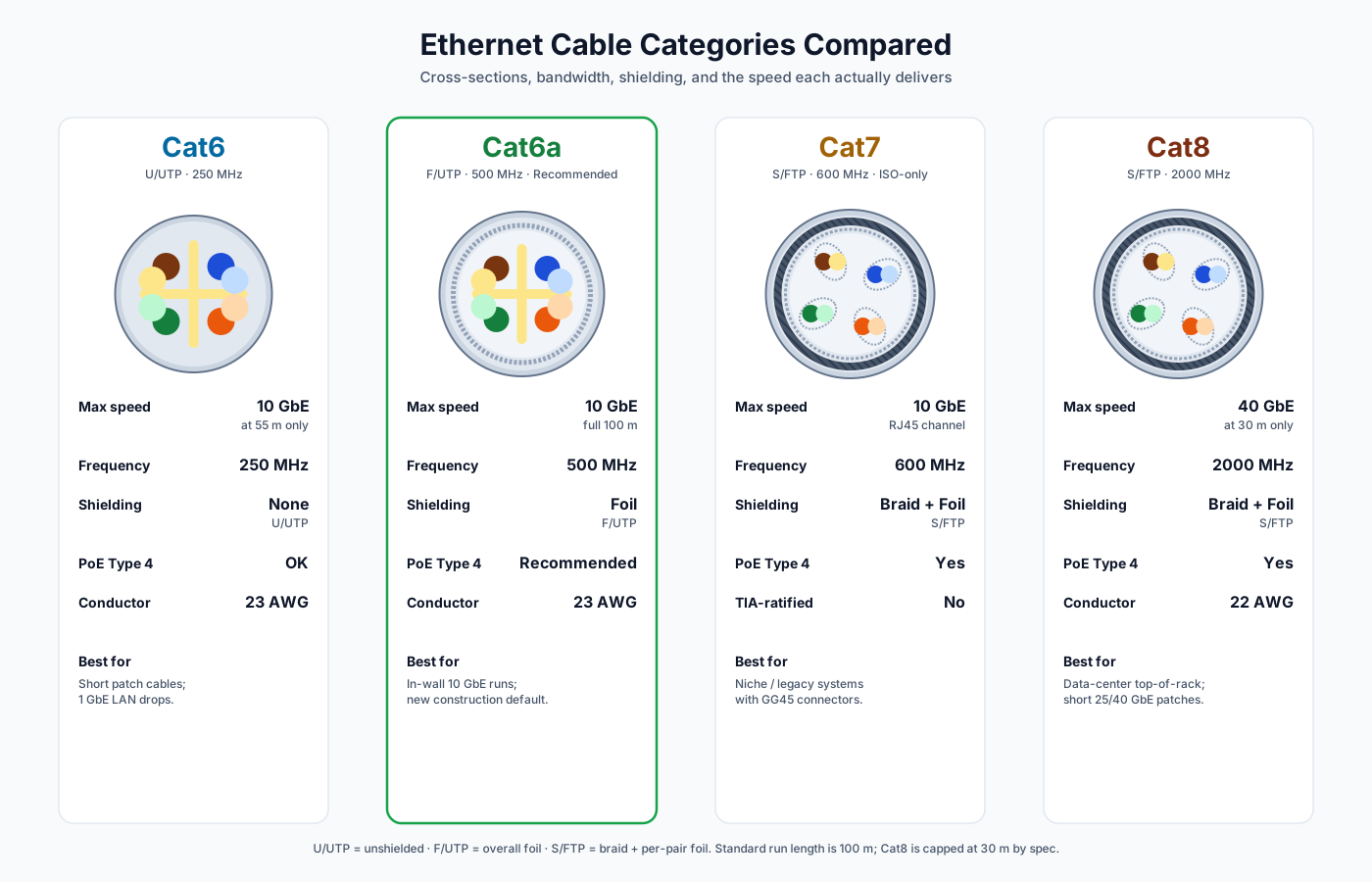
Cat6a is the right answer for almost every in-wall run; Cat6 is fine for short patch cables; Cat7 is a marketing label TIA never ratified for RJ45; Cat8 is purpose-built for short data-center patches, not your walls. Here's what each category actually delivers and which one belongs where.
The verdict up front: for home Ethernet in 2026, Cat6a is the right answer for almost every in-wall run, Cat6 is fine for short patch cables and basic 1 GbE drops, Cat7 is a marketing label that ANSI/TIA never ratified for RJ45 networking, and Cat8 is purpose-built for short data-center patches — not your walls. If you are wiring a new house and your ceiling is going up next week, run Cat6a F/UTP. If you are buying a 6-foot patch cable for a printer, buy Cat6. If you see "Cat7" on Amazon and the connector is RJ45, you are paying a premium for Cat6a-grade performance with a sticker that says Cat7. This guide walks through what each category actually is, what it actually delivers, and which one belongs where.
Why the Numbers Are Confusing
Ethernet category cables are governed by two different standards bodies that mostly agree but occasionally don't. In North America, the authoritative body is ANSI/TIA-568. Internationally, it's ISO/IEC 11801. The two are aligned on Cat5e, Cat6, Cat6a, and Cat8 — those are real, ratified, testable specifications used by both. They diverge on Cat7 and Cat7a: ISO/IEC 11801 defines them; ANSI/TIA-568 does not. There is no TIA-recognized Cat7 cable.
Layered on top is what gets sold. Manufacturers can print "Cat7" or "Cat8" on a cable jacket without certification. The category labeling on a cable jacket is not policed by either standards body — only the underlying electrical performance test, conducted by an independent lab (UL, ETL, Intertek), is. So in practice, "what category cable is this?" is two questions: what is the jacket printed with, and what does it actually test to.
A useful way to think about it: cable categories are about bandwidth, not just speed. A category specifies the cable's rated frequency response in MHz. The maximum Ethernet speed that runs cleanly over that cable is a function of the bandwidth, the encoding scheme of the Ethernet standard (1000BASE-T, 10GBASE-T, 25GBASE-T, etc.), and the length of the run.
What Each Category Actually Is
Cat5e
Not the focus of this post, but it's the floor everyone compares against. Cat5e is rated to 100 MHz and supports 1 Gbps at 100 m (the standard maximum Ethernet run length). It's been the residential default since the early 2000s. Most houses built between 2002 and 2018 have Cat5e in the walls if they have anything. It's also the minimum category that supports PoE Type 2 (25 W) reliably.
If you already have Cat5e in your walls and you only need gigabit, don't tear it out. It works. It will run the next ten years of streaming, video calls, and Wi-Fi backhaul without complaint. The reason to upgrade is only if you're moving to 10 GbE or you're running long PoE++ powered devices (cameras, access points) where the higher gauge of Cat6/6a gives you thermal margin.
Cat6
Ratified in 2002 (ANSI/TIA-568-B.2-1). Rated to 250 MHz. Supports:
- 1 Gbps at 100 m — the same as Cat5e, but with much more headroom
- 10 Gbps at 55 m — yes, Cat6 can do 10 GbE, but only at half the standard length
The 55-meter limit on 10 GbE is the catch. In a typical single-family home, your longest run from a central wiring closet to a far bedroom is usually 25–45 m, so Cat6 can deliver 10 GbE in many residential layouts. But it's right at the edge, and any noise — fluorescent lights, an unshielded jacket near a high-voltage AC run, a kinked cable — eats into your margin fast.
Cat6 ships almost universally as U/UTP (unshielded twisted pair). Each pair has tighter twists than Cat5e and the cable adds a plastic spline ("pair separator") down the middle to keep the four pairs from coupling into each other. That's where the extra bandwidth comes from. Conductors are typically 23 AWG, thicker than Cat5e's 24 AWG, which gives Cat6 better DC resistance — important for PoE.
Cat6 is the right choice for patch cables (the short runs from wall to device) and for new-build LAN drops where you're sure you'll never need 10 GbE.
Cat6a
Ratified in 2008 (ANSI/TIA-568-B.2-10). Rated to 500 MHz — double Cat6's bandwidth. Supports:
- 1 Gbps at 100 m
- 10 Gbps at 100 m — the full standard run length
This is the meaningful upgrade. With Cat6a you get 10 GbE end-to-end without distance compromise, which is why every commercial structured-cabling spec from 2012 onward uses it as the default. The bandwidth headroom also makes it the recommended cable for PoE++ (802.3bt, Type 4, 100 W) because the higher conductor mass and required shielding give better thermal performance under heavy power loads.
Cat6a is where shielding starts to matter. To pass the 500 MHz crosstalk requirements at 100 m, Cat6a cables almost always have some form of shielding:
- F/UTP — foil shield around all four pairs, unshielded individual pairs. The mainstream Cat6a flavor in North America.
- U/FTP — foil shield around each individual pair, no overall shield. Better against alien crosstalk; popular in Europe.
- S/FTP — braided shield around all pairs plus individual foil per pair. Heavy, expensive, used in industrial or extreme-EMI environments.
The trade-off with shielded cable is grounding. A shielded cable needs to be grounded at one end — typically through a shielded keystone jack and a shielded patch panel that bonds to your electrical ground. Get this wrong and the shield can act as an antenna, picking up noise instead of rejecting it. For most home installs with a single rack/closet at one end, a properly bonded shielded keystone is straightforward.
For new in-wall runs in a home you'll live in for the next 10+ years, Cat6a is the default answer. It runs about 30–60% more per foot than Cat6, the labor cost is the same, and you get true 10 GbE plus PoE++ headroom.
Cat7
Here's where things get weird. Cat7 is defined by ISO/IEC 11801 (the international standard), not by ANSI/TIA-568. It's rated to 600 MHz and supports 10 GbE at 100 m, like Cat6a — just with higher shielding margins.
The catch: the original Cat7 specification was designed around a non-RJ45 connector. ISO/IEC defined two options — the GG45 (a compatible RJ45-style connector with extra contacts in the corners for high-frequency pairs) and the TERA (a square 4-pair connector with a fundamentally different geometry). Neither of these connectors ever achieved consumer adoption. Networking equipment — every switch, every NIC, every wall jack you can buy at retail — uses standard 8P8C RJ45.
That creates a problem: a Cat7 cable physically connected to RJ45 jacks at both ends is no longer running at Cat7's certified frequency profile, because RJ45 was never tested or certified above ~600 MHz with the specific pair separation Cat7 requires. The cable, in isolation, may meet 600 MHz electrical specs. The channel — cable plus connectors plus jacks — does not.
In retail, "Cat7" almost always means: a cable with S/FTP shielding, RJ45 connectors, and a Cat7 sticker on the jacket. Electrically, that channel performs like a well-shielded Cat6a cable. You are paying a 20–50% premium over Cat6a for a category that does not provide certified additional channel performance over RJ45.
Buy Cat7 only if you have a specific reason that requires Cat7 — a structured cabling system already built around GG45 or TERA connectors, or a procurement requirement from your IT department. In a home, that's almost never. Buy Cat6a instead.
Cat7a
ISO-only, like Cat7. Rated to 1000 MHz. Supports 10 GbE at 100 m with even more margin. Same connector problem as Cat7. Same conclusion: not a meaningful retail consumer product. Skip.
Cat8
Ratified by ANSI/TIA in 2016 (ANSI/TIA-568.2-D). Rated to 2000 MHz — four times Cat6a. Supports:
- 25 Gbps at 30 m (25GBASE-T)
- 40 Gbps at 30 m (40GBASE-T)
Note the length: 30 m, not 100 m. Cat8 was explicitly engineered for top-of-rack data-center applications, where a server connects to a switch one or two racks away. It uses RJ45 (so it's backward-compatible) and ships exclusively as S/FTP with heavy shielding.
For a home, Cat8 is overkill in two directions at once. You almost certainly don't have a 25/40 GbE switch — even prosumer "10 GbE" switches are still the high end of the home market in 2026 — and even if you did, Cat6a runs 10 GbE at 100 m and Cat8 will run 10 GbE at 100 m too. The only thing Cat8 buys you in a residential context is bandwidth margin you can't use.
Where Cat8 does make sense at home: a short patch cable from a 10 GbE switch to a 10 GbE NAS, in a rack where you also have other high-current AC running and you want maximum noise immunity. It's a $20–$40 cable for a 3-foot run. Fine. Not transformative.
What Speeds Each Category Actually Supports
| Category | Rated frequency | 1 Gbps | 2.5 / 5 Gbps | 10 Gbps | 25 / 40 Gbps | PoE Type 4 (100 W) | Typical shielding |
|---|---|---|---|---|---|---|---|
| Cat5e | 100 MHz | 100 m | 100 m | No | No | Marginal | U/UTP |
| Cat6 | 250 MHz | 100 m | 100 m | 55 m | No | OK | U/UTP |
| Cat6a | 500 MHz | 100 m | 100 m | 100 m | No | Recommended | F/UTP, U/FTP |
| Cat7 (ISO) | 600 MHz | 100 m | 100 m | 100 m | No | Yes | S/FTP |
| Cat7a (ISO) | 1000 MHz | 100 m | 100 m | 100 m | No | Yes | S/FTP |
| Cat8 | 2000 MHz | 30 m | 30 m | 30 m | 30 m | Yes | S/FTP |
A few things to call out from that table:
- 2.5 GbE and 5 GbE (introduced as NBASE-T in 2016, ratified as 802.3bz) run on Cat5e and up to 100 m. If you're upgrading to a 2.5 GbE switch and Wi-Fi 7 mesh nodes, the cable you already have in the wall almost certainly handles it. There's no cable reason to rewire for 2.5 GbE alone — an all-2.5 GbE unmanaged switch like the TP-Link TL-SG108-M2 is around $130 and runs fanless over existing Cat5e.
- 10 GbE on Cat6 works in shorter runs but is not standards-guaranteed at full distance. Run Cat6a if you want a clean 10 GbE house.
- PoE Type 4 (100 W, IEEE 802.3bt) is rated for Cat5e but is significantly happier on Cat6a. The thicker conductors and shielding dissipate heat from the bundle better, which matters when you have multiple PoE cables together in a wall sleeve.
What You Should Actually Buy
For a new house, in the walls
Cat6a F/UTP, riser-rated (CMR) or plenum-rated (CMP) per your local code. Riser is required for most vertical runs between floors; plenum is required when the cable runs through forced-air return spaces. Most homes need CMR.
This is the category to install for new construction or a remodel. The wall is open exactly once. The cost difference between Cat6 and Cat6a is real but small relative to the total labor and drywall cost. Future-proof to 10 GbE while the wall is open.
Brands we use for in-wall pull boxes:
- Monoprice Entegrade Series Cat6a 1000 ft pull box — solid CMR copper, common on home installs
- Cable Matters Cat6a F/UTP 1000 ft riser-rated — well-tested for home structured wiring
- TrueCABLE Cat6a F/UTP — slightly higher price, ETL listed channel performance
Pair with shielded keystone jacks and a shielded patch panel for proper bonding.
For short patch cables (1–10 ft)
Cat6 or Cat6a, stranded conductor, U/UTP or thin F/UTP. Stranded cable is more flexible than solid in-wall cable and tolerates the constant flexing of a patch cable. Avoid heavy S/FTP for short runs; it doesn't add anything at 6 feet and the bend radius makes it a pain to route.
Slim patch cables (28 AWG slim Cat6a) are great in dense racks where bend radius and cable density matter:
- Monoprice SlimRun Cat6a 28 AWG patch cable — the rack-cable workhorse
- Cable Matters 10GbE Cat6a snagless patch
For a long single run you can't replace easily
Cat6a, solid conductor, F/UTP. Even if you currently only have a 1 GbE switch, the cost of pulling the cable again later is far higher than the small premium for 6a today.
For a rack with 10 GbE+ NAS or switches
Cat6a stranded patch cables are sufficient. Copper 10 GbE has also stopped being exotic — the TP-Link TL-SX105 puts five 10GBASE-T ports in a fanless box for about $200, which is roughly $40 a port, and every port steps down cleanly through 5G, 2.5G and 1G so nothing older gets stranded. If you have a 25 GbE+ environment (rare in homes, but starting to appear in heavy NAS/lab setups), use Cat8 for the short switch-to-server hops:
- Mediabridge Cat8 patch cable — common entry-level Cat8
- TrueCABLE Cat8 S/FTP patch — TIA-tested
Don't buy
- "Cat7" cables with RJ45 connectors. You're paying for a category label the connector can't certify. Buy Cat6a S/FTP instead if you want max shielding.
- "Cat8" in-wall runs unless you have a specific 25/40 GbE plan. It's stiffer, harder to terminate, and gives you no real benefit at 10 GbE.
- Unbranded "10 Gbps Cat6" "high speed" no-name cables. Cable testing is the entire reason ETL/UL labels exist. If a 100 ft cable is $15, it almost certainly won't pass a Fluke channel test.
Termination, Bonding, and Where Most Installs Go Wrong
Buying the right category is the easy part. The cable category is only one of three things that determine the actual channel performance you'll get:
- The cable itself — covered above.
- The connectors and jacks. A perfectly good Cat6a cable terminated into Cat5e keystones at the wall plate performs as Cat5e. Always match keystone and patch panel category to the cable.
- The termination quality. A loose pair, an over-untwisted pair at the punchdown, or a wrong T568A/T568B mix between the two ends will tank your performance regardless of the category sticker.
For shielded cable, bonding to electrical ground at exactly one end of the channel is the rule. Bond it at both ends and you create a ground loop that injects noise. Bond it at neither end and the shield does nothing. Most home installs ground at the patch panel side, which is also where the rack ties to building ground.
If you've never punched down a keystone before, get a proper 110 punchdown tool and follow the color code printed on the keystone itself. The cheap "all-in-one" crimper-punchdowns are fine for occasional use. For a full house run, rent or buy a real one.
What About Outdoor and Direct-Burial?
If you're running between buildings (house to detached garage, house to outbuilding), you need either direct-burial outdoor-rated Cat6a with a gel-filled jacket, or fiber. For runs longer than ~75 m or in areas with heavy lightning exposure, fiber is the right answer, full stop — copper outdoors will eventually take a surge that propagates back into your network gear. Use SFP+ media converters at each end and a small armored single-mode or OM4 multimode fiber for the run.
Direct-burial Cat6a is fine for short, dry runs:
- TrueCABLE Cat6a outdoor direct-burial — gel-filled, UV-resistant jacket
Add a surge protector at the building entry on both ends and ground it to that building's electrical ground.
FAQ
Will Cat8 make my Wi-Fi faster? No. Your Wi-Fi speed is bottlenecked by the wireless link, not by the Ethernet cable from the router to the wall. Even a 6 Gbps Wi-Fi 7 client only carries ~3–4 Gbps of real-world throughput. Any Cat6/Cat6a cable handles that with room to spare.
Will Cat6a make my internet faster? Only if your internet plan is over 1 Gbps and your modem/router/switch chain has 2.5 GbE or faster ports. If you're on a 1 Gbps cable plan with a 1 GbE router, the cable category between modem and router is invisible.
What about Cat6e? "Cat6e" is not a real category. It is a marketing label some manufacturers use to mean "better than Cat6 but not certified Cat6a." Avoid it. Buy Cat6 or Cat6a explicitly.
Do I need shielded cable in a home? For Cat6 and below, no — UTP is fine. For Cat6a runs over 50 m, shielded F/UTP gives you more margin against alien crosstalk in dense bundles. For runs near high-power AC, motors, or fluorescent ballasts, shielded is worth it. For a single drop across an empty wall, U/UTP Cat6 is fine.
Can I run Ethernet next to AC wiring? Briefly crossing AC wiring at a perpendicular angle is fine. Running parallel to AC for long distances (>1 m) inside the same stud bay will inject noise. Keep at least 6 inches of separation for parallel runs, more if you can. Shielded cable helps here.
Why does my Cat6a cable get hot under PoE++? It's expected. 100 W of power across an 8-conductor cable dissipates real heat — typically 2–4°C above ambient for a single cable in free air, more if it's in a bundle. Cat6a's larger conductors and shielding handle the thermal load better than Cat6 or Cat5e. If you're running multiple PoE++ devices in a single conduit, derate the bundle per the TIA-568 thermal tables.
Is plenum (CMP) cable required for residential? Usually not. Plenum is required when the cable passes through forced-air return spaces (typically commercial drop ceilings used as air plenums). Most residential walls are not plenum spaces. Use CMR (riser) for vertical runs between floors and CM or CMR for in-wall horizontal runs. Always check your local code — it's the final authority.
Related Reading
Affiliate disclosure: NetAudioHub links to retailers including Amazon. We earn a small commission on qualifying purchases at no extra cost to you.