PoE vs PoE+ vs PoE++: How Much Power Does Your Camera or AP Actually Need?
Published 2026-07-21 · By NetAudioHub Editorial
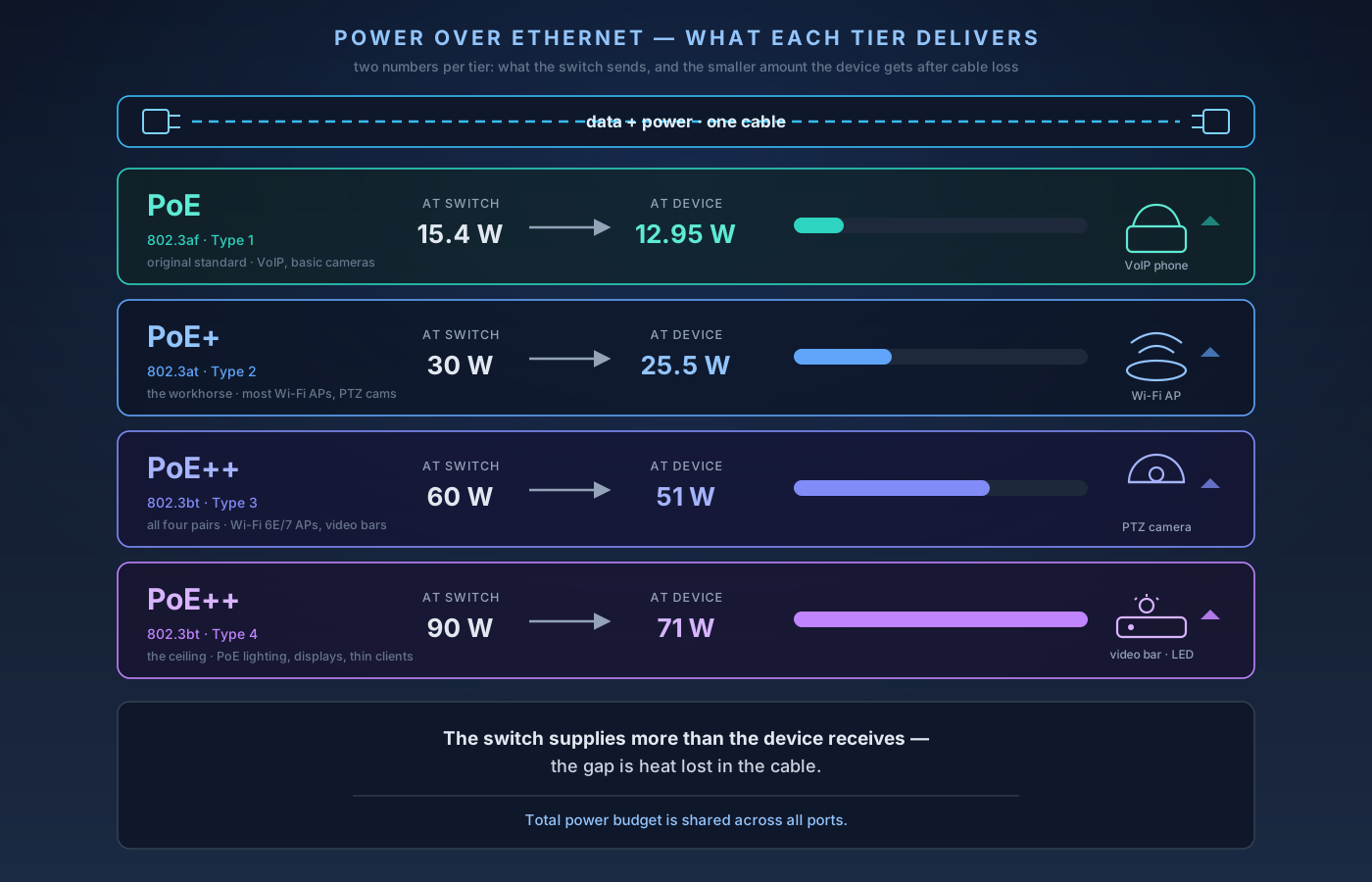
Power over Ethernet carries data and electricity down one cable, so a camera or access point needs no wall wart. There are three tiers you'll actually shop — PoE, PoE+, and PoE++ — but the number that quietly bites people isn't the per-port rating; it's the switch's total power budget. Here's what each tier delivers and how to pick.
The verdict up front: Power over Ethernet lets one ethernet cable carry both data and electricity, so a camera, phone, or wireless access point needs no separate power adapter or nearby outlet. There are three tiers you'll actually shop for. PoE (the 802.3af standard) delivers about 13 watts to the device — enough for a VoIP phone or a basic camera. PoE+ (802.3at) roughly doubles that to about 25 watts, which covers most Wi-Fi access points and pan-tilt-zoom cameras. PoE++ (802.3bt, in a 60-watt "Type 3" and a 90-watt "Type 4" flavor) powers hungry gear like multi-radio Wi-Fi 7 APs, video bars, and LED lighting. Two rules save you from every common PoE mistake: match or exceed the tier your device asks for (a PoE switch will not power a PoE+ AP), and check the switch's total power budget — the watts it can share across all ports at once — not just the per-port rating. And avoid "passive PoE" gear unless the device explicitly calls for it; it skips the safety handshake and can fry equipment. Below: what each tier delivers, why the switch's budget is the number that actually bites you, and how to pick.
What PoE Actually Does
Power over Ethernet sends DC power down the same twisted-pair cable that carries your data. The device on the far end — a camera, an access point, a phone — draws its electricity from the cable instead of a wall wart. That's the whole appeal: you can mount an access point on a ceiling or a camera under an eave where there's no outlet, and a single Cat5e or better run does both jobs.
Two pieces of jargon are worth learning because every spec sheet uses them:
- PSE (Power Sourcing Equipment) — the thing supplying power. Usually a PoE switch, sometimes a standalone injector that adds power to a cable between a regular switch and the device.
- PD (Powered Device) — the thing being powered: the camera, AP, or phone.
Before any power flows, the PSE and PD run a quick handshake. The switch briefly probes the cable, detects a compliant device, negotiates how much power it needs, and only then turns on full voltage. That negotiation is the safety feature that lets you plug a non-PoE laptop into the same switch without cooking it — the handshake fails, and the port stays a plain data port. Standard PoE runs at 44–57 volts DC and, like all ethernet, works over the usual 100-meter cable length.
The Three Tiers, Defined
Every tier below is backward-compatible downward: a PoE+ switch happily powers a plain-PoE camera, and an 802.3bt switch powers everything beneath it. The catch is always the other direction — a lower-tier switch can't feed a higher-tier device.
PoE — IEEE 802.3af (Type 1). The original standard. The switch supplies up to 15.4 watts per port, but after resistance loss in the cable the device actually receives about 12.95 watts. That's plenty for VoIP desk phones, simple fixed IP cameras, and basic sensors. If your device is old or low-power, this is likely all it needs.
PoE+ — IEEE 802.3at (Type 2). The workhorse tier. The switch supplies up to 30 watts, delivering about 25.5 watts to the device. This is the sweet spot for most modern Wi-Fi access points, pan-tilt-zoom (PTZ) cameras with motors and IR illuminators, and video-conferencing gear. If you're buying a PoE switch today and aren't sure, PoE+ is the safe default — it covers the vast majority of home and small-office devices.
PoE++ — IEEE 802.3bt (Type 3 and Type 4). The high-power standard, and the one most likely to trip people up because "PoE++" hides two different levels:
- Type 3 supplies up to 60 watts at the switch, about 51 watts at the device. This is what a multi-radio Wi-Fi 6E/7 access point, a high-end PTZ camera, or a small video bar wants.
- Type 4 supplies up to 90 watts, delivering roughly 71 watts — enough for PoE lighting, large displays, thin clients, and the most power-hungry APs.
Unlike the older tiers, which powered the device over two of the cable's four wire pairs, 802.3bt uses all four pairs to move that much power without overheating the conductors. That's part of why it needs healthy Cat5e-or-better cabling to hit the top numbers.
Here's the one-line test: count the watts your device asks for on its spec sheet, then buy a switch tier rated at or above it — never below.
The Number That Actually Bites You: Power Budget
This is the mistake that catches people who did everything else right. A switch's per-port rating (say, "PoE+, 30W per port") is not the same as its total power budget — the combined wattage it can hand out across all its PoE ports at the same time.
Say you buy an 8-port PoE+ switch. Each port can do 30W, but the switch has a total budget of, say, 120 watts. That's fine if you're running eight VoIP phones at ~7W each (56W total). But hang eight 25-watt access points off it and you're asking for 200 watts from a 120-watt supply. This is the number worth paying for: the TP-Link Omada SG3210XHP-M2 has a 240W budget across eight 2.5G PoE+ ports, which is enough to run all eight at the full 30W simultaneously — that headroom, not the port count, is what the price buys. The switch runs out of budget and starts shutting off ports — often the ones that powered up last, sometimes seemingly at random. Devices reboot, cameras drop offline, and it looks like a hardware fault when it's really an accounting problem.
So when you shop a PoE switch, read two numbers:
- The per-port tier (PoE / PoE+ / PoE++) — does it meet your hungriest device?
- The total PoE budget in watts — add up what every device draws and leave headroom. A common rule of thumb is to size the budget to about 1.3× your expected draw so you can add a device later.
If you only need to power one or two devices off an existing non-PoE switch, skip the whole calculation and use a single-port PoE injector instead — it adds power to one cable run and costs a fraction of a new switch. Budget for one up front, because plenty of access points don't include it: the Ubiquiti UniFi U6 Pro and the TP-Link Omada EAP773 both ship without an injector in the box. This pairs naturally with the wired-backbone thinking in managed vs. unmanaged switches: budget is one more reason the "just buy more ports" instinct can backfire.
Watch Out For: Passive PoE
Not everything labeled "PoE" follows the IEEE standards above. Passive PoE dumps a fixed voltage — often 24V, sometimes 48V — straight onto the cable with no handshake and no negotiation. Some older networking gear (a number of Ubiquiti and MikroTik devices, for instance) shipped with passive-PoE injectors in the box.
The danger is that passive PoE skips exactly the safety check that makes standard PoE idiot-proof. Plug a passive 24V injector into a device expecting standard 48V PoE — or into a plain non-PoE device — and there's no negotiation to stop it. You can permanently damage hardware. The rules are simple:
- Only use a passive-PoE injector with the specific device it was designed for, at the exact voltage that device expects.
- Don't mix passive-PoE gear into a standard 802.3af/at/bt switch setup unless the manufacturer says it's safe.
- When in doubt, buy standard (active) PoE gear on both ends. The handshake is worth it.
How to Choose, in Practice
Work backward from your devices:
- VoIP phones, a doorbell cam, simple fixed cameras → plain PoE (802.3af) is enough, but there's little price penalty to buying PoE+ for headroom.
- Wi-Fi access points, PTZ cameras, most modern gear → PoE+ (802.3at). This is the default to buy if you're standardizing on one switch.
- Wi-Fi 6E/7 APs with multiple radios, video bars, PoE lighting → PoE++ (802.3bt), and check whether the device wants Type 3 (60W) or Type 4 (90W). Check rather than assume, though — it is not true of every Wi-Fi 7 AP. The TP-Link Omada EAP773 is a tri-band BE11000 ceiling AP that draws up to 25.4W and runs on plain PoE+ (802.3at), which most decent managed PoE switches can already deliver.
Then size the switch's total power budget to the sum of everything you'll plug in, with room to grow. Match the tier, respect the budget, and steer clear of passive PoE unless a device specifically calls for it — get those three right and Power over Ethernet is one of the most quietly satisfying upgrades in a home network: fewer wall warts, cleaner installs, and gear you can mount wherever it works best instead of wherever there's an outlet.
Sources for standards figures: IEEE Power over Ethernet overview (Wikipedia) and FS.com — Understanding PoE Standards and Wattage.
Affiliate disclosure: NetAudioHub links to retailers including Amazon. We earn a small commission on qualifying purchases at no extra cost to you.