TP-Link RE653BE Review: The First Range Extender That Fixes the Halving Problem
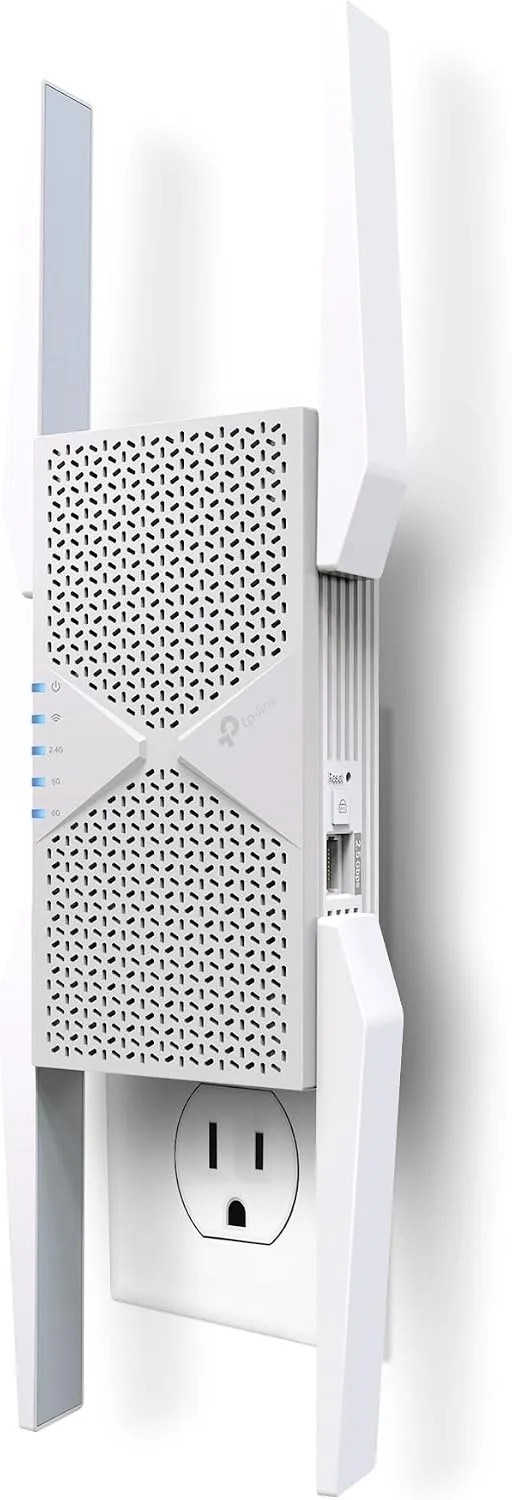
Verdict: the RE653BE is the first range extender we have tested that is architecturally capable of not wasting half your bandwidth — and it still is not the thing most people asking for a range extender should buy. Extenders earned their bad reputation honestly. A single-radio repeater listens on one channel and re-broadcasts on that same channel, so every packet crosses the air twice and the far room gets roughly half the throughput of the link feeding it. Three radios plus Multi-Link Operation breaks that pattern, and TP-Link deserves credit for building it. But $199.99 buys you exactly one 2.5 Gbps Ethernet port, which forces a choice: this can be a wired access point, or it can wire one device in the far room, never both. And if you can get a cable to it, a plain wired AP does the job better and cheaper. The RE653BE is for the person who genuinely cannot pull a cable, already owns a tri-band Wi-Fi 7 router, and needs one stubborn dead zone solved.
✅ Pros
- +Three radios plus MLO genuinely fix the throughput halving that made every previous extender bad advice
- +2.5 Gbps port instead of the Gigabit port the rest of the category still ships
- +Doubles as a proper wired access point, which is the best way to use it
- +Separate 2.4G, 5G and 6G status LEDs make it obvious which bands the uplink actually picked up
- +WPA3, 320 MHz, 4K-QAM and Multi-RU — the full Wi-Fi 7 feature set, not a partial one
- +Tether-app setup is genuinely five minutes, with per-band SSID control if you want it
- +Independent testing confirms it passes a link through without loss, which a single-radio extender cannot do
❌ Cons
- −One Ethernet port: it can be a wired access point or wire one device, never both
- −At $199.99 it costs the same as a whole tri-band Wi-Fi 7 router and $10 more than a faster-rated ceiling AP
- −Its 6 GHz radio is rated 5,188 Mbps against 5,765 Mbps on TP-Link's own cheaper EAP773
- −4K-QAM does not apply on 2.4 GHz — TP-Link's own sensitivity table stops at MCS11 there
- −320 MHz is confined to the 6 GHz band, the band with the worst wall penetration
- −EasyMesh-compatible but not Wi-Fi EasyMesh certified, by TP-Link's own footnote — cross-brand meshing is a gamble
- −Wall-plug body hangs across the second socket of the duplex, with no pass-through to give it back
- −No published stress test exists; the one substantial independent review was bounded by a 150 Mbps source link
- −Up to 23.5 W continuous, roughly ten times a powerline adapter
- −US only, and the UK/AU BE11000 is a different model rather than a rebadge
Key Specs at a Glance
| Spec | TP-Link RE653BE |
|---|---|
| Class | BE10000 tri-band Wi-Fi 7 (802.11be) |
| Signal rate, 6 GHz | 5188 Mbps |
| Signal rate, 5 GHz | 4320 Mbps |
| Signal rate, 2.4 GHz | 688 Mbps |
| Combined headline | 10.2 Gbps (arithmetic sum of all three bands) |
| Working modes | Range Extender, Access Point |
| Ethernet | 1 × 2.5 Gbps LAN |
| Antennas | 4 external |
| 320 MHz channels | 6 GHz band only, per TP-Link's own footnote |
| 4K-QAM | 5 GHz and 6 GHz; 2.4 GHz tops out at 1024-QAM |
| MLO | Yes |
| Multi-RU | Yes |
| Mesh | EasyMesh-compatible, not Wi-Fi EasyMesh certified |
| Security | WPA3, WPA/WPA2-PSK |
| Buttons | WPS, Reset |
| Max power consumption | 23.5 W |
| Input | 100–240 V, 50/60 Hz, 0.5 A |
| Dimensions (W × D × H) | 4.2 × 1.5 × 6.3 in (107.2 × 39 × 161 mm) |
| Certification | FCC, RoHS |
| Price | $199.99 |
| Availability | US only |
The Problem Extenders Have Always Had
If you have ever been told not to buy a range extender, this is why.
A classic extender has one radio. It associates with your router on, say, channel 44 in the 5 GHz band, and then it re-broadcasts your network on channel 44 in the 5 GHz band. Those are the same radio and the same channel. Radios are half-duplex — they cannot transmit and receive at the same moment — so every frame the extender relays occupies the air twice: once on the way in, once on the way out.
The arithmetic is not subtle:
| Setup | Router link rate | What the far room gets |
|---|---|---|
| Single-radio extender, same band | 800 Mbps | ~400 Mbps |
| Single-radio extender, two hops | 800 Mbps | ~200 Mbps |
| Tri-band, uplink on a band clients are not using | 800 Mbps | ~800 Mbps |
| Wired uplink (access point mode) | 2.5 Gbps port | Port speed, no wireless penalty |
That halving is not a quality problem you can fix with a better extender. It is a consequence of using one radio for two jobs, and it is why our extender vs mesh vs access point explainer has, until now, come down against extenders nearly every time.
The fix is the same one that made tri-band mesh systems worth buying: give the uplink its own radio. That is what our dedicated-backhaul explainer is about, and the RE653BE is the first product in this category on the site with the hardware to do it.
What TP-Link Actually Built
Three radios. TP-Link's specification sheet rates them at 5188 Mbps on 6 GHz, 4320 Mbps on 5 GHz and 688 Mbps on 2.4 GHz. Add those and you get 10,196 Mbps, which rounds to the 10.2 Gbps on the box.
That sum is a marketing convention across the whole industry, not a TP-Link invention, but it is worth being precise about what it is not. It is not a speed any client reaches. It is three separate radios' theoretical peak rates added together, and a typical laptop or phone is a 2×2 client talking to one band at a time. MLO changes that somewhat — it is specifically the Wi-Fi 7 feature that lets a client hold simultaneous links on more than one band to the same access point — but it does not turn a 2×2 client into a nine-stream one. If you want the full picture of what MLO does and does not deliver, we wrote that up separately in Wi-Fi 7 MLO explained.
There are four external antennas on a body 6.3 inches tall, and the shape matters. This is a wall-plug unit. It goes into the upper socket of a duplex outlet and its body hangs down over the lower one, so you lose the pair. TP-Link's spec sheet puts the width at 107.2 mm; TechRadar, which reviewed the unit in August 2026, measured 81 mm and still found it wide enough to block the adjacent socket in their office. We have not measured a unit ourselves, so treat the width figure as contested — but both sources agree on the practical consequence, which is that the RE653BE needs an outlet with room around it, and there is no pass-through socket to give one back.
The Single Port Is the Real Constraint
TP-Link's spec sheet lists the interface as "1× 2.5 Gbps LAN Port." One port. That is normal for the category — most extenders ship a single Gigabit port — but at $199.99 it drives the entire buying decision, because the same sheet lists two working modes and that one port does a different job in each.
In Access Point mode, the port is the wired uplink. You run Ethernet from your router or switch to the RE653BE, and it broadcasts Wi-Fi with no wireless backhaul penalty at all. This is by far the best way to use this device, and our wired access point how-to covers the configuration. It is also the mode in which it has zero ports left over for wired clients.
In Range Extender mode, the port is a downlink. The uplink is wireless, and you can plug one device — a TV, a console, a desktop — into the extender to give it a wired-to-the-extender connection. That device's traffic still has to cross the wireless uplink to reach your router.
You cannot have both. If you want a wired uplink and a wired device at the far end, you need a switch, and then you are building the thing the wired backhaul how-to describes — at which point a dedicated access point is the better purchase. Our EAP773 review covers a tri-band Wi-Fi 7 ceiling AP from the same manufacturer at $189.99, and it is a better radio for a wired install than the RE653BE is.
The 2.5 Gbps port also sets a hard ceiling nobody mentions next to the 10.2 Gbps headline: anything you wire to this device, in either mode, is capped at 2.5 Gbps. The other 7.7 Gbps of the headline only exists on the wireless side, spread across three radios.
Three Findings From TP-Link's Own Spec Sheet
The specification page rewards reading past the marketing copy. Three things on it are worth knowing before you spend $199.99.
4K-QAM does not apply on 2.4 GHz. The Advanced Features row lists "4K-QAM" without qualification, but the reception-sensitivity table underneath tells a different story. The 6 GHz and 5 GHz rows are given for MCS0 through MCS13 — MCS13 is the 4096-QAM rate. Every 2.4 GHz row stops at MCS11, which is 1024-QAM, the Wi-Fi 6 ceiling. So on the band that reaches furthest through walls, and the band your older devices and IoT gear actually live on, the flagship modulation feature is not in play. This is not unique to TP-Link and it is not a defect; 2.4 GHz is too noisy for 4096-QAM to hold in practice. It is simply not what the feature list implies.
320 MHz is 6 GHz only. TP-Link's own footnote states it outright: "The 320 MHz bandwidth is only available on the 6 GHz band." The same footnote adds that 320 MHz on 6 GHz and 160 MHz on 5 GHz "may be unavailable in some regions/countries due to regulatory restrictions." Wide channels are the single biggest contributor to Wi-Fi 7's headline numbers, and they are confined to the band with the worst wall penetration. This is the central trade of the Wi-Fi 7 generation and we covered it in the Wi-Fi 7 vs Wi-Fi 6E upgrade guide; it applies with extra force to a product whose whole job is reaching a room your router cannot.
EasyMesh compatible is not EasyMesh certified. The footnote is unusually candid: "This product is compatible with standardized EasyMesh technology but has not obtained the Wi-Fi EasyMesh certification." The same paragraph warns that "failed connections may be due to firmware conflicts of different vendors" and that "the EasyMesh-compatible function is still being developed on some models." EasyMesh is the standard that is supposed to let a range extender join a router from a different brand and behave like a proper mesh node, with unified management and clean handoff. If that interoperability is why you are buying this — if you own a NETGEAR or ASUS router and want the RE653BE to become a mesh node on it — TP-Link is telling you in its own footnotes not to count on it. Pair it with a TP-Link router, where it is tested, or accept that it may end up as a plain extender with its own network name and the roaming behaviour described in our band steering and roaming explainer.
Power: 23.5 W, and Why That Is Fair
Maximum power consumption is 23.5 W. That is an upper bound and real-world draw will be lower, but TP-Link does not publish a typical figure, so the bound is what we have to work with.
At 23.5 W running continuously, that is 205.9 kWh over a year. At 17 cents per kilowatt-hour — substitute your own rate, the arithmetic is the point — the worst case is about $35 a year to run. For comparison, the TL-PA7017P powerline adapter we reviewed last week draws 2.54 W maximum, roughly a tenth as much.
It would be easy to turn that into a complaint, so it is worth heading off: this is not the RE653BE being inefficient. The Omada EAP773, a tri-band Wi-Fi 7 ceiling AP from the same manufacturer, is rated at up to 25.4 W over PoE. Three Wi-Fi 7 radios cost roughly this much power wherever you put them. The useful takeaway is not that the RE653BE is thirsty; it is that a plug-in device with a tri-band Wi-Fi 7 radio has the power budget of a small appliance rather than a wall-wart, which is also why the body is as large as it is and why the Eco Mode in the Tether app exists.
Performance, and Why Nobody Has Really Tested It
Here is the honest state of the evidence.
TechRadar's August 2026 review is the most substantial independent coverage of this unit, and its reviewer placed the RE653BE in a hallway between a router and an office dead zone and reported that it "was able to hit the full 150 Mbps on all three frequency bands," on both Ookla and Steam downloads.
That result is worth something. It says the extender does not lose throughput — a single-radio extender in that position would have delivered roughly 75 Mbps, so the tri-band architecture is doing exactly what it is supposed to. But 150 Mbps is the source connection, not the device's ceiling. A test bounded by a 150 Mbps feed cannot tell you what a BE10000 extender does at 500 Mbps or 1 Gbps, which is precisely where the halving problem used to become intolerable and precisely where a $199.99 extender has to justify itself against a $60 one. TechRadar's own reviewer put it fairly: "that effortless performance is the only real disadvantage of the BE10000."
Dong Knows Tech has also published a review of this model, but the site blocks automated access, so we could not verify its measured figures directly and are not quoting numbers we have not read in context.
So: there is good evidence the RE653BE does not waste bandwidth, and no published evidence establishing how much bandwidth it can actually move through a wall. If you are buying this specifically to push more than a few hundred megabits into a far room, understand that you are buying on specification, not on test data. We will revisit this if a measured stress test appears.
Pros and Cons
Pros
- Three radios plus MLO genuinely fix the throughput halving that made every previous extender bad advice
- 2.5 Gbps port instead of the Gigabit port the rest of the category still ships
- Doubles as a proper wired access point, which is the best way to use it
- Separate 2.4G, 5G and 6G status LEDs make it obvious which bands the uplink actually picked up
- WPA3, 320 MHz, 4K-QAM and Multi-RU — the full Wi-Fi 7 feature set, not a partial one
- Tether-app setup is genuinely five minutes, with per-band SSID control if you want it
- Independent testing confirms it passes a link through without loss, which a single-radio extender cannot do
Cons
- One Ethernet port: it can be a wired access point or wire one device, never both
- At $199.99 it costs the same as a whole tri-band Wi-Fi 7 router and $10 more than a faster-rated ceiling AP
- Its 6 GHz radio is rated 5,188 Mbps against 5,765 Mbps on TP-Link's own cheaper EAP773
- 4K-QAM does not apply on 2.4 GHz — TP-Link's own sensitivity table stops at MCS11 there
- 320 MHz is confined to the 6 GHz band, the band with the worst wall penetration
- EasyMesh-compatible but not Wi-Fi EasyMesh certified, by TP-Link's own footnote — cross-brand meshing is a gamble
- Wall-plug body hangs across the second socket of the duplex, with no pass-through to give it back
- No published stress test exists; the one substantial independent review was bounded by a 150 Mbps source link
- Up to 23.5 W continuous, roughly ten times a powerline adapter
- US only, and the UK/AU BE11000 is a different model rather than a rebadge
How It Compares
The uncomfortable comparison is not against other extenders. It is against what else $199.99 buys on this site.
| Product | Price | What it is | Radios | Ports |
|---|---|---|---|---|
| TP-Link RE653BE | $199.99 | Extender / wired AP | Tri-band BE10000 (688 + 4,320 + 5,188) | 1 × 2.5G |
| TP-Link Omada EAP773 | $189.99 | Ceiling AP, wired only | Tri-band BE11000 (688 + 4,324 + 5,765) | 1 × 10G PoE+ |
| TP-Link Archer BE550 | $199.99 | Whole router | Tri-band Wi-Fi 7 | 1 × 10G + 4 × 2.5G |
| TP-Link Deco BE63 | $499.99 | Tri-band mesh, multi-pack | Tri-band Wi-Fi 7 per node | 2.5G per node |
| TP-Link Archer BE230 | $99.99 | Budget router | Dual-band Wi-Fi 7 | 2.5G WAN |
Two things fall out of that table, and both are worth saying plainly.
The cheaper access point has the faster 6 GHz radio. TP-Link rates the EAP773's 6 GHz band at 5,765 Mbps and the RE653BE's at 5,188 Mbps — about 10% lower — despite both being tri-band Wi-Fi 7 products with 320 MHz support, and despite the extender costing $10 more. The EAP773 also carries a 10G uplink against the RE653BE's 2.5G. The catch is that the EAP773 needs PoE and a ceiling, so it is not a like-for-like swap; it is the better radio if, and only if, you can wire and mount it.
A whole router costs the same as the extender. The Archer BE550 is a tri-band Wi-Fi 7 router with a 10G port and four 2.5G ports at the same $199.99. If your current router is the actual problem — and if it is dual-band Wi-Fi 6, it probably is — replacing it is the better spend, and you may not need an extender afterwards at all.
Who Should Buy It
The case for the RE653BE is narrower than $199.99 suggests, but it is real.
Buy it if all of these are true. You cannot run Ethernet to the room in question — not "would rather not," but genuinely cannot. You already own a tri-band Wi-Fi 7 router, ideally a TP-Link one, so the extender's uplink can use a band your clients are not competing for and EasyMesh interoperability is not a gamble. And you need to fix one or two rooms, not a whole floor.
If that describes you, this is the best tool for the job that exists in the extender category right now, and the tri-band architecture means you will not hit the halving wall that makes cheaper extenders feel broken.
Buy something else if any of these are true.
- You can pull a cable. Run it. Our Ethernet through walls how-to covers the job, and a wired access point beats every wireless extender ever made. If the run is the obstacle rather than the wiring, coax is worth checking — a MoCA 2.5 adapter turns existing TV cabling into a 2.5 Gbps backhaul.
- Your router is Wi-Fi 6 or older. The RE653BE's uplink can only be as good as the radio at the other end. Pairing a BE10000 extender with a dual-band Wi-Fi 6 router means paying for a 6 GHz uplink you cannot use. Replace the router first — the Archer BE550 is a tri-band Wi-Fi 7 router for less than this extender costs, and the Archer BE230 is the budget entry point.
- You have more than two problem rooms. That is a mesh job, not an extender job. The Deco BE63 and the ASUS ZenWiFi BD4 are the relevant comparisons, and our mesh systems under $200 round-up covers the cheaper end.
- You have not tried moving the router yet. This is free and it works more often than anyone expects. Read the router placement guide and check whether you are simply on a congested channel with our best Wi-Fi channel how-to before spending $199.99.
Setup Notes
Setup is TP-Link's Tether app or the WPS button, and it is genuinely easy — plug the extender in near the router, let the app find it, then move it to its final position. That last step is the one people skip. An extender belongs roughly halfway between the router and the dead zone, with a strong link to the router, not inside the dead zone itself.
Two configuration decisions are worth thinking about rather than accepting the default.
Same SSID or separate SSIDs. The Tether app will let you give each band its own network name and password, or reuse your router's SSID across all of them. Reusing the router's SSID is what makes roaming work, and it is the right default for most people. Separate names are useful in exactly one case: pinning a specific device — a gaming PC, a 4K streamer — to the 6 GHz band so it never wanders onto 2.4 GHz. If you go that route, our band steering explainer covers what you are giving up.
Which band carries the uplink. This is the decision that determines whether you get the tri-band benefit at all. The point of three radios is that the extender's link back to the router runs on a band your clients are not saturating. If your router is tri-band Wi-Fi 7, let the 6 GHz link carry the backhaul and put clients on 5 GHz and 2.4 GHz. If your router has no 6 GHz radio, the uplink has to run on 5 GHz — but you can still hand 6 GHz to nearby clients, and you still avoid the halving, because the client band and the uplink band are different. That is the whole argument for tri-band, and it survives an older router better than the marketing suggests.
If you are setting up Wi-Fi 7 for the first time, the Wi-Fi 7 setup how-to covers channel width, MLO and the 6 GHz decisions in more depth.
Price and Availability
$199.99 at TP-Link's list price, and $199.99 on Amazon at the time of writing, sold and shipped by Amazon with a 4.1-star average across roughly 370 ratings. TechRadar notes street prices ranging from $149 to $249, so it is worth comparing before buying.
The RE653BE is a US-only product. TP-Link sells a BE11000 variant in the UK and Australia at a considerably higher price, and it is a different model rather than a rebadge — do not use UK reviews as a proxy for this one.
Bottom Line
The RE653BE is a well-built answer to a question most people should not be asking. Tri-band and MLO genuinely solve the structural flaw that made range extenders bad advice for fifteen years, and if you are stuck with a wireless uplink, that solution is worth real money.
But $199.99 is access point money, and TP-Link's own specification sheet keeps pointing at the access point. One port. 320 MHz confined to 6 GHz. EasyMesh compatible but uncertified. 23.5 W. Every one of those constraints relaxes the moment you can get a cable to the thing — and if you can get a cable to it, you should have bought an access point.
Three and a half stars: an excellent product for a narrow case, sold at a price that makes the broader case hard to justify.
Our Verdict
Verdict: the RE653BE is the first range extender we have tested that is architecturally capable of not wasting half your bandwidth — and it still is not the thing most people asking for a range extender should buy. Extenders earned their bad reputation honestly. A single-radio repeater listens on one channel and re-broadcasts on that same channel, so every packet crosses the air twice and the far room gets roughly half the throughput of the link feeding it. Three radios plus Multi-Link Operation breaks that pattern, and TP-Link deserves credit for building it. But $199.99 buys you exactly one 2.5 Gbps Ethernet port, which forces a choice: this can be a wired access point, or it can wire one device in the far room, never both. And if you can get a cable to it, a plain wired AP does the job better and cheaper. The RE653BE is for the person who genuinely cannot pull a cable, already owns a tri-band Wi-Fi 7 router, and needs one stubborn dead zone solved.
Ready to buy the TP-Link RE653BE?
Buy on Amazon →Affiliate link — we may earn a commission at no extra cost to you.