2.5GbE vs 10GbE at Home in 2026: Which Multi-Gig Upgrade Actually Pays Off?
Published 2026-05-29 · By NetAudioHub Editorial
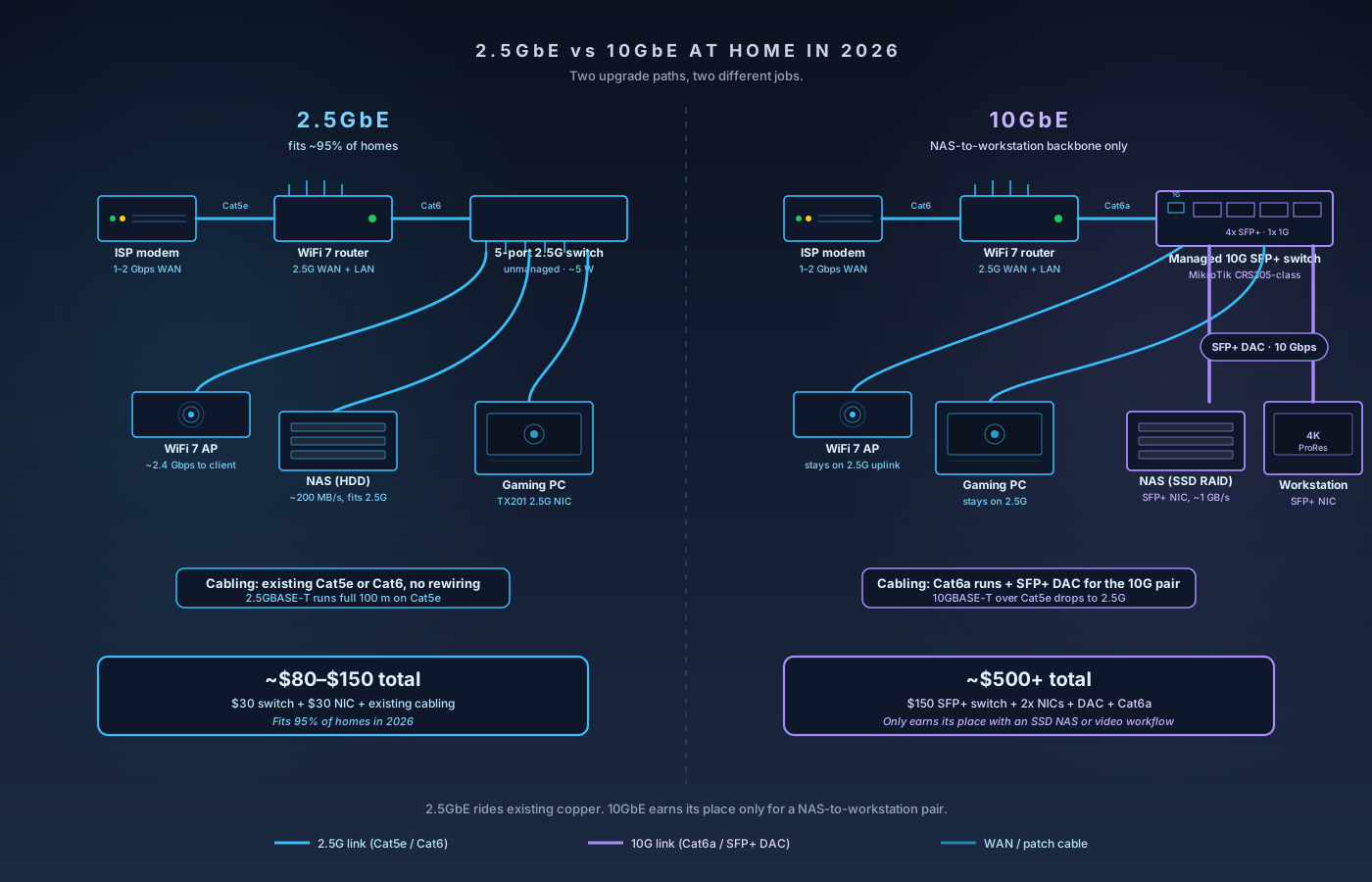
2.5GbE rides existing Cat5e copper for under $80 and fits 95% of homes. 10GbE earns its place only for a NAS-to-workstation pair — and even then, SFP+ DAC beats 10GBASE-T copper on cost, power, and heat. Here's the four-scenario buying guide.
The verdict up front: in 2026, 2.5GbE is the multi-gig upgrade that pays off for almost everyone. ISPs in most U.S. markets still cap at 1–2 Gbps, WiFi 7 access points top out at around 2 Gbps of real wireless throughput per radio, and a five-port 2.5G unmanaged switch now costs less than $50 and uses less than 5 W under load. 10GbE only earns its place when you have a specific wired workflow that moves 10+ GB of data between two machines on a regular basis — primarily a NAS-to-workstation pair for photo, video, or virtualization workloads — and even then, the cheapest 10G path is almost always SFP+ DAC, not 10GBASE-T copper. The dumbest upgrade in 2026 is buying a 10GBASE-T copper switch to "future-proof" a network where the only multi-gig device is the router's WAN port. You will spend $400+ to deliver the same performance as a $30 2.5G switch, and you will heat your closet doing it. This guide walks the actual decision: where the bottleneck is, what each tier costs fully installed, and exactly what to buy for the four scenarios that cover almost every home.
The WAN Reality Check: How Fast Is Your ISP Actually?
Before spending a dollar on multi-gig hardware, look at the wire coming into your house. As of mid-2026, the most common residential plans in the U.S. are:
- Cable (DOCSIS 3.1): Up to 1.2 Gbps down / 35 Mbps up on most plans. The "Gigabit" tier from Xfinity, Spectrum, and Cox.
- Cable (DOCSIS 4.0, where deployed): Up to 2 Gbps symmetric in select markets. Still rolling out as of 2026.
- Fiber (XGS-PON): Up to 5 Gbps and 8 Gbps tiers from AT&T Fiber, Frontier, Ziply, and Google Fiber. The 2 Gbps tier is the most common upper plan.
- 5G home internet: Typically 100–600 Mbps real-world. Multi-gig is irrelevant.
The implication: if you are on a 1 Gbps or slower ISP plan, no amount of internal LAN upgrade improves your internet speed. The router's WAN port is the bottleneck, and a 1G port keeps up just fine. If you are on a 2 Gbps fiber plan, a 2.5G WAN port on the router solves it — you do not need 10G to absorb a 2 Gbps WAN feed. Only the 5 Gbps and 8 Gbps tiers actually require a 10G WAN port (or 2x 2.5G with link aggregation, if your router supports it).
A reasonable rule: your WAN port only needs to match the next plan you would realistically buy, not the theoretical maximum your ISP advertises in a competing city.
The LAN Reality Check: Where Is the Actual Bottleneck?
For internal traffic — the stuff that never touches your modem — the bottleneck depends entirely on what you are doing. Here are the real-world throughput ceilings of the devices in a typical 2026 home:
| Device or Use Case | Realistic Throughput | Notes |
|---|---|---|
| WiFi 6 AP, single client | 800–1,200 Mbps | At close range, 80 MHz channel |
| WiFi 6E AP, single client | 1,200–1,800 Mbps | 6 GHz, 160 MHz channel |
| WiFi 7 AP, single STR client | 1,800–2,400 Mbps | Aggregated 5 + 6 GHz with MLO |
| 4K Netflix / Disney+ / Max | 15–40 Mbps | Per stream |
| 4K UHD Blu-ray remux to Plex | 80–120 Mbps | Per stream |
| Steam / PSN game download | 600–950 Mbps | Caps below 1 Gbps in most cases |
| Single-client cloud backup | 100–300 Mbps | Cap is the cloud, not your LAN |
| NAS-to-PC, single HDD | 150–250 MB/s ≈ 1.2–2 Gbps | Limited by the spinning disk |
| NAS-to-PC, SSD RAID | 600–1,100 MB/s ≈ 5–9 Gbps | This is where 10G earns its keep |
| Video editor pulling 4K ProRes | 800–1,500 MB/s | 10G-class workload |
Three honest conclusions fall out of that table:
- A single WiFi client never saturates a 2.5G uplink. Even WiFi 7 maxes at around 2.4 Gbps to one device. The 2.5G port on your router or AP is the right port for that traffic.
- A single-drive NAS doesn't saturate 2.5G either. A 7,200 rpm spinning disk tops out around 200–250 MB/s, which is well under 2.5 Gbps. Going from 1G to 2.5G doubles the throughput; going from 2.5G to 10G changes nothing for that workload. The Synology DS225+ is the arithmetic made concrete: its 2.5GbE port lifts the transfer ceiling from about 110 MB/s to about 280 MB/s over the gigabit DS224+ it replaces, and that is the whole of the gain — only one of its two ports is 2.5GbE, and a 10G upgrade would hit the same disks.
- SSD-backed NAS arrays and multi-disk RAID can absolutely saturate 2.5G. If you have a four-bay NAS with SSDs or a striped HDD array, 2.5G becomes the bottleneck and 10G unlocks real speed.
This is why "2.5G is enough" is true for 95 percent of homes and false for the 5 percent doing serious media work. The cleanest way to figure out which group you are in is to ask: do I move more than 10 GB of data between two specific machines in my house, more than once a week? If yes, look at 10G. If no, 2.5G is the answer.
Cabling: What Runs Cleanly on What
The good news for retrofit installs: 2.5GBASE-T was specifically designed by the IEEE 802.3bz working group to run on the cable you already have. Specifically:
- 2.5GBASE-T (2.5G): Rated for Cat5e and above, full 100-meter run. Most Cat5 from the 2000s also works at this speed if the run is short. This is the whole reason 2.5G exists — it's a software-and-PHY upgrade on existing copper, no rewiring required.
- 5GBASE-T (5G): Rated for Cat6 (55 m) or Cat6a (100 m). Useful but rare.
- 10GBASE-T (10G): Rated for Cat6a or Cat7 at the full 100 m. Cat6 works only up to about 37–55 m depending on cable quality and bundling. Cat5e is not rated for 10GBASE-T.
If you have older runs in the walls and you're not sure of the category, two clues:
- Look at the print on the jacket. Every legitimately certified cable prints its category every 60 cm or so: "CAT 5E," "CAT 6," "CAT 6A," or "CAT 7." If you see "CAT 5E" or no print at all, plan for 2.5G, not 10G.
- The plug matters less than the cable. A Cat6a-rated plug terminated on a Cat5e cable does not give you Cat6a performance. It gives you Cat5e performance.
We covered the category landscape in detail in our Cat6 vs Cat6a vs Cat7 vs Cat8 explainer. The short version: for 2.5G, anything Cat5e or newer works. For 10G, plan on Cat6a and run lengths under 100 m.
The Hidden Cost of 10GBASE-T: Heat and Power
This is the part the spec sheet doesn't tell you. 10GBASE-T copper is dramatically more power-hungry than every other Ethernet standard, and that power becomes heat inside small consumer enclosures.
Typical per-port power draw under load:
| Standard | Power per port (under load) |
|---|---|
| 1000BASE-T (1G) | 0.5–0.7 W |
| 2.5GBASE-T (2.5G) | 1.5–2.0 W |
| 5GBASE-T (5G) | 2.5–3.5 W |
| 10GBASE-T (10G) | 5.0–8.0 W |
| SFP+ DAC (10G) | 0.1–0.5 W |
| SFP+ optical (10G) | 1.0–1.5 W |
An eight-port 10GBASE-T copper switch under full load is dissipating 40–60 W just in PHY power, before you count the switch ASIC. That's why every cheap 10GBASE-T switch on Amazon has at least one cooling fan, and why the fanless ones throttle under sustained load. Inside a closet with no airflow, this matters.
A practical implication: a single 10GBASE-T NIC in a PC will add roughly 5–8 W to your idle power draw and a meaningful amount of heat next to your motherboard. For a desktop that's already running a hot GPU, the math may be fine. For a small-form-factor NAS or a fanless mini-PC, the 10GBASE-T card can be the thing that pushes the chassis into thermal throttling.
This is why SFP+ exists in the consumer space at all. An SFP+ DAC (direct attach copper) cable is a fixed-length twinax cable with the transceiver bonded directly to the connector. It runs at 10 Gbps full duplex with under half a watt of power per side, no heat to speak of, and at roughly the same cost as a Cat6a patch cable for runs up to 3 m. The catch is that both ends need to be SFP+ ports — you cannot plug a DAC into a 10GBASE-T RJ45 port.
For a NAS-to-workstation backhaul in the same rack or closet, SFP+ DAC is the right answer almost every time. For longer runs across a house, 10GBASE-T copper is the only realistic path, with all of its heat and power penalties.
What Each Tier Actually Costs in 2026
These are real Amazon prices as of May 2026, picked for parts that have been shipping reliably and have meaningful review counts. Treat them as a budget benchmark, not a guarantee — multi-gig pricing has been falling steadily for two years and may be lower by the time you read this.
2.5GbE Tier (Recommended for Most)
Five-port unmanaged 2.5G switch:
- TP-Link TL-SG105-M2 (5-port 2.5G unmanaged) — around $30. The default pick. Fanless, ~5 W typical draw, all five ports are 2.5G.
- QNAP QSW-1105-5T (5-port 2.5G unmanaged) — around $45. Similar spec, slightly older.
Eight-port unmanaged 2.5G switch:
- TP-Link TL-SG108-M2 (8-port 2.5G unmanaged) — around $50–$80. Same family, eight ports.
2.5G NIC for desktop:
- TP-Link TX201 (2.5G PCIe NIC, Realtek RTL8125B) — around $25–$40. The default consumer 2.5G card. Solid Windows and Linux driver support.
2.5G USB adapter for laptop:
- USB 3.0 to 2.5G adapter (Realtek RTL8156B) — around $20–$35. Many brands, same chip inside.
Total installed 2.5G upgrade (one switch + one NIC): roughly $60–$120.
10GbE Tier (Only for the Right Workload)
Five-port 10GBASE-T copper switch:
- QNAP QSW-308-1C (8x 1G + 3x 10G SFP+ + 1x 10GBASE-T combo) — around $220. Good mixed-tier switch.
- TRENDnet TEG-S750 (5-port 10G) — around $300–$400. All five ports 10GBASE-T. Runs hot.
- TP-Link TL-SX105 (5-port 10G) — around $200, which is roughly $40 a port and the cheapest honest copper 10G fanout we've reviewed. Fanless, and every port steps down through 5G/2.5G/1G/100M. Unmanaged: no VLANs, no LACP, no SFP+.
- QNAP QSW-M2108-2C (8x 2.5G + 2x 10G combo, managed) — around $150. The better buy if what you actually need is 2.5G fanout with a couple of 10G uplinks for the NAS, since it adds VLANs and link aggregation. It has a fan.
SFP+ switch (cheaper, cooler path):
- MikroTik CRS305-1G-4S+IN (4x 10G SFP+ + 1x 1G) — around $140–$170. The community-favorite cheap 10G switch. SFP+ only, plus one 1G management port.
10GBASE-T NIC:
- Marvell AQtion AQC107 (10GBASE-T PCIe) — around $90–$120. The standard consumer 10G copper card.
- Intel X550-T2 (dual-port 10GBASE-T) — around $130–$200. Server-grade, runs cooler than AQC107 at idle but uses more power under load.
SFP+ NIC (cheaper than 10GBASE-T):
- Mellanox ConnectX-3 (SFP+, single port, used) — around $25–$50. Used enterprise hardware. Best dollar-per-port in 10G.
SFP+ DAC cable:
- 10GTek 1m / 2m / 3m SFP+ DAC — around $15–$25.
Total installed 10G upgrade (managed SFP+ switch + 2 NICs + 2 DACs): roughly $250–$400 if you go SFP+; $600+ if you go 10GBASE-T copper end to end.
The Four-Scenario Buying Guide
These four buckets cover roughly 95 percent of home networks. Find yours and stop reading the spec war.
Scenario 1: ISP plan ≤ 1 Gbps, WiFi for everything, no NAS
Don't upgrade. A 1G router and a 1G unmanaged switch are correctly sized for this network. There is nowhere in your topology where 2.5G or 10G helps. Spend that money on a better WiFi 6E or WiFi 7 access point instead — covered in our WiFi 7 vs WiFi 6E upgrade guide.
Scenario 2: ISP plan 1.2–2 Gbps, WiFi 7 AP, one or two wired clients
Upgrade to 2.5G. Specifically:
- 2.5G WAN port on the router (most WiFi 7 routers already have this).
- One five-port 2.5G unmanaged switch in your network closet (TP-Link TL-SG105-M2).
- 2.5G NIC (TP-Link TX201) in the desktop or gaming PC that wants the most throughput.
- Existing Cat5e/Cat6 wall runs are fine — no rewiring.
Total cost: roughly $80. This is the right answer for the vast majority of multi-gig homes in 2026.
Scenario 3: ISP plan 1–2 Gbps, NAS with HDD array, no SSD pool
Upgrade to 2.5G everywhere, plus consider a 2.5G NIC on the NAS. Spinning-disk NAS arrays cap at roughly 200–400 MB/s, which fits inside 2.5G with headroom to spare. 10G is wasted money here.
Cost: roughly $100–$150, same parts as scenario 2 plus one extra 2.5G NIC for the NAS.
Scenario 4: SSD-backed NAS or video editing workflow
This is the only home that should buy 10G in 2026. Specifically:
- Managed SFP+ switch (MikroTik CRS305) in the closet.
- SFP+ NIC in both the NAS and the workstation. New AQtion AQC107S-based cards, or used Mellanox ConnectX-3 for the budget path.
- SFP+ DAC cables between them if they share a closet. If they're across the house, you have two real options: a 10GBASE-T copper run on Cat6a (manageable heat in open air, problematic in a sealed enclosure), or single-mode fiber with SFP+ optical transceivers at each end (the right answer for any run over 30 m).
- Everything else in the house stays 2.5G or 1G. The 10G fabric is exclusively for the NAS-to-workstation pair.
Total cost: roughly $250–$400 for a clean SFP+ build. $600+ if you insist on 10GBASE-T copper end to end.
Common Mistakes That Waste Money
A few patterns we see repeatedly when people post their multi-gig builds online:
Buying a 10GBASE-T switch to "future-proof" a 1 Gbps WAN. If nothing in your LAN moves data faster than the slowest single device, the switch's headroom does nothing. A 2.5G switch is correct for almost every WiFi 7 home in 2026. Revisit the decision when you actually buy a 10G NIC for something.
Pairing a 10GBASE-T NIC with a Cat5e cable. The link will negotiate down to 1G or 2.5G depending on the cable and the run length. You spent $120 on a 10G card to get 2.5G performance. If you can't run Cat6a, buy a 2.5G card.
Trusting "AV2000" or "2.5G WiFi" marketing. AV2000 is a Powerline marketing number; in any real house it delivers a fraction of its rated speed. We covered that in detail in Powerline vs MoCA vs Ethernet Backhaul. "2.5G WiFi" on a router box almost always refers to the wired port on the router, not the wireless link speed.
Putting a 10GBASE-T switch in a sealed AV cabinet. The 40–60 W of PHY heat from a loaded eight-port 10GBASE-T switch will throttle the switch and cook everything around it in a closed enclosure. Either pick an SFP+ switch, vent the cabinet, or move the switch into open air.
Ignoring CPU offload. 10G to a low-power Celeron or N100 mini-PC will not actually deliver 10 Gbps even if the NIC and switch are correctly sized — the kernel network stack alone can saturate a slow CPU at line rate. If you're putting 10G on a NAS, check the CPU spec and look for NICs with hardware checksum offload and TSO/LRO support.
What This Looks Like in Three Years
Two trends shape where the multi-gig market is headed:
2.5G is becoming the new gigabit baseline. Almost every WiFi 7 router ships with at least one 2.5G port, the cheapest unmanaged 2.5G switches are now under $30, and ISP plans in the 1.2–2 Gbps range are mainstream. By 2028, expect 2.5G to be the default LAN tier in new construction, with 1G surviving mostly in older gear and IoT devices.
10G in the home stays niche but cheaper. 10GBASE-T copper continues to be hot and power-hungry — that's a physics problem, not a price problem. SFP+ keeps getting cheaper as enterprise gear cycles into the used market. The home users who actually need 10G — small video studios, photographers running a Lightroom catalog off a NAS, virtualization homelabs — will keep buying it. Mainstream households will not.
WiFi 8 won't change the picture. The early 802.11bn drafts in 2026 are aimed at reliability and roaming, not headline speed. A WiFi 8 client to a single AP is unlikely to exceed 3–4 Gbps for years. Your access point's uplink port will continue to be correctly sized at 2.5G or, in dense multi-radio configurations, a pair of 2.5G ports with link aggregation. The pressure for 10GBASE-T at the AP is not coming from the wireless side.
The honest answer for most people reading this in 2026: buy the 2.5G switch, buy the 2.5G NIC for the one machine that wants it, leave the rest of the network at 1G, and revisit the 10G question only when you have a wired workload that actually needs it.
Quick Buying Checklist
- ISP at 1 Gbps or less, no NAS: stay 1G. Spend the money on a better AP.
- ISP at 2 Gbps, WiFi 7 AP, one fast PC: buy 2.5G. ~$80 done.
- Spinning-disk NAS: buy 2.5G everywhere. No 10G needed.
- SSD NAS or video workflow: buy SFP+ 10G, not 10GBASE-T copper.
- Cabinet has no airflow: avoid 10GBASE-T. SFP+ DAC or fiber.
- Cat5e in the walls: 2.5G is your ceiling without rewiring.
- Cat6a in the walls: 10G is on the table if you actually need it.
Recommended Gear
Quick links to the parts called out above:
2.5G upgrade:
10G upgrade (SFP+ path):
10G upgrade (10GBASE-T copper path, only if you must):
Related reading:
- Cat6 vs Cat6a vs Cat7 vs Cat8 — what each cable category can actually carry.
- Powerline vs MoCA vs Ethernet Backhaul — for the houses that can't run Cat6a.
- WiFi 7 vs WiFi 6E upgrade guide — when the wired side is right and the wireless side is the bottleneck.
Affiliate disclosure: Links in this article use the tag `webstore0fd1-20`. NetAudioHub earns a commission on qualifying purchases at no extra cost to you.