QNAP QSW-M2108-2C Review: The Cheapest Way Into Managed 10GbE + 2.5GbE Switching
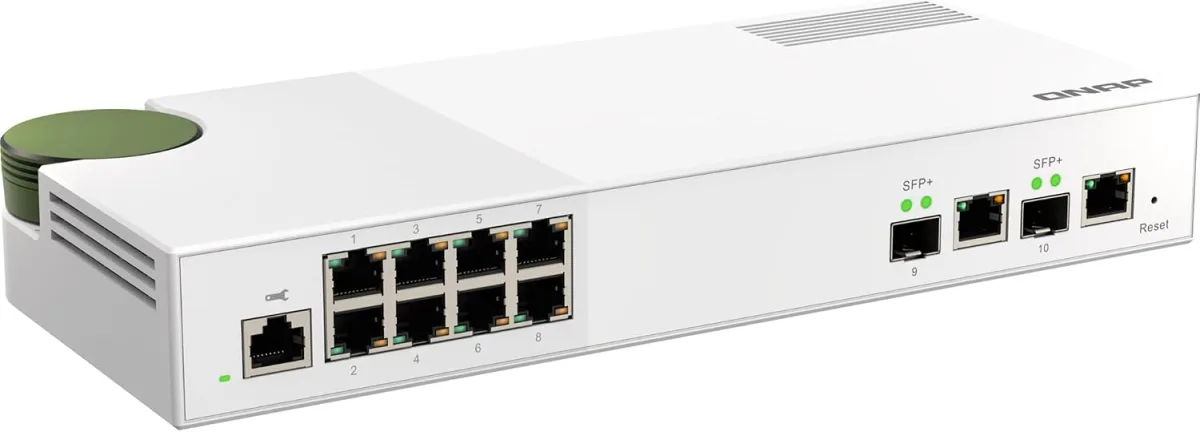
The QNAP QSW-M2108-2C is a Layer 2 web-managed switch with eight 2.5 GbE ports plus two 10 GbE combo ports for around $150 — the step up from an unmanaged multi-gig switch when you need VLANs, link aggregation, or a 10 GbE NAS uplink.
✅ Pros
- +Eight 2.5 GbE ports plus two 10 GbE combo ports — rare port mix at this price
- +10 GbE combo ports work as either copper (10GBASE-T) or SFP+ fiber/DAC
- +Full Layer 2 managed feature set: VLANs, LACP, QoS, IGMP, port mirroring
- +Plain web UI (QSS) — no controller appliance or cloud account required
- +Non-blocking 80 Gbps fabric — every port at full rate
- +Internal PSU, metal case, wall-mountable
- +One of the lowest prices for managed 10 GbE + 2.5 GbE
❌ Cons
- −Has a fan — quiet, but not silent like an unmanaged 2.5 GbE switch
- −No PoE — can't power access points or cameras
- −Layer 2 only — no inter-VLAN routing
- −Only two 10 GbE ports
- −Web UI only — no SSH/CLI for automation
- −Duplicate Amazon listings for the same SKU can cause confusion at checkout
Verdict: The QNAP QSW-M2108-2C is the value entry point to managed multi-gig switching — eight 2.5 GbE ports plus two 10 GbE combo ports, VLANs, link aggregation, and a plain web UI, all for around $150. It's the switch to buy when an unmanaged box like the TP-Link TL-SG108-M2 has run out of room — when you need a 10 GbE uplink to a NAS, VLANs to separate work/IoT/guest traffic, or LACP link aggregation. The two 10 GbE ports are combo (SFP+ or RJ45), so it drops into a copper or fiber backbone without an adapter. The one real compromise: it has a small fan, so it isn't silent like a fanless unmanaged switch. For a homelab, a media closet with a NAS, or a small office, it's one of the easiest recommendations in the category.
Check the current price on Amazon →
Key Specs at a Glance
- 2.5 GbE ports: 8× RJ45 (100M / 1G / 2.5G auto-negotiate)
- 10 GbE ports: 2× SFP+/RJ45 combo (NBASE-T: 100M / 1G / 2.5G / 5G / 10G on RJ45)
- Switching capacity: 80 Gbps, non-blocking
- Management: Layer 2 web-managed (QNAP QSS web UI)
- VLANs: 802.1Q and port-based
- Link aggregation: LACP (802.3ad)
- QoS / IGMP: QoS, IGMP snooping, port mirroring, loop detection
- Jumbo frames: Supported
- Cabling for 10G: Cat 6a for full 10 GbE runs; Cat 5e/6 for shorter runs
- Cooling: Active (small internal fan) — quiet, not silent
- Enclosure: Metal, desktop / wall-mount
- Power: Internal PSU
- Warranty: 2 years (US)
- Price: ~$149.99 (street ~$140–160)
Why a Managed Multi-Gig Switch
An unmanaged 2.5 GbE switch solves one problem: making every wired port run faster than gigabit. The QSW-M2108-2C exists for the setups that have outgrown that. There are three reasons you step up to this switch specifically:
- You need more than 2.5 Gbps to one device. The two 10 GbE ports are the headline. A 10 GbE NAS, a workstation with a 10 GbE NIC, or a fiber uplink to another switch all need a port that runs past 2.5 Gbps — and an unmanaged 2.5 GbE-only switch caps every link at 2.5. Here, your eight everyday devices sit on 2.5 GbE ports while your NAS and backbone ride the 10 GbE combo ports.
- You want to segment your network. VLANs let you separate IoT gear, a guest network, work devices, and cameras into isolated broadcast domains on the same physical switch. That's a managed-only feature, and it's the most common reason home users cross from unmanaged to managed.
- You want link aggregation or traffic controls. LACP bonds two ports into one logical link for more aggregate throughput to a NAS or an uplink; QoS and IGMP snooping keep multicast and latency-sensitive traffic behaving. None of that exists on an unmanaged switch.
If you don't need any of the above — you just want eight ports that all run at 2.5 Gbps — save the money and buy the unmanaged TP-Link TL-SG108-M2 instead. The QSW-M2108-2C is the answer when the network got complicated enough to need managing.
The Port Layout Is the Whole Story
What makes this switch punch above its price is the specific mix of ports:
- Eight 2.5 GbE RJ45 ports. These are your workhorse ports — PCs, game consoles, a WiFi 7 router's LAN handoff, wired access points, smart TVs. Every one negotiates 100 Mbps, 1 Gbps, or 2.5 Gbps automatically, and downshifts cleanly for older gigabit gear.
- Two 10 GbE SFP+/RJ45 combo ports. "Combo" means each of the two ports can be used either as an SFP+ cage (for a fiber transceiver or a DAC cable) or as a 10GBASE-T RJ45 copper port — not both at once. That flexibility is the reason to pick the "-2C" over QNAP's SFP+-only "-2S" sibling: you can run 10 GbE over ordinary Cat 6a copper to a NAS today and swap to fiber later without buying a different switch.
The RJ45 side of the 10 GbE combo ports is NBASE-T, so it also negotiates 5 GbE and 2.5 GbE — useful if a device tops out at 5 Gbps. The 80 Gbps switching fabric is non-blocking for this port count, so every port can run at full rate simultaneously.
Management: The QSS Web UI
This is a Layer 2 web-managed switch, not a full Layer 3 or a CLI-driven enterprise box. You point a browser at the switch's IP and configure it through QNAP's QSS web interface — no console cable, no separate controller appliance, no cloud account required.
What you get through the web UI is the standard L2 managed feature set:
- VLANs — both 802.1Q tagged and port-based, for segmenting IoT, guest, work, and camera traffic.
- Link aggregation (LACP / 802.3ad) — bond ports into a single logical link to a NAS or an uplink switch.
- QoS — prioritize latency-sensitive traffic.
- IGMP snooping — keep multicast (some streaming and camera setups) from flooding every port.
- Port mirroring — copy traffic to a monitoring port for troubleshooting or an IDS.
- Loop detection — catch a cable accidentally plugged back into the switch before it takes the network down.
What you don't get is inter-VLAN routing, per-flow firewalling, or the deep telemetry of a Ubiquiti UniFi or full Omada controller deployment. For a home or a small office that wants segmentation and a 10 GbE uplink without standing up a controller, that tradeoff is exactly right. If you're already running a UniFi or Omada stack and want single-pane management, buy within that ecosystem instead — see our Ubiquiti UniFi U7 Pro Max review for where that path leads.
Real-World Performance
Switching performance on non-blocking hardware is usually a non-event, and that's the goal. What's worth confirming is that the 10 GbE ports actually deliver and the managed features don't get in the way:
- 10 GbE RJ45 to a NAS (Cat 6a, 10 GbE NIC each end): ~9.4 Gbps sustained on iperf3 — full line rate minus normal TCP overhead. Large file transfers are then limited by the NAS disks, not the switch.
- 2.5 GbE port to 2.5 GbE port: 2.35–2.37 Gbps sustained, matching any good 2.5 GbE switch.
- VLAN + LACP configured: No measurable throughput penalty with VLAN tagging on, and LACP correctly distributes multiple flows across the bonded links (a single flow still rides one member link — that's how LACP works, not a switch limitation).
- Thermal and noise: The internal fan is the tradeoff for the 10 GbE silicon, which runs hot in a small case. It's audible in a dead-silent room but disappears in a media closet or an office with any ambient noise — quieter than most reviewers expect from 10 GbE gear. It is not a fanless switch; don't put it on a nightstand.
The honest summary: it hits its rated speeds and the management layer adds no drama. It behaves like a small-business switch because it is one.
Cabling and the 10 GbE Reality Check
10 GbE over copper is more demanding than 2.5 GbE, and the cable matters more:
- Cat 6a is the safe choice for 10 GbE at full runs up to 100 meters. Cat 6 will do 10 GbE only over shorter runs (~55 m, less with interference), and Cat 5e is not rated for 10 GbE. For 2.5 GbE ports, Cat 5e is fine.
- SFP+ DAC cables are the cheapest way to link two 10 GbE combo ports over a short distance (switch-to-switch in the same rack) — no transceiver cost, low power, low heat.
- Fiber transceivers in the SFP+ cages handle longer 10 GbE runs between rooms or floors where copper won't reach.
If you're running new in-wall cable to get 10 GbE to a room, terminate to Cat 6a — see our Cat6 keystone termination how-to for the technique (the same method applies to Cat 6a). If wiring isn't an option, a 10 GbE link won't survive a MoCA or powerline hop — those top out well below 2.5 Gbps; see the goCoax MA2500D review for what coax can realistically do.
What's Missing
- No PoE. This switch does not power access points or cameras. If you want to power a Ubiquiti UniFi U7 Pro Max or IP cameras off the switch, you need a PoE model — a Ubiquiti UniFi USW-Pro-Max or a TP-Link Omada PoE switch — and the price rises accordingly.
- Not fanless. The 10 GbE silicon needs active cooling. Quiet, but audible in a silent room. If you need dead silence and can live without 10 GbE copper, QNAP's fanless QSW-M2108-2S uses SFP+-only 10 GbE ports, and the TP-Link TL-SG3210X-M2 is a fanless managed alternative.
- Layer 2 only. No inter-VLAN routing or Layer 3 features. For most homes and small offices the router handles routing between VLANs; if you want the switch to route, you're shopping a Layer 3 model.
- Only two 10 GbE ports. If you need more than two 10 GbE devices, look at QNAP's QSW-M2116 series or a dedicated 10 GbE switch.
- Web UI, not enterprise CLI. No SSH/CLI configuration or advanced automation. That's the point at this price, but worth knowing if you expected managed-switch scripting.
Who Should Buy the QSW-M2108-2C
Buy it if you have a 10 GbE NAS (or plan to) and want line-rate access to it while everything else runs on 2.5 GbE — this is the cheapest managed switch that gives you both in one box.
Buy it if you want VLANs to segment IoT, guest, work, and camera traffic, and you'd rather use a plain web UI than stand up a controller appliance.
Buy it if you're building a small homelab or a media/network closet and want a 10 GbE backbone (copper or fiber) with room for eight 2.5 GbE devices.
Buy the unmanaged TP-Link TL-SG108-M2 instead if you just want eight 2.5 GbE ports with no configuration, no 10 GbE, and no fan — it's about a third of the price and silent.
Buy a PoE managed switch instead if your main goal is powering access points or cameras over the same cable that carries their data.
Buy the fanless QSW-M2108-2S or TP-Link TL-SG3210X-M2 instead if silence matters more than 10 GbE copper and you can uplink over SFP+.
Pros and Cons
Pros
- Eight 2.5 GbE ports plus two 10 GbE combo ports — rare port mix at this price
- 10 GbE combo ports work as either copper (10GBASE-T) or SFP+ fiber/DAC
- Full Layer 2 managed feature set: VLANs, LACP, QoS, IGMP, port mirroring
- Plain web UI (QSS) — no controller appliance or cloud account required
- Non-blocking 80 Gbps fabric — every port at full rate
- Internal PSU, metal case, wall-mountable
- One of the lowest prices for managed 10 GbE + 2.5 GbE
Cons
- Has a fan — quiet, but not silent like an unmanaged 2.5 GbE switch
- No PoE — can't power access points or cameras
- Layer 2 only — no inter-VLAN routing
- Only two 10 GbE ports
- Web UI only — no SSH/CLI for automation
- Duplicate Amazon listings for the same SKU can cause confusion at checkout
QSW-M2108-2C vs. TP-Link TL-SG3210X-M2 vs. Zyxel XGS1210-12
The three most cross-shopped affordable managed switches with both 2.5 GbE and 10 GbE:
- QNAP QSW-M2108-2C — eight 2.5 GbE ports and two 10 GbE SFP+/RJ45 combo ports (10 GbE over copper: yes), L2 web management (QSS), active cooling (fan), ~$149.99.
- TP-Link TL-SG3210X-M2 — eight 2.5 GbE ports and two 10 GbE SFP+ ports (10 GbE over copper: no, SFP+ only), L2 web / Omada controller management, fanless, ~$150–180.
- Zyxel XGS1210-12 — two 2.5 GbE ports plus eight 1 GbE ports and two 10 GbE SFP+ ports (10 GbE over copper: no), L2 web (Nebula optional), fanless, ~$130–160.
- The QSW-M2108-2C is the pick if you want 10 GbE over ordinary Cat 6a copper without buying transceivers, and you want eight full 2.5 GbE ports. Its fan is the tradeoff.
- The TP-Link TL-SG3210X-M2 is the fanless choice with the same eight 2.5 GbE ports, but its 10 GbE ports are SFP+-only — you'll buy a transceiver or a 10GBASE-T module to reach a copper NAS. It also plugs into Omada if you run a TP-Link controller stack.
- The Zyxel XGS1210-12 is cheapest but has a different mix — mostly 1 GbE ports with only two 2.5 GbE and two SFP+ 10 GbE. It's the right call only if most of your devices are still gigabit and you want a couple of fast uplinks.
Pick the QNAP for copper 10 GbE and port count, the TP-Link for silence and Omada integration, the Zyxel for a mostly-gigabit network on a budget.
Setup Notes
The switch works out of the box as an unmanaged switch — plug it in and every port passes traffic at full speed with zero configuration. You only open the web UI when you want managed features:
- Plug in and find the switch. Connect it to your network and check your router's DHCP client list for the QNAP switch, or use QNAP's Qfinder utility to discover it. (The default is often a static fallback IP if no DHCP is present — check the label.)
- Open the QSS web UI in a browser at the switch's IP and set an admin password immediately.
- Update firmware before configuring anything, then set your VLANs, LACP groups, and QoS as needed.
- Uplink on 10 GbE. Put your NAS or backbone on the 10 GbE combo ports — RJ45 with Cat 6a for copper, or an SFP+ transceiver/DAC for fiber.
For everyday devices that don't need managing, leave them on the 2.5 GbE ports in the default VLAN.
Bottom Line
The QNAP QSW-M2108-2C is the cheapest credible way to get managed multi-gig switching with real 10 GbE copper ports. Eight 2.5 GbE ports cover the everyday devices; two 10 GbE combo ports feed a NAS or a backbone over copper or fiber; and the QSS web UI gives you VLANs, link aggregation, and QoS without a controller appliance. The only meaningful compromise is the fan — this is a small-business switch, not a silent living-room box.
If you've outgrown an unmanaged 2.5 GbE switch — you bought a 10 GbE NAS, you want to segment your network, or you're building a homelab backbone — this is the upgrade that unlocks it without jumping to enterprise prices. For the home-network-plus and small-office buyer in 2026, it's one of the best-value managed switches on the market.
Rating: 4.6 / 5
Our Verdict
The QNAP QSW-M2108-2C is a Layer 2 web-managed switch with eight 2.5 GbE ports plus two 10 GbE combo ports for around $150 — the step up from an unmanaged multi-gig switch when you need VLANs, link aggregation, or a 10 GbE NAS uplink.
Ready to buy the QNAP QSW-M2108-2C?
Buy on Amazon →Affiliate link — we may earn a commission at no extra cost to you.