Where to Place Your Router for the Best Wi-Fi (and the Spots That Quietly Kill Your Signal)
Published 2026-09-17 · By NetAudioHub Editorial
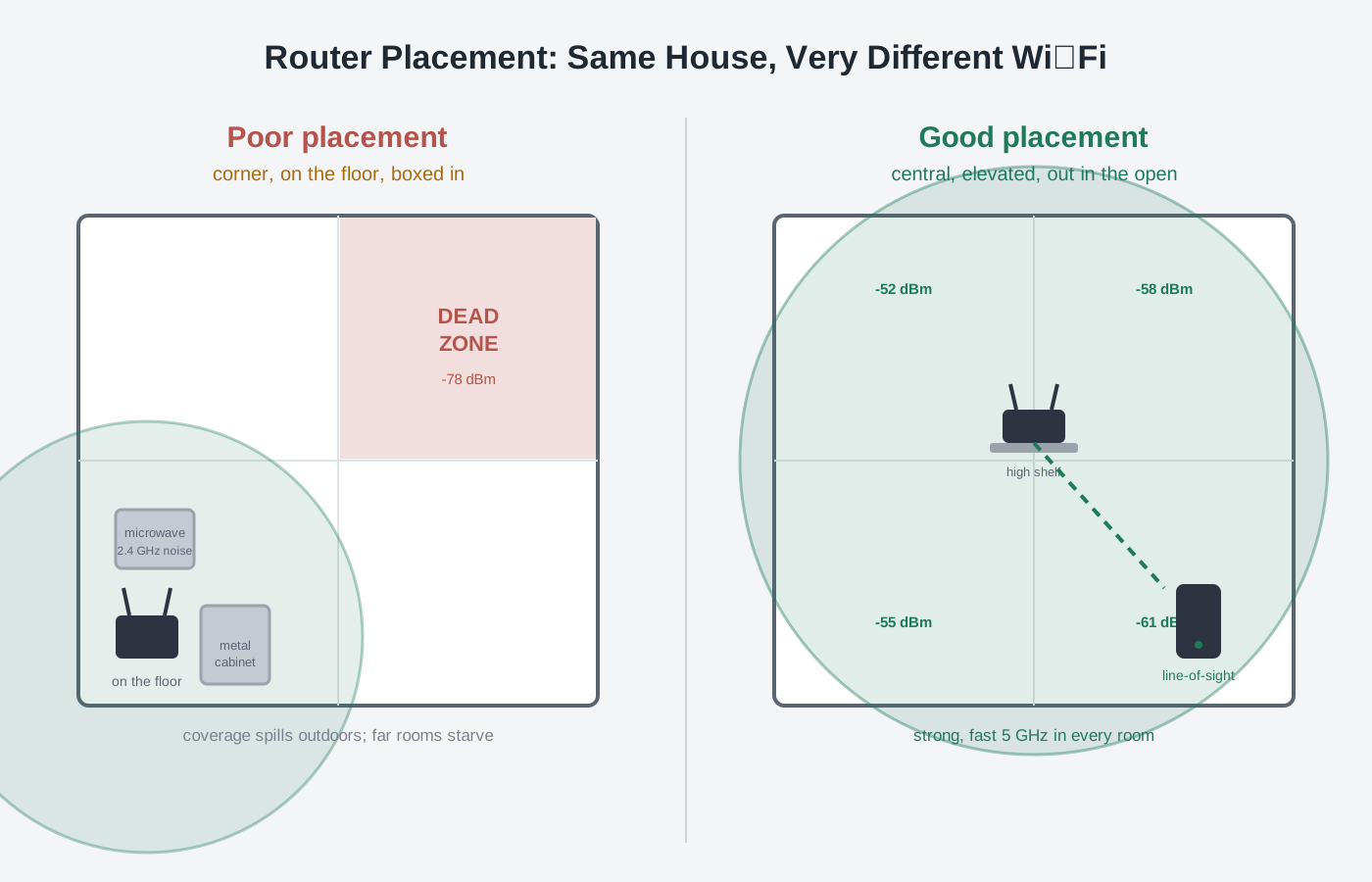
Where you put your router changes your Wi-Fi more than almost any setting you can toggle. Radio waves fan out and weaken with distance and through walls, so a router shoved in a basement corner behind the TV is fighting physics before the first device connects. Get it central, elevated, and out in the open with line-of-sight to where you actually use Wi-Fi, and keep it away from the specific objects — metal, water, microwaves, other 2.4 GHz radios — that quietly gut a signal. Here's exactly where to put it, what to keep it away from, and how to tell when no amount of repositioning will help and you need a second node.
The verdict up front: where you physically put your router changes your Wi-Fi more than almost any setting you can toggle in the app. Wi-Fi is radio, and radio fans out in every direction and weakens with distance and with every wall, floor, and metal object it passes through. A router jammed in a basement corner, on the floor, behind the TV, is losing signal to physics before a single device connects. The fix is boring but it works: get the router as central to your living space as you can, up high (shelf height, not floor), out in the open with clear line-of-sight to where you use Wi-Fi most, antennas up, and away from the specific signal-killers — large metal objects, water, microwaves, cordless phones, and Bluetooth clutter on the crowded 2.4 GHz band. But placement has a ceiling: if your home is large, long, or chopped up by dense walls, no perfect spot exists, and the honest answer is a second node rather than another afternoon of moving the router around. Here's how to find the best spot, what to keep it away from, and how to know when you've hit that ceiling.
Why Placement Beats Almost Every Setting
People spend hours changing channels and firmware settings when the single biggest lever is where the box sits. Here's the physics in one paragraph: a router radiates radio energy outward, and that energy follows an inverse-square falloff — signal strength drops steeply with distance even in open air, and every obstacle it crosses takes another bite. Signal strength is measured in dBm (a negative number; closer to zero is stronger), and because the scale is logarithmic, small-sounding losses are huge: every 3 dB lost is half the signal power. A couple of interior walls and some distance can easily swing you from a fast -50 dBm connection to a crawling -75 dBm one. If dBm and RSSI are unfamiliar, our Wi-Fi signal strength explainer breaks down exactly what those numbers mean and what's usable.
The practical takeaway: you can't out-configure bad geometry. Move the router three feet up and ten feet toward the center of the house and you'll often gain more real-world speed than any setting change delivers.
The Five Rules of Good Placement
1. Central, not tucked in a corner
A router broadcasts in all directions, so if it sits in a corner of your house, roughly three-quarters of its coverage is spilling outdoors and into your neighbor's yard instead of into your rooms. Put it as close to the center of your living space as the cabling allows. If your modem connection point is in a far corner (it usually is), running a single Ethernet cable to a better central spot — or relocating the router and leaving a small switch at the corner — is one of the highest-return things you can do.
2. Up high, never on the floor
Radio waves generally propagate down and out better than up. A router on the floor has to punch its signal up through furniture, and the floor itself (especially concrete) absorbs a lot. Get it to shelf or waist height and above — the top of a bookshelf in a central room is close to ideal. Elevation also gets it above the metal and clutter that live at floor level.
3. Out in the open, with line-of-sight
The best signal path is a clear one. A router shut inside a media cabinet, behind a large TV, or in a closet is broadcasting into an obstacle course. Wi-Fi doesn't need to see your device, but the fewer dense objects in the direct path, the better. Aim for line-of-sight to the rooms where you stream, game, and take calls.
4. Antennas positioned right
If your router has external antennas, they radiate strongest perpendicular to their length — a vertical antenna blankets a floor horizontally, which is what you want in a single-story home. For a two-story house, angling some antennas horizontally helps push signal up and down between floors. If your router has internal antennas (most mesh units and many modern routers), just keep the unit upright as the manufacturer intends and don't lay it on its side.
5. Away from the signal-killers
Some things in a normal home are genuinely bad for Wi-Fi. The worst offenders and why:
| Object | Why it hurts | What to do |
|---|---|---|
| Microwave ovens | Leak energy on 2.4 GHz — the exact band Wi-Fi uses — and can stall a connection every time they run | Keep the router several feet away and out of the kitchen line-of-fire; favor 5 GHz for nearby devices |
| Large metal objects (fridges, filing cabinets, metal shelving, mirrors) | Reflect and block radio waves, creating shadows and dead spots behind them | Don't place the router against or behind them |
| Water (fish tanks, water heaters, even a full bathtub) | Water absorbs 2.4 GHz energy strongly | Keep a clear path; don't route signal through a big tank |
| Cordless phones, baby monitors, Bluetooth clutter | Many share the 2.4 GHz band and add interference | Move them apart; use 5 GHz where possible |
| Brick, concrete, stone, and tile walls | Dense materials attenuate signal far more than drywall | Position so signal crosses as few dense walls as possible |
| Other routers nearby (dense apartments) | Overlapping networks compete for airtime on the same channels | Placement plus a good channel choice helps; see below |
2.4 GHz vs 5 GHz: Placement Changes Which Band Wins
Placement and band interact. 2.4 GHz travels farther and penetrates walls better but is slower and far more congested (it's the band microwaves, Bluetooth, and every neighbor's old gear crowd onto). 5 GHz is much faster and cleaner but has shorter range and is blocked more easily by walls. 6 GHz, on the newest routers, is faster and cleaner still with even shorter reach.
What that means for placement: the closer and more line-of-sight your router is to a device, the more you can lean on fast 5 GHz (or 6 GHz). Bad placement forces devices back onto slow 2.4 GHz just to hold a connection. So good placement doesn't only add bars — it lets your devices stay on the fast band. If you're weighing the newer bands, our 6 GHz vs 5 GHz breakdown covers when each actually wins, and our band steering explainer covers how the router tries (and sometimes fails) to keep devices on the right band.
How to Actually Find the Best Spot
Don't guess — measure. It takes ten minutes:
- Pick your candidate spot using the five rules: central, high, open, line-of-sight, away from killers.
- Walk the house with a signal meter. A free Wi-Fi analyzer app on your phone shows live dBm at each spot. Aim for -50 to -60 dBm in the rooms you care about (excellent to good); -67 dBm is the practical floor for reliable HD streaming and video calls; past -70 dBm things get flaky.
- Test the worst rooms, not the room the router is in. The far bedroom and the back of the house tell you the truth.
- Move and re-measure. Try one clearly different spot — higher, or ten feet more central — and compare the far-room numbers. The winner is usually obvious.
- Set the channel while you're at it. On 2.4 GHz stick to channels 1, 6, or 11 (the only non-overlapping ones); on 5 GHz pick a clear channel or let auto handle it. In a crowded building this matters as much as placement.
When Placement Can't Fix It
Here's the honest limit: placement optimizes coverage from a single point, and a single point can only reach so far. If your home is large, long and narrow, spread over multiple floors, or built with dense walls, there is no magic spot that covers everything — the far corner will always be weak. Signs you've hit the ceiling:
- You've measured several spots and the far rooms are still worse than -70 dBm.
- Coverage is fine in a ring around the router but dies past a certain wall or floor.
- Moving the router to help the back of the house just creates a new dead zone in the front.
At that point, stop chasing the perfect location and add a node. A mesh system or a wired access point puts a second (or third) strong source of signal where the router alone can't reach — which is a fundamentally better fix than a range extender that halves throughput and makes you reconnect as you move. Our Wi-Fi extender vs. mesh vs. access point breakdown covers why mesh and wired APs win, and if you're wondering whether you need a fancy tri-band mesh or a simpler dual-band kit, the dual-band vs. tri-band mesh explainer sorts that out.
If there is Ethernet in that far wall — or you can get it there — a ceiling access point is the version of this fix that gives nothing back to the air. The Ubiquiti UniFi U6 Pro at $179 and the Wi-Fi 7 TP-Link Omada EAP773 at around $190 both mount directly over the room that needs coverage and run on PoE. Neither ships with a PoE injector, and they differ on management: the UniFi AP needs a controller running somewhere, while the Omada can be driven from a standalone local web UI with no cloud account.
For most homes that have outgrown a single router, a dependable modern mesh is the right move. The ASUS ZenWiFi BD4 mesh runs a single network name with band steering and fast roaming across nodes out of the box, so you drop a second unit in the weak end of the house and the dead zone closes. (Check current price on Amazon.) If the problem is square footage rather than one stubborn corner, the TP-Link Deco XE75 is the one we'd point at homes over 3,000 sq ft, because its third band is 6 GHz and carries the node-to-node traffic instead of taking airtime from your devices. Wherever you place those nodes, the same five rules apply to each one — central to the area it serves, up high, and out in the open.
The Bottom Line
Router placement is the cheapest, highest-return Wi-Fi upgrade there is, because you're working with physics instead of against it. Get the router central, elevated, and out in the open with clear line-of-sight; point the antennas right; and keep it away from microwaves, metal, water, and 2.4 GHz clutter. Then measure the far rooms with a free analyzer app and aim to keep them stronger than -67 dBm. Do all that and most single-router homes go from "why is the back bedroom always slow" to solid everywhere. And when the numbers say a single point simply can't reach the whole house, don't keep moving the box — add a node and be done with it.