goCoax MA2500D Review: Cheap, Fast MoCA 2.5 That Turns Coax Into 2.5-Gig Ethernet
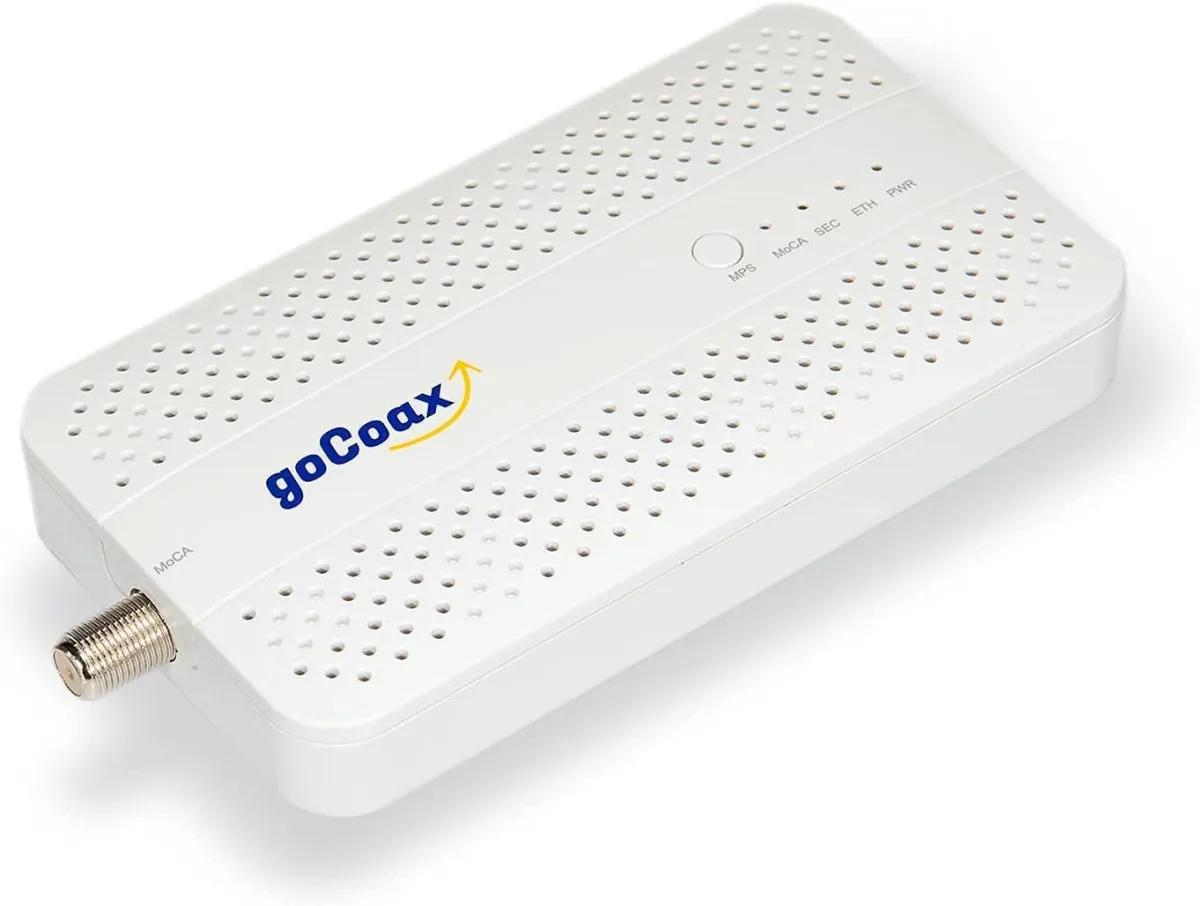
The goCoax MA2500D is a ~$75 MoCA 2.5 adapter with a 2.5GbE port that runs a rock-solid, sub-3ms wired link over the coax already in your walls. Here's what it does, what it doesn't, and who should buy it.
✅ Pros
- +True MoCA 2.5 with a 2.5GbE port — real multi-gig over existing coax
- +Close to the full 2.5 Gbps in real-world use on clean coax
- +Sub-3ms latency and wired-grade consistency — great for gaming and backhaul
- +Plug-and-play — auto-configures in seconds, no app required
- +Optional link encryption for shared-coax situations
- +Backward compatible with MoCA 2.0/1.1 gear on the same network
- +Excellent value — noticeably cheaper than the ScreenBeam/Actiontec equivalent
❌ Cons
- −Requires two or more adapters — one is useless alone
- −Not compatible with satellite TV or AT&T U-verse coax
- −Shared medium — many simultaneous heavy nodes split the same pipe
- −Real-world speed depends on coax and splitter quality; a MoCA-rated splitter and PoE filter matter
- −Single 2.5GbE port per unit — no built-in switch for multiple devices
Verdict: The goCoax MA2500D is the cheapest sensible way to get a true 2.5-gigabit wired link over the coax already in your walls. Each unit has a 2.5GbE Ethernet port and pushes close to the full MoCA 2.5 ceiling with sub-3ms latency, zero configuration, and no new cable to pull. If a room has a coax jack but no practical way to run Ethernet, this is the fix — for a mesh node's wired backhaul, a hardwired console or gaming PC, or a fast pipe to an upstairs office. Two catches to know: you need at least two adapters, and it won't work on satellite TV or AT&T U-verse coax.
Check the current price on Amazon →
Key Specs at a Glance
| Spec | Detail |
|---|---|
| Standard | MoCA 2.5 (backward compatible with MoCA 2.0 / 1.1) |
| Max Throughput | Up to 2.5 Gbps actual data throughput |
| Ethernet Port | 1× 2.5GbE RJ45 (auto 10/100/1000/2500 Mbps) |
| Coax Port | 1× F-type MoCA connector |
| Channel Bonding | Up to 5 bonded channels |
| Frequency Band | 1125–1675 MHz (MoCA "Extended D" band) |
| Latency | Typically under 3 ms node-to-node |
| Max Nodes | Up to 16 adapters on one coax network |
| Security | Optional MoCA link encryption (enabled in setup) |
| ISP Compatibility | Cable & fiber (Comcast/Xfinity, Spectrum, Cox, Verizon Fios) — not satellite (DirecTV/DISH) or AT&T U-verse |
| Setup | Plug-and-play auto-configuration |
| Units Required | 2 or more (sold single or 2-pack) |
| Price | ~$60–$75 single (MSRP $74.99); ~$120–$135 for a 2-pack |
What MoCA Is — and Why the MA2500D Matters
Wi-Fi is convenient; it is not always fast or steady enough. But running new Ethernet through finished walls is expensive and messy, and that's where a lot of home-network projects stall.
MoCA (Multimedia over Coax Alliance) solves it by turning the coax TV cabling already in your walls into a high-speed wired network. You plug one adapter into a coax jack near your router, plug the other into a coax jack in a distant room, connect each to an Ethernet port, and you get a wired backbone between the two — no drilling, no fishing cable, no drywall repair.
The MA2500D is the current sweet-spot adapter for that job. It's MoCA 2.5, so it carries a full 2.5GbE port and delivers up to 2.5 Gbps of real throughput — enough to keep pace with a multi-gig internet plan and a 2.5-gigabit local network. Older MoCA 2.0 gear topped out around 1 Gbps per port; the MA2500D removes that ceiling for about the same money. If you want the full step-by-step, our MoCA 2.5 setup guide walks through wiring, splitters, and the PoE filter.
The Two Things to Know Before You Buy
Two limitations decide whether MoCA is right for you, so read these first.
1. You need at least two adapters. MoCA is a point-to-point (or point-to-multipoint) link — one adapter does nothing by itself. Every MoCA network needs a minimum of two nodes: one by the router, one at the far end. goCoax sells the MA2500D as a single unit and as a 2-pack; if you're starting fresh, the 2-pack is the buy, and single units are for adding a third or fourth room later.
2. It won't work on satellite or AT&T U-verse coax. MoCA rides the same coax as cable and fiber-TV (ONT) service without interference, and it's compatible with Comcast/Xfinity, Spectrum, Cox, and Verizon Fios. But satellite systems (DirecTV, DISH) and AT&T U-verse use the coax band differently and are not compatible. If that's your setup, MoCA is a hard stop — look at a wired Ethernet run or a Wi-Fi solution instead.
If neither of those rules you out, the rest of the decision is easy.
Performance
The number that matters is real throughput, and the MA2500D delivers close to its rated ceiling. On clean home coax you can expect roughly 2.3–2.5 Gbps of usable throughput node-to-node — a genuine multi-gig wired link, not a marketing figure. It gets there by bonding up to five channels across the 1125–1675 MHz band, well above the frequencies your cable modem or TV service uses, which is why MoCA and your internet coexist on the same cable.
Just as important is latency and consistency. MoCA runs typically under 3 ms node-to-node, and because it's a wired link it doesn't suffer the jitter, interference, or fade that Wi-Fi does. For a hardwired console, a gaming PC, or a work-from-home video setup, that steady low ping is the whole point — it behaves like Ethernet because, functionally, it is.
Two honest caveats. First, MoCA is a shared medium: all the adapters on one coax network split the same pipe, so a house running four heavy nodes at once won't see 2.5 Gbps on every one simultaneously. For the typical two- or three-adapter home this is a non-issue. Second, your coax matters — old corroded splitters, unterminated runs, or a splitter that doesn't pass the MoCA band will drag speeds down. A quality MoCA-rated splitter (or a direct run) and a Point-of-Entry (PoE) filter at the demarc get you the full rate and keep your signal from leaking onto the neighborhood cable plant. Our MoCA setup guide covers exactly where the PoE filter goes.
Setup and Software
This is the easy part, and it's where the MA2500D earns a lot of goodwill. Setup is genuinely plug-and-play: connect coax and Ethernet to each adapter, power them on, and they auto-negotiate a link in seconds — no app, no account, no configuration required. The front-panel LEDs tell you at a glance whether you have a MoCA link and how strong it is.
For the security-minded, the adapter supports optional MoCA link encryption, set through goCoax's simple web interface. Combined with a PoE filter at the point of entry, encryption closes the small theoretical risk of a neighbor on the same cable segment seeing your traffic. Most single-family homes are fine either way, but it's there if you want it — and it's worth enabling in apartments or anywhere the coax is shared.
There's no ongoing maintenance and no subscription. A MoCA adapter's job is to disappear once it's working, and the MA2500D does exactly that.
Who Should Buy the goCoax MA2500D
Buy it if:
- You have coax jacks in the rooms you want to connect but can't easily run Ethernet.
- You're on cable or fiber internet (Comcast, Spectrum, Cox, Fios) — not satellite or U-verse.
- You want a wired backhaul for a mesh node so it isn't relying on a wireless link. See our wired-backhaul guide.
- You want a rock-solid, low-latency hardline for a gaming PC, console, or work setup.
- You have a multi-gig plan or a 2.5GbE local network and want a port that can keep up.
Skip it if:
- You use satellite TV or AT&T U-verse — incompatible coax band; this won't work.
- You can easily run Ethernet — a real Cat6 run is cheaper and slightly faster; see our Cat6 keystone guide.
- You only need to connect one device and don't have a coax jack near the router — you'd still need a second adapter and a coax path between them.
- You need more than ~2.5 Gbps to a single device — that's beyond MoCA 2.5; use 10GbE Ethernet.
Pros and Cons
Pros
- True MoCA 2.5 with a 2.5GbE port — real multi-gig over existing coax
- Close to the full 2.5 Gbps in real-world use on clean coax
- Sub-3ms latency and wired-grade consistency — great for gaming and backhaul
- Plug-and-play — auto-configures in seconds, no app required
- Optional link encryption for shared-coax situations
- Backward compatible with MoCA 2.0/1.1 gear on the same network
- Excellent value — noticeably cheaper than the ScreenBeam/Actiontec equivalent
Cons
- Requires two or more adapters — one is useless alone
- Not compatible with satellite TV or AT&T U-verse coax
- Shared medium — many simultaneous heavy nodes split the same pipe
- Real-world speed depends on coax and splitter quality; a MoCA-rated splitter and PoE filter matter
- Single 2.5GbE port per unit — no built-in switch for multiple devices
MA2500D vs. ScreenBeam ECB7250 vs. Cat6 Ethernet
| goCoax MA2500D | ScreenBeam/Actiontec ECB7250 | New Cat6 Ethernet run | |
|---|---|---|---|
| Medium | Existing coax | Existing coax | New cable in walls |
| Standard / Speed | MoCA 2.5, up to 2.5 Gbps | MoCA 2.5, up to 2.5 Gbps | Up to 10 Gbps (Cat6/6A) |
| Ethernet Port | 1× 2.5GbE | 1× 2.5GbE | N/A (you provide) |
| Latency | ~1–3 ms | ~1–3 ms | <1 ms |
| Install effort | Plug-and-play, minutes | Plug-and-play, minutes | High — fishing cable, drywall |
| Brand track record | MoCA-only specialist | Longest MoCA history | N/A |
| Price (per link) | Lower | Higher | Cheap parts, costly labor |
The read: the MA2500D and the ScreenBeam ECB7250 are the two adapters to consider for true 2.5GbE MoCA, and they perform within a hair of each other. ScreenBeam (formerly Actiontec) has the deepest MoCA pedigree and the longest ISP-compatibility track record, and it's the safe pick if you want the incumbent. The goCoax MA2500D undercuts it on price while delivering the same real-world speed and latency, which is why it's our value pick. And if you can run Cat6 without tearing up the house, a real Ethernet drop is still the fastest, lowest-latency option — MoCA is what you buy when pulling cable isn't practical.
Bottom Line
The goCoax MA2500D does one job extremely well: it turns the coax already in your walls into a fast, stable, low-latency 2.5-gigabit wired link, with no configuration and no cable to pull. For anyone who's been fighting a weak Wi-Fi corner, wants a hardline for a console or gaming PC, or needs a proper wired backhaul for a mesh node, it's the cheapest sensible way there.
Clear the two gates first — you need two or more adapters, and it won't work on satellite or AT&T U-verse coax. If you're on cable or fiber and there's a coax jack where you need the connection, this is close to a no-brainer, and the best value in MoCA 2.5 today.
Rating: 4.5 / 5
Our Verdict
The goCoax MA2500D is a ~$75 MoCA 2.5 adapter with a 2.5GbE port that runs a rock-solid, sub-3ms wired link over the coax already in your walls. Here's what it does, what it doesn't, and who should buy it.
Ready to buy the goCoax MA2500D?
Buy on Amazon →Affiliate link — we may earn a commission at no extra cost to you.