WiFi 7 vs WiFi 6E: When to Upgrade and When to Wait
Published 2026-04-09 · By NetAudioHub Editorial
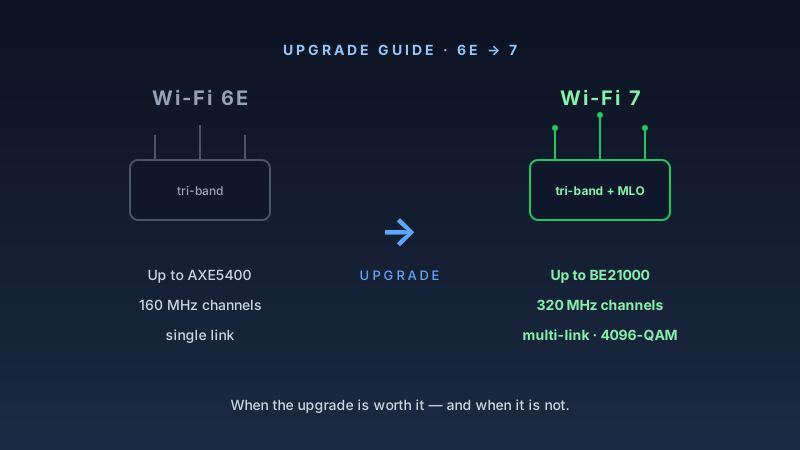
WiFi 7 brings real improvements over WiFi 6E — 320 MHz channels, 4K-QAM, and Multi-Link Operation. But for most households, the question isn't capability. It's timing. Here's how to decide.
The verdict up front: WiFi 7 is the better technology by a meaningful margin. But if your WiFi 6E setup works well and your devices don't have WiFi 7 adapters yet, there's no urgency. This guide tells you exactly when to upgrade and when to wait.
What Actually Changed Between WiFi 6E and WiFi 7
WiFi 6E (802.11ax) was an incremental update. It took the WiFi 6 spec and added access to the 6 GHz band — a previously unlicensed chunk of spectrum that offered less interference and shorter-range performance improvements. The underlying technology — OFDMA, spatial streams, 1024-QAM — was the same as WiFi 6.
WiFi 7 (802.11be) is a more substantial revision. The three headline changes:
1. 4K-QAM
WiFi 6 and 6E used 1024-QAM, encoding 10 bits per symbol. WiFi 7 uses 4096-QAM, encoding 12 bits per symbol. That's a 20% increase in raw spectral efficiency under ideal signal conditions. In practice, 4K-QAM requires an exceptionally clean signal to decode correctly — it's sensitive to interference and distance. You'll see the benefit most in close-range, high-bandwidth scenarios: a laptop on the same floor as the router, a desktop in the same room.
2. 320 MHz Channels
WiFi 6E maxed out at 160 MHz channels in the 6 GHz band. WiFi 7 doubles that to 320 MHz. Combined with 4K-QAM, this is where the throughput numbers in marketing materials come from — the theoretical ceiling for a tri-band WiFi 7 router exceeds 40 Gbps aggregate. Realistic peak throughput on a single client connection: 3–5 Gbps range under favorable conditions. Still a meaningful improvement over WiFi 6E's 1–2 Gbps ceiling.
3. Multi-Link Operation (MLO)
This is the most architecturally significant change. With WiFi 7, a device can connect to a router across two or three bands simultaneously, treating them as a single logical pipe. The router and client negotiate which traffic flows on which band based on congestion, latency requirements, and interference. Critical traffic (video calls, gaming) can get lower-latency paths while bulk transfers move on higher-bandwidth links.
The nuance: as covered in our WiFi 7 MLO deep-dive, most consumer hardware implements NSTR MLO rather than full STR MLO. Real-world benefits are real but modest compared to the marketing diagrams.
WiFi 6E: What It Still Does Well
WiFi 6E isn't a dead end. For most homes, a well-deployed WiFi 6E system covers every realistic use case well into 2026–2027.
The 6 GHz band remains lightly loaded. WiFi 6E devices are still a minority in most neighborhoods. The 6 GHz backhaul on a mesh system like the ASUS ZenWiFi Pro ET12 runs in near-interference-free conditions in most deployments. You get the benefits of a clean band without paying WiFi 7 prices.
WiFi 6E routers have dropped significantly in price. The TP-Link Archer AXE75 — a solid tri-band WiFi 6E router — costs well under $200. A year ago it was $300. Mesh systems like the eero Pro 6E and the TP-Link Deco XE75 now represent the best per-dollar value in home mesh networking.
Client support is mature. Phones, laptops, and tablets from 2022 onward often include WiFi 6E adapters. Your existing devices will perform at their ceiling on a WiFi 6E network. Upgrading to WiFi 7 will not improve your current devices — only future devices benefit.
When to Upgrade to WiFi 7
You're buying new anyway. If you're setting up a new home, replacing a failed router, or building a network from scratch, buy WiFi 7 now. The price premium over WiFi 6E flagship gear has narrowed considerably. The TP-Link Archer BE550 competes directly with WiFi 6E options in the same price band — it has since settled around $200 — and you're buying a platform that will remain current through 2028+. Our Archer BE550 review has the full breakdown, including the range caveat: 6 GHz fades noticeably past about 40 feet, so this is a small-to-medium-home router.
Your home has multiple heavy users. WiFi 7's enhanced OFDMA and MLO provide meaningful improvements in dense client scenarios — households where 5–10 devices are actively streaming, video conferencing, or gaming simultaneously. If congestion is a real problem today, the architectural improvements in WiFi 7 help.
You're building a mesh and want future-proof backhaul. The Amazon eero Max 7 (our review) pairs WiFi 7 with two 10G ports on every node, so a wired backhaul is never the thing that caps the system. As WiFi 7 clients proliferate, a WiFi 7 mesh has room to grow. A WiFi 6E mesh may become the bottleneck in 2–3 years.
You have a high-bandwidth use case now. 4K + 8K video production workflows, NAS backups over WiFi, or consistent multi-gigabit needs justify WiFi 7's throughput ceiling today. Pair it with a WiFi 7 adapter in your workstation and you can sustain multi-gigabit wireless throughput.
When to Wait (Or Buy WiFi 6E Instead)
Your current setup works. If you have a WiFi 6E or even WiFi 6 router and it handles your household load without complaint, don't replace it. The gains from upgrading will be invisible to you in everyday use.
You're budget-constrained. A $200 WiFi 6E mesh will outperform a $200 WiFi 7 router in a multi-room home. WiFi 7 hardware at the low end often sacrifices antenna count, spatial streams, or processor capability to hit a price point. Buy where the value is.
None of your devices are WiFi 7 capable. WiFi 7 requires WiFi 7 clients to unlock its benefits. If your laptop, phone, and streaming devices max out at WiFi 6E or WiFi 6, you're buying a router for future devices you don't own yet. That's a legitimate investment, but understand what you're actually paying for.
You need maximum coverage, not maximum speed. Mesh coverage depends on node count, antenna gain, and placement — not generation. A three-node WiFi 6E mesh blankets a large home more effectively than a single WiFi 7 router. Match the solution to the problem.
Side-by-Side Comparison
| Feature | WiFi 6E | WiFi 7 |
|---|---|---|
| Max channel width | 160 MHz | 320 MHz |
| Maximum modulation | 1024-QAM | 4096-QAM |
| Multi-Link Operation | No | Yes (NSTR or STR) |
| Peak theoretical throughput | ~9.6 Gbps | ~46 Gbps |
| 6 GHz band support | Yes | Yes |
| Widespread client support | Yes (2022+) | Emerging (2024+) |
| Entry-level price (router) | ~$150 | ~$250 |
| Best value pick | TP-Link AXE75 | TP-Link BE550 |
Bottom Line
Buy WiFi 7 if: you're setting up a new network, replacing aging equipment, have multiple heavy users, or want to future-proof for the next 5 years.
Stick with WiFi 6E if: your current network works well, you're on a budget, or your devices max out at WiFi 6E anyway.
The best WiFi 7 routers right now:
- Budget-to-mid: TP-Link Archer BE550 — $300, solid WiFi 7 implementation without flagship pricing
- Flagship: ASUS RT-BE96U — tri-band WiFi 7 with 10G WAN and 10G LAN; the most capable single router we've reviewed, and priced accordingly at $699
- Mesh: Amazon eero Max 7 — best WiFi 7 mesh for simplicity and performance
The best WiFi 6E routers right now:
- Budget: TP-Link Archer AXE75 — the most affordable path into 6 GHz
- Mesh: TP-Link Deco XE75 — excellent value, solid coverage
- Premium mesh: ASUS ZenWiFi Pro ET12 — top-tier WiFi 6E mesh performance
Affiliate disclosure: Links in this article use the tag `webstore0fd1-20`. NetAudioHub earns a commission on qualifying purchases at no extra cost to you.