WiFi 7 MLO Explained: Why True Simultaneous Multi-Link Is Rarer Than You Think
Published 2026-04-02 · By NetAudioHub Editorial
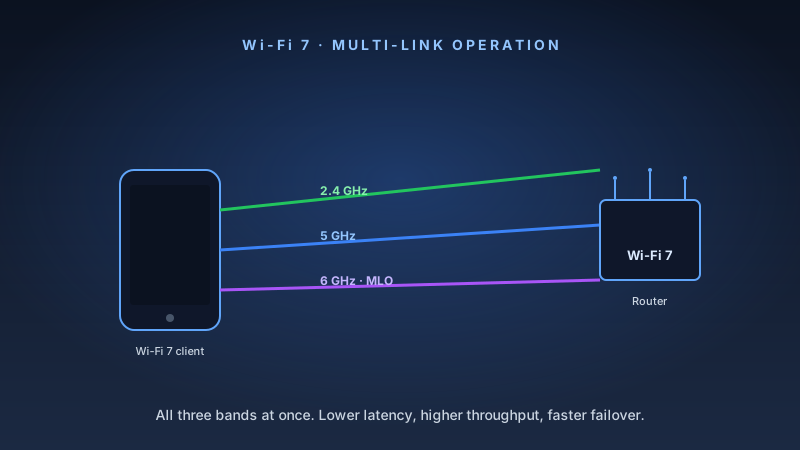
WiFi 7's Multi-Link Operation promises simultaneous connections across multiple bands. But most consumer hardware only supports the restricted NSTR form. Here's what the spec sheet doesn't tell you.
The verdict up front: MLO is WiFi 7's most important feature — and the most misunderstood. Most devices sold as "MLO-capable" only support the restricted version. True simultaneous multi-link hardware exists but remains rare. Here's how to tell the difference.
What Is MLO?
Multi-Link Operation (MLO) is the headline feature of WiFi 7, defined in the IEEE 802.11be standard. The core idea is simple: instead of your device being locked to a single frequency band — 2.4 GHz, 5 GHz, or 6 GHz — it can connect to two or even three bands at once, treating them as a single logical pipe.
Before MLO, your phone or laptop had to pick one band and stay on it. If that band got congested, you waited. With MLO, the router and client negotiate a multi-link setup during association. Data can then flow across whichever links are least congested, and critical traffic (like video calls) can be split across bands simultaneously for redundancy and lower latency.
On paper, this means:
- Higher aggregate throughput — multiple bands combined
- Lower latency — packets take the fastest available path
- Better reliability — if one band has interference, traffic shifts to another
In practice, whether you actually get those benefits depends entirely on which flavor of MLO your hardware uses.
STR vs. NSTR: The Distinction That Matters
The 802.11be standard defines two fundamentally different ways to implement MLO. Marketing materials almost never distinguish between them. You need to know the difference.
STR — Simultaneous Transmit and Receive
STR (Simultaneous Transmit and Receive) is the full version of MLO. An STR-capable device has independent radio hardware for each link — separate RF chains, separate antennas, separate transceivers. All links operate completely asynchronously. The 2.4 GHz radio can be transmitting while the 5 GHz radio is receiving. There is no coordination overhead between them.
This is what the marketing diagrams promise. A Cisco lab test comparing STR-capable Qualcomm 7800-based clients against WiFi 6 baselines showed a 47% improvement in aggregate throughput — from 506 Mbps to 747 Mbps — with lower latency across the board.
To implement STR, a device needs physically separate RF chains for each band in use. This means more silicon, more antennas, higher cost, and more power consumption. It is fundamentally a hardware constraint, not a software feature that can be patched in later.
You can identify an STR-capable station by checking the "Maximum Number of Simultaneous Links" field in the ML information element of the 802.11 association request. If that value is non-zero, the device supports true simultaneous operation.
NSTR — Non-Simultaneous Transmit and Receive
NSTR (Non-Simultaneous Transmit and Receive) is the constrained version. With NSTR, all links must be doing the same thing at any given instant — either all transmitting or all receiving. Links cannot operate independently. The device still participates in MLO and can still aggregate bandwidth over time, but it cannot truly parallelize across bands in a single moment.
NSTR is far easier and cheaper to implement. It requires less silicon and less power. As a result, it is what the vast majority of consumer WiFi 7 devices actually ship with.
The nuance that matters: NSTR still brings real benefits. It provides faster band-switching than pre-MLO WiFi, and over time the aggregated throughput can still be meaningfully higher than single-band operation. But it does not deliver the latency reduction and true parallel throughput that STR enables. It is link aggregation with constraints, not simultaneous transmission.
Quick Reference
| Feature | STR MLO | NSTR MLO |
|---|---|---|
| Simultaneous multi-band TX/RX | Yes | No |
| Requires separate RF chains | Yes | No |
| Lower latency | Significant | Moderate |
| Consumer availability (2025) | Very limited | Common |
| Typical chipset | Qualcomm QCN9274 + QCN6224 | MediaTek Filogic 880 |
The Marketing Gap
Walk into any major retailer and you'll find dozens of routers advertised as "WiFi 7 with MLO." That statement is technically accurate for nearly all of them — and tells you almost nothing useful.
The WiFi Alliance's certification program requires MLO support for WiFi 7 certification, but does not require STR. A router can be certified WiFi 7 and only support NSTR. The certification badge on the box doesn't distinguish between the two.
Similarly, many laptops shipping with WiFi 7 adapters — including some Intel BE200 configurations — advertise MLO support without specifying whether the adapter implements STR. The Intel BE200 supports tri-band WiFi 7, but its actual STR capability depends on the system integration, particularly whether the laptop OEM provided adequate antenna isolation between bands.
This is the gap between marketing and engineering reality. "MLO-capable" is a minimum bar, not a performance guarantee.
Hardware Reality Check: What Actually Supports STR MLO
As of early 2025, true STR MLO at the client (device) side is extremely rare in consumer hardware.
On the Access Point Side
Most consumer WiFi 7 routers use a single multi-band chipset — MediaTek Filogic 880 is the most common — that implements NSTR. A smaller number use multi-chip designs that enable STR.
ASUS has been aggressive about MLO implementation. Even their entry-level WiFi 7 routers like the RT-BE58U support MLO, though chipset constraints mean only the primary node benefits in AiMesh configurations. The ASUS RT-BE88U is a dual-band (2.4/5 GHz) WiFi 7 router that explicitly supports MLO across both bands with two 10 GbE ports. It skips the 6 GHz band entirely, which is a reasonable tradeoff for most homes where 6 GHz client penetration remains low.
TP-Link's flagship Archer BE800 is a tri-band BE19000 with MLO support across 2.4/5/6 GHz. At $599 it is priced for enthusiasts, but it is one of the more complete WiFi 7 implementations available in a consumer package.
Ubiquiti takes a measured approach. The UniFi Dream Router 7 supports MLO, but the cheaper UniFi Express 7 explicitly does not use MLO for its backhaul link due to chipset limitations. Ubiquiti's documentation is unusually honest about this. If you are building a UniFi mesh, verify MLO support on each specific model before assuming it.
On the Client Side
This is where the current WiFi 7 ecosystem falls short. As of 2024–2025, no mainstream consumer client device supports STR MLO. Laptops, phones, and tablets shipping with WiFi 7 are implementing NSTR.
The closest thing to available STR client support is found in:
- Qualcomm FastConnect 7800 with High Band Simultaneous (HBS): designed for STR, found in select Snapdragon-based Android flagships and some laptops
- Qualcomm NCM865 PCIe adapters: a desktop/development-oriented part that supports tri-band WiFi 7 with STR capability
Even with an STR-capable router, your phone or laptop needs an STR-capable client adapter to get the full benefit. Right now, nearly nobody has both sides of that equation in a consumer product.
Practical Implications for Home Users
This is not a reason to avoid WiFi 7. It is a reason to calibrate expectations.
If you are buying a WiFi 7 router today, you will almost certainly get NSTR MLO. You will still benefit from:
- Higher peak speeds due to 4K-QAM (the other major WiFi 7 improvement)
- Better congestion handling from wider 320 MHz channels in the 6 GHz band
- Faster band switching and improved reliability from NSTR MLO versus no MLO
- Future-proofing for when STR clients become available
What you will not get yet: the dramatic latency reduction and true simultaneous throughput that STR MLO enables. Those benefits are coming — the hardware is being designed — but mainstream client devices are 12–24 months away.
For dense environments (apartments, open offices), the congestion-handling improvements of WiFi 7 alone justify upgrading. For gaming and low-latency use cases, NSTR MLO is still a measurable improvement over WiFi 6E. For future-proofing a home theater or home office, buying a tri-band WiFi 7 router now positions you to benefit from STR clients as they arrive.
Buying Guidance
Best dual-band MLO router for most homes: ASUS RT-BE88U — $350. Dual-band (2.4/5 GHz) WiFi 7 with explicit MLO support, dual 10 GbE ports, and ASUS's mature AiMesh ecosystem. The lack of a 6 GHz radio is a practical non-issue until 6 GHz client adoption rises.
Pros:
- Dual 10 GbE ports (LAN + SFP+)
- Solid MLO implementation
- AiMesh compatibility
- 4x 2.5 GbE ports
Cons:
- No 6 GHz band
- Larger footprint
- Premium price for dual-band
Best tri-band MLO router for enthusiasts: TP-Link Archer BE800 — $599. BE19000 tri-band with MLO across all three bands, dual 10 GbE, and a built-in LED display. Overkill for most homes, but the most complete consumer WiFi 7 package currently available.
Pros:
- Full tri-band MLO (2.4/5/6 GHz)
- Dual 10 GbE ports
- 11,520 Mbps on 6 GHz alone
- Feature-rich firmware
Cons:
- $599 is steep
- 6 GHz client pool is still thin
- Large physical footprint
The Bottom Line
MLO is real. The performance gains are real. But "MLO-capable" on a spec sheet does not tell you whether you are getting the full STR experience or the more constrained NSTR version. For 2025 consumer hardware, assume NSTR unless the manufacturer explicitly states STR support and identifies the chipset configuration.
Buy a WiFi 7 router now for the other improvements — 4K-QAM, wider channels, better congestion handling. The MLO story will get more compelling as STR clients arrive in laptops and phones over the next 12–24 months.
Affiliate disclosure: Links in this article use the tag `webstore0fd1-20`. NetAudioHub earns a commission on qualifying purchases at no extra cost to you.