TP-Link Deco BE63 Review: The WiFi 7 Mesh That Lands Where Most Homes Live
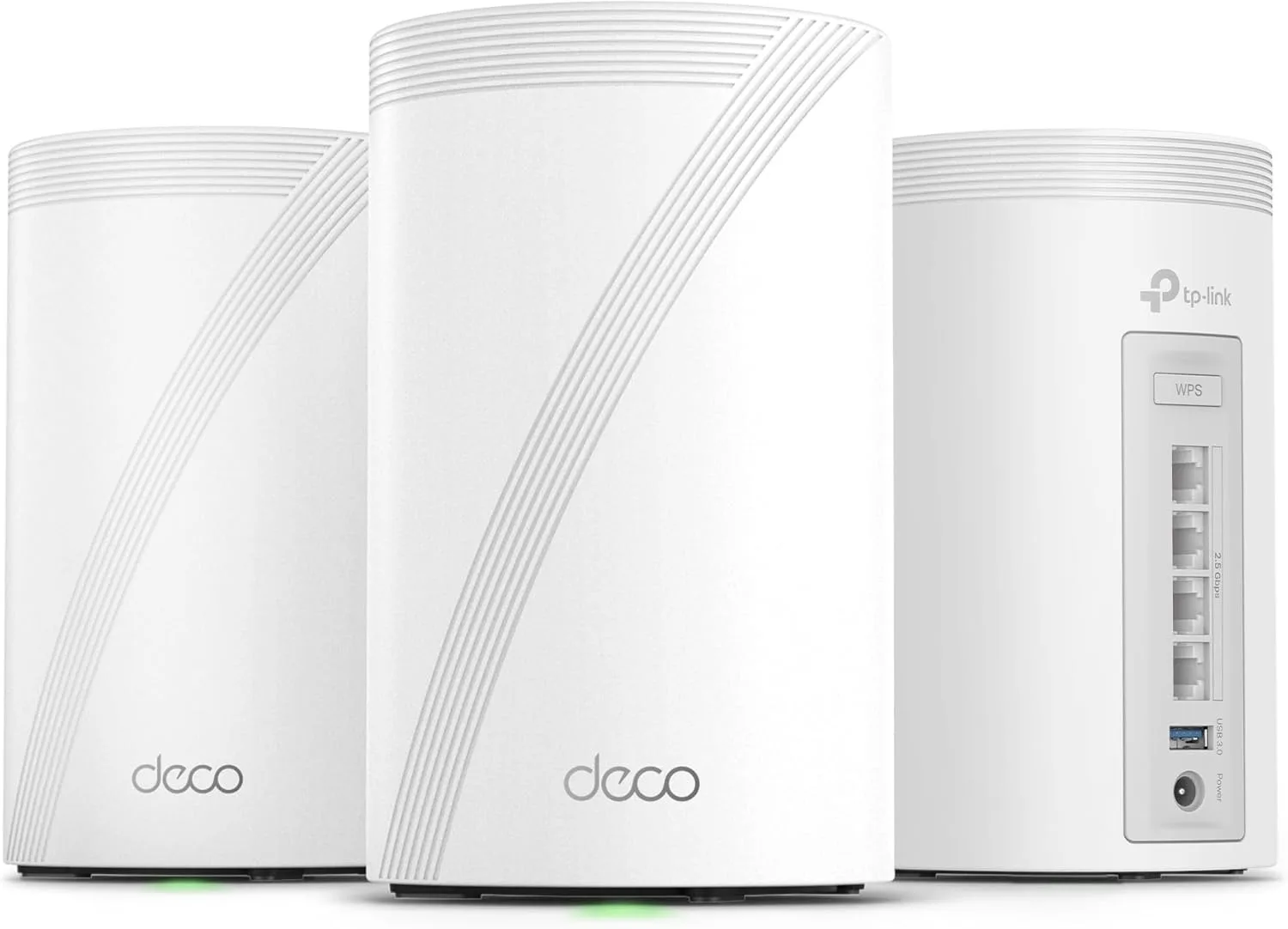
The TP-Link Deco BE63 is a BE10000 tri-band WiFi 7 mesh with dual 2.5 GbE per node and TP-Link-rated coverage of up to 7,200 sq ft — the mid-tier WiFi 7 mesh that actually fits typical home internet plans.
✅ Pros
- +True WiFi 7 mesh with MLO, 320 MHz 6 GHz, and 4-stream 5 GHz at a mid-tier price
- +TP-Link's 7,200 sq ft 3-pack rating actually matches the typical American home
- +Dual 2.5 GbE ports per node — every wired port is multi-gig, supports wired backhaul cleanly
- +Deco app is one of the most polished consumer mesh apps available
- +HomeShield free tier is genuinely useful out of the box
- +EasyMesh compatibility leaves a path to extend the network later
- +AI Roaming works without manual band steering
❌ Cons
- −Only 2 streams on the 6 GHz radio — meaningfully behind the Deco BE85 for close-range peak throughput
- −No 10 GbE port — caps the system at 2.5 Gbps internet plans
- −No USB port — no file sharing, Time Machine targets, or printer hosting
- −HomeShield Pro advanced features require a paid subscription
- −No VLANs, advanced firewall, or controller-class management
The TP-Link Deco BE63 is the WiFi 7 mesh for the gigabit-and-2.5-gig majority. It's a tri-band BE10000 system with dual 2.5 GbE ports per node and a 3-pack TP-Link rates at up to 7,200 sq ft. It doesn't have the 10 GbE port or the full BE22000 radio of the flagship Deco BE85, and it isn't trying to. What it does instead is land at the price point where most WiFi 7 buyers actually live — under $500 for a whole-home 3-pack — and give you the parts of WiFi 7 that matter on a 1 Gbps or 2.5 Gbps internet plan.
Key Specs
The Deco BE63 is a tri-band WiFi 7 (802.11be) BE10000 mesh — 2.4 GHz at 2 streams, 5 GHz at 4 streams, and 6 GHz at 2 streams with 320 MHz channel support. Aggregate throughput tops out around 10 Gbps. Each node ships with two 2.5 GbE ports (one WAN/LAN and one LAN), supports wired or wireless backhaul (6 GHz preferred for wireless), and runs through the Deco app and HomeShield software stack. EasyMesh compatibility leaves a path to extend the network later. TP-Link rates coverage at up to 2,900 sq ft on a single node and up to 7,200 sq ft on the 3-pack, with support for 200+ clients. Street price for the 3-pack is around $499.99.
Where the BE63 Fits in TP-Link's Deco Lineup
The Deco lineup has gotten wide enough to confuse buyers. The shortest correct version: BE85 is the flagship, BE63 is the mid-tier WiFi 7 mesh, and the older Deco XE75 and XE55 are WiFi 6E and a generation behind.
The Deco BE85 is BE22000, 12-stream, with dual 10 GbE plus dual 2.5 GbE per node and a TP-Link-rated 9,600 sq ft of coverage. This is the mesh you buy when you have 5 Gbps fiber, a 10 GbE NAS, and a 5,000+ sq ft home — around $1,010 for a 3-pack. The Deco BE63 is BE10000, 8-stream, with dual 2.5 GbE per node and 7,200 sq ft on the same rating — the mesh you buy when you have 1 Gbps or 2.5 Gbps internet and a typical 2,000–3,500 sq ft home, around $499.99 for a 3-pack. The Deco XE75 is AXE5400 WiFi 6E — previous generation. Still a fine product if you don't have WiFi 7 client hardware yet, but you're buying into a soon-deprecated radio. The Deco XE55 is entry-level WiFi 6E — same generation as the XE75 but with stripped-down ports.
The BE63 isn't the most powerful mesh in this list. It's the one that matches the most homes.
What "BE10000" Actually Buys You
BE10000 is the marketing total — the sum of theoretical maximums across all three radios. No single client will see anything close to that; aggregate-class numbers are a comparison tool, not a real-world throughput claim. What matters is what each band can do. The 6 GHz band runs 2 streams at 320 MHz channel width — roughly 5,765 Mbps theoretical. This is the new spectrum WiFi 7 unlocks, and modern phones, laptops, and tablets (2024+) will prefer this band when they're in range. The 320 MHz channel is what makes WiFi 7 meaningfully faster than WiFi 6E in real testing. The 5 GHz band runs 4 streams — roughly 4,324 Mbps theoretical — and that's where the rest of your devices live: smart TVs, game consoles, laptops older than 2024, most phones, anything that isn't a 2024-or-newer flagship. The 2.4 GHz band runs 2 streams — roughly 574 Mbps theoretical, but practically used for smart plugs, thermostats, older phones, and any device that needs range over speed.
What the BE63 trades versus the Deco BE85 is the 6 GHz stream count. The BE85 runs 4 streams on 6 GHz, the BE63 runs 2. For a single close-range WiFi 7 client, that means the BE85 can peak around 2 Gbps in real testing and the BE63 typically tops out around 1.2–1.4 Gbps. If your internet plan is 1 Gbps or 2.5 Gbps, the difference is invisible — you can't push data through a pipe you don't have. If you have 5 Gbps fiber and a workload that actually saturates it (a 10 GbE NAS, a homelab uplink), the BE85 is the right buy.
Multi-Link Operation (MLO) and Why It's the Real WiFi 7 Upgrade
The single most useful WiFi 7 feature on a mesh system is Multi-Link Operation. MLO lets a WiFi 7 client connect to two bands simultaneously — typically 5 GHz and 6 GHz — and the router treats them as a single combined link. The practical effect is lower latency, higher resilience to interference, and smoother roaming as you move through the house.
The BE63 supports MLO across 5 GHz and 6 GHz on the client side. It also supports MLO for the wireless backhaul between nodes, which is where the bigger gain lives. In a wireless-backhaul deployment, the BE63's nodes talk to each other across multiple bands at once, which is the difference between a backhaul that quietly eats half your wireless throughput and one that mostly doesn't.
If you can run Ethernet between the nodes, do — see the wired backhaul section below — but if you can't, MLO backhaul is the reason the BE63 holds up where older WiFi 6E mesh systems start to wobble.
Ports and Wired Backhaul
Each Deco BE63 node has two 2.5 GbE ports. On the main node, one is the WAN port; on the others, both are LAN. There is no 10 GbE port, no SFP+ cage, and no USB port.
For homes on 1 Gbps or 2.5 Gbps internet, that's enough. The WAN port saturates a 2.5 Gbps fiber or cable plan, and the LAN ports give you multi-gig wired backhaul between nodes and multi-gig speeds to wired clients. If you're running a 10 GbE NAS or a multi-gig switch, the BE63 isn't the right answer; that's Deco BE85 or Archer BE800 territory.
Wired backhaul is the most important upgrade you can make to any mesh system. Connecting nodes with Ethernet eliminates the wireless backhaul tax — the bandwidth that would otherwise be consumed by nodes talking to each other. Even with MLO, a wireless backhaul on the BE63 consumes a meaningful slice of the 6 GHz radio's capacity. Run Cat6 between your nodes and that capacity goes to your clients instead. If you have an existing structured-wiring drop in your house, this is the single biggest performance win available.
Real-World Performance
WiFi 7 mesh performance is most useful as a real-world number, not a theoretical one. On the BE63, close-range performance in the same room as a node (10–15 ft) typically lands at 1.2–1.4 Gbps download on a WiFi 7 client. One interior wall away at 20–30 ft, expect 850 Mbps to 1.1 Gbps. Two walls away at 40–50 ft, 500–750 Mbps. At the edge of single-node coverage (~2,900 sq ft on TP-Link's rating), 200–350 Mbps before the next node takes over. Node-to-node wireless backhaul over MLO runs around 2.5–3 Gbps aggregate, which is the practical ceiling on the 6 GHz backhaul band.
In practice, for any client device on a 1 Gbps internet plan, the BE63 saturates the line in every realistic location in a typical home. For a 2.5 Gbps internet plan, it saturates the line in any room with a node — which is what a 3-pack is designed to do. For a 5 Gbps plan, you'll see the line on a single close-range client, but the BE63 isn't built to maintain that across a busy household — that's the case for the Deco BE85.
For WiFi 6E and older clients (anything that isn't a 2024-or-newer flagship), throughput tops out at the 5 GHz radio's ceiling — typically 800 Mbps to 1.2 Gbps close range, dropping with distance. The 4-stream 5 GHz radio is the workhorse for the rest of your devices, and it's not the bottleneck the way it was on older WiFi 6 mesh systems.
Setup and Software
Setup is via the Deco app on iOS or Android. From unboxing to first connection takes under 10 minutes. The app handles node placement guidance (it'll tell you if a satellite is too far from the main unit), speed testing, device discovery, and ongoing management. There's no separate web admin requirement; everything runs through the app.
HomeShield is TP-Link's security and parental-control suite, bundled at a basic tier for free and offered as HomeShield Pro for a paid subscription. The free tier covers a network-level firewall, basic threat database, simple parental controls, and a weekly usage report. HomeShield Pro adds deeper threat protection, advanced parental controls with time-of-day rules and per-category content filtering, intrusion detection, and DDoS protection. Pricing runs roughly $5–7/month or around $54.99/year depending on tier — the Deco app will show current rates before you subscribe.
AI Roaming and AI Mesh handle client handoff between nodes as you move through the house. In practice, this is the feature that makes mesh worth buying: a phone moves from the living room to the bedroom and silently switches nodes without dropping a video call. The BE63 does this well, with the caveat that any roaming system depends on having nodes placed reasonably close together — if you've stretched the 3-pack across a 7,200 sq ft footprint with no overlap, you'll see brief pauses on the edges.
EasyMesh compatibility means you can mix the BE63 with other EasyMesh-compatible TP-Link products if you need to extend further later. That's a less common workflow than buying a matching pack up front, but it's a useful escape hatch.
What the BE63 doesn't give you is power-user controls. There's no VLAN management with multiple tagged SSIDs across separate VLANs, no advanced firewall chains, no full BGP/OSPF routing, and no controller-class segmentation. If those matter to you, the answer isn't a Deco — it's Ubiquiti UniFi. For the homes the BE63 is built for, none of that is missing.
Who Should Buy the Deco BE63
Buy the BE63 if you have a home in the 2,500–7,200 sq ft range and a 1 Gbps or 2.5 Gbps internet plan, and you want WiFi 7's benefits (MLO, 320 MHz 6 GHz, lower latency) without paying flagship pricing. It's the right call if you have at least one WiFi 7 client device, you want the option of wired backhaul if you have Cat6 already in the walls, and you're happy with consumer-app management — no controllers, no terminal access, no VLAN configuration.
Skip it and step up to the Deco BE85 if your home is over 7,200 sq ft, if you have 5 Gbps fiber or a 10 GbE NAS, or if you want dual 10 GbE WAN/LAN at the main node.
Skip it and pick a single router instead if your home is under 2,500 sq ft — a TP-Link Archer BE800 or Archer BE550 will deliver more peak throughput in a single-router footprint for less money than a 3-pack mesh.
Skip the WiFi 7 generation entirely if your devices are all WiFi 6 or older — the Deco XE75 or even an Eero Pro 6E will deliver the same real-world experience for less, and you can upgrade when your client devices catch up.
Deco BE63 vs. Eero Pro 7 vs. Netgear Orbi RBE973S
All three are WiFi 7 mesh systems, but they sit at different price/coverage tiers. The Deco BE63 (3-pack) is BE10000 with a 2-stream 6 GHz radio, dual 2.5 GbE ports per node, and 7,200 sq ft of coverage at roughly $499.99. The Eero Pro 7 (3-pack) is also BE10000 with a 2-stream 6 GHz radio, but adds a 5 GbE port on the lead node (with 2.5 GbE on satellites) for 6,000 sq ft of coverage at roughly $699.99. The Netgear Orbi RBE973S (3-pack) is in a different league: BE21000, 4-stream 6 GHz, dual 10 GbE on the router, and 10,000 sq ft of coverage at roughly $1,499.99. None of the three require a paid subscription for core features. Every coverage figure in that comparison is the vendor's own rating, and no standard defines how any of them is measured — treat them as marketing estimates, not as commensurable specs.
The BE63's positioning is clean: it's the best price for the 7,200 sq ft / 1–2.5 Gbps tier. The Eero Pro 7 costs more for less coverage but adds 5 GbE on the lead node — useful if you have exactly 5 Gbps fiber and no plan to grow beyond it. The Orbi 970-series is in a different price bracket and a different home — buy that one if your home is over 7,200 sq ft.
Bottom Line
The TP-Link Deco BE63 is the WiFi 7 mesh that doesn't try to sell you headroom you'll never use. It gives you the parts of WiFi 7 that actually move the needle on a 1 Gbps or 2.5 Gbps internet plan — MLO, 320 MHz channels on 6 GHz, fast roaming, MLO-backed wireless backhaul — and skips the parts that only matter for 5+ Gbps fiber and 10 GbE NAS owners. The 3-pack covers a typical American home end-to-end at a price most buyers can actually justify.
For the buyer who has 1–2.5 Gbps internet, a 2,500–7,200 sq ft home, and at least one WiFi 7 device, this is the mesh to buy. For everyone else, the price gap to the Deco BE85 and the feature gap to the Archer BE800 point you toward different products in the same catalog.
Our Verdict
The TP-Link Deco BE63 is a BE10000 tri-band WiFi 7 mesh with dual 2.5 GbE per node and TP-Link-rated coverage of up to 7,200 sq ft — the mid-tier WiFi 7 mesh that actually fits typical home internet plans.
Ready to buy the TP-Link Deco BE63?
Buy on Amazon →Affiliate link — we may earn a commission at no extra cost to you.