TP-Link Archer BE230 Review: The Cheapest Real Way Into Wi-Fi 7
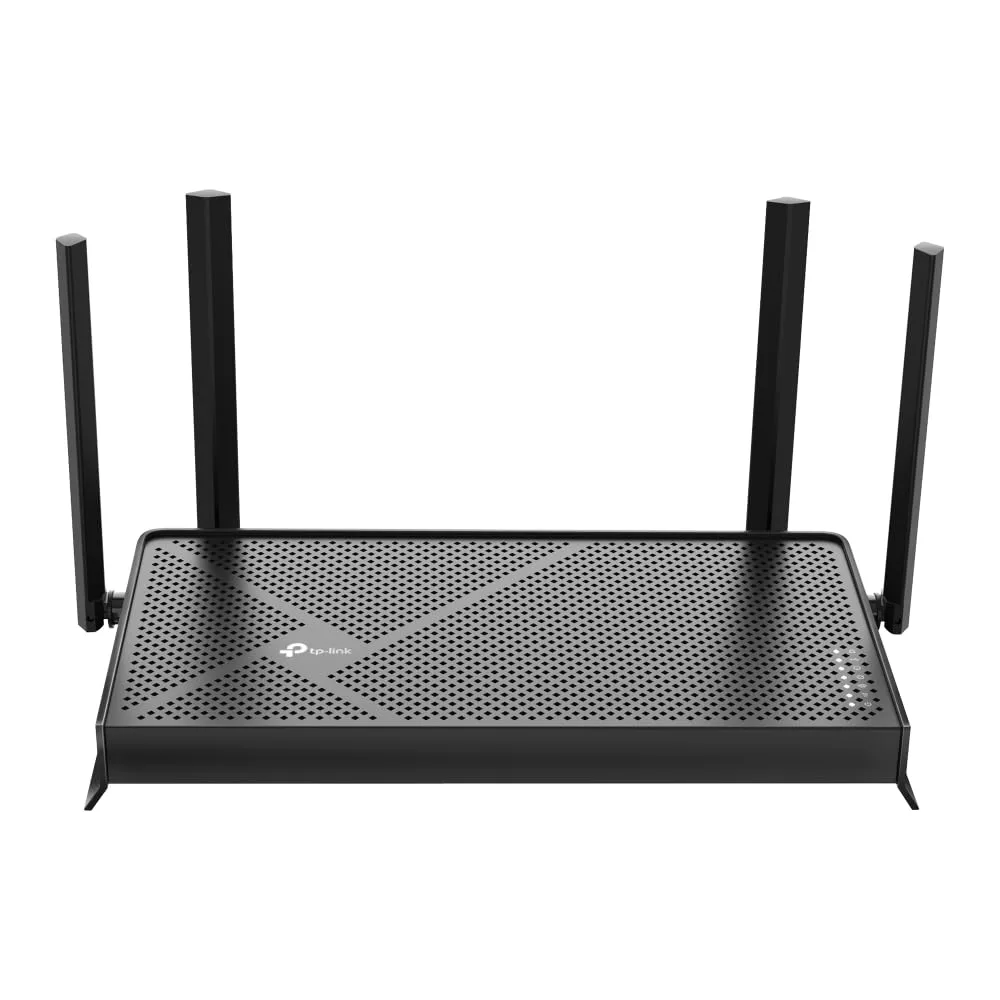
The TP-Link Archer BE230 (BE3600) is a ~$90 dual-band Wi-Fi 7 router with MLO and two 2.5G ports. Here's what you actually get for under $100 — and where it cuts corners.
✅ Pros
- +The cheapest genuine Wi-Fi 7 router — real MLO, Multi-RU, and 4K-QAM for under $100
- +2.5G WAN port makes full use of a gigabit-plus internet plan
- +Capable, disclosed Broadcom BCM6764 quad-core CPU with 512 MB RAM
- +Saturates a gigabit connection easily at close-to-medium range
- +EasyMesh support and a dedicated Private IoT Network
- +Fast, beginner-friendly Tether-app setup
- +2-year warranty
❌ Cons
- −Dual-band only — no 6 GHz, so Wi-Fi 7's headline features are diluted; MLO bonds only 2.4 + 5 GHz
- −Just one 2.5G LAN port — a second multi-gig device drops to gigabit
- −Range through walls is only average; TP-Link's 2,000 sq ft rating is optimistic
- −The useful HomeShield security features require a paid subscription
- −Basic VPN support (OpenVPN/PPTP/L2TP), not WireGuard
Verdict: The Archer BE230 is the cheapest real way into Wi-Fi 7 — with one big asterisk. For around $90 you get genuine Wi-Fi 7 with MLO, a 2.5G WAN port, and a single 2.5G LAN port, wrapped in TP-Link's easy Tether app. The asterisk: it's dual-band only. There's no 6 GHz radio, which is where most of Wi-Fi 7's headline speed lives. For a small home on a gigabit plan that just wants a fast, modern, future-friendly router, that's a smart trade. For anyone with multi-gig internet or a stack of 2.5G gear, it isn't.
Check the current price on Amazon →
Key Specs at a Glance
- Wi-Fi Standard: Wi-Fi 7 (802.11be)
- Class: BE3600 (dual-band)
- Bands: 2.4 GHz (688 Mbps) + 5 GHz (2882 Mbps) — no 6 GHz
- Wi-Fi 7 Features: MLO (Multi-Link Operation), Multi-RU, 4K-QAM
- Streams / Antennas: 2×2 (4-stream total), 4 external antennas
- Ethernet: 2× 2.5GbE (1× WAN, 1× LAN) + 3× Gigabit LAN
- 10G Ports: None
- USB: 1× USB 3.0 Type-A
- SoC: Broadcom BCM6764 quad-core @ 2.0 GHz
- Memory: 512 MB RAM / 128 MB flash
- VPN: OpenVPN, PPTP, L2TP (client + server)
- Mesh: EasyMesh compatible
- Security: HomeShield (basic free; Pro subscription paid), WPA3
- Coverage: TP-Link rates it up to ~2,000 sq ft; 60 devices
- VLAN / IoT: Dedicated "Private IoT Network" isolation
- Warranty: 2-year limited (TP-Link US standard)
- Price: ~$87–$100 street (MSRP $99.99)
What "Wi-Fi 7 Without 6 GHz" Actually Means
This is the whole story of the BE230, so it's worth being precise. Wi-Fi 7's marquee features — 320 MHz-wide channels, the cleanest spectrum, the biggest speed jumps — all depend on the 6 GHz band. The BE230 doesn't have one. It's a dual-band router (2.4 GHz + 5 GHz) that supports the other Wi-Fi 7 technologies: MLO, Multi-RU, and 4K-QAM.
The catch is that the 6 GHz band isn't technically required to call a router "Wi-Fi 7," so manufacturers can ship a dual-band box and put the Wi-Fi 7 badge on the front. That's not a scam — the BE230 genuinely is faster and more efficient than a comparable Wi-Fi 6 router — but you should know that MLO here bonds the 2.4 GHz and 5 GHz bands rather than 5 GHz + 6 GHz. That's a smaller, more congestion-prone pair, so MLO's real-world benefit is more modest than on a tri-band router like the TP-Link Archer BE550.
If you want the version of this that keeps the 6 GHz band, that's the whole point of stepping up to a tri-band BE9300 model. If you just want a solid, current-generation router for a gigabit connection, the missing band costs you very little today.
The Ports: Two 2.5G, Then Gigabit
The back panel is honest about the price. You get one 2.5G WAN port and one 2.5G LAN port, plus three Gigabit LAN ports and a USB 3.0 Type-A port. That's a sensible layout for the target buyer: the 2.5G WAN lets you take full advantage of a gigabit-plus internet plan, and the single 2.5G LAN port covers one fast device — a NAS, a 2.5G desktop, or a switch uplink.
The limit shows up the moment you have two things that want multi-gig at once. With only one 2.5G LAN port, a second 2.5G device drops to gigabit. If you're running a 2.5G NAS and a 2.5G workstation, or you want to daisy-chain a multi-gig switch and still keep a fast wired client, you've outgrown this router. That's exactly where the Archer BE550, with its full set of five 2.5G ports, earns its higher price.
The USB 3.0 port handles a basic shared drive over the network — fine for occasional file access, not a NAS replacement.
Wi-Fi and Wired Performance
For its class, the BE230 performs the way reviewers expect: at close-to-medium range on the 5 GHz band it comfortably saturates a gigabit connection, and in independent testing it pulled roughly full speed from a ~900 Mbps plan on a nearby 5 GHz client. That's the sweet spot this router is built for — a fast single-broadcaster home where the internet plan, not the Wi-Fi, is the ceiling.
Two honest weak spots. First, range through walls: like most compact dual-band routers, signal strength falls off noticeably through multiple walls and floors, so the ~2,000 sq ft coverage rating is optimistic for anything but an open, central placement. Second, the 2.4 GHz band is there for range and IoT devices, not speed — don't expect it to rescue a far-corner bedroom at high throughput.
Under the hood it's a Broadcom BCM6764 quad-core running at 2.0 GHz with 512 MB of RAM — genuinely capable silicon for the price, and enough to keep a full house of ~60 devices connected without the router itself becoming the bottleneck. Unlike some pricier TP-Link models, the internals here are actually disclosed, which is a nice bit of transparency.
Setup, Software, and the HomeShield Catch
Setup runs through the TP-Link Tether app and takes about five minutes: name your network, set a password, done. EasyMesh, a guest network, VPN toggles, and a dedicated Private IoT Network for isolating smart-home gadgets are all reachable from the app. EasyMesh support means you can add a compatible TP-Link node later to patch coverage instead of replacing the router — a useful escape hatch given the modest range.
The same caveat applies here as on every recent TP-Link router: HomeShield. The free tier gives you a network scan, basic parental controls, and QoS. The genuinely useful features — advanced parental controls, detailed reporting, IoT protection — sit behind the paid HomeShield Pro subscription. The router is fully functional without it; just don't buy the BE230 expecting premium security software for free. If a no-subscription philosophy matters to you, the GL.iNet Flint 3 includes everything, though it costs more than twice as much.
For VPN, the BE230 supports OpenVPN, PPTP, and L2TP in both client and server modes — enough to reach your home network on the road, but a basic story compared with the WireGuard-first GL.iNet boxes.
Who Should Buy the Archer BE230
Buy it if:
- You want the cheapest genuine Wi-Fi 7 router and you're on a gigabit (or slightly faster) internet plan.
- Your home is an apartment or small house and you have one fast wired device to connect.
- You're replacing an aging Wi-Fi 5 or budget Wi-Fi 6 router and want something current that'll last a few years.
- You value a simple app and a set-and-forget setup over tinkering.
Skip it if:
- You want the real Wi-Fi 7 experience with 6 GHz and full-benefit MLO — spend up for the tri-band Archer BE550.
- You have multi-gig internet or two or more 2.5G devices — one 2.5G LAN port isn't enough.
- You have a large multi-story home where coverage is the priority — a Wi-Fi 7 mesh will serve you far better.
- You want open firmware, whole-network WireGuard, or no subscriptions — look at the GL.iNet Flint 3.
Archer BE230 vs. Archer BE550 vs. a Wi-Fi 7 Mesh
- TP-Link Archer BE230 (BE3600): dual-band Wi-Fi 7 (no 6 GHz); MLO on 2.4 + 5 GHz; two 2.5G ports (1 WAN + 1 LAN); best for a small home or apartment; HomeShield Pro optional and paid; ~$90.
- TP-Link Archer BE550 (BE9300): tri-band Wi-Fi 7 with 6 GHz; MLO on 5 + 6 GHz; five 2.5G ports (1 WAN + 4 LAN); best for a small-to-medium home; HomeShield Pro optional and paid; ~$200.
- TP-Link Deco BE63 (mesh): tri-band Wi-Fi 7 mesh with 6 GHz; MLO on 5 + 6 GHz; 2.5G per unit; best for a large / multi-story home; HomeShield Pro optional and paid; ~$300 (2-pack).
The read: the BE230 is the entry ticket — buy it if you're on gigabit, in a smaller space, and don't need 6 GHz. Step up to the BE550 the moment you want the full tri-band Wi-Fi 7 experience or more than one 2.5G port. Go Deco mesh if coverage across a big house is the real problem you're solving.
Bottom Line
The TP-Link Archer BE230 does one thing very well: it makes Wi-Fi 7 cost less than $100. As long as you understand that "Wi-Fi 7" here means MLO on 2.4 and 5 GHz — not the 6 GHz band that headlines the standard — it's a genuinely good deal. On a gigabit plan in a small home, you get modern, efficient Wi-Fi, a 2.5G WAN port that keeps up with your internet, and a capable CPU, all for the price of a decent Wi-Fi 6 router.
Just be honest with yourself about the ceiling. One 2.5G LAN port and no 6 GHz mean you can outgrow it. If that describes you, buy the tri-band Archer BE550 instead. If it doesn't, the BE230 is the easiest, cheapest upgrade in networking right now.
Rating: 4.0 / 5
Our Verdict
The TP-Link Archer BE230 (BE3600) is a ~$90 dual-band Wi-Fi 7 router with MLO and two 2.5G ports. Here's what you actually get for under $100 — and where it cuts corners.
Ready to buy the TP-Link Archer BE230?
Buy on Amazon →Affiliate link — we may earn a commission at no extra cost to you.