TP-Link Archer BE550 Review: Affordable Tri-Band Wi-Fi 7 With Full 2.5G Ports
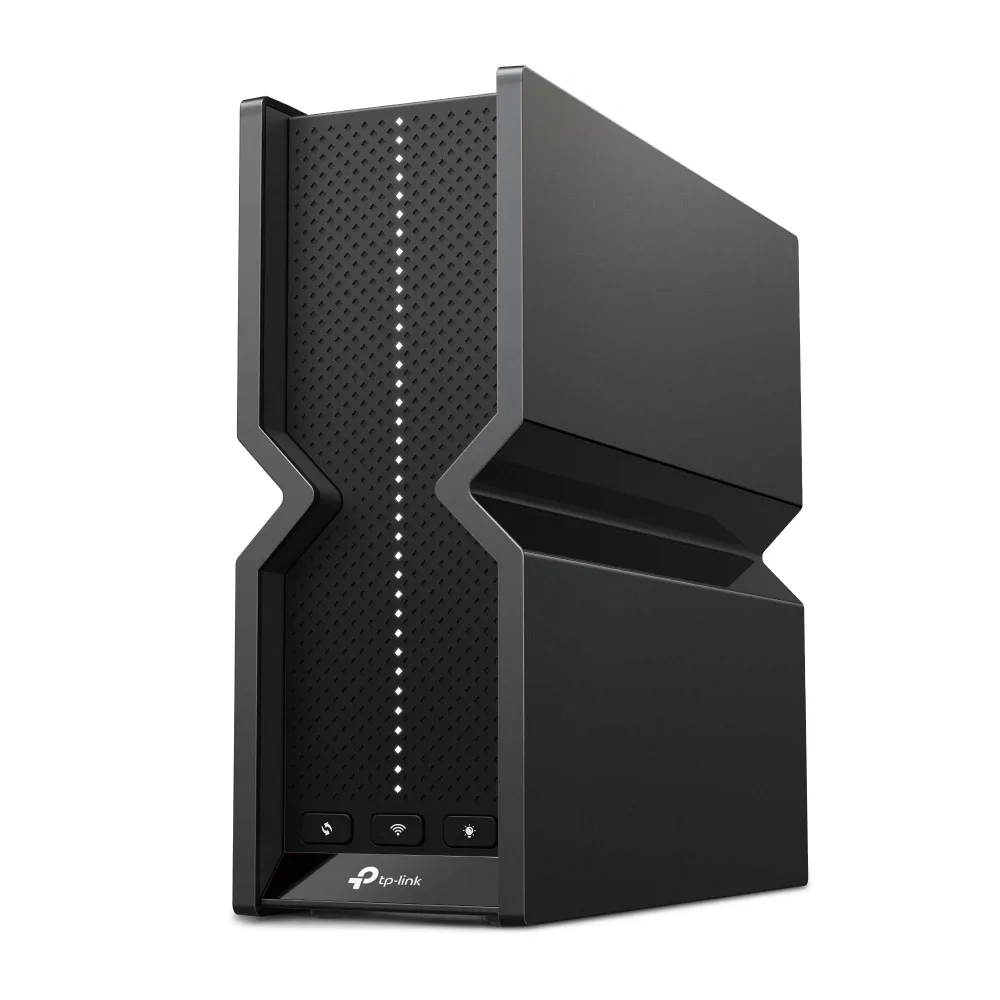
The TP-Link Archer BE550 (BE9300) is the value tri-band Wi-Fi 7 router for a small-to-medium home on gigabit or 2.5-gig internet. For around $200 you get real 6 GHz Wi-Fi 7 with MLO and five 2.5GbE ports — one WAN, four LAN. Range is modest and TP-Link won't disclose the CPU, but for mainstream buyers who want future-proof Wi-Fi and multi-gig wiring without flagship prices, it's the easiest recommendation in the category.
✅ Pros
- +True tri-band Wi-Fi 7 (2.4 + 5 + 6 GHz) with MLO and 320 MHz channels
- +Five 2.5GbE ports — every wired port is multi-gig, rare at this price
- +USB 3.0 port for basic network storage
- +EasyMesh support to expand coverage later
- +Runs cool and proved stable under sustained load
- +Clean Tether-app setup; approachable for non-technical buyers
- +Aggressive ~$200 pricing for a full tri-band feature set
❌ Cons
- −No 10G port — wired backbone caps at 2.5 Gbps per link
- −Only average range; 6 GHz especially fades past ~40 ft
- −The most useful HomeShield security features require a paid subscription
- −TP-Link doesn't disclose the CPU/RAM specs
- −Basic VPN support (OpenVPN/PPTP/L2TP) — not a WireGuard powerhouse
Verdict: The Archer BE550 is the value tri-band Wi-Fi 7 router for a normal home. For around $200 it delivers genuine 6 GHz Wi-Fi 7 with MLO and — the part that matters most for the price — a full set of 2.5GbE ports: one WAN and four LAN. Range is only average and TP-Link won't say what CPU is inside, but for a small-to-medium home on gigabit or 2.5-gig internet, this is the easiest way into Wi-Fi 7 without paying flagship money.
Check the current price on Amazon →
Key Specs at a Glance
| Spec | Detail |
|---|---|
| Wi-Fi Standard | Wi-Fi 7 (802.11be) |
| Class | BE9300 (tri-band) |
| Bands | 2.4 GHz (574 Mbps) + 5 GHz (2880 Mbps) + 6 GHz (5760 Mbps) |
| Wi-Fi 7 Features | MLO (Multi-Link Operation), 320 MHz channels, 4K-QAM, 6 GHz band |
| Streams / Antennas | 6-stream, 6 internal antennas |
| Ethernet | 5× 2.5GbE (1× WAN, 4× LAN) — every port is 2.5G |
| 10G Ports | None |
| USB | 1× USB 3.0 Type-A |
| SoC | Not disclosed by TP-Link |
| VPN | OpenVPN, PPTP, L2TP (client + server) |
| Mesh | EasyMesh compatible |
| Security | HomeShield (basic free; Pro subscription paid), WPA3 |
| Coverage | TP-Link rates it up to ~2,000 sq ft; ~1,600 sq ft effective in testing |
| Dimensions | 76 × 231.7 × 203 mm (3.0 × 9.1 × 8.0 in) |
| Power | 12V / 3.3A adapter |
| Warranty | 2-year limited (TP-Link US standard) |
| Price | ~$180–$220 street (MSRP $199.99) |
What the Archer BE550 Is For
Most Wi-Fi 7 routers under $250 cut a corner to hit the price — they drop the 6 GHz band and ship as dual-band "Wi-Fi 7," or they give you one 2.5G port and fill the rest of the back panel with old gigabit. The Archer BE550's pitch is that it doesn't do either. It's a real tri-band router with the 6 GHz band intact, and every single wired port is 2.5G. At around $200, that's an unusually complete package.
That makes it the natural mainstream pick in a lineup that otherwise leans expensive or specialist. If you want a flagship with 10G ports, the ASUS RT-BE88U is the step up; if you want an open-firmware, VPN-first box, the GL.iNet Flint 3 is the same BE9300 class for tinkerers. The BE550 is for everyone else: buy it, run the setup app, get modern Wi-Fi and multi-gig wiring, move on.
The Ports: Five 2.5G, No 10G
The back panel is the BE550's strongest argument. You get one 2.5G WAN port and four 2.5G LAN ports — so a 2.5-gig internet handoff, a 2.5G NAS, a 2.5G desktop, and a 2.5G switch uplink all get full-speed connections at once. At this price most competitors give you a single 2.5G port and pad the rest with gigabit, which quietly bottlenecks any multi-gig gear you add later. Here you don't have to plan around that.
The ceiling is the obvious trade-off: there is no 10G port. If you have 5-gig or 10-gig fiber, or you routinely move large files between 10G-connected machines, the BE550 caps each wired link at 2.5 Gbps. For that you want a router with a 10G port — again, the ASUS RT-BE88U with its dual 10G is the sensible upgrade.
There's also a single USB 3.0 Type-A port for a shared drive. In testing it pushes about as much as a 2.5G link allows (~2 Gbps after overhead) with an external SSD, so it's a capable basic file-share — just not a NAS replacement.
Wi-Fi 7 Performance
The BE550 is a true tri-band BE9300 radio: 574 Mbps on 2.4 GHz, 2880 Mbps on 5 GHz, and 5760 Mbps on 6 GHz, for roughly 9.2 Gbps of aggregate capacity. Keeping the 6 GHz band is the important part — 6 GHz-capable clients get the clean spectrum and 320 MHz-wide channels that are the whole point of Wi-Fi 7, and MLO (Multi-Link Operation) lets compatible clients bond bands for steadier throughput and lower latency.
Real-world speeds are solid rather than spectacular. A close-range Wi-Fi 7 client comfortably saturates a gigabit or 2-gig plan; in independent testing a Wi-Fi 7 phone pulled around 1.5 Gbps of usable throughput even on a much faster connection, which is typical for a single-stream mobile client. The honest weak spot is range — signal falls off noticeably past ~40 feet, so this is a router for apartments and small-to-medium homes (rated to 2,000 sq ft, more realistically ~1,600 sq ft with a central placement), not a sprawling multi-story house.
The upside: it runs cool and stays stable. Reviewers report it staying "relatively cool" under load and passing multi-day stress tests with no drops. TP-Link does not publish the processor specs for this series, which is worth knowing if you like to compare silicon — but in practice it handles a full house of devices without stumbling.
Setup, Software, and the HomeShield Catch
Setup runs through the TP-Link Tether app or the web interface and is genuinely quick — SSIDs, guest network, EasyMesh, and VPN toggles are all easy to reach. EasyMesh support means you can add a compatible TP-Link node later to extend coverage instead of replacing the router, which softens the modest range for buyers who might grow into a bigger space.
The one thing to go in with eyes open about is HomeShield. The basic tier — network scan, basic parental controls, QoS — is free. The genuinely useful stuff (advanced parental controls, detailed reporting, IoT protection) sits behind the paid HomeShield Pro subscription. That's a real difference from a router like the Flint 3, where every feature is included with no subscription. Budget for the Pro tier only if you actually want those features; the router works fully without it.
For VPN, the BE550 supports OpenVPN, PPTP, and L2TP in both client and server modes. That's enough to reach your home network remotely or route through a provider, but it's a more basic VPN story than the WireGuard-first GL.iNet boxes — don't buy the BE550 primarily as a VPN router.
Who Should Buy the Archer BE550
Buy it if:
- You want real tri-band Wi-Fi 7 (with 6 GHz and MLO) for around $200.
- You have — or plan to add — multiple 2.5G devices and want every wired port to be multi-gig.
- Your home is an apartment or small-to-medium house on gigabit or 2.5-gig internet.
- You want a set-up-and-forget router with a clean app, not a project.
Skip it if:
- You have 5-gig or 10-gig internet or a 10G LAN — you need a 10G port; look at the ASUS RT-BE88U.
- You want open firmware, whole-network WireGuard, or no subscriptions — get the GL.iNet Flint 3.
- You have a large multi-story home where coverage matters most — a Wi-Fi 7 mesh will serve you better than any single router.
Archer BE550 vs. Flint 3 vs. Flagship Wi-Fi 7
| TP-Link Archer BE550 (BE9300) | GL.iNet Flint 3 (BE9300) | ASUS RT-BE88U (flagship) | |
|---|---|---|---|
| Wi-Fi | Tri-band Wi-Fi 7 (6 GHz) | Tri-band Wi-Fi 7 (6 GHz) | Tri-band Wi-Fi 7 (6 GHz) |
| 2.5G Ports | 5 (1 WAN + 4 LAN) | 5 | 4 |
| 10G Ports | None | None | 2 |
| Firmware | TP-Link (Tether app) | OpenWRT + LuCI | ASUS (AiMesh) |
| VPN | OpenVPN/PPTP/L2TP | WireGuard/OpenVPN, 30+ providers | WireGuard/OpenVPN/IPsec |
| Subscriptions | HomeShield Pro (optional, paid) | None | None |
| Price | ~$200 | ~$210 | ~$300 |
The read: get the BE550 if you want the simplest, cheapest way into full tri-band Wi-Fi 7 with lots of 2.5G ports and an easy app; get the Flint 3 if you want the same class of hardware but with open firmware and serious VPN; step up to the RT-BE88U only if you actually need 10G.
Bottom Line
The TP-Link Archer BE550 nails the thing budget Wi-Fi 7 routers usually get wrong: it keeps the 6 GHz band and gives you a full set of 2.5G ports, all for about $200. Range is only average and TP-Link is cagey about the internals, but neither is a dealbreaker for the buyer this router is built for — a normal home on gigabit-to-2.5-gig internet that wants modern Wi-Fi and multi-gig wiring without overpaying.
If you don't need 10G and you don't want a networking hobby, this is the tri-band Wi-Fi 7 router to buy right now.
Rating: 4.2 / 5
Our Verdict
The TP-Link Archer BE550 (BE9300) is the value tri-band Wi-Fi 7 router for a small-to-medium home on gigabit or 2.5-gig internet. For around $200 you get real 6 GHz Wi-Fi 7 with MLO and five 2.5GbE ports — one WAN, four LAN. Range is modest and TP-Link won't disclose the CPU, but for mainstream buyers who want future-proof Wi-Fi and multi-gig wiring without flagship prices, it's the easiest recommendation in the category.
Ready to buy the TP-Link Archer BE550?
Buy on Amazon →Affiliate link — we may earn a commission at no extra cost to you.