How Long Do Routers Last? Your Router Has an Expiration Date, and Your Vendor Already Published It
Published 2026-10-29 · By NetAudioHub Editorial
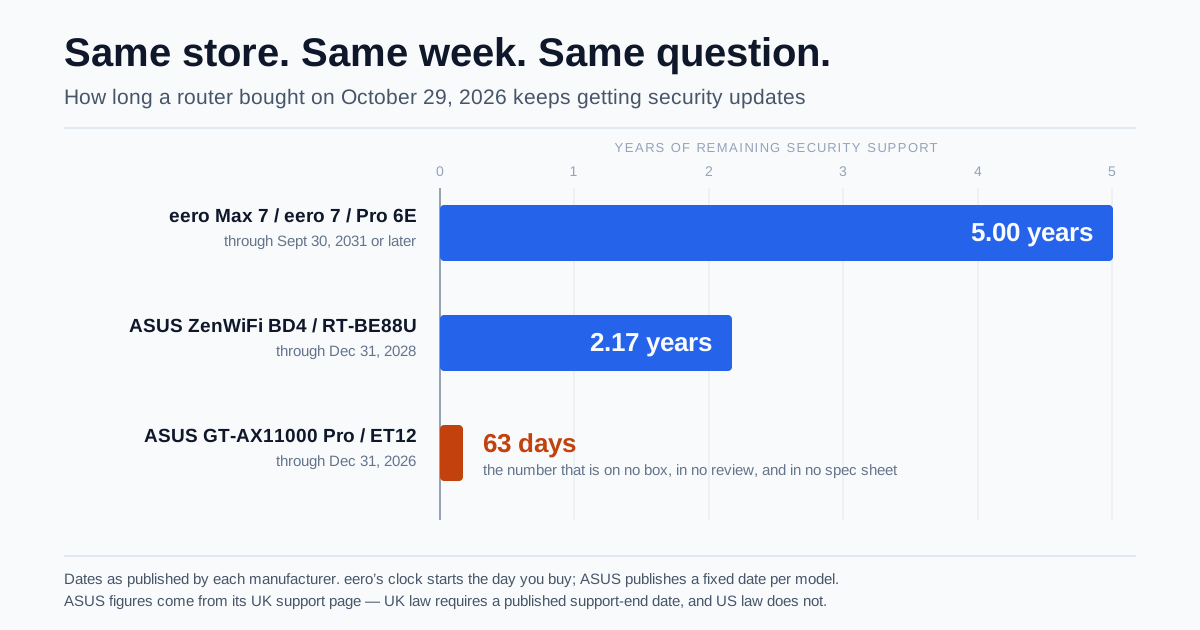
Two Wi-Fi routers sold side by side today have published security-update end dates of December 31, 2026 and September 30, 2031. That is 63 days versus five years for a buyer this week — a 29-fold difference in the one spec nobody puts on the box. The reason you have never seen those numbers is that no US law requires a router maker to tell you. The UK does, so ASUS publishes a model-by-model date on its UK support page for hardware it sells everywhere. Singapore does, so there is a second list. Meanwhile eero publishes dates voluntarily, TP-Link gives you a formula and a separate spreadsheet, Netgear gives you a formula whose starting date it never discloses, and Ubiquiti gives you nothing at all. Here is how to find your own router's date at every major brand, the arithmetic that turns a vendor's support window into your actual runway, and how to tell whether the router you own is finished.
The short version: routers rarely die. They stop getting security updates, keep working perfectly, and quietly become the least protected device in your house. That end-of-support date is a real, published date for most major brands, and almost nobody knows how to look it up. Two flagship routers a shopper would cross-shop this week have published support-end dates of December 31, 2026 and September 30, 2031 — 63 days versus five years for the same purchase date. No US law requires a router maker to disclose this, so most Americans never see it. UK law does require it, and vendors sell the same hardware in both countries, so the UK and Singapore support pages work fine as a lookup tool for a router sitting on a shelf in Ohio. The five big brands define the deadline five incompatible ways: eero counts five years from the day you bought it, ASUS publishes a fixed calendar date per model, TP-Link promises three years after a model's end of life, Netgear promises three years after a date it does not tell you, and Ubiquiti promises nothing in writing. Here is how to find yours.
Two Different Questions
Search for how long a router lasts and you will get an answer between three and five years, sourced from nowhere in particular. That number is describing hardware failure — capacitors, power supplies, thermal fatigue — and for a router sitting on a shelf in a normal house, it is far too pessimistic. Plenty of ten-year-old routers still pass traffic all day.
The question worth asking is different, and it has an exact answer:
- How long will this thing physically work? Usually longer than you want it to. Often a decade.
- How long will the manufacturer patch it when someone finds a remote code execution bug in its web interface? Frequently three to five years, and the clock usually started before you bought it.
The second question is the one that matters, because a router is the one device in your home that is exposed to the internet by design, runs a web server, holds your Wi-Fi credentials, and sees every DNS lookup on your network. When a router stops receiving firmware updates, nothing visible happens. It does not slow down, pop up a warning, or change color. It simply stops being fixed, while researchers keep publishing new ways into it. That is the actual end of a router's life, and it arrives years before the hardware gives up.
Nobody Has to Tell You — Unless You Live Somewhere Else
Here is the reason this information feels impossible to find in the US: it is not required.
The UK's Product Security and Telecommunications Infrastructure Act took effect on April 29, 2024. It requires manufacturers of consumer connectable products — home routers included — to publish a defined support period with an end date, and to state it at the point of sale. Not a vague policy. A date.
Singapore's Cybersecurity Labelling Scheme, run by its Cyber Security Agency, does something similar for products carrying the label, which is why there is a second published list with its own dates.
The US equivalent is the FCC's Cyber Trust Mark. It does ask participants to disclose a minimum support period and an end-of-support date, which sounds like the same thing — but two details gut it. It is voluntary, and routers were not in the initial scope; the FCC has said the program may expand to cover routers and other infrastructure later. The program has also had a rocky administration, with UL Solutions withdrawing as lead administrator in December 2025 and the ioXt Alliance taking over in April 2026. So as of right now, an American buying a router has no legal right to know how long it will be patched.
The useful consequence: manufacturers do not build separate hardware for the UK. An ASUS RT-AX86U Pro sold in Manchester and one sold in Minneapolis are the same product running the same firmware line. When ASUS tells a British regulator that model's support ends on a specific date, that is the most honest read anyone has on when that firmware line goes quiet — including for the unit on your shelf. It is a commitment made in one market, not a guarantee in yours, but it is the only number that exists, and it is free to look up.
The Five Clocks
Every major brand has a policy. The problem is that no two of them start counting at the same moment, and only some of them let you finish the arithmetic.
| Brand | Support window | Clock starts at | Can you actually get a date? |
|---|---|---|---|
| eero | At least 5 years (or the published floor, whichever is later) | The day you bought it | Yes. Public US table, per model, no law required |
| ASUS | About 4 years, fixed per model | Product's compliance date | Yes, but only on the UK and Singapore support pages |
| TP-Link | 3 years | The model's end-of-life date | Yes, with arithmetic. EOL list is published; add three years |
| Netgear | 3 years | The model's last sale date | No. Netgear does not publish last sale dates to consumers |
| Ubiquiti | Not stated | Not stated | No. Only a vintage/legacy list, updated after the fact |
Read that middle column again, because it is the whole game. Four of the five clocks start on the product's timeline, not yours. Only eero starts counting when you hand over money.
eero: the only vendor whose clock is about you
eero's policy is the clearest in the industry, and it is published on a normal US support page with no regulator forcing it:
eero guarantees software security updates until at least five years from when you bought the device new on eero.com or Amazon.com — or until the published date for that model, if that is later. Bought it somewhere else, and you still get at least the published date.
And the published dates are generous. Every current Wi-Fi 6 and Wi-Fi 7 model — eero 6, 6+, Pro 6E, Max 7, eero 7, Pro 7, Outdoor 7, PoE 6 and PoE 7 — is committed through at least September 30, 2031. Even the discontinued eero Pro and eero Beacon run to March 12, 2030, and the second-generation eero to April 29, 2030.
The one exception is instructive. The original first-generation eero stopped receiving guaranteed updates on September 30, 2022. eero said so publicly and offered a trade-in. That is what a support policy looks like when a company actually intends to honor it: a date, announced, with an exit ramp.
ASUS: a real date, published in the wrong country
ASUS maintains per-model security-update end dates on its UK support page (citing PSTI) and its Singapore support page (citing the CLS). Roughly four years per model. A sample of what is on the UK list right now:
| ASUS model | Security updates end |
|---|---|
| GT-AX11000, RT-AX89X, ZenWiFi XD6, ZenWiFi AX Mini XD4, TUF-AX6000 | December 31, 2025 (already past) |
| GT-AX11000 Pro, GT-AX6000, GT-BE98, RT-AX86U Pro, RT-AX88U Pro, RT-AX5400, ZenWiFi Pro ET12, ZenWiFi XT8, XT9 | December 31, 2026 |
| RT-BE58U, RT-BE86U, RT-BE88U, RT-BE92U, TUF-BE3600, ZenWiFi BD4, BT8, BT10, BQ16 | December 31, 2028 |
| RT-BE82U, RT-BE58U V2, TUF-BE9400, RP-BE58, ZenWiFi BD4 Outdoor | December 31, 2029 |
| RT-BE90U, RT-BE3600E, GS-BE7200, RP-AX50, ZenWiFi BT7 | December 31, 2030 |
Two things jump out.
First, the December 31, 2026 row is full of routers that are still being sold as current flagships. The GT-AX11000 Pro and the ZenWiFi Pro ET12 are both products we have reviewed and recommended on their merits — and both have a published support commitment that expires this December. That does not make them bad routers. It makes them routers you should buy at a Wi-Fi 6E clearance price, not a flagship price, and it is exactly the kind of thing that never appears in a spec comparison.
Second, look at the ZenWiFi BD4 and the ZenWiFi BD4 Outdoor. Same product family, same name, one word different — and a full year apart on the support list. Whatever you look up, look up your exact model including hardware revision. ASUS's list distinguishes TUF-AX3000 from TUF-AX3000 V2, and RT-BE58U from RT-BE58U V2, and they are not the same entry.
TP-Link: a formula plus homework
TP-Link's PSTI statement commits to security updates during a defined support period that ends three years after the product's end-of-life date. TP-Link does not put the resulting dates on the policy page — but it does publish a searchable end-of-life list with real EOL dates, which means you can finish the calculation yourself:
Your TP-Link support ends = the EOL date on the list + 3 years.
Worked example: the Archer C5400 v2.0 shows an EOL date of January 8, 2022. Add three years and its support period ended January 8, 2025. If you are running one today, you have been unpatched for well over a year.
The catch is that a model not yet on the EOL list has no end date at all — the clock has not started. That is genuinely good news for anything current, and it is why buying a TP-Link model early in its life is worth real money in support terms.
Netgear: a formula you cannot solve
Netgear publishes a proper End of Service policy document, and the policy itself is reasonable and tiered:
- Year 1 after last sale: software updates and feature enhancements may continue
- Years 1 through 3: critical bug fixes and security patches
- After year 3: no more firmware updates, including security updates
The problem is the starting gun. Everything hangs off the Last Sale Date — Netgear's term for the last day it expects the product to be purchasable through authorized channels. That date is internal. It is not printed on the box, not on the product page, and not in the manual. Netgear does host an end-of-service lookup, but it only helps after a product has already been retired into it; searching it for a router you can still buy returns nothing. So for a Netgear router you own right now, the honest answer is that the policy is three years from a date you are not allowed to know.
Ubiquiti: no written commitment
Ubiquiti maintains a vintage and legacy products list and has no published support-duration policy. In practice UniFi hardware tends to be supported for a long time through rolling UniFi OS releases, and gear absent from the legacy list is generally still getting updates — but "generally" is doing real work in that sentence. There is no date, no formula, and no commitment to hold anyone to. For a prosumer audience that accepts the tradeoff for the feature set, fine. It should still be priced into the decision.
The Arithmetic Nobody Does
Here is the part that changes what you buy. A vendor's support window is not your support runway.
Your runway = the vendor's end date − the day you buy it.
Because four of the five clocks start on the product's timeline, buying late in a model's life silently shortens your window. Buy a router two years into its run under a three-year-from-EOL policy and you may get one year, not three. The discount that made the older model attractive is often a discount on the support, not on the hardware.
Run it for a shopper buying on October 29, 2026, cross-shopping routers that all sit on the same retail page today:
| Router | Published end of security updates | Runway from Oct 29, 2026 |
|---|---|---|
| eero Max 7, eero 7, eero Pro 6E | Later of Sept 30, 2031 or purchase + 5 years | 5.00 years |
| ASUS ZenWiFi BD4 / RT-BE88U | December 31, 2028 | 2.17 years |
| ASUS GT-AX11000 Pro / ZenWiFi Pro ET12 | December 31, 2026 | 63 days |
That is a 29-fold difference between the top and bottom of a list of routers a normal person would compare on price and throughput. Nothing on any of those boxes, in any spec table, or in most reviews — ours included, until now — would tell you.
This does not mean "always buy eero." eero's hardware, feature depth and pricing are their own argument, and plenty of people have good reasons to prefer an ASUS or a TP-Link. It means the support runway is a spec, it varies by more than an order of magnitude, and you should price it like you price throughput. A router with two extra years of patches is worth real money against one without them.
There is also a clean corollary: the support clock is a strong argument against the clearance bin. The Wi-Fi 6E flagship at 50% off is often 50% off precisely because its firmware line is winding down. Sometimes that is still the right buy — a great router with two years of patches at a third of the price is a defensible call. Just make it on purpose.
How to Look Up Your Own Router in Five Minutes
- Get your exact model and hardware revision. Read the label on the bottom of the unit, not the marketing name. "v2," "V3," "Pro" and "Go" are different products with different dates.
- eero: check eero's software security updates support article. It lists every current model with a date, and remember your personal date is five years from your purchase if that is later.
- ASUS: search for ASUS's "Duration of Security Update Support" FAQ pages. There is a UK version and a Singapore version. Find your model on either. Use the earlier date if both list it and they disagree.
- TP-Link: find your model on TP-Link's end-of-life products list, then add three years to the listed EOL date. Not on the list at all means the clock has not started.
- Netgear: search Netgear's end-of-service page for your model. A hit means support has ended or is ending. No hit means you cannot determine the date — treat the general three-year-post-retirement rule as your planning assumption.
- Anyone else: go to your model's support and downloads page and look at the date of the most recent firmware release. This is the universal fallback and it is often more honest than any policy page. If the newest firmware for your router is more than 18 to 24 months old and the vendor is still shipping updates for newer models, you are effectively unsupported no matter what the policy says.
That last check is the one to run first if you are in a hurry. Policy documents describe intentions. A download page describes behavior.
What Actually Happens After the Date Passes
Nothing, immediately. That is the whole problem.
Your router keeps routing. Wi-Fi keeps working. No light turns red. What changes is that new vulnerabilities in that firmware stop getting fixed, while the disclosure pipeline keeps running — and an unpatched consumer router is a well-understood target. It is internet-facing by definition, it runs an administrative web server, it holds the credentials for every device in the house, and it resolves every DNS query on your network. Compromise it and you do not need to attack anything else.
This is not hypothetical; it is the ordinary pattern. D-Link has repeatedly declined to fix serious flaws in routers past end of life, telling owners to replace the hardware instead. That is the standard industry response, and it is the response you should expect from any vendor once the date passes.
If you are past your date and cannot replace the router immediately, three things measurably reduce the exposure:
- Turn off remote management and any cloud/WAN admin access. This removes the single most exploited attack surface on consumer routers. Do it today regardless of your router's age.
- Disable WPS and UPnP, change the admin password from the default, and confirm you are on WPA3 or at minimum WPA2-AES. Our WPA2 vs WPA3 guide covers what your hardware can actually support.
- Install the final firmware release that does exist. Plenty of unsupported routers are running firmware two or three versions behind the last one their vendor ever shipped.
These are mitigations, not fixes. The fix is new hardware.
So When Should You Actually Replace It?
Three separate lifespans expire at different times, and you replace at whichever comes first:
1. Support life — usually 3 to 5 years from launch. The security answer, and typically the earliest to expire. This is the one this article is about.
2. Capability life — variable. Your router stops keeping up with what you do: no 160 MHz channels, no 6 GHz band, a 1 Gb WAN port on a 2 Gb plan, choking on device count. Our guides on Wi-Fi generations, when to move to Wi-Fi 7, and how many devices a router can really handle cover this. Note that plenty of "my Wi-Fi is bad" problems are placement or coverage, not age — try router placement and mesh versus an extender versus an access point before spending money.
3. Hardware life — 5 to 10+ years. Genuine failure: overheating, random daily reboots, ports going dead, throughput collapsing after uptime. Real, but usually the last to arrive.
Replace now if any of these are true:
- Your published support date has passed, or the newest available firmware is over two years old
- Your router cannot do WPA3 at all
- It is on a published end-of-service or end-of-life list
- It reboots on its own, runs too hot to touch, or needs regular power-cycling to stay usable
Age alone is not a reason. A four-year-old router with a 2030 support date and a 6 GHz radio is fine. A two-year-old router whose vendor stopped shipping firmware last year is not.
What to Buy With This in Mind
The buying rule that falls out of all of the above is short: buy early in a model's life, and prefer vendors that publish a date.
- If a long, verifiable, no-homework support window is the priority, eero is the only brand that publishes per-model dates on a US page and starts the clock at your purchase. We have reviewed the eero Max 7, the eero 7 and the eero Pro 6E; all three are committed through at least September 30, 2031. You can compare current mesh systems on Amazon.
- If you want ASUS, the Wi-Fi 7 generation is where the support dates are. The ZenWiFi BD4 and RT-BE88U are listed to December 31, 2028, versus December 31, 2026 for the Wi-Fi 6E flagships. Browse Wi-Fi 7 routers.
- If you want TP-Link, check the EOL list before you buy. A model that has not entered EOL has not started its three-year countdown, which is the best position to be in — which in practice argues for the current Wi-Fi 7 line over a discounted Wi-Fi 6 holdover. The Archer BE550 is the value tri-band Wi-Fi 7 router in that line at around $200. See current Wi-Fi 7 mesh systems.
- A patch you never install is not a patch, so check how your candidate actually ships firmware. Some routers update silently; others do not. Our review of the GL.iNet Flint 3 found its updates are largely manual rather than automatic — a fair trade for an OpenWRT box you can configure to the metal, but it means the checking is on you.
- Whatever you pick, this is worth reading alongside the FCC router ban and what is still legal to buy, since import status and firmware support are now tangled together, and buying versus renting your modem if your ISP gateway is also in the mix.
The Bottom Line
"How long does a router last?" is the wrong question, and the three-to-five-year answer you will find everywhere is describing the wrong failure mode. Routers outlive their security support by years, and the dangerous window is the one after the patches stop and before you notice — which, since nothing visibly changes, can easily be forever.
The support date is knowable. eero publishes it outright. ASUS publishes it because British law made it. TP-Link hands you a formula and the numbers to run it. Netgear hands you a formula and withholds the input. Ubiquiti does not engage. Five minutes on the right support page will tell you what you actually own, and for a lot of readers that five minutes will turn up a date that has already passed.
And when you do buy the next one, treat the support window as a spec on the same shelf as throughput and port count. It ranges from 63 days to five years on routers sold side by side at the same store in the same week. There is no other spec on the box with that much spread — and it is the only one measured in how long the thing stays safe.