WPA2 vs WPA3: What Changed, Why It Matters, and Whether You Should Switch
Published 2026-07-26 · By NetAudioHub Editorial
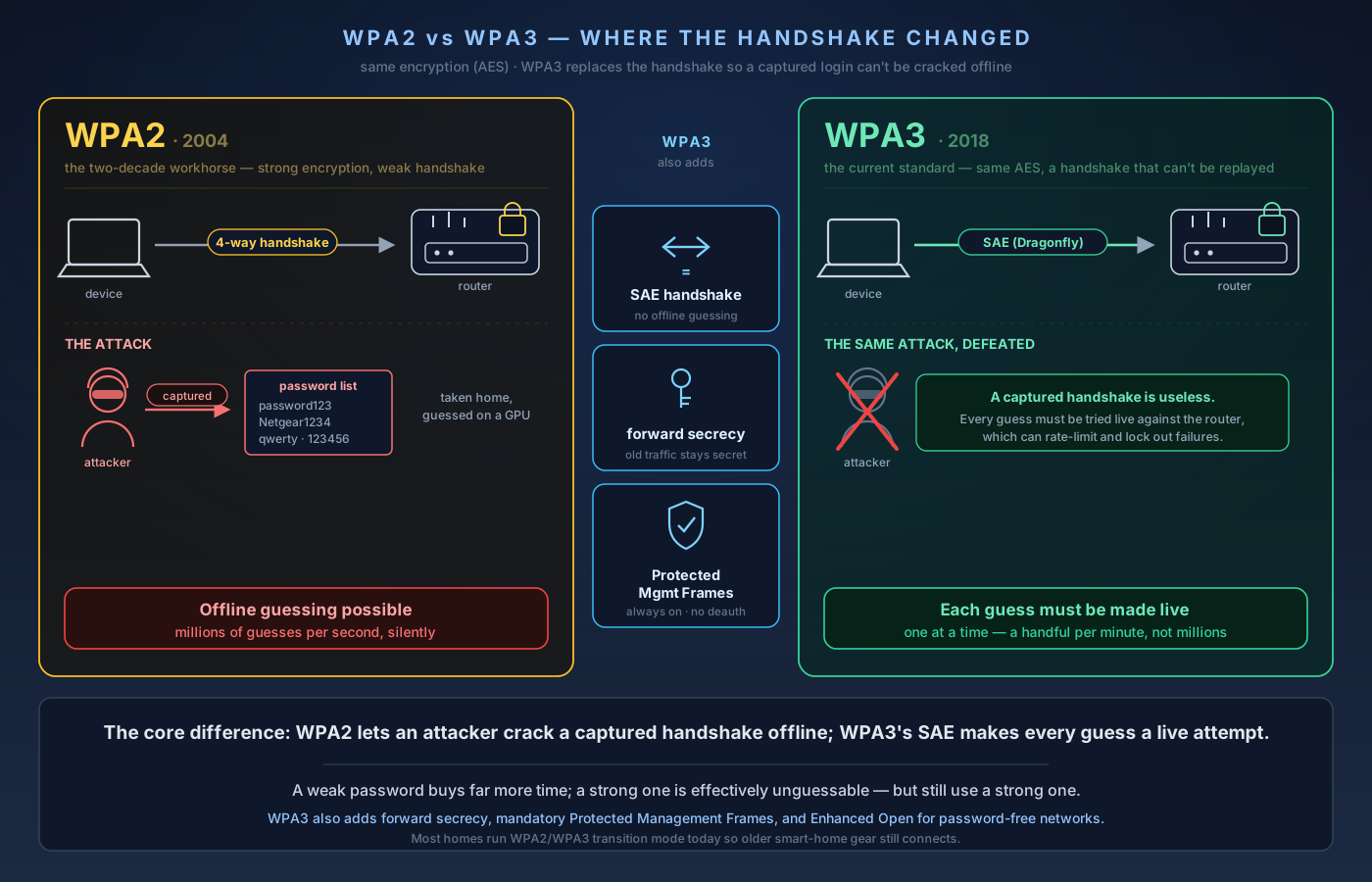
WPA3 is a real security upgrade over WPA2, and the biggest change is how your password is verified. Under WPA2, an attacker who captures your connection handshake can guess your password offline at millions of tries per second; WPA3's SAE handshake makes every guess a live attempt against your router. Here's what SAE, forward secrecy, Protected Management Frames, and Enhanced Open actually do — and how to switch without bricking your IoT.
The verdict up front: WPA3 is a real security upgrade over WPA2, and if your router and devices support it you should turn it on. The single biggest change is how your password is verified. Under WPA2-Personal, an attacker who sits nearby and captures the brief "handshake" when a device joins your network can walk away with that capture and guess your password offline — millions of attempts per second on their own hardware, with you none the wiser. WPA3 replaces that handshake with a method called SAE (Simultaneous Authentication of Equals) that makes offline guessing impossible: every guess has to be made live, against your router, one at a time. That alone turns a weak password from "cracked over lunch" into "would take years." WPA3 also adds forward secrecy (capturing today's traffic doesn't let an attacker decrypt it later even if they get the password), makes Protected Management Frames mandatory (blocking the deauth attacks that kick you off your own network), and brings Enhanced Open, which encrypts even open guest/café networks that have no password at all. The catch: some older smart-home gadgets don't speak WPA3, so most people run "WPA2/WPA3 transition mode" for now. Below: what each of these actually does, the one setting that trips people up, and how to switch without bricking your IoT.
The Short History
Wi-Fi security has gone through a few generations, and the names are worth keeping straight because routers still let you pick the old ones:
- WEP (1997) — broken beyond repair. Crackable in minutes. Never use it.
- WPA (2003) — a stopgap patch for WEP. Also obsolete.
- WPA2 (2004) — the workhorse for two decades. Introduced AES-CCMP encryption, which is still perfectly strong. Its weakness isn't the encryption; it's the handshake used to prove you know the password.
- WPA3 (2018) — the current standard. Keeps strong encryption, replaces the vulnerable handshake, and closes several long-standing gaps.
The important takeaway: WPA2's encryption was never the problem. AES-CCMP has not been broken. What WPA3 fixes is everything around the encryption — how you authenticate, what an eavesdropper can do with captured traffic, and how the network protects its own management messages.
The Core Fix: SAE Replaces the 4-Way Handshake
Here's the WPA2 flaw in plain terms. When a device joins a WPA2-Personal network, the router and device run a "4-way handshake" to prove both sides know the password and to set up encryption keys. The problem is that this handshake contains enough information for an attacker to verify a password guess without being connected.
So the attack is simple and patient:
- An attacker parks within Wi-Fi range and passively captures a single handshake — which happens every time any device joins or reconnects. (They can even force it by briefly knocking a device off the network.)
2. They take that capture home.
3. They run it against a wordlist — common passwords, leaked password dumps, dictionary variations — at whatever speed their hardware allows. Modern GPUs test hundreds of thousands to millions of guesses per second.
If your password is `password123`, `Netgear1234`, your street name, or anything on a leaked list, it falls quickly. This is offline guessing, and it's the reason "use a long random Wi-Fi password" has been standard advice for years.
WPA3 kills this attack. It replaces the 4-way handshake with SAE — Simultaneous Authentication of Equals (based on a key exchange nicknamed Dragonfly). With SAE, a captured handshake is useless for guessing. There's nothing in it an attacker can check a password against offline. To test a guess, they have to actually attempt a live connection to your router — one guess per attempt — and the router can rate-limit or lock out repeated failures. Millions-per-second becomes a handful-per-minute against your own hardware.
The practical result: a weak WPA3 password is dramatically safer than the same weak WPA2 password, and a strong one is effectively unguessable. (You should still use a strong password — SAE raises the floor, it doesn't excuse `1234`.)
Forward Secrecy: Yesterday's Traffic Stays Secret
WPA3 also adds forward secrecy. Under WPA2, if an attacker records your encrypted traffic today and later obtains your Wi-Fi password — say, you gave it to a houseguest, or it leaked — they can go back and decrypt everything they captured.
With WPA3, each session negotiates unique keys that can't be reconstructed from the password alone. Crack or learn the password next year, and last month's captured traffic is still just noise. This matters more than it sounds: it means the damage from a leaked Wi-Fi password is limited to the future, not retroactive to everything an eavesdropper ever recorded.
Protected Management Frames: No More Getting Kicked Off Your Own Network
One of the oldest Wi-Fi annoyances is the deauthentication attack. Wi-Fi uses small unencrypted "management frames" to coordinate things like joining and leaving a network. On WPA2 (by default), an attacker can forge a "disconnect" frame and boot your device off the network at will — the basis of a lot of casual Wi-Fi jamming, and a common step in more serious attacks (knock a device off, then capture the handshake when it reconnects, or lure it to a fake access point).
WPA3 makes Protected Management Frames (PMF, 802.11w) mandatory. These frames are now authenticated, so forged disconnect messages get ignored. Deauth attacks stop working. WPA2 technically supports PMF as an option, but hardly anyone turned it on; WPA3 makes it non-negotiable.
Enhanced Open: Encryption Even Without a Password
This one is for public and open networks. A café or guest network with no password has always meant no encryption — anyone nearby can read the traffic of anyone else on it. WPA3 introduces Enhanced Open, built on OWE (Opportunistic Wireless Encryption), which encrypts each device's traffic individually even though there's no shared password.
It doesn't authenticate the network (you still can't be sure the "Free Airport WiFi" is really the airport's), so a VPN is still smart on public Wi-Fi. But it stops the trivial "sit on the same open network and sniff everyone's traffic" attack. If you run an open guest SSID at a shop or short-term rental, Enhanced Open is the responsible way to do it.
WPA3 Flavors You'll See in Router Menus
- WPA3-Personal — SAE-based, for homes and small offices. This is what almost everyone wants.
- WPA3-Enterprise — uses a RADIUS authentication server (per-user logins, not one shared password). For offices and campuses; overkill for a house. Includes an optional 192-bit security suite for high-security environments.
- WPA2/WPA3 Transition (mixed) mode — the router accepts both. WPA3 devices connect with WPA3; older WPA2-only devices still connect with WPA2. This is the default sweet spot for most homes today, because plenty of smart-home gear is WPA2-only.
Note that Wi-Fi 6E and Wi-Fi 7 require WPA3 on the 6 GHz band — the standard mandates it. So the moment you move devices onto 6 GHz, they're on WPA3 whether you thought about it or not.
The Compatibility Catch (and How to Handle It)
The main reason people hesitate on WPA3 is old hardware. Budget smart plugs, older cameras, some smart-TVs and streaming sticks, and a lot of 2.4 GHz-only IoT gadgets are WPA2-only and will either fail to connect to a pure-WPA3 network or connect unreliably. A few very old devices even choke on transition mode.
Practical options, in order of preference:
- Run WPA2/WPA3 transition mode. Simplest fix. New devices get WPA3; old ones get WPA2. You lose the guarantee that everything is on WPA3, but you break nothing. Good enough for most homes.
2. Split by SSID. Run a modern WPA3 network for phones, laptops, and computers, and a separate WPA2 network (ideally 2.4 GHz) for the IoT junk drawer. Cleaner than mixed mode, and it pairs beautifully with network segmentation.
3. Segment the old stuff onto its own VLAN. If you've already read our VLANs explainer, this is the endgame: put the WPA2-only, rarely-updated devices on an isolated segment so that even if one is compromised, it can't reach your trusted devices. WPA3 on the trusted side, WPA2 in a walled garden. This is the "do it right" tier.
The one thing you should not do is stay on WPA2-only across the whole house indefinitely just because one thermostat is stubborn. Isolate the stubborn device, not your entire network.
A Known Wrinkle: Dragonblood
For completeness, because it comes up: in 2019, researchers disclosed a set of flaws nicknamed Dragonblood in early implementations of WPA3's SAE handshake — side-channel and downgrade weaknesses that could, in some cases, leak information about the password or force a device back to WPA2. These were implementation bugs in specific chipsets and drivers, not a flaw in the WPA3 design itself, and the major vendors patched them years ago.
The takeaways are the same as always: keep your router and device firmware updated, and don't rely on transition mode as a permanent security posture on a hostile network, since a downgrade attack targets the WPA2 fallback. For a home network, patched WPA3 is solidly ahead of WPA2.
Should You Switch? Quick Decision Guide
- Your router and devices all support WPA3 → Turn on WPA3-Personal. No reason not to.
- Mostly modern gear, a few WPA2 holdouts → Use WPA2/WPA3 transition mode, or split the holdouts onto their own SSID/VLAN.
- Router doesn't support WPA3 at all → It's likely several years old. Any current Wi-Fi 6, 6E, or Wi-Fi 7 router supports WPA3; upgrading gets you the security and the speed. See our mesh and router round-ups for current picks.
- Running an open guest network → Enable Enhanced Open if your hardware offers it.
WPA3 isn't a magic shield — a reused, leaked, or guessable password is still a risk, a strong one is still your best defense, and segmenting untrusted devices still matters. But it meaningfully raises the floor: offline password cracking is off the table, captured traffic stays secret, and the deauth nuisance is gone. If the option is in your router's settings, use it.
Related reading on netaudiohub.com: our guide to securing your home Wi-Fi network, the VLANs explainer for isolating smart-home devices, and our Wi-Fi 6 vs Wi-Fi 7 breakdown for choosing a router that supports WPA3 on 6 GHz.
Affiliate disclosure: NetAudioHub links to retailers including Amazon. We earn a small commission on qualifying purchases at no extra cost to you.