Wi-Fi Generations Explained: Every 802.11 Standard From Wi-Fi 4 to Wi-Fi 7
Published 2026-09-29 · By NetAudioHub Editorial
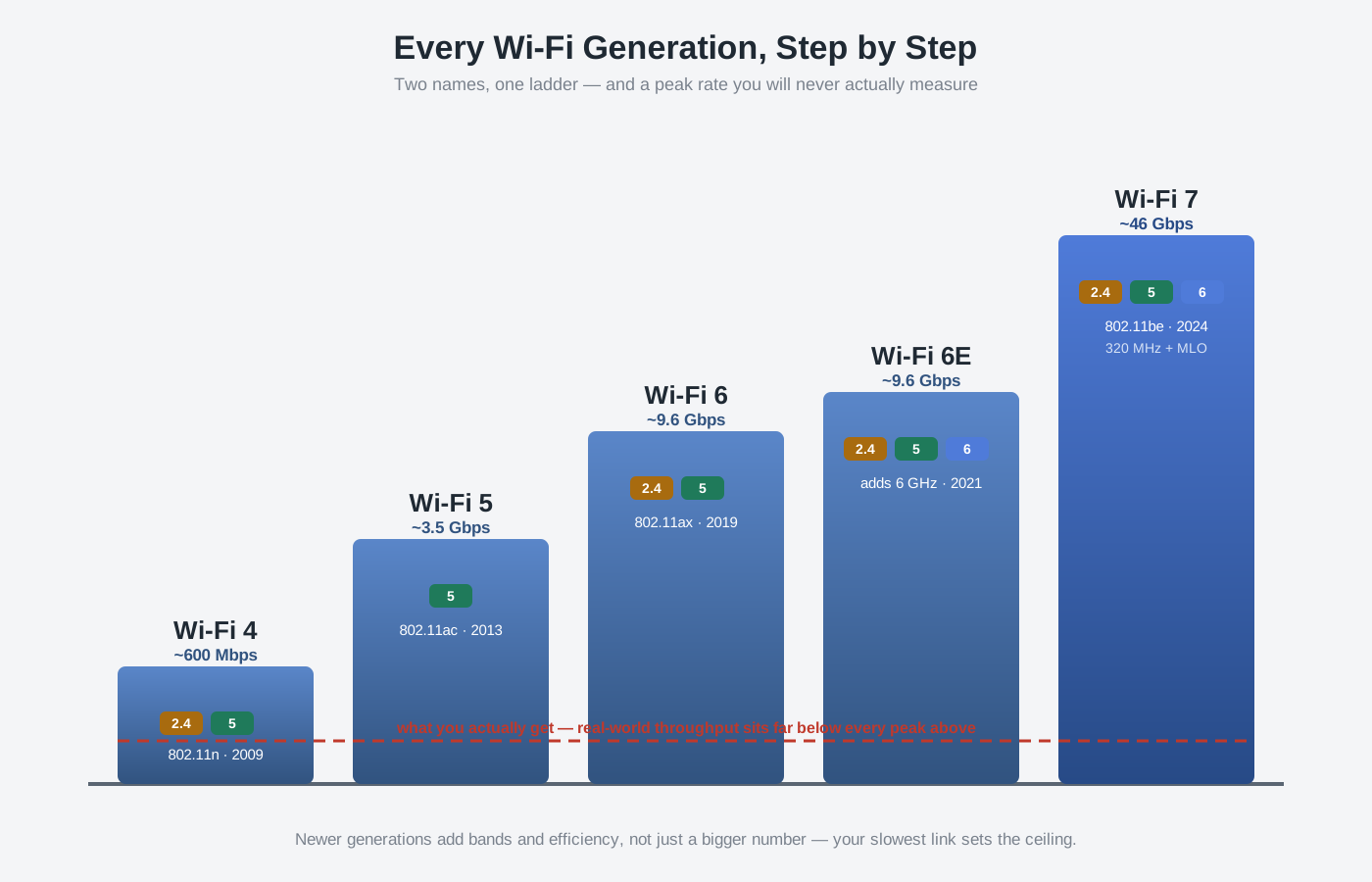
Every router box shouts a generation number, and every generation has a second, uglier name — Wi-Fi 6 is 802.11ax, Wi-Fi 5 is 802.11ac, and so on. It sounds like marketing, but each step actually changed something specific: MIMO, then the 5 GHz speed jump, then the tools that keep a crowded house of devices from choking each other, then a brand-new slice of spectrum, then wider channels and the ability to use two bands at once. This is the plain-English tour of the whole lineage — what Wi-Fi 4 through Wi-Fi 7 each added, what Wi-Fi 8 is aiming at, why the gigabit figure printed on the box is a number you will basically never see, and how to decide which generation is worth your money right now.
The short version: "Wi-Fi 6" and "802.11ax" are two names for one thing — a marketing name and an engineering name for the same standard. Newer generations are almost entirely backward compatible, so a new router still talks to your old phone and vice versa; you only get a generation's benefits when both ends support it. Each step added something concrete: Wi-Fi 4 brought MIMO and multiple antennas, Wi-Fi 5 pushed speed hard on the 5 GHz band, Wi-Fi 6 rebuilt how the airtime is shared so crowded homes stop choking, Wi-Fi 6E opened a clean new 6 GHz band, and Wi-Fi 7 added even wider channels plus the ability to use two bands at the same time. But the gigabit number on the box is a theoretical peak measured under lab conditions you'll never meet — real throughput is a fraction of it, and your slowest link (an old client, a weak signal, or your internet plan) sets the ceiling. Buy for the band and the features, not the headline number.
First: Two Names, One Standard
Every Wi-Fi generation has two names, and they trip people up constantly.
- The IEEE standard name — 802.11n, 802.11ac, 802.11ax, 802.11be — is the engineering designation. It's what shows up in spec sheets and chipset datasheets.
- The Wi-Fi Alliance generation name — Wi-Fi 4, 5, 6, 7 — is the consumer-friendly label, introduced in 2018 to make the alphabet soup shoppable.
They map one to one:
| Marketing name | IEEE standard |
|---|---|
| Wi-Fi 4 | 802.11n |
| Wi-Fi 5 | 802.11ac |
| Wi-Fi 6 | 802.11ax |
| Wi-Fi 6E | 802.11ax (extended into 6 GHz) |
| Wi-Fi 7 | 802.11be |
The older standards — 802.11a, 802.11b, and 802.11g from around 1999 to 2003 — predate the numbering scheme and are sometimes retroactively called Wi-Fi 1, 2, and 3, though nobody officially branded them that way. They topped out at 54 Mbps and are only worth knowing as ancient history. The story that matters for anything you'd buy today starts at Wi-Fi 4.
One thing to internalize before the tour: Wi-Fi is backward compatible. A Wi-Fi 7 router happily serves a Wi-Fi 5 laptop, and a Wi-Fi 7 phone connects fine to an old Wi-Fi 5 router — it just falls back to the older, slower rules. You only unlock a generation's tricks when the router and the device both speak it.
The Whole Lineage at a Glance
| Generation | IEEE | Year | Bands | Max channel width | Modulation | Headline peak rate | The signature addition |
|---|---|---|---|---|---|---|---|
| Wi-Fi 4 | 802.11n | 2009 | 2.4 + 5 GHz | 40 MHz | 64-QAM | ~600 Mbps | MIMO / multiple antennas |
| Wi-Fi 5 | 802.11ac | 2013 | 5 GHz | 160 MHz | 256-QAM | ~3.5 Gbps | Wider channels, downlink MU-MIMO |
| Wi-Fi 6 | 802.11ax | 2019 | 2.4 + 5 GHz | 160 MHz | 1024-QAM | ~9.6 Gbps | OFDMA — efficient airtime sharing |
| Wi-Fi 6E | 802.11ax | 2021 | 2.4 + 5 + 6 GHz | 160 MHz | 1024-QAM | ~9.6 Gbps | Adds the clean 6 GHz band |
| Wi-Fi 7 | 802.11be | 2024 | 2.4 + 5 + 6 GHz | 320 MHz | 4096-QAM | ~46 Gbps | 320 MHz channels + Multi-Link Operation |
These headline peak rates are theoretical maximums with the maximum number of antennas, perfect signal, and every option maxed out — a lab number, not a speed you will ever measure. More on that below, because it's the single most misunderstood thing about Wi-Fi.
Wi-Fi 4 (802.11n): MIMO Arrives
Ratified in 2009, Wi-Fi 4 is the oldest standard still worth mentioning, and its big idea was MIMO — Multiple Input, Multiple Output. Instead of one antenna sending one stream of data, a router could use several antennas to send several independent spatial streams at once, multiplying throughput. Those multi-antenna routers that suddenly sprouted three or four sticks around 2010? That was Wi-Fi 4.
It was also the first standard to work on both the 2.4 GHz and 5 GHz bands, and it introduced 40 MHz-wide channels (double the old 20 MHz). With four streams and a 40 MHz channel, the spec tops out around 600 Mbps — though the two-stream devices most people actually owned landed closer to 300 Mbps. Today Wi-Fi 4 is the floor: it still works, it's just slow, and any router you buy new will be several generations past it.
Wi-Fi 5 (802.11ac): The 5 GHz Speed Jump
Wi-Fi 5 (2013) was all about raw speed, and it made three moves to get it:
- It lived on 5 GHz. Wi-Fi 5 only defines the 5 GHz band, which is less crowded than 2.4 GHz and has room for much wider channels. (Your Wi-Fi 5 router still broadcasts 2.4 GHz — but that part is running the older Wi-Fi 4 rules.)
- Wider channels. It doubled the maximum channel width to 80 MHz, with an optional 160 MHz mode. Wider channel, more data per transmission — see our channel width explainer for why wider isn't always better.
- Denser modulation. It moved to 256-QAM, packing more bits into each radio symbol.
Wave 2 of Wi-Fi 5 also introduced downlink MU-MIMO, letting the router talk to several devices at once instead of strictly one at a time — the beginning of Wi-Fi thinking about multiple clients rather than a single fast pipe. We dig into what that does and doesn't do in MU-MIMO explained. Realistic Wi-Fi 5 speeds land in the hundreds of Mbps to low gigabit range, which is still plenty for most homes — a big reason so many people never felt a reason to upgrade.
Wi-Fi 6 (802.11ax): Built for Crowds, Not Just Speed
Wi-Fi 6 (2019) is the generation where the goal shifted. Peak speed went up modestly (1024-QAM, a theoretical ceiling near 9.6 Gbps), but the real work went into efficiency — keeping a house full of phones, laptops, TVs, cameras, and smart-home junk from tripping over each other. The headline features:
- OFDMA. The marquee change. It lets a single transmission carry data to multiple devices at once by slicing a channel into smaller sub-channels, instead of forcing each device to wait its full turn. It's the difference between a delivery truck making one stop and one truck dropping parcels at several houses on a single run. Full walkthrough in OFDMA explained.
- Uplink and downlink MU-MIMO, extending the multi-client idea in both directions.
- Target Wake Time (TWT), which lets battery devices schedule when they wake to talk, dramatically improving battery life for phones and IoT sensors.
- BSS Coloring, which tags transmissions so nearby networks interfere less in dense apartments.
If your household has a lot of connected devices, Wi-Fi 6 helped more than any speed number suggests. It works on both 2.4 and 5 GHz, so even your slower band gets the efficiency upgrades. For most people in 2026, plain Wi-Fi 6 is the sensible baseline.
Wi-Fi 6E: Same Wi-Fi 6, Brand-New Band
Wi-Fi 6E (2021) is not a new standard — it's Wi-Fi 6 (802.11ax) with permission to use a third radio band: 6 GHz. That "E" stands for Extended.
Why it matters: the 6 GHz band is a big, empty stretch of spectrum with no legacy Wi-Fi 4/5 devices cluttering it and enough room for numerous non-overlapping 160 MHz channels. On 6 GHz you get the wide, high-speed channels without the congestion that drags down 5 GHz in a busy neighborhood — and none of the DFS radar-avoidance drops that can interrupt certain 5 GHz channels. The trade-off is range: higher-frequency signals don't punch through walls as well, so 6 GHz is a short-range, high-speed band best used near the router. We cover exactly when it wins in 6 GHz vs 5 GHz: when is it actually faster? The device and router both need 6E hardware to use it.
Wi-Fi 7 (802.11be): Wider Channels and Two Bands at Once
Wi-Fi 7, certified in 2024, keeps the three bands (2.4 / 5 / 6 GHz) and pushes the technology harder in three ways:
- 320 MHz channels. Double Wi-Fi 6E's max width, available in the roomy 6 GHz band — the biggest single contributor to Wi-Fi 7's giant peak-rate number.
- 4096-QAM (4K-QAM). Even denser modulation, squeezing ~20% more data into each symbol when signal quality is high enough to support it.
- Multi-Link Operation (MLO). The genuinely new idea. A Wi-Fi 7 device can connect over two bands at the same time — say 5 GHz and 6 GHz together — and either combine them for more throughput or use whichever is momentarily cleaner to cut latency and dropouts. This is the feature most likely to matter in daily use, and we break it down in Wi-Fi 7 MLO explained.
The spec's theoretical ceiling is a wild ~46 Gbps, which you should mentally file under "marketing." What Wi-Fi 7 realistically delivers is lower latency, better behavior in congestion, and headroom for multi-gig internet. Whether it's worth jumping to depends heavily on what you have now — that's the whole subject of Wi-Fi 7 vs Wi-Fi 6E: should you upgrade?
What About Wi-Fi 8?
Wi-Fi 8 (IEEE 802.11bn) is in development, expected to arrive in devices around 2028. The interesting thing is what it's not chasing: it does not raise the peak data rate — it keeps Wi-Fi 7's 320 MHz channels and 4096-QAM. Its official goal is reliability, marketed under the banner "Ultra High Reliability" (UHR).
The headline concept is coordinated multi-access-point operation — having your mesh nodes or access points actively cooperate (coordinating who transmits when, and even steering signal together) instead of competing for the same air. The aim is seamless roaming as you walk through the house, steadier throughput at the edges of coverage, and lower worst-case latency for things like video calls and gaming. In other words, Wi-Fi 8 is about making the speed you already have feel consistent, rather than printing a bigger number on the box. It's years away and nothing to wait for today.
Why the Number on the Box Isn't the Speed You Get
Here's the part that saves you money. Those headline rates — 9.6 Gbps, 46 Gbps — assume every favorable condition at once: the maximum number of spatial streams (often eight, when your phone has two), the widest channel, the densest modulation, a flawless short-range signal, and zero interference. No real device hits it. Expect real-world throughput to be a fraction of the advertised figure.
Worse, your Wi-Fi is only ever as fast as its weakest link:
- The client device. A two-antenna phone can't use a router's eight streams. The slower end sets the pace.
- The signal. Distance, walls, and interference knock the connection down to a lower speed automatically. Where the router sits matters more than its generation — see router placement for the best signal.
- Your internet plan. If your ISP delivers 500 Mbps, a 46 Gbps router does not make your Netflix load faster — the internet is the bottleneck, not the Wi-Fi. Figure out the plan you actually need in how much internet speed do you need?
- How devices roam. Moving between bands and access points smoothly is its own problem, handled by features like band steering, not by the raw generation number.
So compare generations by what they add — a cleaner band, better airtime sharing, dual-band connections — not by whose peak-rate sticker is biggest.
So What Should You Actually Buy in 2026?
- Still on Wi-Fi 5 or older? This is the upgrade that will be felt, especially in a device-heavy home. Even a solid Wi-Fi 6 router or mesh system is a large, affordable step up in efficiency and range.
- On Wi-Fi 6 and content? You're fine. Don't chase 6E or 7 unless you have a specific reason — multi-gig internet, a house so dense that 5 GHz is congested, or a use case that benefits from the clean 6 GHz band. If 5 GHz congestion genuinely is the problem, more radios beat a newer number on the box: the Ubiquiti UniFi U7 Pro Max is quad-band with two separate 5 GHz radios, though it wants PoE++ and a UniFi controller to run at all.
- Buying new and want it to last? A Wi-Fi 7 router is the future-proof pick. Its MLO and 6 GHz support give real headroom — just remember your phones and laptops need Wi-Fi 7 radios to use the newest tricks, and the benefits show up most clearly with fast internet and modern client devices. You do not have to pay flagship money for the full feature set: the TP-Link Archer BE550 is tri-band Wi-Fi 7 with MLO and 320 MHz channels for around $200 as a single router, and the Eero 7 is a full Wi-Fi 7 mesh — MLO, 6 GHz, 4K-QAM — in a sub-$350 three-pack.
Match the generation to your devices, your internet plan, and your home — not to the biggest number in the aisle.
The Bottom Line
Wi-Fi's two naming schemes describe one ladder of standards, and each rung added something real: MIMO (Wi-Fi 4), the 5 GHz speed jump (Wi-Fi 5), efficient airtime sharing for crowded homes (Wi-Fi 6), a clean new 6 GHz band (Wi-Fi 6E), and wider channels plus dual-band connections (Wi-Fi 7) — with Wi-Fi 8 coming to make all of it more reliable rather than faster. Ignore the gigabit sticker; it's a lab fiction. Buy for the band, the features, and your actual devices, remember that your slowest link sets the ceiling, and you'll pick the right router without overpaying for a number you'll never see.
Affiliate disclosure: NetAudioHub links to retailers including Amazon. We earn a small commission on qualifying purchases at no extra cost to you.