Should You Buy Your Own Modem or Rent From Your ISP?
Published 2026-10-11 · By NetAudioHub Editorial
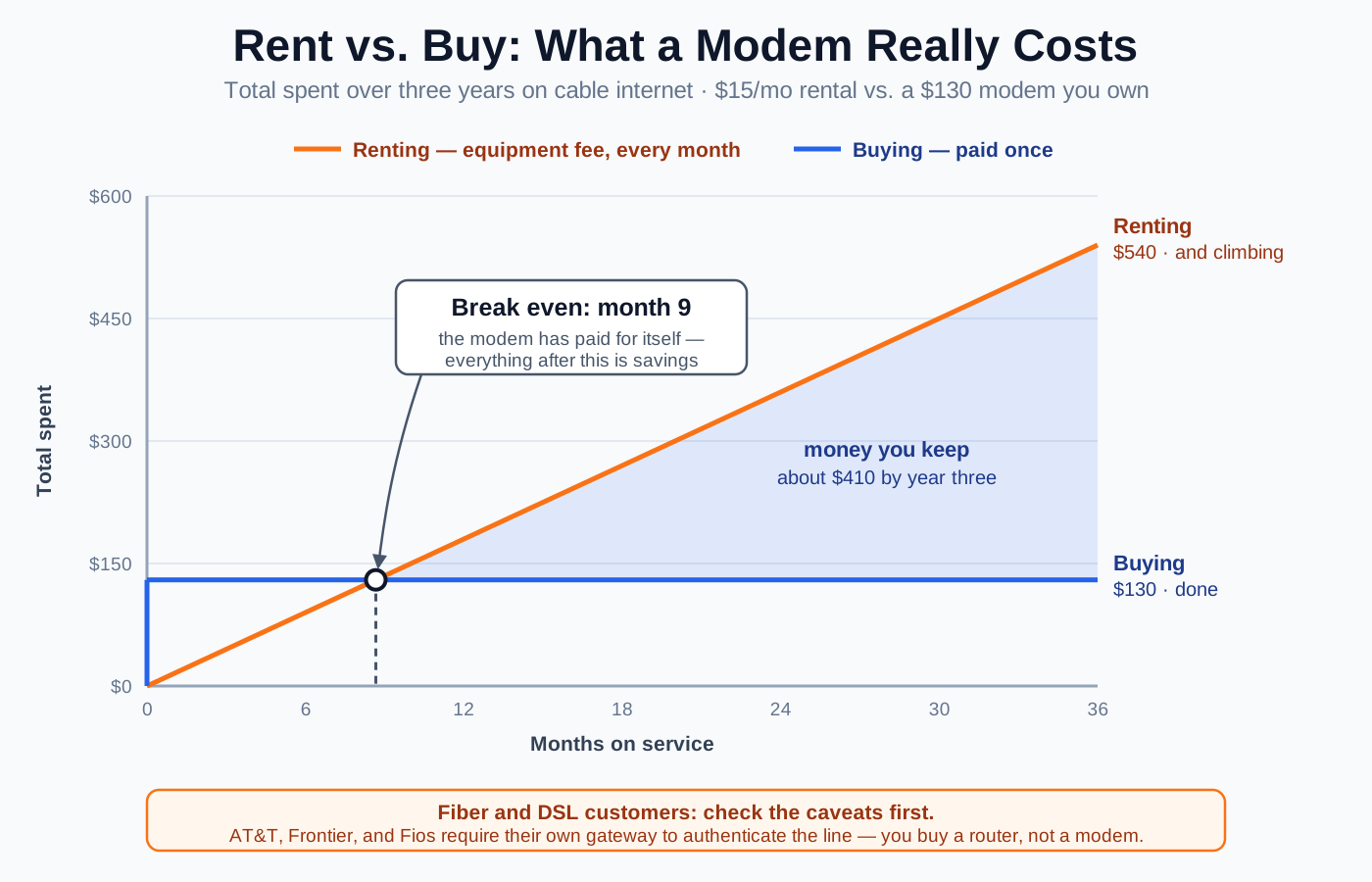
Somewhere on your internet bill there is a line item called equipment rental, gateway fee, or Wi-Fi service. On most cable providers it runs $10 to $15 a month, it never ends, and it buys you hardware that would cost around $130 to simply own. Do the arithmetic and buying your own modem pays for itself in well under a year, then keeps paying — which is why it's one of the highest-return hours you can spend on your home network. But the advice gets repeated as gospel without the fine print, and the fine print matters: fiber and DSL customers mostly can't do it, bundled phone service can block it, and a modem bought one tier too cheap will quietly cap the speed you're paying for. This guide runs the numbers, then tells you exactly when to ignore them.
The short version: on most cable providers you are renting a modem for $10 to $15 every month, forever, and a gigabit-class DOCSIS 3.1 modem you own outright costs roughly $130. At $15 a month that purchase pays for itself in about nine months and saves you around $410 by year three — the clearest win on the whole bill. Buy your own if you are on cable, plan to stay put for a year or more, and don't have landline phone service bundled in. Do not bother if you're on fiber (AT&T, Frontier, Fios all require their own gateway to authenticate the line), if your plan already includes equipment at no charge, if you have ISP phone service, or if you're on a multi-gig tier where retail hardware is still scarce and expensive. The one way to lose money here is buying the wrong box: it must be on your provider's approved list and rated for at least the speed you pay for. Here's the math and the fine print.
What You're Actually Renting
That line on your bill covers one physical box, and which box it is changes the calculation.
- A modem translates between your provider's line — coax, in the cable case — and the Ethernet your home network speaks. This is the part that has to be certified by your ISP.
- A router creates your local network and Wi-Fi, hands out addresses, and firewalls the whole thing.
- A gateway is both of the above welded into one chassis. This is what nearly every ISP rents you now, under a brand name like xFi Gateway or Panoramic Wi-Fi.
That distinction is the entire reason the rental fee is sticky: because the box does two jobs, replacing it means buying two things — a modem and a router — or one combo unit. If you're hazy on which device does what in your own setup, our modem vs. router vs. gateway explainer untangles the roles in detail.
The important consequence: the modem is the boring, cheap, long-lived half, and the router is the half you actually want to control. A modem is a dumb translator you will not think about for six years. A router determines your Wi-Fi speed, your coverage, your security updates, and whether you can run features your ISP's firmware won't. Buying your own gets you both the savings and the control.
What the Fee Costs, by Provider
Rental fees move around, they vary by plan and promo, and some newer packages fold the equipment in at no charge. Treat this as the shape of the market and then go read your own bill — the line you're looking for is called equipment rental, gateway fee, or Wi-Fi service.
| Provider | Typical monthly equipment fee | Can you use your own? |
|---|---|---|
| Xfinity | $15 for the xFi Gateway; $25 with xFi Complete. Some newer price-locked plans include it. | Yes — modem and router both, from their approved list |
| Cox | About $14 for Panoramic Wi-Fi | Yes — Cox-compatible modem plus your own router |
| Spectrum | Modem is included free; the Wi-Fi router runs about $5 to $10 | Yes — and here you only need to replace the router |
| Optimum | $5 to $10 for Smart Wi-Fi | Yes |
| Mediacom | About $15 | Yes — Mediacom-compatible modem |
| CenturyLink (DSL) | Up to about $17 | Yes — CenturyLink-compatible modem |
| AT&T Fiber | Gateway included at no separate charge | No — their gateway is required |
| Verizon Fios / Frontier Fiber | Router fee varies; often included on fiber plans | Partly — the ONT stays; you may add your own router |
Two things jump out of that table. First, Spectrum customers are playing an easier game — the modem is already free, so the only fee to kill is the router, and any retail router does it. Second, the fiber providers aren't really optional, which is the caveat most rent-vs-buy advice skips entirely.
The Break-Even Math
Take the most common case: Xfinity at $15 a month, and you replace the gateway with a DOCSIS 3.1 modem at roughly $130.
| Time on service | Renting at $15/mo | Owning a $130 modem | Where you stand |
|---|---|---|---|
| Month 6 | $90 | $130 | Behind by $40 |
| Month 9 | $135 | $130 | Break even |
| Year 1 | $180 | $130 | Ahead $50 |
| Year 2 | $360 | $130 | Ahead $230 |
| Year 3 | $540 | $130 | Ahead $410 |
| Year 5 | $900 | $130 | Ahead $770 |
The crossover lands around month nine, and everything after that is pure return. Because a modem has no moving parts and DOCSIS generations last the better part of a decade, the realistic ownership window is five or six years — so the honest number to compare against isn't $130 versus $180, it's $130 versus $900.
If you're also replacing the router, add $80 to $150 and push break-even out to roughly 14 to 18 months. Still an easy yes on a five-year horizon, and you get a meaningfully better network out of it rather than the same one.
The one arrangement where this collapses: if your provider bundles the equipment at genuinely no charge, there is no fee to recover and no savings to chase. Buy a router anyway if you want better Wi-Fi — just don't tell yourself it's paying for itself.
Cable vs. Fiber: This Is Mostly a Cable Question
Here's the part that gets glossed over. On fiber, the provider's box is not just a modem — it's the thing that proves to the network that you're you.
AT&T Fiber is the clearest example: the gateway terminates the fiber line and performs AT&T-specific authentication that no retail router can do, so it has to stay in the path. You are allowed to put your own router behind it, and it's often worth doing, but you accomplish that by setting the gateway to bridge mode or enabling IP passthrough — not by removing it. Frontier and Fios work similarly: the ONT is theirs, permanently.
If you do stack your own router behind an ISP gateway, configure it properly or you'll end up with two devices both trying to run a network — the classic symptom set of double NAT, which breaks port forwarding, game-console connectivity, and some VPNs. Bridge mode or passthrough is what prevents it.
So the rule of thumb: coax coming out of your wall means this article applies to you. Fiber means read your provider's policy first, and expect to be buying a router, not a modem.
When Buying Wins
Buy your own if most of these describe you:
- You're on cable and paying a visible equipment fee. The single biggest factor. Nine-month payback is hard to beat.
- You'll be at this address, on this provider, for a year or more. DOCSIS modems are broadly portable between cable providers, so even a move usually doesn't waste the hardware — but you do have to re-activate.
- You want control over your own Wi-Fi. Your own router means your choice of security standard, your firmware update cadence, real guest-network and VLAN options, and no waiting for your ISP to ship features. If you're still on older encryption because the rented box defaults to it, our WPA2 vs. WPA3 breakdown explains what you're leaving on the table.
- Your Wi-Fi coverage is bad. Rented gateways are one box in one spot, usually wherever the coax happens to enter. Replacing it with a real router — or a mesh set, per our extender vs. mesh vs. access point guide — fixes problems no rental swap will.
- You care about latency under load. Some retail routers expose queue management that dramatically improves responsiveness on a busy connection; most ISP firmware doesn't. See bufferbloat.
When Renting Is Actually the Right Call
Genuinely, sometimes it is. Don't buy if:
- Your plan includes the equipment free. No fee, no savings. Check before you shop.
- You have phone service bundled. ISP landline service typically runs through a voice-capable gateway. Retail modems generally don't do voice, and dropping the gateway can drop your phone line.
- You're on a multi-gig tier. Above about 2 Gbps, the retail hardware that keeps up is limited and expensive, and the rental starts looking reasonable. Worth pairing with a look at whether your wired network can even carry it.
- You move constantly. If you change addresses or providers every several months, re-activation hassle can outweigh a fee you'll only pay briefly.
- You want one throat to choke. With rented gear, a dead modem is a free swap at a store and the ISP can't blame your hardware. Owning means you handle the RMA. For some people that's worth $15 a month, and that's a legitimate choice.
How to Buy the Right Modem
This is where people lose the savings they just calculated. Five rules:
1. Start from your provider's approved list, not from a product page. Every cable ISP publishes a compatibility list, and a modem that isn't on it will not activate — no matter how good it is. Check the list first, then shop within it.
2. Match the modem to the speed you pay for, with headroom. DOCSIS 3.1 is the right target for anything gigabit or near it — and on a gig-plus plan that means a 2.5 GbE LAN port, not a gigabit one, or the modem itself becomes the cap. The Motorola MB8611 is the cheapest way we've found to clear that bar at $159.99. Older DOCSIS 3.0 hardware is cheap and fine for plans in the few-hundred-megabit range, but it will bottleneck a gigabit tier. If you're not sure what you actually need, how much internet speed do you need is the honest version of that question.
3. Check the upstream, not just the download. Providers are rolling out mid-split and high-split upstream to deliver much faster uploads, and only some modems support it. Buying a modem without it means re-buying when your provider upgrades your area — the specific thing that separates a current model from last generation's bargain. In practice this is a one-line spec: the ARRIS SURFboard S34 has a switchable upstream filter and is one of the first retail modems built for those tiers, where the otherwise-similar SURFboard S33 is not.
4. Prefer separate modem and router over a combo. A combo unit is tidier and slightly cheaper, but it welds a six-year-lifespan device to a three-year-lifespan device. Separates let you upgrade Wi-Fi without touching the modem.
5. Be careful with used modems. A used unit may still be provisioned to someone else's account, which turns activation into a support call. The savings over a new mid-range modem rarely justify it.
If you want a starting point, our hands-on reviews cover the mainstream picks: the ARRIS SURFboard S33 is the safe gigabit default, the SURFboard S34 adds 2.5 Gbps and the switchable upstream filter that makes it next-gen-upload ready, and the Motorola MB8611 is the value multi-gig option. Otherwise, browse DOCSIS 3.1 cable modems and pair one with a Wi-Fi 6 or newer router.
Making the Switch
The whole job is about 30 minutes.
- Confirm compatibility on your provider's approved-device list, and confirm your plan speed.
- Buy the modem — and the router, if you're replacing the whole gateway.
- Connect it before you call: coax into the modem, Ethernet from modem to router, power up, and let it finish its startup sequence. The lights settling takes a few minutes.
- Activate. Most providers have a self-activation app or web page; some still need a phone call. Have the modem's MAC address and serial number handy — they're on the label.
- Return the rental, and keep the receipt. This is the step that bites people. Unreturned-equipment charges are large and disputing them without proof is miserable. Return it in person and keep the paperwork.
- Check your next bill. Confirm the equipment fee is actually gone. If it isn't, call — the fee sometimes survives the hardware.
The Bottom Line
If you're on cable and paying to rent, buying your own modem is close to free money: about nine months to break even, roughly $410 ahead by year three, and $770 by year five. Add your own router and you get a better network as well as a cheaper one.
But check the four disqualifiers before you spend anything — fiber service, bundled phone, an already-included gateway, or a multi-gig tier. And buy from the approved list at the right DOCSIS tier with mid-split upstream support, because the only real way to lose this trade is to buy the wrong box and cap the speed you're already paying for.
Go find the line on your bill. It's probably been there for years.
Affiliate disclosure: NetAudioHub links to retailers including Amazon. We earn a small commission on qualifying purchases at no extra cost to you.