How to Connect a Turntable to Speakers (Phono Preamps, Gain, and the Ground Wire)
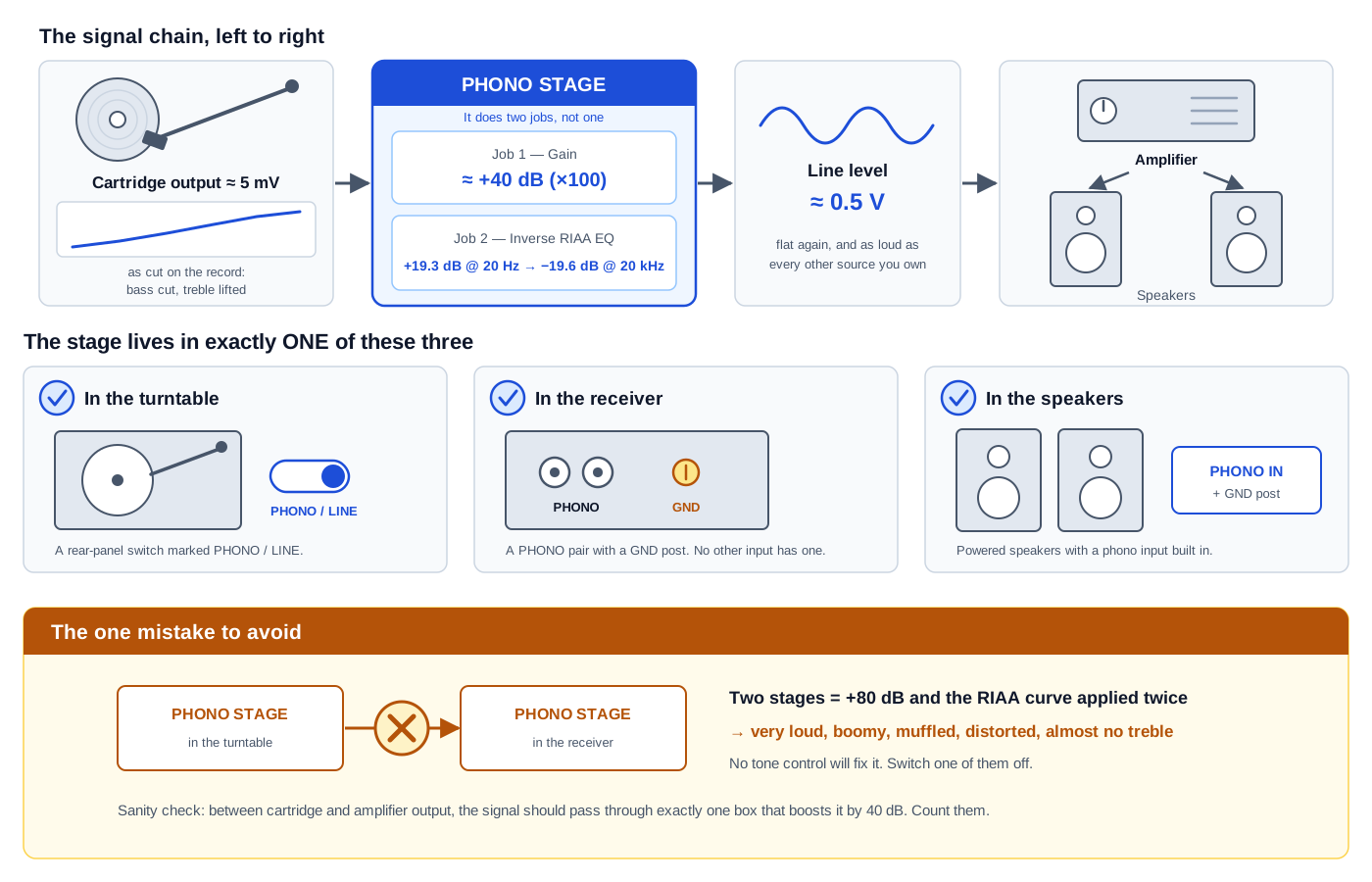
A turntable is the one source in your system that cannot be plugged into an ordinary input. Every other box you own — a streamer, a disc player, a games console, a TV — puts out line level, a signal your amplifier is built to accept as-is. A phono cartridge puts out something thousands of times weaker, and deliberately distorted. Connect it to an AUX jack and you get a thin, quiet, bass-less version of the record, and nothing is broken. That is what a record sounds like before the missing piece is put back.
The missing piece is a phono stage, and the entire job of connecting a turntable comes down to one question: which box in your chain already contains one. It might be in the turntable, in the receiver, or in the speakers — and if you are unlucky it is in two of them at once, which sounds worse than having none at all. This guide walks the whole chain in order: what the phono stage actually does, how to find the one you already own, how to make sure only one of them is switched on, what changes if your cartridge is a moving-coil type, how to wire it up, and how to read the three classic failure sounds. It assumes nothing beyond a turntable and a pair of speakers, and most people will be done inside an hour.
What you’ll need
- A turntable with a cartridge fitted and a pair of RCA output cables (usually captive, sometimes detachable)
- Somewhere for the signal to go: an AV receiver, a stereo amplifier, or a pair of powered speakers
- A phono stage — built into one of the above, or a separate box if none of them has one
- The thin ground wire attached to most turntables, usually ending in a spade terminal
- A small flat screwdriver, if your amplifier's ground post is a screw-down terminal rather than a thumbscrew
- A step-up transformer or MC head amp, only if your cartridge is a low-output moving-coil type
- A record you know well, for judging the result against something familiar
8-Step Overview
- 1
Understand what a phono preamp actually does
A phono stage does two separate jobs, and knowing both is what makes every later step obvious.
Job one is gain. A moving-magnet cartridge puts out somewhere around 2.5–7 mV. Consumer line level is nominally 0.316 V, and a modern DAC or disc player often hits 2 V. To lift a 5 mV cartridge to 0.316 V you need 36 dB; to reach 2 V you need 52 dB. A typical MM phono stage provides about 40 dB, or ×100, which turns 5 mV into 0.50 V — comfortably in line-level territory. Plug the cartridge into a line input instead and you are simply ~40 dB short, which is why it sounds so quiet.
Job two is equalization, and this is the part people miss. Records are not cut flat. Bass is deliberately reduced and treble deliberately boosted before cutting, because full-level bass would need groove excursions so wide that a 12-inch side would hold only a few minutes of music, and the treble boost buys back surface noise. The phono stage applies the exact inverse — the RIAA playback curve — to put the record back the way it was recorded:
Frequency RIAA playback EQ (relative to 1 kHz) 20 Hz +19.27 dB 50 Hz +16.95 dB 100 Hz +13.09 dB 1 kHz 0.00 dB (reference) 10 kHz −13.73 dB 20 kHz −19.62 dB That is a 38.9 dB tilt across the audible band, computed from the standard RIAA time constants of 3180 µs, 318 µs and 75 µs. It is an enormous correction, and it is why a turntable through a line input doesn't just sound quiet — it sounds thin and bright, missing almost 20 dB of bottom end. Both jobs have to happen, and they happen in the same box.
- 2
Find the phono stage you already own
Most people already have one and don't know it. There are exactly three places it hides, and you should check all three before buying anything.
In the turntable. Look on the back for a small switch marked PHONO / LINE (sometimes PHONO / PRE, or just a toggle next to the RCA jacks). If it exists, the deck has a built-in stage. Set to LINE it is switched on and the deck outputs line level; set to PHONO it is bypassed and the deck outputs raw cartridge level. Some turntables have a built-in stage with no switch at all — those are permanently line level.
In the amplifier or receiver. Look for a pair of RCA jacks labelled PHONO, almost always with a small screw post next to them marked GND or SIGNAL GND. The ground post is the giveaway: no other input has one. This is more common than people assume, including on current mid-range AV receivers — the Onkyo TX-NR6100, the Denon AVR-X2800H, the Denon AVR-X3800H, the Denon AVR-S770H, the Marantz Cinema 70s and the Yamaha RX-V6A all have one.
In the speakers. Powered and active speakers increasingly build one in. The Klipsch The Fives II has a real MM phono stage with its own ground post, so a deck plugs straight into the speakers with no amplifier at all. So does the WiiM Ultra streaming preamp at $329, which is unusual at that price.
And some near-misses worth knowing, because they look like they should work and don't: the WiiM Amp has line, optical and HDMI ARC inputs but no phono stage, and the KEF LSX II LT takes an analog input but expects line level, so it needs a phono stage in front of it. If your gear is in this category you need a separate box — which is the one case where you actually have to buy something.
Search on Amazon →Recommended Product
Standalone MM phono preamp
Only buy one if all three checks above came up empty. A basic MM stage is an inexpensive, simple device and the budget end of the market is genuinely competent, because 40 dB of gain and a fixed EQ curve is a well-solved problem. Prioritize one with a metal case and an external power supply, since hum rejection is most of what separates a good cheap one from a bad cheap one.
- 3
Pick exactly one phono stage, and switch the others off
This is the step that fixes most "my turntable sounds wrong" complaints. If you found a stage in more than one box, only one may be active. Running two in series is not a small error — it compounds both of the jobs from step 1.
The gain stacks: roughly 40 dB plus another 40 dB is about 80 dB, or ×10,000, which drives the input into clipping long before you reach a normal listening volume. And the RIAA curve gets applied a second time to a signal that was already corrected, so the second pass tilts the bass up another ~19 dB and pulls the treble down another ~19 dB. The combined result is unmistakable once you know it: very loud, boomy, muffled, and distorted, with almost no treble. If that is what you are hearing, you have two stages on, and no amount of tone control will fix it.
How to resolve it, in order of preference:
- Deck has a PHONO/LINE switch and your amp has a PHONO input — set the deck to PHONO (bypassing its internal stage) and use the amp's phono input. The amp's stage is almost always the better one.
- Deck's stage can't be bypassed — plug it into a line input (AUX, CD, TV) and leave the amp's phono input unused.
- Powered speakers with a phono input — set the deck to PHONO and plug into the speakers' phono jacks, or set the deck to LINE and use the speakers' line input. Either works; do not do both.
The quick sanity check is that between the cartridge and the amplifier output, the signal should pass through exactly one box that boosts it by 40 dB. Count them.
- 4
Check your cartridge type, because built-in stages are MM only
Nearly every phono input built into a receiver, amplifier or powered speaker is a moving-magnet (MM) input, and the manufacturers say so plainly. Denon's AVR-S770H manual states the unit "is compatible with turntables equipped with a moving magnet (MM) phono cartridge," and that for a low-output moving-coil cartridge you should "use a commercially available MC head amp or a step-up transformer." Yamaha's RX-V6A manual says the same thing in fewer words: "The PHONO jack of the unit is compatible with an MM cartridge," and "to connect a turntable with a low-output MC cartridge, use a boosting transformer."
This matters because of the numbers. A moving-coil (MC) cartridge comes in two flavours and only one of them is a problem:
Cartridge type Typical output Gain needed to reach 0.316 V Works in an MM input? Moving magnet (MM) 2.5–7 mV 36–42 dB Yes — this is what it is built for High-output MC ~2 mV 44 dB Usually yes, slightly quiet Low-output MC ~0.3 mV 60.5 dB No — about 20 dB short Run a 0.3 mV low-output MC into a 40 dB MM stage and you get 0.03 V, roughly 20 dB below nominal line level. The symptom is distinctive: the record plays cleanly and sounds tonally correct, but you have to run the volume control far higher than usual and the noise floor comes up with it. That is not a fault — it is a cartridge mismatch, and the fix is a step-up transformer or MC head amp between the deck and the MM input.
If you bought a turntable complete with a cartridge fitted and did not specifically choose otherwise, you almost certainly have an MM cartridge and can ignore this step entirely.
Search on Amazon →Recommended Product
MC step-up transformer or head amp
Needed only for a low-output moving-coil cartridge feeding an MM input. A transformer is passive and adds no noise of its own but must be matched to your cartridge's impedance; an active head amp is more forgiving about matching. Check your cartridge's rated output and recommended load before buying either, because this is one of the few places in audio where a mismatch is audible rather than theoretical.
- 5
Make the connections
With the chain decided, the wiring is quick.
- Power everything off before connecting or disconnecting the phono leads. A 40 dB gain stage amplifies the pop of a live connection as enthusiastically as it amplifies music.
- Connect the RCA cables from the turntable to the chosen input: white to white (left), red to red (right). Push them fully home — a partly seated RCA plug is a classic cause of one channel dropping out or hum on one side only.
- Attach the ground wire to the GND / SIGNAL GND post. Loosen the thumbscrew, slip the spade terminal under it, tighten. Step 6 covers what to do if your deck doesn't have one.
- Select the right input on the amplifier — and make sure it actually is the phono input. On receivers that share a jack between PHONO and another source, there is often a menu item that assigns it.
- Set the deck's PHONO/LINE switch to match the decision you made in step 3, and double-check it, because it is easy to wire everything correctly and leave this in the wrong position.
Speaker wiring is a separate job with its own pitfalls — if you are building the system from scratch, our how-to on wiring speakers with banana plugs covers the amplifier end.
- 6
Connect the ground wire, then try it without
Nearly every guide tells you to always connect the ground wire. The manufacturers are more careful than that, and it is worth reading what they actually say.
Denon's AVR-S770H manual: "The earth terminal (SIGNAL GND) of this unit is not for safety grounding purposes. If this terminal is connected when there is a lot of noise, the noise can be reduced. Note that depending on the turntable, connecting the ground line may have the reverse effect of increasing noise. In this case, it is not necessary to connect the ground line." The Marantz Cinema 70s manual carries the identical wording. Yamaha's RX-V6A manual is hedged the same way: "Connecting the turntable to the GND terminal of the unit may reduce noise in the signal. (This GND terminal is not a safety ground.)"
Two things follow from that. First, this post has nothing to do with electrical safety, so leaving it unconnected is not dangerous — it is purely a hum-reduction measure. Second, whether it helps is a property of your particular turntable, not a universal rule. So test it rather than assuming:
- Connect the ground wire, play a quiet passage, and turn the volume up to a bit above normal listening level. Listen for a steady low hum.
- Power down, disconnect the ground wire, and repeat at the same volume.
- Keep whichever was quieter.
Attached is quieter most of the time, which is why the blanket advice exists. But detached is quieter often enough that two manufacturers document it, and if you have been fighting a hum you could not explain, this is the first thing to try.
If your turntable has no ground wire at all, nothing is missing. Many modern decks — particularly those with a built-in phono stage or a detachable RCA lead — carry the ground inside the cable itself. There is nothing to attach and no post to use.
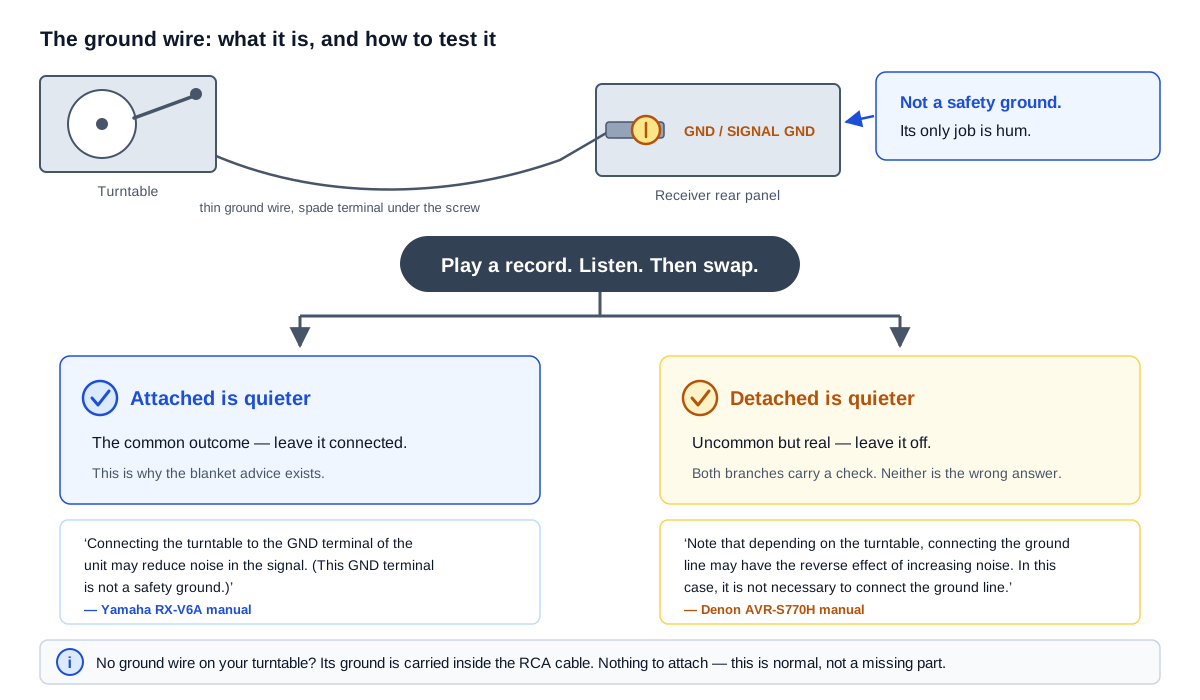
Both outcomes are documented by the manufacturers themselves. Denon's manual says the ground line 'may have the reverse effect of increasing noise'; Yamaha's says connecting it 'may reduce noise.' Neither says always. Test it. - 7
Set the level and confirm the chain is right
Start the volume low and bring it up on a familiar record. You are checking three things.
Loudness in the right ballpark. The turntable should need roughly the same volume setting as your other sources, give or take a few dB. Needing far more volume points at step 4 (an MC cartridge in an MM input) or a missing phono stage; needing far less, with distortion, points at step 3 (two stages in series).
Both channels present and the right way round. Play something with an obvious off-centre element and confirm it appears where it should. A swapped pair of RCA plugs is easy to do and easy to miss.
Tonal balance that matches your other sources. Play the same track from a streaming service and from the record, and switch between them. They will not sound identical — they are different masters — but they should be recognisably the same tonal shape. Dramatically less bass and more treble than the digital version means the RIAA curve is not being applied at all, which means the signal is going through a line input somewhere.
If your speakers are crossed over to a subwoofer, bass from vinyl can also expose a bass-management problem that movies hid — our how-tos on setting the crossover frequency and positioning a subwoofer for even bass cover that side of it.
- 8
Diagnose the three classic failure sounds
Almost every turntable connection problem presents as one of these. The symptom tells you which step to go back to.
What you hear Most likely cause Fix Very quiet, thin, almost no bass No phono stage in the chain — you are plugged into a line input Step 2: find or buy a phono stage Correct tone but far too quiet, high noise floor Low-output MC cartridge in an MM input Step 4: add a step-up transformer or head amp Very loud, boomy, muffled, distorted Two phono stages in series Step 3: switch one off Steady low hum at any volume Ground wire, or a hum loop Step 6: try the ground wire both ways Hum only on one channel Partly seated RCA plug, or a damaged cable Step 5: reseat both plugs firmly Hum that changes as the tonearm moves Cartridge picking up radiated field, usually from a nearby power supply or the deck's own motor Move the turntable away from the amplifier, and route the phono leads away from mains cables Loud buzz only when touching the tonearm Missing ground path Step 6: connect the ground wire The hum cases are worth a note. A phono input is the highest-gain input in your system by a wide margin, so it amplifies interference that every other input would shrug off. Before suspecting a fault, try physically separating the turntable from the amplifier and from any mains adapters, and keep the phono leads from running parallel to power cables. Distance fixes more phono hum than components do.
What to do next
Once the deck is connected and quiet, the rest of the system is what decides how it sounds:
- Work out what you're actually plugging into. Passive vs. powered vs. active speakers explains which kinds of speakers can take a turntable directly, and AV receiver vs. integrated amp vs. stereo receiver covers which amplifier suits a music-first system.
- Get the speakers in the right place. Speaker placement and the listening triangle matters more for two-channel vinyl listening than for movies, because there is no centre channel to anchor the image.
- Choose speakers for a system with no subwoofer. Bookshelf vs. floorstanding speakers is the relevant comparison, since a 2.0 vinyl setup has nothing to hand the bottom octave to.
- Wire the amplifier end properly. Wiring speakers with banana plugs and speaker wire gauge cover the connections between amp and speakers.
Frequently asked questions
Can I plug my turntable straight into powered speakers? Only if the speakers have a phono input, or the turntable has a built-in phono stage. Check the speakers' rear panel for a jack marked PHONO with a ground post — The Fives II have one, while the KEF LSX II LT has an analog input that expects line level and needs a phono stage in front of it.
My receiver has no PHONO jack. What now? Buy a standalone MM phono preamp, connect the turntable to it, and connect its output to any ordinary line input (AUX, CD, TV). Functionally this is identical to a built-in stage.
Is a separate phono preamp better than the one in my receiver? Not automatically, and not by enough to matter at the budget end. The gain and EQ are a well-solved problem. A separate box earns its place when you need adjustable loading, an MC input, or you are escaping a particularly noisy built-in stage — not as a default upgrade.
Does a USB turntable still need a phono preamp? For the USB output, no — the digitizing circuit includes its own stage. For the analog RCA output, the usual rules apply: check for a PHONO/LINE switch and follow step 3.
Why does my turntable hum only when I touch the tonearm? That is the signature of a missing ground path. Connect the ground wire (step 6). If there is no ground wire, check that the RCA plugs are fully seated, since on those decks the ground travels in the cable.
Can I use the phono input for something else if I don't own a turntable? No. It applies 40 dB of gain and a 39 dB EQ tilt to whatever you connect, so a line-level source plugged into it will be deafeningly loud and tonally wrong.