How to Wire Speakers: Gauge, Polarity, and Banana Plugs
Speaker wire is one of the least exciting links in a home theater chain and one of the most common places where new owners give up audible performance for no reason. The wire you buy at the local hardware store will sound identical to a $30/ft "premium" interconnect at any run length you'd ever use in a living room — but the gauge of that wire, the polarity you wire it with, and the termination you finish it with all change what the speaker is actually doing. Wire too thin for a 40-foot run drops voltage and dulls dynamics. One swapped conductor on a single channel collapses the stereo image into mono. A few stray copper whiskers at a binding post short the amplifier into protection mode the first time you push the volume.
This guide is the foundational wiring how-to for any AVR-driven home theater or two-channel stereo system. It covers picking the right gauge for your run length, identifying polarity on the cable you bought, terminating cleanly with banana plugs, verifying polarity with a battery test, and dressing the runs so they survive the life of the system. Time budget is 30–60 minutes per speaker pair the first time through. The only specialized tool you need is a wire stripper sized for 12–18 AWG; a screwdriver, a tape measure, and an AA battery cover the rest.
What you’ll need
- Speaker wire (12, 14, or 16 AWG, oxygen-free copper)
- Banana plugs (screw-type or set-screw)
- Wire stripper sized for 12–18 AWG
- Small flathead or Phillips screwdriver
- AA battery for polarity test (optional)
10-Step Overview
- 1
Pick the wire gauge for your run length
Speaker wire gauge controls how much voltage the wire steals from the amplifier on the way to the speaker. Thinner wire has more resistance per foot, which means more voltage drop across the run and slightly less power reaching the driver. At very short distances the difference is inaudible; over long runs the difference becomes a measurable change in damping factor and a softer low end. A rule of thumb that errs on the side of overspending by a few dollars: 16 AWG for runs under 25 feet to an 8-ohm speaker (desktop, bookshelf, most front-of-room placements). 14 AWG for 25–50 feet, or any run to a 6-ohm speaker — the right default for surround placements on the far wall of a typical living room. 12 AWG for runs over 50 feet, in-wall runs, or any speaker rated at 4 ohms or lower (most floor-standing towers from Klipsch, KEF, and Polk fall into this bucket). Buy oxygen-free copper, ignore directional arrows and marketing about "skin effect" or "cryogenic treatment," and stay away from copper-clad aluminum (CCA) — CCA has roughly 60% more resistance than copper at the same gauge and is the one specification difference that genuinely matters at this price point.
Search on Amazon →Recommended Product
Mediabridge 14 AWG Speaker Wire (100 ft, CL2-rated oxygen-free copper)
CL2 jacket is in-wall safe in most jurisdictions, oxygen-free copper avoids the CCA trap, and the polarity markings (one conductor with a printed stripe) are easy to read in dim closet lighting.
- 2
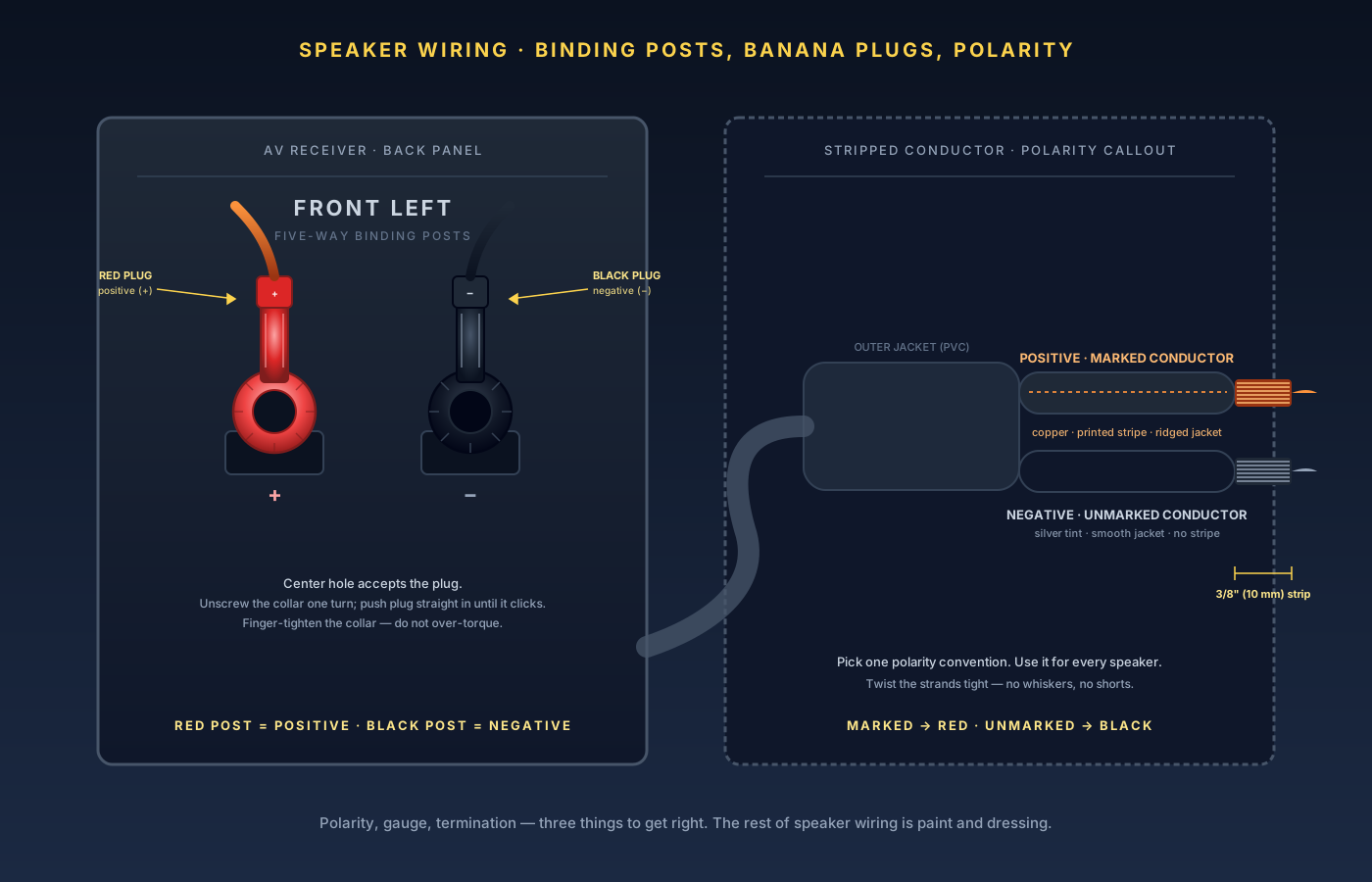
Identify polarity on the wire
Every two-conductor speaker cable marks one conductor so you can keep polarity consistent. The marking is one of: copper vs. silver tinning (one strand of the bundle is copper-colored, the other is silver — copper is conventionally positive); a printed stripe or text (one side of the jacket has a stripe, a "+" symbol, or printed branding — the marked conductor is positive); or ridged vs. smooth insulation (one conductor's insulation has a ridge or rib running its length — the ridged side is positive). Pick one convention at the start of the job and use the same convention for every speaker. Pros pick "copper = positive" and stick with it for life; the convention itself doesn't matter as long as it's identical at both ends of every run. Mixed polarity — even on a single channel out of five — collapses the stereo image, thins the bass, and makes room correction useless because the calibration mic measures the wrong sum.
- 3
Cut, plan, and label the runs
Before you strip a single conductor, plan the cable routing for the whole system. Measure each speaker's run from binding post to AVR with the cable taking its actual route (around the door, behind the sofa, under the rug — not the straight-line distance through the wall). Add 12 inches of slack at each end for service loops; a too-short cable is unrecoverable if the AVR has to move six inches one day. Cut each run, then label both ends of every cable with painter's tape and a Sharpie before doing anything else: "FL," "FR," "C," "SR," "SL," "Sub." A 5.1 setup is six cables; a 7.2.4 Atmos setup is thirteen. After a month behind the wall they all look identical, and chasing a mystery wire with a tone generator is a much worse afternoon than 30 seconds of labeling. For in-wall or in-ceiling runs, also note on the label which channel the cable is destined for in the long term — not which channel you might temporarily plug it into during testing.
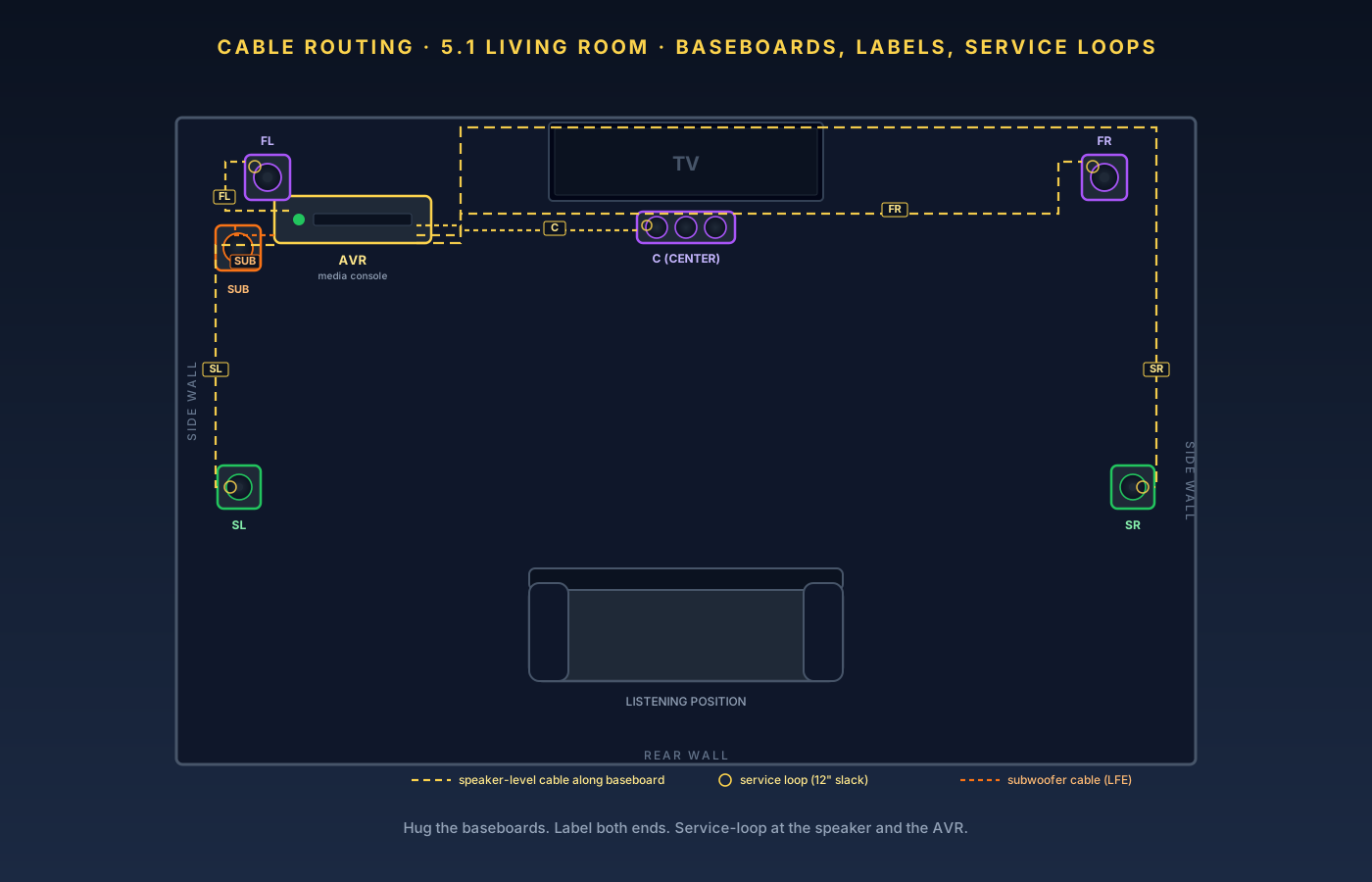
Plan the routes before you cut. Service loops at both ends, labels on every cable, and runs that hug baseboards rather than cross the floor. - 4
Strip the conductors
Set your wire stripper to the correct gauge (16, 14, or 12 AWG) and strip 3/8 inch (about 10 mm) of insulation off each conductor. Less than 1/4 inch and the banana plug or binding post doesn't grip the bare copper firmly enough; more than 1/2 inch and bare copper sticks past the plug or under the binding post collar, where stray strands can short to the adjacent terminal. After stripping, twist the bare strands tightly in the same direction the wire was originally laid up (you can feel the direction; it's never random). A tight twist keeps every individual whisker captured inside the plug or binding post. Loose strands are the single most common cause of an AVR going into protection mode mid-movie — one whisker drifts across to the adjacent black terminal and the protection circuit slams the channel off.
Search on Amazon →Recommended Product
Klein Tools 11055 Solid/Stranded Wire Stripper (10–18 AWG)
Pre-sized notches for each wire gauge so you don't nick the conductor, and a built-in cutter that handles 12 AWG copper without crushing.
- 5
Terminate with banana plugs
Banana plugs are the right termination for any speaker post that accepts them, which is essentially every AVR and every modern speaker. Banana plugs make polarity unambiguous (red plug on red post, black on black), they don't fray under tension the way bare wire eventually does, and they let you disconnect and reconnect speakers in 10 seconds. Skip pin connectors and spade lugs unless your speakers specifically require them. Two styles to choose from: screw-type plugs accept the bare conductor in a channel and clamp it with a captive screw — tool-free, fast, and the right choice for most users. Set-screw plugs use a perpendicular channel and a tiny Allen or Phillips set-screw — slightly more secure and useful for very thick 12 AWG runs that don't fit screw-type plugs. To terminate a screw-type plug: loosen the captive screw by a couple of turns, insert the twisted bare conductor into the channel until the wire jacket meets the plug body, then tighten the screw until the conductor cannot be pulled out by hand. Finger-tight plus a quarter-turn with a small flathead is enough. Tug-test every plug; one that pulls out under hand pressure will pull out under amplifier vibration. Keep color and convention consistent: red plug on the marked (positive) conductor, black plug on the unmarked conductor, for every speaker.
Search on Amazon →Recommended Product
Mediabridge SPC-BP2 Screw-Type Banana Plugs (12 pairs, gold-plated)
The default budget banana plug for AVR-level use — gold plating that doesn't corrode in real-world humidity, screw-type termination that doesn't need a tool, and an internal channel that accepts up to 12 AWG cleanly.
- 6
Insert plugs into the binding posts
Most AVRs and quality speakers use five-way binding posts: knurled plastic collars that unscrew to expose a center hole (banana plug) and a side hole (bare wire or pin). To insert a banana plug: unscrew the binding post collar by one or two full turns (do not unscrew it all the way; the collar is captive but the metal pin underneath isn't). Push the banana plug straight in through the center hole — plugs are spring-loaded; you'll feel resistance, then a soft click when the contact fingers seat fully into the post's center bore. Re-tighten the collar finger-tight; the collar is for strain relief and grounding, not for the electrical contact. Red post = positive (marked) conductor. Black post = negative (unmarked) conductor. This is universal; every AVR in the world labels it this way. Two cautions: do not over-torque binding post collars (many AVRs use plastic collars on metal posts; cranking them with pliers strips the threads). And inspect for stray strands before powering up — with the plug fully inserted, no bare copper should be visible at the post.
- 7
Verify polarity with a battery test
The cheapest, most reliable polarity check costs $0.50 and takes 30 seconds. You need a fresh 1.5 V AA battery and the speaker disconnected from the amplifier at the amp end (leave it connected at the speaker end). Place the positive terminal of the AA battery against the marked (positive) conductor at the amp end of the cable. Place the negative terminal of the battery against the unmarked (negative) conductor. Watch the speaker's woofer. A correctly wired speaker's cone will push outward (toward you) when the battery connects, and pull back when it disconnects. If the cone pulls inward when the battery contacts the marked-to-positive convention, the cable is flipped somewhere — almost always at the speaker end where you terminated the second banana plug. Untwist the plug, swap conductors, retighten, and retest. Do this for every speaker before you play any music through the system; it catches the one mistake everyone eventually makes — swapping conductors on a single channel — in a way that even an experienced ear won't notice until the system is already calibrated wrong. For active or powered subwoofers, this test isn't applicable; the sub is fed by LFE or line-level signal, not the speaker-level posts you wired here.
- 8
Play a polarity test track at low volume
The battery test catches reversed conductors. A polarity-verified test track catches problems the battery test can't — like a speaker that's internally cross-wired from the factory (rare but real), or a setup where every channel is polarity-flipped together (which would test "correct" on the battery test). Set the system to stereo playback and play one of: pink noise, mono-summed (both speakers in phase produce a tight, narrow phantom center image between them; out of phase the center hollows out and the noise sounds wider but thinner — you'll hear sounds coming from outside the speakers instead of from between them). A male voice recording, mono (same test: in phase, the voice is a focused point between the speakers; out of phase, the voice scatters and the low frequencies cancel audibly). Or a dedicated polarity test track from a setup disc or the AVR's built-in test signals; these often include a click that should sound like a single, sharp transient (out of phase, it sounds smeared). Play at conversational volume. If a single speaker is reversed, fix the polarity at the speaker end (Step 7) before doing room correction — once polarity is verified across every channel, the room correction routine has a chance of producing a clean, focused soundstage.
- 9
Manage cable runs and dress the wire
Speaker wire is mechanically sensitive in ways the rest of your gear isn't. Don't let it cross open floor where someone will trip on it; don't kink it tightly around a furniture leg; don't tape it down so tight that the insulation creeps under thermal cycling. Practical wire dressing: run along baseboards or behind furniture, with adhesive cable clips every 2–3 feet to keep horizontal runs flat without crushing the jacket. Avoid sharp 90° bends — use a gentle radius (an inch or two) wherever the cable turns a corner; a tight kink stresses the conductor and, over years, work-hardens the copper into brittleness. Keep at least 6 inches of separation from parallel AC power runs (crossing AC at 90° is fine; running parallel along the same wall for 20 feet picks up 60 Hz hum that you'll only hear later, after the rest of the system is dialed). Service-loop both ends — leave a loose foot of cable behind the AVR and at the speaker so future rearrangements don't yank the termination. For long runs through walls, in-wall-rated CL2 or CL3 jackets are required by code in most US jurisdictions; ordinary speaker wire doesn't meet that spec. For runs under a rug, use a flat-profile wire (Sewell Ghost Wire or equivalent ribbon cable) rather than round wire; round wire under a rug telegraphs through and creates a tripping ridge.
- 10
Audit every termination after the first listening session
Copper creeps. After a few hours under current, with the cable warming and cooling against the binding post, every screw-type and set-screw termination loosens slightly — often imperceptibly, but enough that a previously secure plug can be pulled out by hand a week later. The same is true of binding post collars on the AVR side. Retighten every termination once after the first week, and again after the first month. After that, an annual audit when you dust behind the rack is enough. You're looking for: banana plugs that have backed off and pull out under hand pressure (retighten the captive screw or set-screw); binding post collars that have loosened past finger-tight (retighten finger-tight; don't over-torque); whiskers of bare copper that have emerged from a too-aggressive strip job (pull the plug, retrim, retwist, reseat); insulation that's chafed against a metal furniture edge (re-route, add a strip of electrical tape over the chafe, or replace the run). This audit takes five minutes and prevents the failure mode that ruins a perfectly engineered system: one tiny loose connection that adds intermittent distortion until you've stopped using the system because "something doesn't sound right."
The wiring order that gets it right
- Pick the right gauge for the run: 16 AWG under 25 ft, 14 AWG 25–50 ft, 12 AWG beyond that or for 4-ohm speakers.
- Identify polarity on the wire (copper vs. silver, stripe, ridge) and use the same convention everywhere.
- Plan, cut with slack, and label both ends of every run before stripping.
- Strip 3/8 inch and twist the strands tight; no whiskers.
- Terminate with banana plugs — red on positive, black on negative, on every speaker.
- Insert into binding posts straight and finger-tighten the collars; never over-torque.
- Battery-test every speaker before powering the amplifier — the cone should push out.
- Run a polarity test track with mono pink noise or a male voice; a tight phantom center means in phase.
- Dress the cable along baseboards, with service loops, away from parallel AC.
- Audit terminations after one week, after one month, and yearly thereafter.
What to do next
Get these ten steps right once and the wiring layer of your home theater is invisible — which is exactly what it should be. The next thing worth your attention isn't the wire:
- Where the subwoofer sits in the room — the single biggest change you can make for free.
- How the AVR is calibrated to that room — once polarity is verified across every channel, room correction has a chance of producing a clean, focused soundstage.
- Audyssey vs. Dirac vs. YPAO — if you're choosing between correction systems.
With wiring solid, the rest of the chain is yours to optimize.