OFDMA Explained: What It Actually Does for Your Home Network
Published 2026-04-18 · By NetAudioHub Editorial
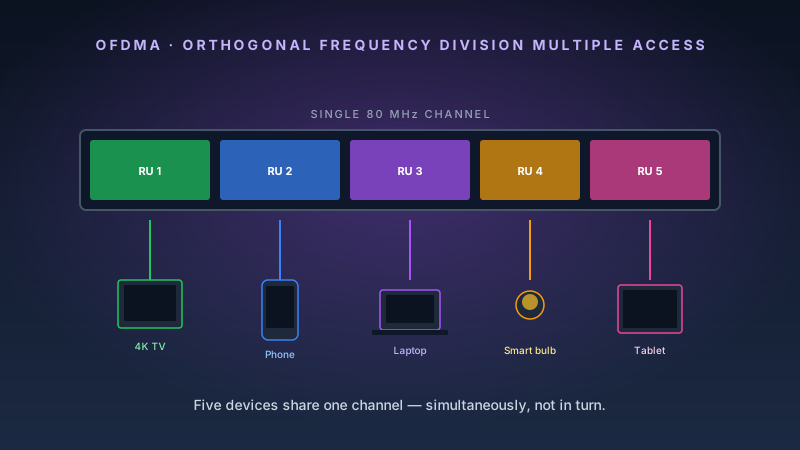
OFDMA is one of the most consequential improvements in modern WiFi — and also one of the most poorly explained. This breaks down what it does, why it matters, and when you'll actually feel the difference.
The verdict up front: OFDMA doesn't make your WiFi faster in a straight line — it makes your WiFi faster when you need it most, under load with multiple devices. If you've ever had WiFi that felt sluggish at 6pm when the whole house is online, OFDMA is what fixes that.
What WiFi Looked Like Before OFDMA
To understand OFDMA, you need to understand OFDM — the technology it replaced.
OFDM (Orthogonal Frequency Division Multiplexing) was the dominant wireless transmission scheme from 802.11a onward through WiFi 5 (802.11ac). It works by splitting the available frequency channel into many small sub-channels called subcarriers, then transmitting data across all of them simultaneously.
The efficiency gain over earlier schemes was real: OFDM made WiFi significantly faster by parallelizing data transmission across hundreds of subcarriers. But it had a structural limitation that WiFi 5 never solved:
An entire channel — all of its subcarriers — could only serve one device at a time.
Every time a device wanted to transmit or receive, it locked up the full channel. Other devices had to wait. This is called contention, and it's why a network with ten active devices performs worse per-device than a network with two active devices, even if the router is perfectly capable. Airtime is a shared resource, and with OFDM, you can only share it one device at a time.
In the early days of WiFi, this wasn't a significant problem. A household might have five or six devices, most of them idle most of the time. Today, a typical smart home has 30–50 connected devices. Your TV is streaming. Your phone is updating apps. Your security cameras are uploading footage. Your laptop is syncing files. All of them are competing for the same channel.
How OFDMA Works
OFDMA (Orthogonal Frequency Division Multiple Access — note the "Multiple Access") solves the one-device-at-a-time problem by subdividing the channel itself.
Instead of allocating all subcarriers to a single device, OFDMA groups subcarriers into Resource Units (RUs). Each RU is a small allocation of the channel — a subset of subcarriers for a specific duration. The router's scheduler can assign different RUs to different devices simultaneously.
The result: multiple devices transmit and receive within the same time window, each using their assigned RUs. The channel is no longer a single-lane road with one car allowed at a time. It's a multi-lane highway.
The scheduler is the key. The access point tracks the buffer status and traffic demands of all connected clients. It then assembles a frame that serves multiple clients in a single transmission opportunity — a process called trigger-based OFDMA uplink scheduling.
RU Sizes in WiFi 6/6E
| RU Size | Subcarriers | Approx. Bandwidth |
|---|---|---|
| 26-tone RU | 26 | ~2 MHz |
| 52-tone RU | 52 | ~4 MHz |
| 106-tone RU | 106 | ~8 MHz |
| 242-tone RU | 242 | ~20 MHz |
| 484-tone RU | 484 | ~40 MHz |
| 996-tone RU | 996 | ~80 MHz |
A single 80 MHz channel can be subdivided to serve up to 37 devices simultaneously in an optimal OFDMA scenario. In practice, real schedulers deal with variable traffic demands and PHY constraints, but the efficiency improvement over OFDM is substantial.
OFDMA in Practice: What You Actually Notice
OFDMA's benefits are most visible in specific scenarios:
Dense Device Environments
If you live in an apartment building or a dense suburban neighborhood, your 5 GHz channel is shared with your neighbors' APs. OFDMA doesn't help with adjacent AP interference, but within your own network, it dramatically improves per-device efficiency when many of your devices are active.
The Ubiquiti UniFi U6 Pro is one of the best-performing access points for OFDMA efficiency in multi-device environments. Its enterprise-grade scheduler does a noticeably better job of RU allocation than most consumer routers — which matters in homes with 20+ connected devices.
Small Packet Traffic
OFDMA helps most with small, latency-sensitive packets — exactly the kind generated by DNS queries, IoT sensors, video call handshaking, and gaming traffic. When a single RU can handle a DNS query while a larger RU handles a video stream and another RU handles a file sync, latency drops for everything.
This is the scenario where you feel the difference: a video call that stays crisp while the rest of the household is actively online. Before WiFi 6/OFDMA, the video call and the file syncs competed for the same transmit slots. With OFDMA, they coexist.
Uplink vs. Downlink OFDMA
WiFi 6 introduced OFDMA in both directions, but there's an asymmetry in how well consumer hardware implements it.
Downlink OFDMA (AP to devices) is well-implemented across all WiFi 6 and WiFi 7 routers. Every client that supports OFDMA benefits.
Uplink OFDMA (devices to AP) requires the AP to send trigger frames telling clients when and on which RUs to transmit. This is harder to implement well. It requires coordinated timing across all clients, and the trigger overhead adds latency at low device counts. Uplink OFDMA is most beneficial when many devices are actively uploading simultaneously — less relevant for a typical home but meaningful for offices and smart home deployments with many sensors reporting data.
OFDMA in WiFi 7: Punctured OFDMA
WiFi 7 extended OFDMA with a new capability: channel puncturing.
In previous WiFi generations, if part of a channel was occupied by interference (a nearby radar system or a neighboring AP), the entire channel had to be abandoned or split. Channel puncturing allows WiFi 7 to exclude contaminated subcarriers while continuing to use the rest of the channel.
This is particularly valuable in the 6 GHz band, where 320 MHz channels span a large swath of spectrum that can include interference sources. Instead of dropping from 320 MHz to 160 MHz when part of the band is occupied, a WiFi 7 AP can puncture the affected subcarriers and maintain most of the channel width.
The result: WiFi 7's wider channels are more reliable in practice than their nominal bandwidth suggests. The TP-Link Archer BE550 implements punctured OFDMA and benefits from it in noisy RF environments.
Does Your Device Need to Support OFDMA?
For downlink OFDMA: yes. The client device needs a WiFi 6, 6E, or 7 chip that supports OFDMA scheduling to participate in RU allocation. Older WiFi 5 devices on the same network revert to OFDM-style operation. The router serves them with full-channel allocations, which reduces the efficiency benefit of OFDMA across the network.
This means the value of OFDMA scales with how many of your devices are WiFi 6 capable. A household with ten WiFi 6 clients sees much more benefit than one where half the devices are still WiFi 5.
For uplink OFDMA: the client also needs to support trigger-based operation. Most WiFi 6 and later clients do, but budget WiFi 6 chips sometimes implement downlink OFDMA while skipping the more complex uplink trigger frame handling.
Which Routers Implement OFDMA Best?
All certified WiFi 6, 6E, and 7 routers support OFDMA — but scheduler quality varies.
Consumer routers from TP-Link, ASUS, and Netgear implement OFDMA correctly but vary in scheduler sophistication. For a typical household, the differences are invisible.
Where it matters more: enterprise-oriented access points like the Ubiquiti UniFi U6 Pro use more sophisticated schedulers that outperform consumer routers in dense environments. If you manage a home with 30+ devices or a small office, the scheduler difference is measurable.
For whole-home mesh, the TP-Link Deco XE75 handles OFDMA scheduling well across nodes — mesh systems with dedicated backhaul links benefit from OFDMA because the backhaul and client-serving bands can apply OFDMA independently.
The Bigger Picture
OFDMA is one of several improvements in WiFi 6 that collectively address the fundamental problem of medium sharing. The others include:
- BSS Coloring — reduces interference from neighboring networks by marking transmissions from different networks so they don't cause unnecessary deferrals
- Target Wake Time (TWT) — allows IoT devices to schedule their transmit windows, dramatically reducing the number of devices competing for airtime at any given moment
- MU-MIMO enhancements — increased spatial stream count for simultaneous multi-user MIMO, complementing OFDMA in scenarios with multiple high-bandwidth clients
Together, these changes mean that a WiFi 6 network with 20 devices does not feel noticeably slower than one with 5 devices — a stark contrast to WiFi 5 behavior.
If you have a pre-WiFi 6 router and your home has grown to 15+ devices, that's the clearest signal to upgrade. OFDMA alone is worth the price of a mid-range WiFi 6E router.
Quick Reference: OFDMA Benefit by Scenario
| Scenario | OFDMA Benefit |
|---|---|
| 1–2 devices, casual use | Minimal — OFDM was fine for this |
| 5–10 devices, mix of traffic | Moderate — noticeable under concurrent load |
| 15+ devices, smart home heavy | High — airtime efficiency matters |
| Video calls + concurrent household use | High — small packet latency improvement |
| Single high-bandwidth transfer | Low — OFDMA doesn't add throughput to one device |
| Dense apartment building | High — combined with BSS Coloring |
Affiliate disclosure: Links in this article use the tag `webstore0fd1-20`. NetAudioHub earns a commission on qualifying purchases at no extra cost to you.