6 GHz vs 5 GHz Wi-Fi: When the New Band Is Actually Faster (And When 5 GHz Wins)
Published 2026-06-17 · By NetAudioHub Editorial
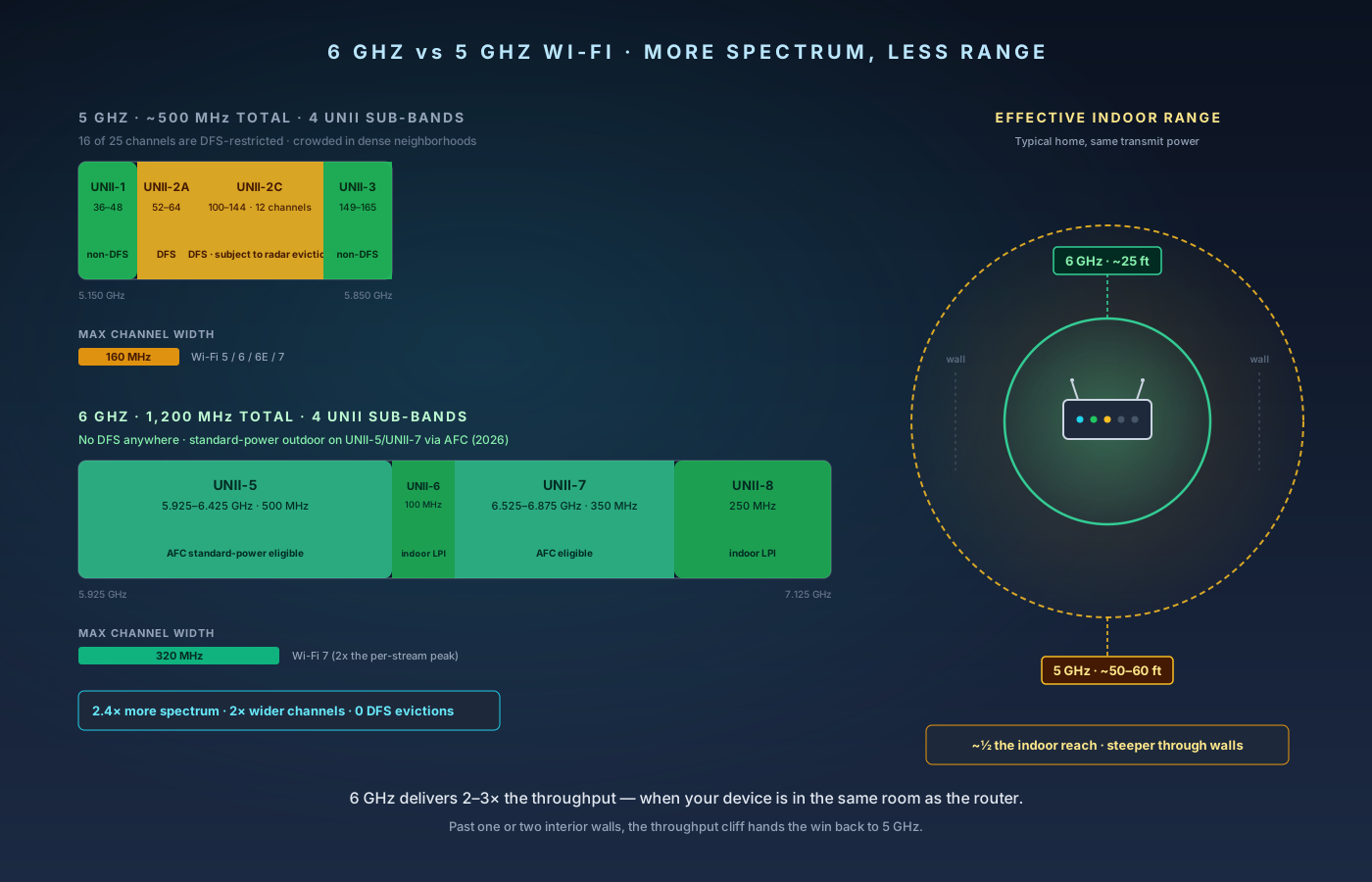
6 GHz Wi-Fi is faster than 5 GHz when your device sits within a wall or two of the router. Past that, the higher frequency loses signal faster than 5 GHz does — and by the far side of a typical home, 5 GHz wins outright. Here's the spectrum math, the range cliff, how AFC changes 2026 routers, and how to set up each device on the right band.
The verdict up front: 6 GHz is faster than 5 GHz when, and only when, your client device is close to the router with at most one interior wall between them. In that scenario, 6 GHz delivers 1.5–3x the throughput of 5 GHz because it has more spectrum (1,200 MHz vs roughly 500 MHz), wider channels (up to 320 MHz on Wi-Fi 7 vs 160 MHz on 5 GHz), and far less congestion. Add more than one wall, and 6 GHz drops fast — by 25 to 50 feet of free space it has lost most of its throughput advantage, and by the far side of a typical home it is slower than 5 GHz or unreachable. This post covers the spectrum math, why 6 GHz has more headroom, why it also has less range, what AFC and standard power are doing in 2026, when client devices actually support it, and how to set up your network so each device picks the right band automatically.
The Bands at a Glance
5 GHz Wi-Fi was opened to unlicensed use in the late 1990s and has been the default high-throughput band for almost two decades. In the US, the FCC allocates four UNII sub-bands totaling roughly 500 MHz of spectrum across channels 36 through 165. Within that, 16 of 25 usable 20 MHz channels are DFS channels — fast and uncongested when they work, but subject to radar-triggered evictions (full explainer here).
6 GHz Wi-Fi was authorized for unlicensed use by the FCC in 2020, and consumer hardware (Wi-Fi 6E routers and clients) shipped in volume starting late 2021. Wi-Fi 7 followed in 2024 with full support for 320 MHz channels and improvements to how 6 GHz clients find an access point. In the US, 6 GHz spans UNII-5 through UNII-8 — a contiguous 1,200 MHz block from 5.925 GHz to 7.125 GHz. There are 59 non-overlapping 20 MHz channels, 14 non-overlapping 80 MHz channels, 7 non-overlapping 160 MHz channels, or 3 non-overlapping 320 MHz channels.
The headline numbers:
| 5 GHz | 6 GHz | |
|---|---|---|
| Total US spectrum | ~500 MHz | 1,200 MHz |
| Max channel width | 160 MHz | 320 MHz (Wi-Fi 7) |
| Non-DFS spectrum | ~200 MHz | 1,200 MHz |
| Backwards compatible with | Wi-Fi 4, 5, 6 | Wi-Fi 6E and later only |
| Standard-power outdoor use | Yes | UNII-5 and UNII-7 only, via AFC |
| Path loss vs 2.4 GHz at 10m | +6.5 dB | +8.5 dB |
Two things stand out. First, 6 GHz has nearly 2.5x more spectrum than 5 GHz. Second, the max channel width on 6 GHz (320 MHz) is twice that of 5 GHz (160 MHz), which on Wi-Fi 7 doubles the peak PHY rate per spatial stream. Together, those two factors are why 6 GHz can deliver multi-gigabit throughput where 5 GHz tops out around 1.4 Gbps in real-world conditions.
The third factor — the one that does not make it onto marketing materials — is path loss. Higher frequencies attenuate faster through air and especially through obstructions. That is the catch.
Why 6 GHz Is Faster in the Same Room
Three things make 6 GHz dramatically faster than 5 GHz in close range:
More spectrum to spread across. On 5 GHz, getting a clean 80 MHz channel is hard in dense neighborhoods. Getting a clean 160 MHz channel often requires using DFS, which has its own problems. On 6 GHz, even a 160 MHz channel uses only one-seventh of the band — there is plenty of room for your router and your three nearest neighbors to all have their own non-overlapping channel.
Wider channels. A 320 MHz channel on Wi-Fi 7 can theoretically push 5,764 Mbps per spatial stream at the highest MCS (4096-QAM). Real-world hardware with a 2x2 client on Wi-Fi 7 routinely measures 2.5–3 Gbps in iperf3 tests at close range. The same router on 5 GHz at 160 MHz tops out around 1.6 Gbps — and most of the time you cannot get a clean 160 MHz channel anyway, so the realistic comparison is 6 GHz at 320 MHz vs 5 GHz at 80 MHz, where the gap is closer to 3x.
Cleaner airspace. Most Wi-Fi traffic in your neighborhood is still on 2.4 and 5 GHz. As of mid-2026, only about 35–40% of new client devices have a 6 GHz radio, and even fewer existing devices have been upgraded. Your apartment building's 6 GHz airspace might have one or two other routers on it. Your 5 GHz airspace has fifteen.
In tests with a Wi-Fi 7 router and a 2x2 Wi-Fi 7 client (laptop, phone, or USB adapter) sitting in the same room within 10 feet of the access point:
- 6 GHz, 320 MHz channel: 2,400–3,100 Mbps real-world throughput
- 6 GHz, 160 MHz channel: 1,400–1,800 Mbps
- 5 GHz, 160 MHz channel (clean): 1,100–1,500 Mbps
- 5 GHz, 80 MHz channel (typical): 600–900 Mbps
If you have a Gigabit internet plan, this conversation does not matter. If you have a 2 Gbps or 5 Gbps plan, or if you are moving large files over your LAN to a NAS, the difference is the difference between saturating the link and bottlenecking.
Why 6 GHz Is Slower Through Walls
Path loss in free space scales with frequency. The Friis transmission equation says signal power at a distance d falls off as (lambda / 4pid)^2 — and lambda is shorter at higher frequencies, so the loss is greater. The free-space loss difference between 5 GHz and 6 GHz is small (about 2 dB at 10 meters), but the real-world difference is much larger because of how those higher frequencies interact with materials.
A standard interior drywall partition attenuates 5 GHz by roughly 4–6 dB and 6 GHz by 6–9 dB. A concrete wall doubles those numbers. A wall with metalized insulation backing — common in modern energy-code homes — can add 15–20 dB at 6 GHz versus 10–14 dB at 5 GHz. Brick exterior walls and tile floors are even worse for 6 GHz.
The compounding effect: the wider the channel, the lower the noise floor you can tolerate before MCS (modulation and coding) drops. A 320 MHz channel needs a 3 dB better signal-to-noise ratio than a 160 MHz channel at the same MCS just because the noise floor is wider. So you do not just lose a few dB of signal through a wall — you also drop modulation rates faster, which compounds into a much steeper throughput cliff than 5 GHz.
The result in a typical 1,800 sq ft single-story home:
| Distance / obstruction | 5 GHz, 80 MHz | 6 GHz, 160 MHz | 6 GHz, 320 MHz |
|---|---|---|---|
| Same room, 10 ft | 800 Mbps | 1,600 Mbps | 2,800 Mbps |
| 1 wall, 20 ft | 600 Mbps | 1,100 Mbps | 1,600 Mbps |
| 2 walls, 30 ft | 400 Mbps | 500 Mbps | 600 Mbps |
| 3 walls, 40 ft | 250 Mbps | 150 Mbps | Falls back to 5 GHz |
| Floor + 2 walls, 50 ft | 150 Mbps | Unreachable | Unreachable |
By the time you are at the far end of the house, 5 GHz wins outright. By the basement or upstairs bedroom, 6 GHz simply is not an option — the client will roam back to 5 GHz or 2.4 GHz on its own. This is the part of the spec sheet you have to know before you spend money on a Wi-Fi 7 router expecting whole-home gigabit Wi-Fi.
PSC Channels: Why 6 GHz Connects Faster Than 5 GHz Does
A subtle but important detail: 6 GHz introduced a concept called Preferred Scanning Channels (PSC). These are 15 specific 20 MHz channels spaced every 80 MHz across the 6 GHz band, and they exist solely to make client discovery faster.
On 5 GHz, when your phone wants to find a Wi-Fi network, it scans every channel — all 25 of them in the US, with the DFS channels requiring passive scanning (listen for beacons, do not transmit a probe request). This takes several seconds and is one reason why 5 GHz can feel slow to associate after a wake-from-sleep.
On 6 GHz, clients only need to scan the 15 PSC channels. Wi-Fi 6E and Wi-Fi 7 access points are required to broadcast their primary channel information on a PSC channel — either by operating their primary 20 MHz on a PSC channel themselves, or by sending "Reduced Neighbor Reports" on PSC channels that point to the non-PSC channel where the actual network lives.
The result: a Wi-Fi 6E or Wi-Fi 7 phone wakes up, scans 15 channels, and finds your network in well under a second. There is no DFS-style listen-before-talk requirement and no "where is my router" delay. This is part of why 6 GHz feels snappier even when peak throughput is similar to 5 GHz.
AFC and Standard Power: What Changed in 2026
When 6 GHz first launched in 2020, the FCC restricted indoor-only access points (Low Power Indoor, or LPI) to 30 dBm EIRP and required them to be permanently powered, hard-wired, and indoor-only — no removable batteries, no external antennas, no outdoor use. A separate "Standard Power" mode allowed higher transmit power and outdoor use, but only under the supervision of an Automated Frequency Coordination (AFC) system that would prevent Wi-Fi from interfering with the licensed incumbents (fixed satellite uplinks and microwave point-to-point links).
For three years, AFC did not actually exist in deployable form. Routers shipped with the hardware capability but no software, because no AFC system had been certified.
That changed in late 2024 and through 2025. The FCC certified six AFC operators (Federated Wireless, Sony, Comsearch, Key Bridge Wireless, Wireless Broadband Alliance, and Qualcomm) for commercial AFC service. By early 2026, most premium Wi-Fi 7 routers ship with AFC client firmware that automatically queries an AFC operator on first power-up and again every 24 hours, and if your location is clear of incumbent operators on UNII-5 and UNII-7 (typically yes for most US homes), the router unlocks standard-power transmission — 36 dBm EIRP, equivalent to 5 GHz UNII-3 — and can use outdoor-capable antenna patterns.
Practically, this means a 2026-or-later Wi-Fi 7 router in an AFC-cleared location gets 6 dB more transmit power on 6 GHz than the same hardware did in 2022. That recovers roughly 12 feet of effective range through air and brings 6 GHz range much closer to parity with 5 GHz indoors. The cliff is still steeper, but it now starts further out.
If you are buying a new Wi-Fi 7 router in 2026, AFC support is the single most important upgrade over a 2023 Wi-Fi 6E model in the 6 GHz band. Check the spec sheet for "AFC" or "Standard Power Mode" — not all current Wi-Fi 7 routers have it certified yet. The ASUS RT-BE96U, TP-Link Archer BE800, and Netgear RS700S have it as of mid-2026.
When 5 GHz Still Wins
Even with AFC, there are scenarios where 5 GHz is still the better band:
Whole-home coverage from a single router. If you have a 2,500+ sq ft home and you want one router to cover it without mesh nodes, 5 GHz reaches further. 6 GHz typically requires either a mesh system or multiple access points to cover the same area.
Outdoor coverage to a patio or yard. AFC unlocks outdoor 6 GHz, but only on UNII-5 and UNII-7. UNII-6 and UNII-8 remain indoor-only at low power. And the wider 320 MHz channels are usually inside UNII-6 and UNII-7, which means outdoor 6 GHz is often limited to 80 or 160 MHz channels anyway. 5 GHz UNII-3 still has more useful outdoor range.
Devices that do not have 6 GHz radios. Anything older than late-2021 phone, anything on a Wi-Fi 5 or Wi-Fi 6 (not 6E) chipset, anything in the budget tier of laptops shipped before 2023, and most smart home devices (thermostats, plugs, cameras, doorbells) are 5 GHz-only or 2.4 GHz-only. Those devices have no choice. They will connect to your 5 GHz radio.
Mesh backhaul. If your mesh system uses Wi-Fi for backhaul between nodes (and you have not run Ethernet — which you should, see our backhaul comparison), 5 GHz is often the better backhaul choice unless the nodes are within line-of-sight in the same room. 6 GHz backhaul exists on tri-band Wi-Fi 7 mesh systems, but the same range cliff applies to node-to-node communication.
You only have a Gigabit internet plan. If your ISP delivers 1 Gbps or less, your 5 GHz radio already saturates the WAN link. 6 GHz buys you nothing for internet — it only matters for LAN-to-LAN transfers (NAS, local AI, file servers) or for plans above 1 Gbps.
How Client Devices Actually Pick the Band
A common misconception is that "the router decides which band each device uses." It does not. Clients pick the band. The router can influence the choice by tuning beacon-rate, signal-strength reports, and 802.11k/v/r hints, but ultimately the client looks at the candidate access points it can see, scores them, and picks one.
Modern clients (iOS 16+, Android 13+, Windows 11 22H2+, macOS 13+) score by a weighted combination of:
- RSSI (signal strength) — heavier weight as RSSI gets worse
- PHY rate (the negotiated max link speed) — heavier weight as RSSI gets better
- Channel utilization — heavier weight in congested environments
- Band preference — most clients have a slight built-in preference for higher-frequency bands when signal is good
The practical effect: if your phone is 6 feet from your Wi-Fi 7 router and can see both the 5 GHz radio and the 6 GHz radio with strong signal, it will pick 6 GHz. If you walk into another room and 6 GHz drops 15 dB while 5 GHz drops 6 dB, the client will roam back to 5 GHz — eventually. Some clients are sluggish about roaming and will stay on a degraded 6 GHz connection for too long.
You can help this in two ways:
Use a single SSID for all three bands. On most modern routers, "Smart Connect" or "Single SSID" merges 2.4 GHz, 5 GHz, and 6 GHz into one network name. The client picks the band on the fly based on conditions. This is generally the right default.
Use separate SSIDs only if you have a specific device that needs band-locking. Some IoT devices fail to connect to dual-band networks (they get confused by the dual-band probe responses). For those, expose a 2.4 GHz-only SSID. For everything else, single-SSID is faster to set up and behaves better.
Practical Setup: Which Band for What
A workable defaults table for a typical Wi-Fi 7 home:
| Device | Preferred band | Why |
|---|---|---|
| Gaming PC / Mac near router | 6 GHz, 320 MHz | Lowest latency, highest throughput |
| Streaming TV / Apple TV / Roku | 5 GHz | Range matters more than peak speed, 4K HDR is well under 100 Mbps |
| Smartphones | Single SSID, let client roam | Will pick 6 GHz when close, 5 GHz when far |
| Laptops on desk | 6 GHz if Wi-Fi 6E/7 capable | Free up 5 GHz for everything else |
| Smart home (lights, plugs, sensors) | 2.4 GHz | Range matters, throughput does not, and most are 2.4-only anyway |
| Security cameras | 5 GHz | Throughput matters for 4K cameras, range matters for outdoor placement |
| Doorbell | 2.4 GHz | Always 2.4 GHz-only on the hardware side |
| Printers | Whatever band the printer supports | Printers are slow regardless |
| Mesh backhaul (wireless) | 6 GHz if line-of-sight, 5 GHz otherwise | Tradeoff between throughput and reliability |
Best Routers and Mesh Systems for 6 GHz in 2026
Best single-router pick for a small-to-medium home:
- ASUS RT-BE96U — Wi-Fi 7 tri-band with full 320 MHz support, AFC certified, and the most granular per-radio channel control in the consumer market. The 5 GHz radio is also strong, so you do not give up coverage to gain 6 GHz.
- TP-Link Archer BE800 — slightly cheaper than the ASUS, supports AFC, has dual 10 GbE ports for backhaul to a NAS or switch.
Best mesh pick for larger homes where 6 GHz is the backhaul:
- TP-Link Deco BE63 — three Wi-Fi 7 nodes with a dedicated 6 GHz backhaul radio. Pricey but the only way to make 6 GHz coverage actually work in a 3,000+ sq ft home without running Ethernet. See our full review.
- Netgear Orbi RBE973S — quad-band Wi-Fi 7 (two 5 GHz radios plus one 6 GHz plus 2.4 GHz). The second 5 GHz radio handles backhaul, leaving 6 GHz free for clients. Best raw coverage in the category.
Best Wi-Fi 6E router if you don't want to pay for Wi-Fi 7:
- ASUS RT-AXE7800 — solid tri-band Wi-Fi 6E at roughly half the cost of equivalent Wi-Fi 7 hardware. You lose 320 MHz channels and MLO, but 6 GHz at 160 MHz still delivers 1.5–1.8 Gbps to compatible clients.
Wired Wi-Fi 7 client adapter for desktops:
- TP-Link Archer TBE550E PCIe — Wi-Fi 7 PCIe card that exposes all three bands and supports 320 MHz on 6 GHz. The cheapest way to get desktop Wi-Fi 7 without buying a new motherboard.
FAQ
Is 6 GHz the same as Wi-Fi 6E? Wi-Fi 6E is the version of the 802.11ax standard that added 6 GHz support. So a Wi-Fi 6E device is a Wi-Fi 6 device with a 6 GHz radio. Wi-Fi 7 (802.11be) also uses 6 GHz, and adds 320 MHz channels, MLO, and 4096-QAM. The 6 GHz band is the same physical spectrum on both — what changes is what the device can do with it.
Do I need a Wi-Fi 7 router to get 6 GHz? No — Wi-Fi 6E routers also use 6 GHz, but at maximum 160 MHz channel width. If your devices are all Wi-Fi 6E (and not Wi-Fi 7), a Wi-Fi 6E router is fine and significantly cheaper.
Why can't my Wi-Fi 6 (not 6E) phone connect to my 6 GHz network? 6 GHz requires hardware support — specifically a radio that can tune to the 5.925–7.125 GHz range. Wi-Fi 6 (without the E) devices lack that hardware. There is no software upgrade path. The same is true of any pre-2022 client device, and most pre-2023 budget-tier laptops and phones.
Should I disable 5 GHz if I have 6 GHz? No. Many of your devices will still need 5 GHz, and 5 GHz is the better band for any device more than a couple of walls from the router. Leave both radios on, ideally with a single SSID, and let clients pick.
Does 6 GHz have DFS? No — there is no DFS requirement on 6 GHz anywhere in the world as of 2026. The incumbents on 6 GHz are fixed satellite uplinks and microwave links, which are protected by AFC (for standard-power outdoor use) and by transmit power limits on indoor use, not by DFS-style listen-before-talk.
Will my Apple TV 4K work on 6 GHz? Only the third-generation Apple TV 4K (released November 2022) and later support Wi-Fi 6E and can use 6 GHz. The first- and second-generation 4K models are Wi-Fi 5 and Wi-Fi 6 respectively, so they top out on 5 GHz.
Why does my phone show "Wi-Fi 6E" but my router shows it connected on 5 GHz? The phone may have associated on 5 GHz because the 6 GHz signal was weaker at that moment, or because 6 GHz had higher channel utilization, or because of a roaming hysteresis bug in the firmware. Walk closer to the router, toggle Wi-Fi off and on, and check again. If your phone consistently picks 5 GHz when it should pick 6 GHz, check whether your router has "Smart Connect" enabled — that is what tells the phone the 6 GHz radio exists in the same SSID.
Is 6 GHz safer to use because nothing else is on it? "Safer" is the wrong word — interference and security are unrelated. 6 GHz is less congested because fewer devices are on it. From a security standpoint, 6 GHz only supports WPA3 (no WPA2), so any device that connects to it is using the stronger crypto. That is a real upgrade for password-cracking resistance, but it is a property of the protocol, not the band.
What about 60 GHz (WiGig / 802.11ad/ay)? Different conversation entirely. 60 GHz is a millimeter-wave band used mostly for fixed point-to-point links and a small number of high-end VR streamers. It does not penetrate walls at all and is not a replacement for 5 or 6 GHz in a normal home network.
Related
Affiliate disclosure: NetAudioHub links to retailers including Amazon. We earn a small commission on qualifying purchases at no extra cost to you.