Wi-Fi Channel Width Explained: 20 vs 40 vs 80 vs 160 MHz (and 320 in Wi-Fi 7)
Published 2026-08-01 · By NetAudioHub Editorial
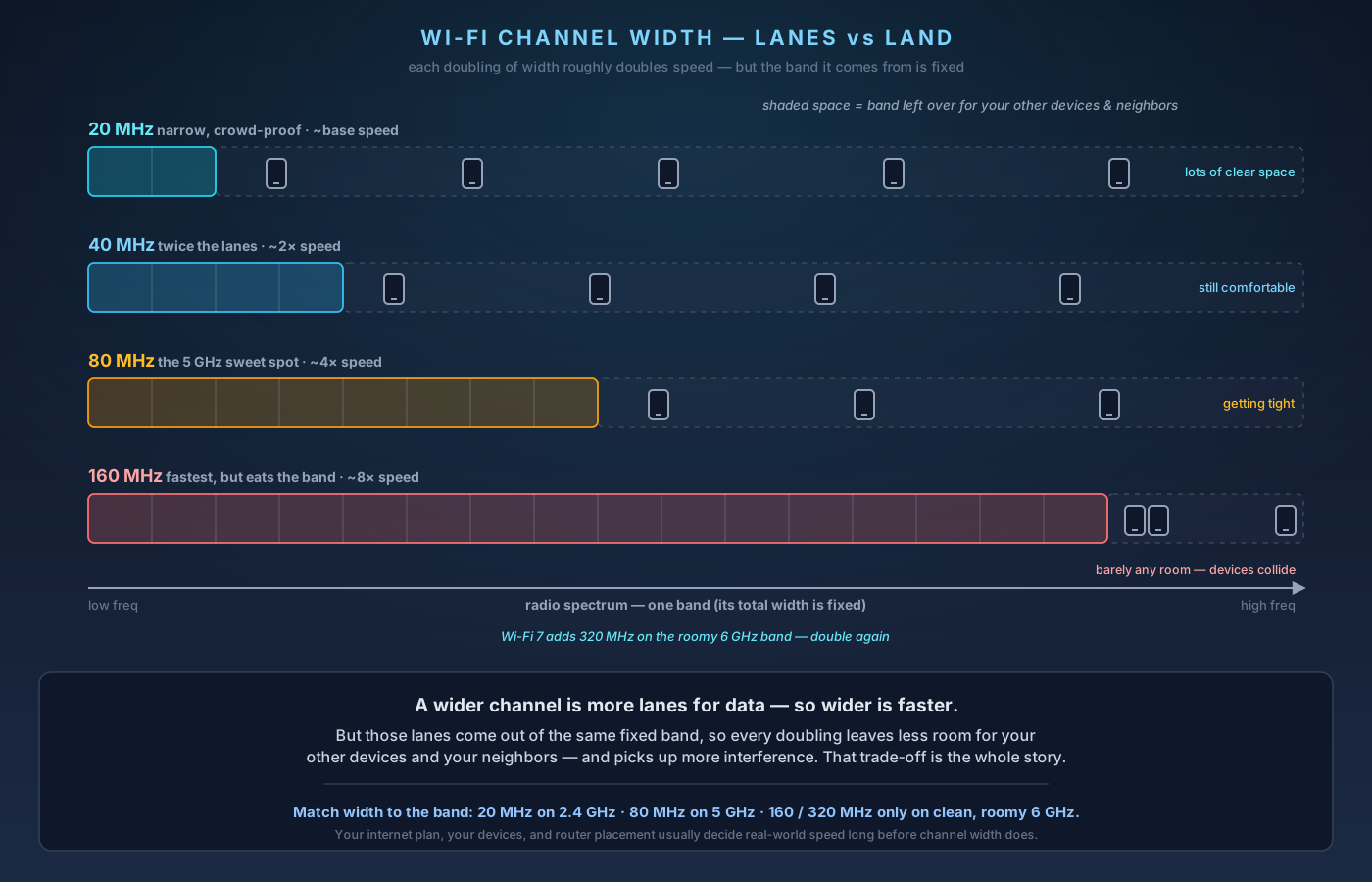
Wi-Fi channel width is how wide a slice of radio spectrum your network grabs — and the rule is simple: wider is faster, but not always better. Each doubling (20 → 40 → 80 → 160 MHz, plus 320 MHz on Wi-Fi 7) roughly doubles the theoretical speed, because a wider channel is literally more lanes for data. The catch is those lanes come out of a fixed band, so a wider channel leaves less room for your other devices and your neighbors, and picks up more interference. Here's what each width buys you, why the right answer depends entirely on the band, and exactly what to set on 2.4, 5, and 6 GHz.
The verdict up front: channel width is how wide a slice of radio spectrum your Wi-Fi uses, and the rule is simple — wider is faster, but not always better. Each doubling (20 → 40 → 80 → 160 MHz) roughly doubles the theoretical speed, because a wider channel is literally more lanes for data. The catch is that those lanes come out of a fixed amount of spectrum, so a wider channel leaves less room for your other devices and your neighbors, and it's more exposed to interference. Which is why the right setting depends entirely on the band: on crowded 2.4 GHz, stay at 20 MHz. On 5 GHz, 80 MHz is the sweet spot for most homes, with 160 MHz worth it only if you have a clean, radar-free area and clients that support it. On 6 GHz (Wi-Fi 6E and 7), the band is so wide open that 160 MHz — and 320 MHz on Wi-Fi 7 — finally make sense without a fight. Below: what a channel actually is, what each width buys you, and exactly what to set.
First, What Is a "Channel"?
Your router doesn't transmit on one single frequency — it uses a band of frequencies, and that band is chopped up into channels. A channel is just a named chunk of spectrum your devices agree to talk on so they aren't all shouting over each other.
Channel width is how wide that chunk is, measured in megahertz (MHz). A 20 MHz channel is a 20 MHz-wide slice; an 80 MHz channel is four times as wide.
Here's the intuition that makes everything else click: think of a channel as a highway, and channel width as the number of lanes. More lanes means more cars (data) can move at once, so throughput goes up. But the land the highway is built on is fixed. Every extra lane you pave is land that can't be used for a different road. That's the entire trade-off in one sentence.
The technical name for making a channel wider is channel bonding — the router glues two or more base 20 MHz channels together into one bigger channel.
What Each Width Actually Buys You
Roughly speaking, throughput scales with width. Doubling the width doubles the raw data rate, all else being equal:
- 20 MHz — the base unit. Narrow, but it fits almost anywhere and is the most resistant to interference. The only sensible choice on 2.4 GHz.
- 40 MHz — two bonded 20 MHz channels. About double the speed of 20 MHz. A reasonable step up on 5 GHz, and the practical ceiling on 2.4 GHz (usually a bad idea there — more on that below).
- 80 MHz — four bonded channels. The default sweet spot on 5 GHz for most homes: a big speed jump while still leaving enough of the band for neighbors and your other devices.
- 160 MHz — eight bonded channels. The fastest option on Wi-Fi 5/6/6E. Great on paper, but it eats a huge slice of the band and, on 5 GHz, almost always has to borrow DFS radar channels (see below).
- 320 MHz — new with Wi-Fi 7, and only available on the 6 GHz band. Sixteen bonded channels — double the top speed of Wi-Fi 6E. Only the wide-open 6 GHz band has room for it.
A quick way to hold the speed picture in your head: on the same hardware, moving from 80 MHz to 160 MHz roughly doubles your link rate (the "connected at" number). Whether you actually feel that jump is a separate question we'll get to.
Why Wider Isn't Always Better
If wider is faster, why not always crank it to the max? Three reasons.
1. Fewer non-overlapping channels. The wider each channel, the fewer distinct ones fit in a band. Two nearby networks on overlapping wide channels have to take turns and interfere — so in an apartment building or dense neighborhood, everyone cranking to 160 MHz can be slower than everyone using 40 or 80 MHz, because nobody can stay out of anyone else's way.
2. More noise gets in. A wider channel listens to more spectrum at once, so it also picks up more interference — from neighbors, microwaves, Bluetooth, baby monitors, and so on. Wi-Fi will fall back to slower speeds when a channel is noisy, so a wide-but-dirty channel can underperform a narrow clean one.
3. Range shrinks in practice. Transmit power is spread across the whole channel, so a wider channel puts less power into any given slice. At the edge of your coverage, a narrower channel often holds a more stable connection than a wide one that keeps dropping to lower rates. Wide channels reward you where the signal is already strong.
The takeaway: width is a speed-vs-robustness dial, not a "more is better" slider.
It All Depends on the Band
Channel width can't be discussed sensibly without saying which band. The three Wi-Fi bands have wildly different amounts of room.
2.4 GHz — keep it at 20 MHz
The 2.4 GHz band is tiny and crowded. In most of the world it has only three non-overlapping 20 MHz channels (1, 6, and 11). Go to 40 MHz and you can fit barely one clean channel — meaning you're almost guaranteed to stomp on a neighbor and get stomped on in return. 2.4 GHz is also where microwaves, Bluetooth, and cheap smart-home gadgets live.
Set 2.4 GHz to 20 MHz and leave it there. Its job is range and old-device compatibility, not speed. Widening it usually makes the whole band worse for everyone, including you.
5 GHz — 80 MHz is the sweet spot
The 5 GHz band is much roomier, which is why it carries most of the real work in a modern home. It splits into a lower group of channels and an upper group, with a big middle section that requires DFS (Dynamic Frequency Selection) because it's shared with weather and military radar. When your router uses a DFS channel and detects radar, it must vacate — which is a common, sneaky cause of Wi-Fi that "drops for no reason." (We cover that in detail in our explainer on why DFS channels make Wi-Fi drop.)
For 5 GHz:
- 80 MHz is the default for most homes — a big speed boost with enough of the band left over to dodge neighbors and shrug off interference.
- 160 MHz is tempting but demanding: on 5 GHz there's only really room for one or two 160 MHz channels, and reaching them almost always means pulling in DFS spectrum. That exposes you to radar-triggered drops and requires that your client devices support 160 MHz too (many older phones and laptops don't). In a dense area, 160 MHz on 5 GHz often nets you less real-world throughput than a rock-solid 80 MHz.
- 40 MHz is a fine fallback if your area is packed and 80 MHz is unstable.
If your router has an "Auto" or "20/40/80" width setting for 5 GHz, that's usually the smart default — it will bond up to 80 MHz when the air is clear and back off when it's busy.
6 GHz — where 160 and 320 MHz finally make sense
The 6 GHz band (available on Wi-Fi 6E and Wi-Fi 7 gear) is the game-changer. It's enormous and, for now, largely empty of legacy devices. There's finally enough contiguous spectrum to run 160 MHz channels without fighting for them — and Wi-Fi 7 adds 320 MHz, doubling the top-end throughput again.
If you have 6E or Wi-Fi 7 equipment and 6 GHz-capable clients, this is where wide channels earn their keep: 6 GHz is clean, so the usual "wider = noisier" penalty is minimal today. The main limits are range (6 GHz doesn't travel as far or through walls as well as 5 GHz) and needing devices that actually support the band.
Wi-Fi 7 and 320 MHz
Wi-Fi 7's headline number — those multi-gigabit link rates — leans heavily on 320 MHz channels on 6 GHz. Double the width of Wi-Fi 6E's max, roughly double the raw speed.
Two caveats keep it honest. First, 320 MHz only exists on 6 GHz, so both your router and the device have to support Wi-Fi 7 on that band. Second, Wi-Fi 7's other big trick, Multi-Link Operation (MLO), can combine bands to boost reliability and speed independently of channel width — so you don't need a single giant channel to benefit from Wi-Fi 7. (See our Wi-Fi 7 MLO explainer for how that works.)
For most people, 320 MHz is a "nice when the stars align" bonus, not the reason to buy Wi-Fi 7. A clean 160 MHz on 6 GHz already delivers far more than a typical home internet plan can feed it.
Why You Might Not Feel the Difference
This is the part router marketing skips. Widening your channel raises the link rate — the theoretical speed between your device and the router. Your actual experience is capped by whichever bottleneck is lowest:
- Your internet plan. If you pay for 500 Mbps, an 80 MHz 5 GHz channel already exceeds that. Going to 160 MHz won't make Netflix load faster — the internet is the limit, not your Wi-Fi.
- The device's radio. A phone with a 2-stream 80 MHz radio can't use a 160 MHz channel to its full width. Width only helps if the client supports it.
- Distance and walls. Wide channels fade fastest. Two rooms away, a wide channel may already have dropped to a rate lower than a narrow channel would hold.
Where wider channels do pay off: moving big files between devices on your own network, fast local backups, high-bitrate 4K/8K streaming from a home server, and low-latency gaming when you're close to the router. If your goal is just "faster internet everywhere," a clean channel and good placement beat a wide, noisy one every time.
What to Set: A Cheat Sheet
If you just want the settings, here's the short version:
- 2.4 GHz: 20 MHz. Always. Don't touch it.
- 5 GHz, typical home: 80 MHz, or "Auto / 20/40/80."
- 5 GHz, dense apartment building: 40 MHz if 80 MHz feels unstable.
- 5 GHz, want max speed and you're close to the router: 160 MHz — but expect possible DFS-related drops and make sure your devices support it.
- 6 GHz (Wi-Fi 6E/7): 160 MHz freely; it's a clean band.
- 6 GHz on Wi-Fi 7: 320 MHz if both ends support it, for top-end local speed.
And two habits that matter more than the width number itself: pick a good, quiet channel (or let the router auto-select), and fix placement and interference first. A well-placed router on a clean 80 MHz channel will beat a badly-placed one on 160 MHz nearly every time.
The Bottom Line
Channel width is a lanes-vs-land trade-off. Wider channels are faster because they're more lanes for data, but every doubling eats spectrum that your other devices and neighbors need, and exposes the connection to more interference and shorter usable range.
Match the width to the band: 20 MHz on 2.4 GHz, 80 MHz on 5 GHz, and go wide (160/320 MHz) only on the clean, roomy 6 GHz band where there's space to spare. Then remember that your internet plan, your devices, and your router placement usually decide how fast your Wi-Fi feels — long before channel width does.
Affiliate disclosure: NetAudioHub links to retailers including Amazon. We earn a small commission on qualifying purchases at no extra cost to you.