How Much Internet Speed Do You Actually Need? (A Plain-English Mbps Guide for 2026)
Published 2026-09-23 · By NetAudioHub Editorial
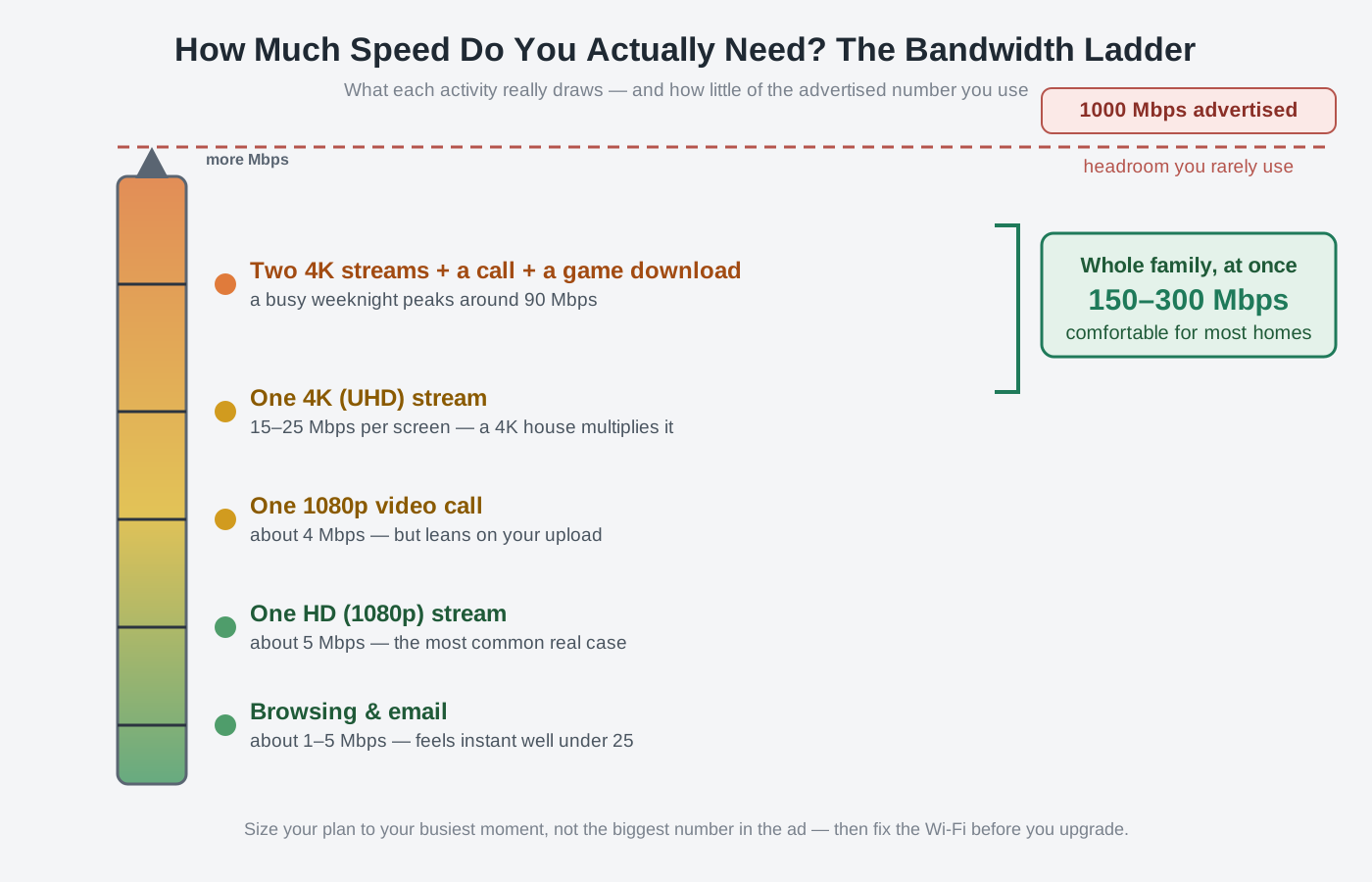
Internet plans are sold on one big number — the download speed in megabits per second — and that number is almost always bigger than you need. What actually determines whether your connection feels fast is how many heavy things happen at once, how much upload you get, and how low your latency stays under load, none of which show up in the ad. Here's what streaming, video calls, gaming, and working from home really cost in Mbps, how to add up your household instead of guessing, and why the honest answer for most homes is somewhere between 100 and 500 Mbps — not the gig.
The verdict up front: almost nobody needs the gigabit plan they're being sold, and the headline download number is the least useful part of the ad. What makes an internet connection feel fast is not its peak speed but three things the marketing hides — how many heavy activities run at the same time, how much upload you get, and how low your latency stays when the connection is busy. Add up your real simultaneous usage and most households land between 100 and 500 Mbps: a couple streaming HD and browsing is fine on 100, a busy family with 4K TVs, video calls, and big game downloads is comfortable around 300-500, and past that you're mostly buying headroom you'll rarely touch. Meanwhile the thing that actually makes your Wi-Fi feel slow is usually your router and your placement, not your plan — so before you pay for more speed, make sure you can even use the speed you already have. Here's how to size it honestly.
First, What "Mbps" Actually Measures
Internet speed is quoted in megabits per second (Mbps), and the single most useful thing to know is that bits are not bytes. There are 8 bits in a byte, and file sizes are in bytes, so to get the download speed you feel, divide the plan number by eight. A 100 Mbps plan tops out around 12.5 megabytes per second; a 1,000 Mbps (gigabit) plan tops out around 125 MB/s — on a wired connection, on a good day, to a server that can actually feed you that fast.
That last clause matters. Your plan speed is a ceiling for the whole house, not a guarantee for one device. A single laptop on Wi-Fi, pulling from a busy server, will almost never see the full number — and that's normal, not a fault. The right way to think about a plan is as a shared pipe: everything in the house draws from it at once, and "how much do I need" is really "how wide does the pipe need to be so nothing chokes when the house is busy."
What Each Activity Really Costs
Here's the honest per-activity draw. These are steady-state numbers for a single stream or session — the trick, which we'll get to, is that they add up when they happen simultaneously.
| Activity | Realistic download need | Notes |
|---|---|---|
| Web browsing, email, social | 1-5 Mbps | Bursty; feels instant well below 25 Mbps |
| Music streaming (Spotify, etc.) | 0.5-1 Mbps | Trivial |
| SD video stream | ~3 Mbps | |
| HD (1080p) video stream | ~5 Mbps | The most common real-world case |
| 4K (UHD) video stream | 15-25 Mbps | Per screen; a 4K house multiplies this |
| Video call (1080p, one person) | 2-4 Mbps | Needs upload too — see below |
| Online gaming (live gameplay) | 0.5-3 Mbps | Bandwidth is tiny; latency is what matters |
| Game / large file download | As much as you'll give it | A 100 GB game takes ~2.2 hrs at 100 Mbps, ~13 min at 1 Gbps |
| Cloud backup, big uploads | As much upload as you'll give it | Upload-bound, not download |
Two things jump out. First, individual activities are cheaper than people assume — one 4K stream on a 100 Mbps plan uses a quarter of it. Second, the two activities with no fixed number — downloads and cloud backup — will happily consume your entire connection, which is exactly why more speed feels nice even when you don't strictly need it: big transfers finish faster.
The Real Driver: Simultaneous Use
You don't need to cover your biggest single activity — you need to cover your worst realistic moment, when several are running at once. Sizing a plan is just adding those up.
Picture a busy weeknight in a family of four:
- One 4K movie in the living room — 25 Mbps
- One HD show in a bedroom — 5 Mbps
- A work video call — 4 Mbps (plus upload)
- A game download quietly running in the background — grabs ~50 Mbps of whatever's left
- Two phones on Wi-Fi doing background app stuff — ~5 Mbps
That peaks around 90 Mbps. On a 100 Mbps plan, that exact moment would feel tight — the download would starve everything else and the call might stutter. On 200-300 Mbps, it all runs with room to spare. That's the whole logic: take your heaviest plausible overlap, then leave headroom so one big download doesn't ruin everyone's evening.
This is also why device count matters more than device speed. Twenty smart-home gadgets, three TVs, and five phones each sip a little, but they sip constantly and simultaneously. A connected home wants more total bandwidth than the raw activity list suggests.
Don't Ignore Upload
Plans are advertised on download because that's the big number, but upload speed is what breaks first for a lot of people — and cable internet, the most common type in the US, is deeply asymmetric. A cable plan advertised at "500 Mbps" might give you only 10-20 Mbps up. That's fine for browsing, but upload is what carries:
- Your side of every video call (this is why you look pixelated even when downloads are fast)
- Cloud backup and syncing photos/files
- Uploading videos, streaming your own gameplay, sending large files
- Working from home over a VPN, where a lot of traffic goes both ways
If your household does a lot of calls or backups, check the upload number before the download number. This is the single biggest advantage of fiber: it's usually symmetric — the same speed up as down — so a "300/300" fiber plan can feel dramatically better for a work-from-home household than a "600/20" cable plan, even though the headline is smaller.
Latency and Bufferbloat Beat Raw Speed for Feel
Here's the part no ISP advertises: past a certain point, more Mbps doesn't make anything feel faster — a page loads, a game responds, a call connects based on latency (ping, measured in milliseconds), not bandwidth. Gaming is the clearest case: competitive games need only a couple of Mbps but live or die on low, stable ping.
The nasty failure mode is bufferbloat — when a big upload or download (a cloud backup, a game patch) fills your connection and your ping balloons from 20 ms to 300 ms, making calls choppy and games laggy even though you have plenty of speed. Buying a faster plan doesn't fix it; it's a queue-management problem in your router. If your connection feels laggy specifically when something big is transferring, that's bufferbloat, and our bufferbloat explainer walks through how to test for it and fix it — usually worth far more than a plan upgrade.
So, How Many Mbps? A Straight Answer by Household
Round these up if you skew toward 4K everything or lots of simultaneous heavy use:
- 1-2 people, light use (HD streaming, browsing, the odd call): 100 Mbps is genuinely plenty. Don't let anyone upsell you.
- Small family or shared home, some 4K, occasional WFH: 200-300 Mbps is the sweet spot — covers a busy night with headroom.
- Busy household, multiple 4K screens, daily video calls, big gaming downloads, lots of smart devices: 500 Mbps comfortably handles the worst moment.
- Heavy creators, huge daily uploads, many simultaneous 4K + downloads, or you just want zero contention ever: gigabit — but buy it for the fast downloads and the upload (if fiber), not because your streams need it.
The honest middle of that range — 200 to 500 Mbps — covers the vast majority of homes. Above 500, you're paying for headroom and faster large transfers, both real but easy to overvalue.
The Catch: Your Plan Is Probably Not the Bottleneck
Before you upgrade anything, run this test. Do a speed test plugged directly into your router with an Ethernet cable — that tells you what your plan delivers. Then run the same test on Wi-Fi in the room where it feels slow. If the wired number is close to your plan but the Wi-Fi number craters, your problem is Wi-Fi, not your plan, and paying for more speed will change nothing — the extra Mbps can't get past your router to your devices.
That's the usual story. An older router, a bad location, or a house that's too big for one unit will cap a device at a fraction of a fast plan. In that case the fixes are, in order: better router placement (the cheapest upgrade there is — see our router placement guide), a newer router with Wi-Fi 6/6E/7 if yours is several years old (our Wi-Fi 6E vs Wi-Fi 7 upgrade guide covers whether the jump is worth it), or a mesh system or wired access point if one router simply can't cover the house (our extender vs. mesh vs. access point explainer sorts out which). If your gear is genuinely dated, a modern Wi-Fi 6 router or mesh system will do more for real-world speed than a bigger plan ever could.
One more ceiling worth knowing: even on a perfect gigabit plan, a single device rarely sees the full 1,000 Mbps, because most home gear tops out at 1 Gbps Ethernet and Wi-Fi overhead eats into it. If you're chasing multi-gig speeds to one machine, that's a wiring-and-hardware project in itself — our 2.5GbE vs 10GbE guide covers what it actually takes.
The Bottom Line
Buy the plan your busiest moment needs, not the biggest number on the page. Add up what actually runs at once — a 4K stream is 25 Mbps, an HD stream is 5, a call is 4, and a background download will eat whatever's left — and most homes land between 100 and 500 Mbps. Weigh upload if you do calls or backups, especially on asymmetric cable, and remember that latency and bufferbloat decide how the connection feels far more than raw speed does. Then check the real bottleneck before you upgrade: if a wired speed test hits your plan but Wi-Fi doesn't, your money belongs in a better router or mesh, not a faster tier. Size it to your household, fix the Wi-Fi, and you'll get a connection that feels fast — usually for less than you're paying now.
Affiliate disclosure: NetAudioHub links to retailers including Amazon. We earn a small commission on qualifying purchases at no extra cost to you.