MoCA 2.5 Explained: Wired-Quality Networking Over the Coax You Already Have
Published 2026-05-08 · By NetAudioHub Editorial
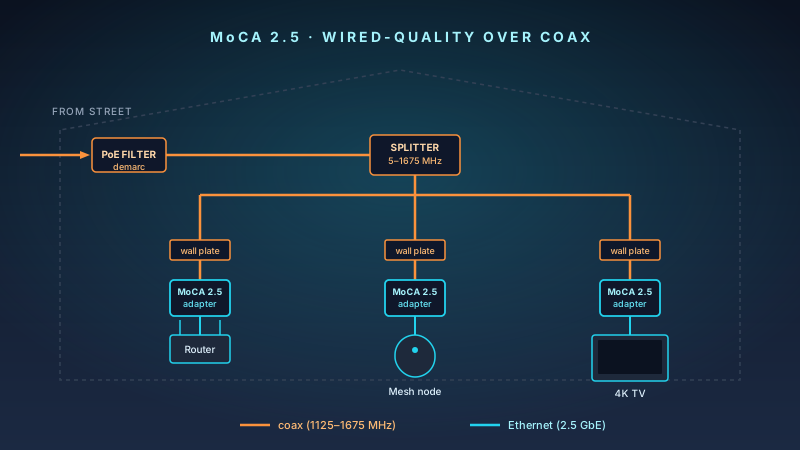
MoCA 2.5 turns the coax already in your walls into a 2 Gbps wired backbone — single-digit latency, 10-minute install, far cheaper than pulling new Ethernet. Here's exactly what to buy, what to check first, and the splitter and PoE filter gotchas that sabotage most installs.
The verdict up front: if you have coax in the rooms that matter, MoCA 2.5 is the cheapest way to get wired-quality networking without pulling a single new cable. A pair of 2.5 Gbps adapters runs about $150–$200, installs in 10 minutes, and delivers 1.5–2 Gbps of real throughput with sub-5 ms latency. It is the right answer for mesh backhaul, a remote-worker office two floors from the router, an Atmos AVR pulling lossless audio over the network, or any setup where Wi-Fi keeps stuttering and Ethernet would mean drywall surgery. The catches are all upfront: an old 1 GHz splitter or a missing PoE filter will sabotage you. This guide covers exactly what to buy, what to check, and how to install it.
What MoCA Actually Is
MoCA — Multimedia over Coax Alliance — is a standard for sending Ethernet over the same coaxial cable that already carries your cable TV or cable internet. It was originally pushed by the cable and satellite industry in the mid-2000s so set-top boxes could share recordings between rooms without anyone running new wires. The home-networking version of the same technology is what we are talking about here.
There have been three meaningful generations:
| Standard | PHY rate | Real-world throughput | Year ratified | Status in 2026 |
|---|---|---|---|---|
| MoCA 2.0 | 1 Gbps | ~700–950 Mbps | 2010 | End-of-life — buy 2.5 instead |
| MoCA 2.5 | 2.5 Gbps | ~1.5–2.0 Gbps | 2016 | Current mainstream |
| MoCA 3.0 | 10 Gbps | TBD | 2022 spec | No consumer adapters shipping yet |
MoCA 2.5 is what you can actually buy and install today. MoCA 3.0 is real on paper but the adapters do not exist in retail. Skip 2.0 unless you are picking up used gear; the price gap to 2.5 is small and the throughput gap is large.
The thing that confuses people: MoCA does not interfere with your cable internet or cable TV. Cable internet uses the lower portion of the coax frequency spectrum (roughly 5 to 1002 MHz on DOCSIS 3.1, with extensions to 1.8 GHz on DOCSIS 4.0 in newer deployments). MoCA 2.5 lives in the D-band at 1125 to 1675 MHz — physically the same wire, completely different frequencies. As long as your splitters can pass that higher band, both signals coexist.
Why You Would Actually Use This in 2026
Wi-Fi 7 is fast. Mesh systems are easier to set up than ever. So why is MoCA still relevant?
Three reasons.
1. Wireless backhaul is the silent killer of mesh performance. Every consumer mesh review you read describes the marketing speeds of the radios. Almost none describe what happens when the satellite node has to talk to the main node over Wi-Fi instead of a wire. The drop is brutal — typically 40–60% throughput loss on the second hop, and worse on the third. A wired backhaul fixes it. MoCA 2.5 is a wired backhaul that uses the coax already in your walls.
2. Ethernet is hard. Pulling new Cat 6 through finished walls is doable but expensive. Most homes have one or two pre-wired Ethernet drops at most, and they are almost never in the right rooms. Coax, on the other hand, is everywhere — every old TV outlet is now a potential Gigabit-plus drop.
3. Wi-Fi has fundamental floors that MoCA does not. A wired link does not care about microwaves, neighbors' routers, or 2.4 GHz IoT chatter. For a remote worker on Zoom all day, an Atmos AVR streaming Tidal Connect, a 4K Plex client, or a gaming PC, MoCA gives you Ethernet-class predictability. The latency is single-digit milliseconds. There is no "the router is in another room" failure mode.
If you fit any of these patterns, MoCA is probably the right answer:
- You're putting a mesh system in a long house and the satellite node is across coax-connected rooms.
- Your home office is two floors above the router and Wi-Fi keeps cutting out during video calls. (See our remote-worker network setup for the full playbook.)
- You have a 4K TV or AVR in a room that already has a coax outlet but no Ethernet jack.
- You're a renter who can't drill walls but every room has a coax plate from the previous cable plan.
- You bought multi-gig internet and your router is too far from your PC to wire directly.
If you have Ethernet to every room you care about, you do not need MoCA. Use the wired backhaul instead. MoCA is the option for everyone else.
How MoCA 2.5 Actually Works
A MoCA 2.5 adapter is a small box with two ports: a coax F-connector and a Gigabit or 2.5 Gigabit Ethernet jack. It does two jobs.
On the coax side, it modulates Ethernet frames into a high-frequency RF signal in the D-band (1125–1675 MHz) and pushes them onto the existing coax run. Other MoCA adapters on the same coax network listen on those frequencies, demodulate the signal back into Ethernet frames, and forward them out their Ethernet ports. From the perspective of a router, mesh node, or PC plugged into the Ethernet side, the MoCA adapter is invisible — it looks exactly like a regular Ethernet switch port.
On the network side, all MoCA adapters on the same coax loop form a single Layer 2 segment. They handle their own MAC-level coordination using a token-passing scheme called NPS (Network Priority Scheduling), so collisions don't happen the way they would on a noisy old Ethernet bus. Up to 16 adapters can share one MoCA network on the 2.5 standard.
The practical numbers, validated in third-party tests across multiple adapter brands:
- Throughput: 1.5–2.0 Gbps net between two adapters on a clean coax run. With three or more adapters sharing the network, aggregate stays roughly the same; per-pair throughput depends on how the bus is shared.
- Latency: typically 3–5 ms adapter-to-adapter. This is wired-class. For comparison, even a clean Wi-Fi 7 link is usually 5–15 ms, and a congested Wi-Fi link can spike past 50 ms.
- Packet loss: effectively zero on healthy coax. MoCA's PHY is built around forward error correction, so signal margin is consumed before frames start dropping.
- Power draw: about 2.5–4 W per adapter — roughly the same as a small USB charger.
The combination of those four numbers is why MoCA exists. Powerline adapters cannot match the throughput or latency. Wi-Fi extenders cannot match the predictability. Pulling new Ethernet beats it on every spec, but costs real money and real wall damage.
MoCA 2.5 vs Powerline vs Wi-Fi Backhaul
Three ways to extend a network without running new Ethernet. The honest comparison:
| Metric | MoCA 2.5 | Powerline (G.hn 2.0) | Wi-Fi 6E mesh backhaul |
|---|---|---|---|
| Real throughput | 1.5–2.0 Gbps | 200–800 Mbps | 400–900 Mbps (one hop) |
| Latency | 3–5 ms | 5–20 ms | 5–25 ms |
| Reliability | Very high | Wiring-dependent | Environment-dependent |
| Setup complexity | Coax + adapter pair | Plug-and-play | Wireless setup |
| Per-room cost | $80–$120 (one adapter) | $40–$80 (one plug) | Included with mesh |
| Catch | Need coax + maybe new splitter/PoE filter | Performance varies wildly by house wiring | Throughput halves at second hop |
Powerline (G.hn / HomePlug AV2) is the right answer in homes with no coax and no Ethernet. It works. It is just slower and more variable than MoCA — performance depends on which circuits the plugs are on, what else is running, and how old the wiring is.
Wi-Fi backhaul is the right answer when you bought a tri-band mesh with a dedicated 6 GHz backhaul radio and the nodes are within line of sight. As soon as you have a wall, a floor, or a third hop, MoCA wins by a wide margin.
MoCA 2.5 is the right answer when coax is already there.
What You Need Before You Buy Adapters
This is where most installs go sideways. Three checks before you order anything.
1. Confirm coax actually runs to the rooms you want
Open every wall plate you plan to use. A live coax outlet has either an active cable, a terminator, or a capped F-connector behind it. A dead outlet sometimes has a cable that was cut or capped during a previous renovation — those won't work and you can't tell from the outside.
The other failure mode: rooms wired in a "home run" pattern (every outlet runs back to a central splitter) work great. Rooms wired in a "daisy chain" (one cable goes outlet-to-outlet-to-outlet through internal couplers) often don't, because the couplers can be older 5–1000 MHz parts that block MoCA's D-band.
If you don't know which pattern your house uses, the easy test is to plug a single adapter in at the first outlet you can find, and a second adapter at the router. If they pair, MoCA works on that path. Move the second adapter to the next outlet you want to test.
2. Audit your splitter
If your house has any kind of central point where one cable from the street splits to multiple rooms, that splitter is now part of your MoCA network. Three things to verify:
- Frequency range: The splitter must pass 5–1675 MHz at minimum. A satellite-grade splitter rated 5–2300 MHz is even better and totally fine for MoCA. A budget cable splitter rated only 5–1000 MHz will block MoCA entirely.
- Insertion loss: Lower is better. A 4-way splitter typically loses 7 dB per output. MoCA tolerates this fine in the 1–10 dB range, but stacked splitters that total 20+ dB will start to choke throughput.
- MoCA-rated splitters: Many newer splitters are explicitly labeled "MoCA compatible" — they are guaranteed to pass the D-band cleanly. Brands like Antronix, Holland Electronics, and PCT offer them in 2-, 4-, and 8-way configurations for $10–$25.
If you find an old 1 GHz splitter, swap it. The replacement pays for itself in not pulling your hair out troubleshooting throughput.
3. Plan for a PoE filter
This is the step every "MoCA doesn't work" forum thread skipped.
A Point-of-Entry (PoE) filter is a small in-line device that screws onto your coax at the demarcation point — where the cable line from the street enters your house. It blocks MoCA's D-band frequencies from leaking out of your house onto the cable plant, while letting cable internet and TV signals pass through normally.
Two reasons it matters:
- Privacy and security. Without a PoE filter, your MoCA signal can technically reach your neighbors' coax — not far, but far enough on shared cable plant. Anyone with a MoCA adapter on the same physical network segment is on your LAN. A $10 filter eliminates this.
- Signal quality. The filter creates a clean reflection point that bounces MoCA signal back into your house, improving throughput and stability for the adapters inside.
Most current MoCA 2.5 starter kits ship with a PoE filter in the box. If yours doesn't, buy one — they cost $8–$15 and any home cable installer can place it in 30 seconds.
Buying Guidance: The Adapters Worth Considering
This is a small market with a few well-understood players. Buy MoCA 2.5 — not 2.0 — and pay attention to the LAN-port speed: a 1 GbE port caps real throughput at ~940 Mbps regardless of how fast the MoCA PHY is.
Best mainstream pick: ScreenBeam ECB7250 (sold as ECB7250K02 2-pack)
Why this matters: ScreenBeam (formerly Actiontec) has been the reference MoCA brand since the standard launched. The ECB7250 is MoCA 2.5, includes a 2.5 Gigabit Ethernet port, and the K02 2-pack ships with a PoE filter in the box. Setup is plug-the-coax-in, plug-the-Ethernet-in, and wait 60 seconds for the LED to go solid.
Pros:
- 2.5 GbE port matches the MoCA 2.5 PHY — no LAN-side bottleneck, full 1.5–2 Gbps available
- PoE filter included in the 2-pack
- Mature firmware, easy admin via web UI
- Backwards-compatible with MoCA 2.0 hardware on the same coax
Cons:
- Only one Ethernet port per adapter (need a small switch if you have multiple devices in one room)
- Premium price for the brand
Buy: ScreenBeam ECB7250K02 (2-pack with PoE filter) — typical street price $200.
Best budget pick: Hitron HT-EM4
Why this matters: Hitron is the OEM behind a lot of Verizon, Xfinity, and Cox supplied gateways' MoCA implementations. The standalone HT-EM4 brings that same chipset to retail at the lowest price of any current-generation MoCA 2.5 adapter — about half the per-unit cost of the ScreenBeam 2-pack. The catch: the HT-EM4 has a single 1 Gbps Ethernet port, so the LAN side caps real throughput at ~940 Mbps even though the MoCA PHY can push more.
For most households, that 1 GbE LAN port is fine. If your internet plan is 1 Gbps or less and you're using MoCA for mesh backhaul or to wire a single 4K TV / gaming console / work-from-home PC, you will not notice the difference between this and the ScreenBeam — Wi-Fi 7 mesh nodes, 4K streamers, and gaming consoles all top out below 1 Gbps anyway. If you have multi-gig internet and a single device that can saturate it, pay the premium for the ScreenBeam.
Pros:
- Lowest current price for a true MoCA 2.5 adapter
- Compact form factor
- Reliable hardware — same chipset shipping in millions of ISP gateways
Cons:
- 1 GbE LAN port caps real throughput at ~940 Mbps (the MoCA PHY can do more, but the LAN port is the bottleneck)
- Sold as a single — buying two costs nearly the same as the ScreenBeam 2-pack, so the price advantage shrinks at pair quantity
- PoE filter sold separately
- Web admin UI is more bare-bones than ScreenBeam's
Buy: Hitron HT-EM4 MoCA 2.5 Adapter — typical street price $90 single.
What to skip
- Anything labeled "MoCA 2.0" only. The price difference to 2.5 is small. The throughput difference is roughly 2x. Buy current generation.
- Cheap unbranded bonded MoCA bridges from marketplace sellers. Firmware quality matters here — bad MoCA implementations can saturate the bus and degrade every adapter on your network. Stick with ScreenBeam or Hitron.
- Discontinued Motorola MoCA adapters (MM1000/MM1025/MM2025). Motorola has stepped back from the MoCA category — the listings still exist but the line is winding down. Long-term firmware support and warranty service are not guaranteed. We'd point readers at ScreenBeam or Hitron for new buys.
- Add-on bonded MoCA cards for your existing router. They exist but are a niche feature on a small number of high-end routers. The standalone adapter approach is simpler and works with any router.
A Standard MoCA 2.5 Install (10–15 Minutes)
Once you've audited the splitter and ordered adapters with a PoE filter, the install is short.
- Place the PoE filter at the demarc. Find the point where the cable line from the street enters your house — usually a grey or beige box on an exterior wall. Unscrew the cable on the inside of that box, screw the PoE filter in line, and reattach the cable. If you're not comfortable opening the demarc box, your cable provider's installer can do this on their next visit at no charge.
- Plug Adapter 1 in next to the router. Connect coax from the wall to the adapter's coax port. Connect the adapter's Ethernet port to a free LAN port on your router. Power it on. Wait 60 seconds — the MoCA link LED should turn solid.
- Plug Adapter 2 in at the destination room. Same drill: coax from the wall to the adapter, Ethernet from the adapter to the device (a mesh node, an AV receiver, a 4K TV, a gaming PC). Power on, wait, watch for solid LED.
- Test throughput. Plug a laptop into the destination adapter's Ethernet port and run an iperf or fast.com test against another device wired to the router. You should see 1.5–2 Gbps. If you see 200–400 Mbps, you almost certainly have an old 5–1000 MHz splitter in the path. Replace it with a MoCA-rated 5–1675 MHz model and retest.
- (Optional) Add more adapters. A MoCA 2.5 network supports up to 16 nodes. You can add a third or fourth adapter for additional rooms with no reconfiguration — they self-discover.
The whole install, including the PoE filter, should take 10–15 minutes. No drilling, no fishing wire, no patch panel.
Common Gotchas
A few patterns we see often enough to call out:
The previous owner cut the coax run. If a wall plate looks live but the adapter never pairs, the cable behind it may have been clipped during a renovation. There is no fix short of pulling new coax. Test before buying multiple adapters.
Cable internet still works fine, but the router pings poorly. Some ISP-supplied gateways already have MoCA enabled by default, particularly Verizon FiOS Quantum Gateways and recent Xfinity xFi gateways. If you start seeing throughput collisions, log into the gateway and either disable its MoCA function (if you don't need it) or coordinate channel selection so your retail adapters share its network.
The PoE filter accidentally got installed on the wrong side. A PoE filter has an "input" (street side) and "output" (house side). Reversed, it can choke your cable internet. Most filters are clearly labeled. If your internet drops the second you install the filter, flip it.
You upgraded to multi-gig internet and MoCA can't keep up. MoCA 2.5 caps at ~2 Gbps real throughput. If you have 5 Gbps fiber, MoCA is your LAN backbone, not your WAN-to-LAN path — you'd want the router-to-modem hop on real Ethernet. MoCA still gives every other room 2 Gbps service, which is usually plenty per device.
Outdoor / detached coax runs. Cable to a garage, ADU, or pool house often runs underground or along the eaves and the runs get long enough that the signal drops. MoCA tolerates 200+ feet of clean RG-6 fine, but only if there are no marginal connectors in the path. If a far-room adapter never pairs, the run quality is the most likely culprit.
Frequently Asked Questions
Will MoCA mess with my cable internet?
No. MoCA uses 1125–1675 MHz; cable internet uses 5–1002 MHz (and up to 1.8 GHz on DOCSIS 4.0 in newer markets). They share the same physical wire on different frequencies. The PoE filter at your demarc keeps them isolated from the cable plant outside.
Do I need a PoE filter?
You should have one. It is a $10 part. It improves signal quality inside your house and prevents your MoCA traffic from being visible to neighbors on the cable plant. Most starter kits include one. If yours doesn't, buy a separate filter rated for the cable + MoCA D-band.
Can I use MoCA as the backhaul for my mesh system?
Yes — and it is one of the best ways to use MoCA. Plug a MoCA adapter at each mesh node's location, connect the adapter's Ethernet port to the mesh node's LAN port, and configure your mesh for "wired backhaul" (Eero, Orbi, ASUS ZenWiFi, and TP-Link Deco all support this automatically once they detect the wired link). Throughput per hop roughly doubles versus wireless backhaul.
My ISP gateway already has MoCA. Do I need separate adapters?
If your gateway has MoCA enabled and you can use that signal in the rooms you want — typically by plugging a MoCA-equipped set-top box or another gateway into the wall — yes, that works. Most home networking use cases (mesh backhaul, Ethernet to a 4K TV, a desk in a far room) still benefit from dedicated retail adapters because they expose a real Ethernet jack. A MoCA-enabled gateway alone doesn't help if all you have at the destination is a coax outlet.
Does MoCA support multi-gig?
MoCA 2.5 has a 2.5 Gbps PHY rate and adapters with 2.5 GbE ports deliver about 1.5–2.0 Gbps of real throughput. MoCA 3.0 spec'd at 10 Gbps was ratified in 2022 but no consumer adapters are shipping yet. For multi-gig backbone today, MoCA 2.5 is the ceiling.
Is MoCA still worth it on a Wi-Fi 7 mesh?
Yes, if your mesh nodes are not in line of sight or are separated by walls and floors. Wi-Fi 7's 320 MHz channels in the 6 GHz band are spectacular when conditions are clean, but a wired backhaul is still more predictable. MoCA 2.5 over coax is the cheapest wired backhaul option in homes that don't have Ethernet drops.
What happens if I have older MoCA 2.0 hardware?
MoCA 2.5 adapters are backwards-compatible with MoCA 2.0 on the same coax network. Mixing them works fine; the network simply runs at the slower 2.0 speed when communicating with 2.0 devices and 2.5 speed between 2.5 devices. You don't have to swap everything at once.
The Bottom Line
MoCA 2.5 is the simplest way to turn unused coax into a 2 Gbps wired backbone. The hardware is mature, the install is short, and the per-room cost is far lower than running new Ethernet. The catches — old splitters, missing PoE filters, dead coax runs — are upfront and cheap to fix.
If you already have Ethernet to every room that matters, you don't need this article.
If you're trying to extend a mesh system into a house with thick walls, running an Atmos AVR pulling lossless audio, or setting up a remote-work office far from the router, MoCA 2.5 is almost certainly the right answer in 2026. A pair of ScreenBeam ECB7250K02 adapters plus the included PoE filter solves more home networking problems than any single $200 product on the market.
Affiliate disclosure: Links in this article use the tag `webstore0fd1-20`. NetAudioHub earns a commission on qualifying purchases at no extra cost to you.