How to Set Up a MoCA 2.5 Network for 2 Gbps Wired Internet Over Coax
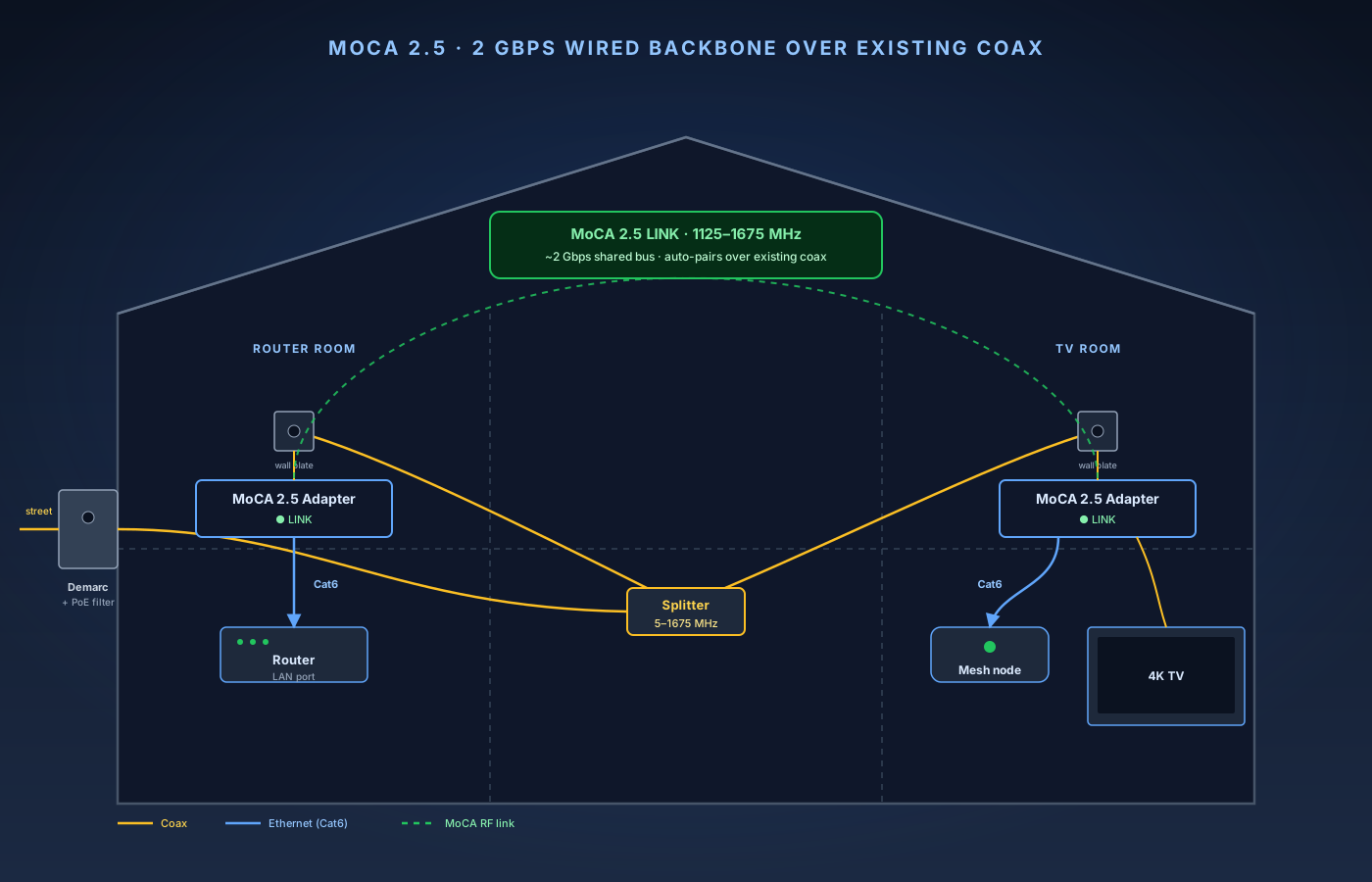
MoCA 2.5 is the cheapest way to get a wired backbone in a house that doesn't have Ethernet drops. You plug an adapter into a coax wall plate at each end, the adapters auto-pair over the existing coax, and each end gets a Gigabit (or 2.5 Gigabit) Ethernet port. No drilling, no fishing wire, no patch panel.
This guide is the step-by-step companion to our MoCA 2.5 explainer, which covers what MoCA is, why it still beats Powerline, and which adapter models to buy. Here we do the install: audit your coax, fit the PoE filter, pair the adapters, verify the link, and extend to more rooms. Plan on 30–60 minutes from box-open to first throughput test, with about half of that being the trip to the cable demarc.
What you’ll need
- A pair of MoCA 2.5 adapters (ScreenBeam ECB7250K02 or goCoax MA2500D pair)
- A MoCA-rated PoE filter (often included with the adapter pair)
- Two short coax patch cables (RG-6, F-connector)
- Two Cat6 Ethernet patch cables
- 1675 MHz-rated coax splitter — only if your current splitter is older than 2015 or labeled 1 GHz / 1000 MHz
11-Step Overview
- 1
Confirm your house has live, usable coax
Before you spend a dollar on adapters, walk the house and confirm the coax is actually there and connected. You need at least two coax wall plates connected to the same splitter — typically the room with your router or cable modem (one end of the MoCA link) and the room you want to extend service into. For each, confirm there is a real F-connector coax wall plate (not a sheared-off cable behind a faceplate), the run is live (if you screw a coax patch in and the other end into a TV or cable modem, the device sees signal), and the run terminates at the same splitter as the rest of your house — usually a metal splitter in a utility closet, attic, basement, or the cable demarc box on the exterior wall. A common gotcha: previous owners had DirecTV, and one of the coax runs goes to a dish bracket on the roof and nowhere else. That run is dead-ended at the splitter and won't carry MoCA. If a wall plate has signal but you can't trace it to the main splitter, it isn't useful. If you only have a coax plate in one of the two rooms you care about, MoCA is the wrong tool — a wired backhaul Ethernet run is what you want instead.
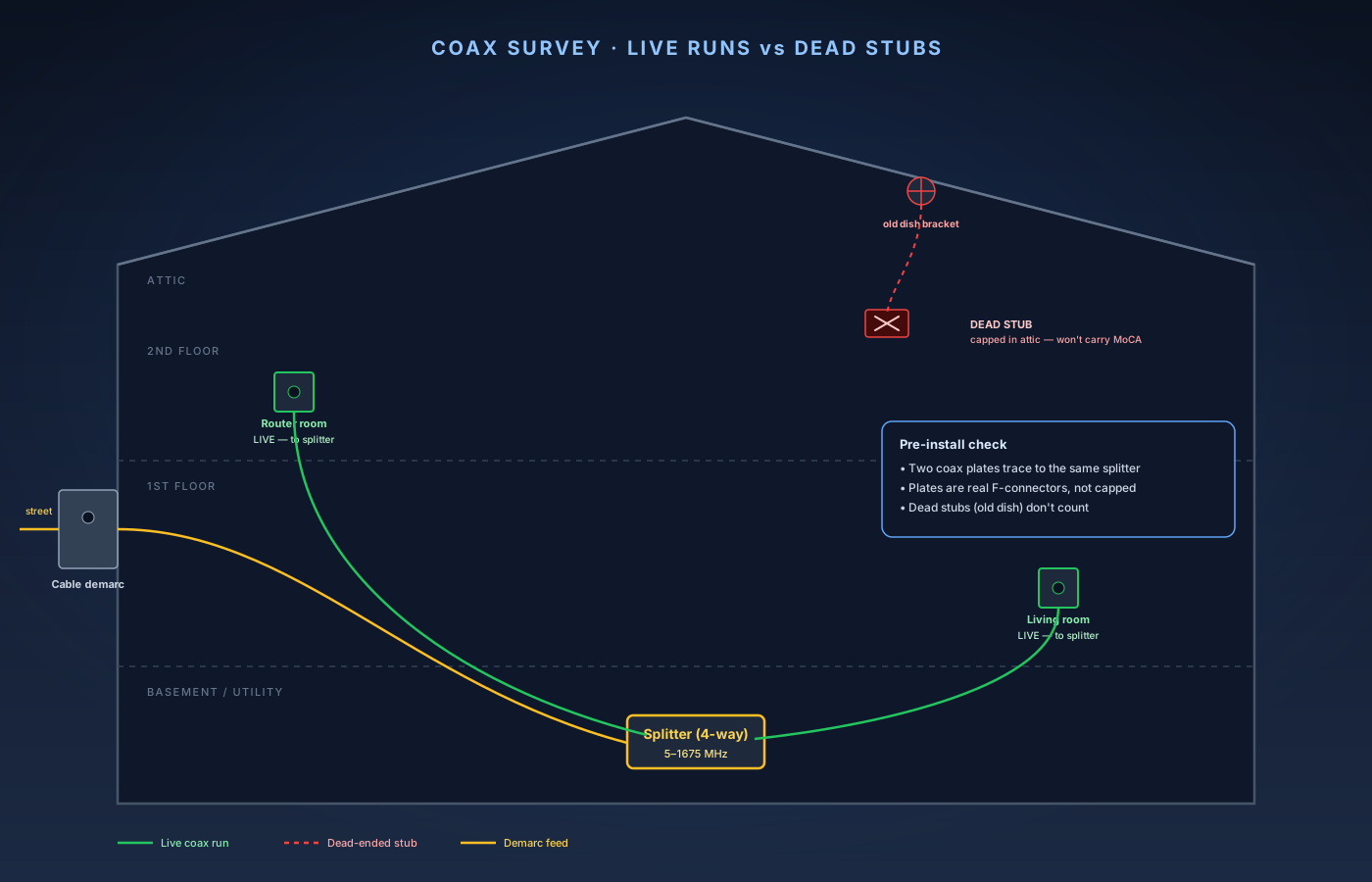
MoCA needs at least two wall plates on the same splitter. Dead-ended runs (here, the attic stub from an old satellite dish) won't carry MoCA — only plates that terminate at the same splitter as the demarc. - 2
Audit your splitter for 1675 MHz pass-through
This is the step most botched MoCA installs come down to. MoCA 2.5 lives in a specific frequency band on the coax: 1125 to 1675 MHz. Your cable internet lives at 5–1002 MHz (up to 1.8 GHz on DOCSIS 4.0 in newer markets). They share the same physical wire on completely different frequencies — but only if every splitter the signal passes through can carry that higher band. Find your splitter (usually a small metal block with one input labeled IN and 2, 4, or 8 outputs). Read the label or printed range. You want one of: 5–1675 MHz, 5–1675+ MHz, MoCA Rated 5–1675 MHz, or 5–2300 MHz. If it says 5–1000 MHz, 5–900 MHz, 1 GHz, or has no frequency printed at all (very old), it will silently block MoCA. The cable internet will still work, the LEDs on the modem will still be green, and you will be confused when your MoCA adapters never link. A MoCA-rated splitter costs $8–$15. Get the splitter that matches the number of outputs you actually need — extra unused legs add insertion loss. If you do swap the splitter, label each leg before you disconnect it, screw the new splitter in the same orientation (IN to demarc, outputs to the house runs), and hand-tighten with a 7/16" wrench until snug.
Search on Amazon →Recommended Product
Antronix CMC2002H 2-way MoCA-rated splitter (5–1675 MHz)
Properly rated for the full MoCA 2.5 band, low insertion loss, cheap. The most common single-cause fix when an existing MoCA install won't link.
- 3
Pick a current-generation MoCA 2.5 adapter pair
Stick with one of two well-supported pairs — both are the recommendations from our MoCA 2.5 explainer, and the install procedure is identical for either. Best long-term pick: ScreenBeam ECB7250K02 (2-pack with PoE filter) — 2.5 Gigabit Ethernet, ScreenBeam has been the reference MoCA brand since the standard launched, solid firmware, regular updates, lifetime warranty. Best price-performance pick: goCoax MA2500D pair — 2.5 GbE, PoE filter included, about 25% cheaper than the ScreenBeam pair at typical street price; slightly fewer firmware revisions historically but reliability has been steady in our testing. What not to buy: MoCA 2.0 adapters (often listed as "MoCA 2.0 Bonded") give half the throughput for the same install effort with no real cost saving anymore; single 1 GbE-port adapters cap real throughput at ~940 Mbps regardless of MoCA bus speed; unbranded marketplace bridges can have bad firmware that saturates the bus and degrades every other adapter; discontinued Motorola MM-series adapters (MM1000/MM1025/MM2025) no longer have assured long-term firmware support.
Check Price on Amazon →Recommended Product
ScreenBeam ECB7250K02 MoCA 2.5 Network Adapter, 2-pack with PoE filter
2.5 Gigabit Ethernet port, PoE filter in the box, reference MoCA brand with steady firmware and a lifetime warranty. The safer long-term pick of the two recommended pairs.
- 4
Install a PoE filter at the cable demarc
A PoE filter (Point-of-Entry filter) is a small inline coax barrel that blocks the MoCA frequency band from leaving your house through the cable feed to the street. Skipping this step is the single biggest MoCA install mistake. Without the filter, your MoCA signal radiates onto the shared cable plant outside — anyone with a MoCA adapter on the same physical segment of cable plant (typically a few houses, sometimes a whole apartment building) can join your LAN and interfere with throughput. Some cable modems' upstream channel performance also degrades subtly when MoCA leaks onto the outside plant. Both major adapter pairs ship one in the box, so there is no cost reason to skip it. Install: find the cable demarc (a grey or beige plastic box on an exterior wall where the cable from the street enters the house). Unscrew the coax on the house side of the entry barrel. Screw the PoE filter inline — the filter has a clearly marked input (toward the street) and output (toward the house). Reattach the in-house coax to the output side of the filter and close the demarc box. If the demarc is locked, painted shut, or you don't want to mess with it, call your cable provider — they'll dispatch a tech and install the filter at no charge on the next routine visit. After installing, confirm your cable internet still works. If it dies the moment you fit the filter, you installed it backwards — just flip it.
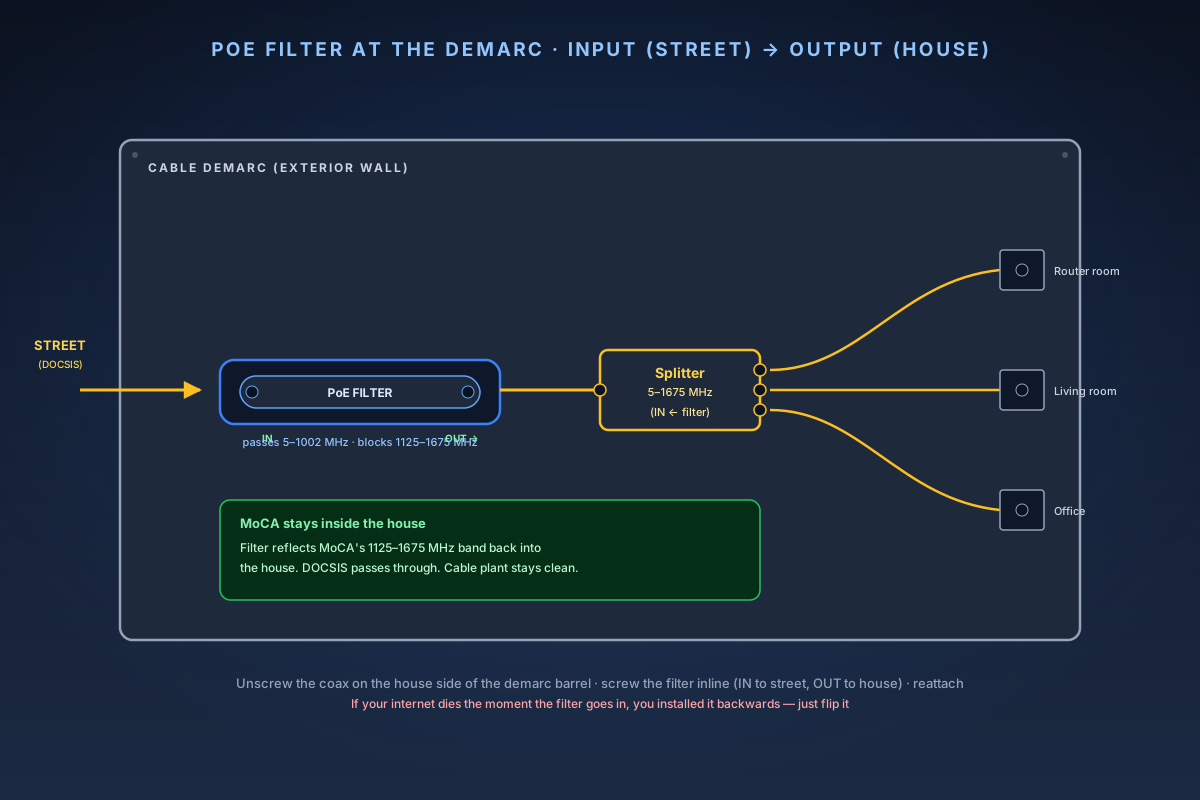
The PoE filter sits at the demarc, before the house splitter. Input side faces the street; output feeds the splitter that distributes coax to each room. Search on Amazon →Recommended Product
Extreme Broadband EVDF-3GHz MoCA PoE Filter
Inexpensive standalone filter, weather-rated for exterior demarc boxes, low insertion loss on the DOCSIS band. Only buy if your adapter pair shipped without one.
- 5
Connect the first MoCA adapter at the router
In the room with your router (or cable modem + router combo), you'll share the coax wall plate between the modem and the MoCA adapter using the adapter's built-in pass-through, or between the cable TV and the adapter if this is a TV outlet. If this room has your cable modem on the same coax: unplug the coax that currently goes into the modem, plug it into the MoCA adapter's COAX IN (sometimes MOCA IN), run a short coax patch from the adapter's COAX OUT (or TV pass-through port) back into the modem, run a Cat6 cable from the adapter's Ethernet port to a free LAN port on your router, and plug in the adapter's power brick. If this room only has a TV outlet (router elsewhere): plug a coax patch from the wall plate to the adapter's COAX IN, run Cat6 from the adapter's Ethernet port to your router — if the router is in another room, this is the run you'd otherwise have had to fish through the walls — and plug in power. The adapter takes 30–60 seconds to boot. There's no app, no setup wizard, no admin page to log into for basic operation (ScreenBeam and goCoax both expose a web admin for diagnostics, but you don't need it for normal use).
- 6
Connect the second adapter at the remote room
Identical procedure on the other end. Coax wall plate → adapter COAX IN. Cat6 from the adapter's Ethernet port to the device you're wiring: a mesh satellite, a gaming PC, a home-office switch, a 4K streaming box. If the remote room has both a TV and a device you want wired, use the adapter's pass-through coax port to keep the TV plumbed: coax patch from wall plate → adapter COAX IN, second coax patch from adapter COAX OUT → TV or set-top box, Cat6 from adapter Ethernet → device or switch. Power on and wait 60 seconds. No buttons to press, no app to install — modern MoCA adapters auto-pair when they see the same coax segment.
- 7
Verify the MoCA link LED
Both adapters now negotiate on the coax. Watch two LEDs per adapter: Power/Status (solid green or white once boot is complete) and COAX/LINK/MOCA (solid once both adapters see each other).
LED state Meaning What to do Both COAX LEDs solid Link established Move on to throughput testing Both COAX LEDs blinking Negotiating — normal for the first 60–90 seconds Wait 2 minutes One adapter solid, the other off Coax break, or a splitter blocking the MoCA band Go back to the splitter audit Both COAX LEDs off after 5 min Adapters don't see each other on the coax Confirm both wall plates trace to the same splitter If the COAX LED on either adapter never goes solid, the cause is on the coax, not the adapters. Most common culprits, in order: old splitter (replace with a 1675 MHz-rated one); wall plate isn't actually wired through to the splitter; one of the plates branches to a different splitter (e.g. a previous owner ran a separate cable line for a back-of-house addition); damaged coax connector (the F-connector center pin is bent or pushed back — re-strip and re-crimp). A coax toner (Klein VDV512-101 or similar) is the fastest way to trace a run end-to-end and confirm continuity.
- 8
Test real-world throughput
Don't rely on the adapter's link LED for "this is fast enough." Run a real throughput test with iperf3. On a wired client at the router end, install iperf3 (`brew install iperf3` on macOS, `sudo apt install iperf3` on Linux, download from iperf.fr for Windows), then start the server with `iperf3 -s`. On a wired client at the MoCA-remote end, install iperf3 the same way and run `iperf3 -c <server-IP> -t 30 -P 4`. What good looks like: MoCA 2.5 with 2.5 GbE ports on both adapters and 2.5 GbE on both test clients gives 1.5–2.0 Gbps sustained; MoCA 2.5 with 1 GbE on either adapter or either test client gives ~940 Mbps sustained (capped by the Gigabit hop, not MoCA); latency is 1–3 ms round-trip on the LAN, with MoCA adding about 1 ms over straight Ethernet. Bad results: 500–800 Mbps stable usually means a 1 GbE Ethernet hop somewhere in the chain — trace each port; throughput swings between 200 Mbps and 1 Gbps usually means a marginal coax connector or a stub-coax reflection — re-seat connectors; below 200 Mbps means the splitter is still partially blocking MoCA — replace with a 1675 MHz-rated one. No iperf3 available? Use LAN Speed Test (Mac/Windows from totusoft.com) or a NAS-to-PC large-file copy as a rough proxy — you want sustained ≥100 MB/s on a Gigabit link, ≥200 MB/s on 2.5 GbE.
- 9
Add adapters to additional rooms as needed
A single MoCA 2.5 segment supports up to 16 adapters on the same coax. The total bus throughput stays at ~2 Gbps and is shared across active nodes — fine for typical home use, and worth thinking about if you intend to push every adapter at line rate at once. To add a third room: just plug another adapter into another wall plate on the same splitter. It joins the existing MoCA network automatically — no pairing, no configuration. The COAX LED goes solid within 60 seconds. Things to keep in mind as you scale up: insertion loss adds up — each splitter port introduces ~3.5 dB of loss (2-way) to ~10 dB (8-way), and long coax runs through multiple splitters can put you near MoCA's link budget, so a smaller splitter (2- or 4-way instead of 8-way) usually fixes a remote adapter that struggles to link. You only need one PoE filter per house, at the demarc — not on every adapter. The MoCA bus is one broadcast domain — all adapters are on the same Ethernet segment from the router's perspective. If you want to segment IoT or guests, layer VLANs on top — MoCA passes VLAN tags transparently.
- 10
Use MoCA as a wired backhaul for your mesh
The single highest-leverage use of MoCA in a home is making a wireless mesh into a wired mesh. Most consumer mesh systems lose 40–60% of throughput on the second hop when the satellite has to talk to the base station over Wi-Fi. Plug each satellite into a MoCA adapter via Cat6 and the satellite switches to wired backhaul. Real-world throughput at the satellite typically doubles, and Wi-Fi roaming becomes noticeably more stable because the backhaul is no longer competing with client airtime. Per-system notes: Eero (any model) — plug Cat6 from the MoCA adapter into any Ethernet port on the satellite, Eero detects the wired uplink automatically; confirm in the Eero app under each node's status — it should say "Wired." Netgear Orbi — plug Cat6 into the satellite's WAN/Ethernet 1 port, Orbi auto-detects and switches to Ethernet backhaul; verify in the Orbi web admin under Attached Devices. TP-Link Deco — plug into any Ethernet port on the satellite, the Deco app shows "Ethernet Backhaul" in green next to that node; if it still shows wireless, power-cycle the node. UniFi mesh APs — UniFi assumes wired by default, just confirm the AP shows as "Wired" in the Adoption section of the controller. The wired-backhaul mesh how-to covers the per-brand verification steps in more depth.
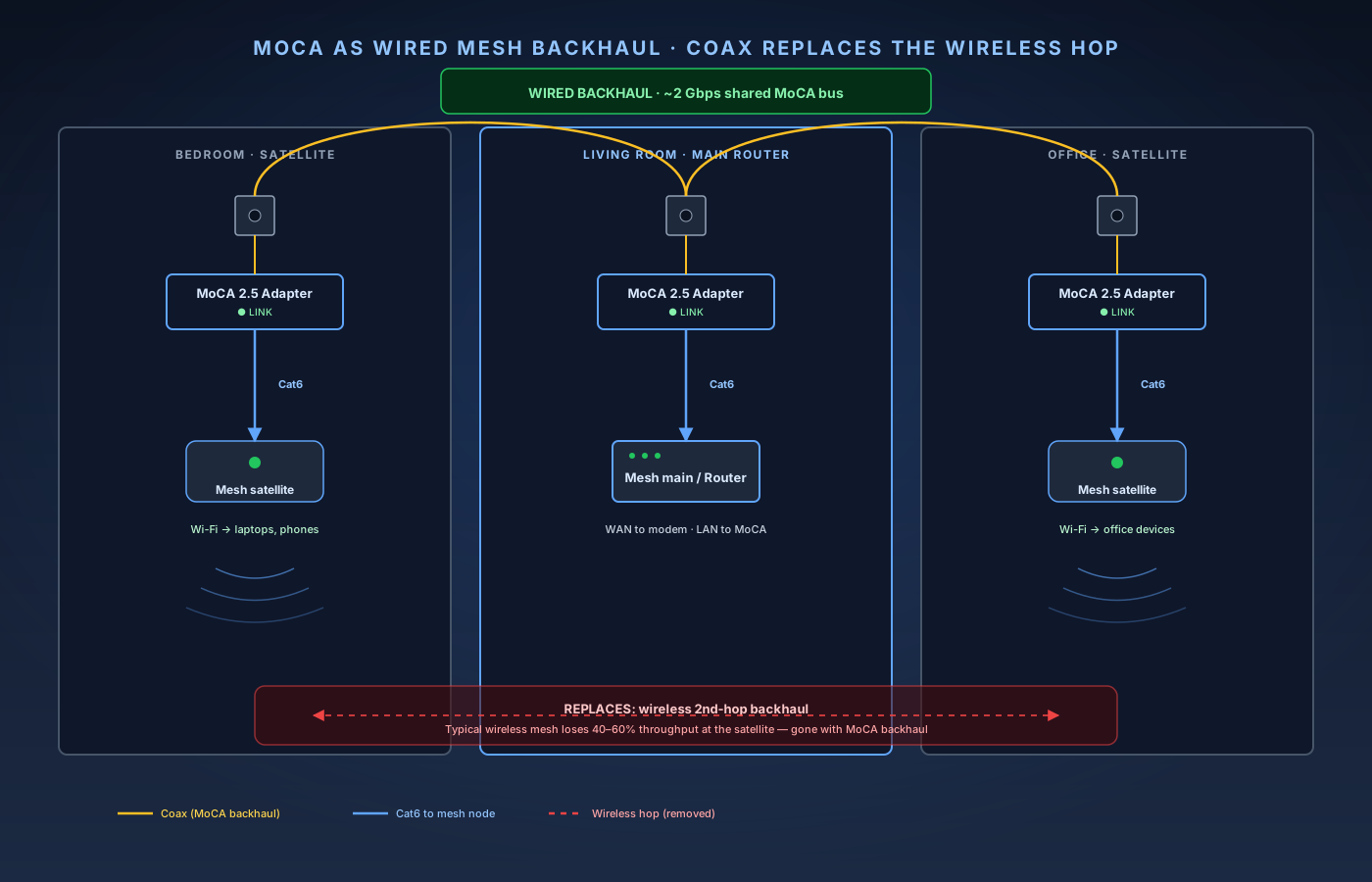
MoCA over coax turns a wireless mesh into a wired mesh. The wireless second hop is replaced with the existing coax — typically doubling real throughput at each satellite. - 11
Watch for the three common failure modes
After install, three things tend to go wrong over the life of a MoCA network. They're all cheap to fix once you know what to look for. First, a new cable tech "fixes" your install by removing the PoE filter — when a cable provider rolls a truck for an unrelated issue, the tech may pull the filter "because it's choking your line." It isn't. Politely ask them to put it back. Keep a spare in the demarc box — they cost $10. Second, adding a new splitter behind a TV breaks the MoCA segment — anywhere you add a splitter on the in-house coax has to be MoCA-rated. A $4 RadioShack-era splitter behind a TV will silently block adapters wired beyond it. If a MoCA adapter that used to link no longer does, look for recent splitter changes first. Third, DOCSIS 4.0 deployments push cable internet into MoCA's band — a small number of newer DOCSIS 4.0 deployments use spectrum up to 1.8 GHz, overlapping the upper portion of MoCA 2.5. If your provider has upgraded to DOCSIS 4.0 and you start seeing MoCA throughput drops, ask the provider about spectrum allocation — most carriers steer below 1 GHz on the upstream and don't actually use the higher band yet. A monthly five-second check — glance at the COAX LEDs on each adapter — catches almost everything before it becomes a "the internet's broken" call from the rest of the household.
The setup order that gets it right
- Confirm two coax wall plates in the rooms you care about both trace back to the same splitter.
- Audit the splitter — replace it with a 5–1675 MHz model if it's older or labeled 1 GHz.
- Buy a current MoCA 2.5 pair (ScreenBeam ECB7250K02 or goCoax MA2500D). PoE filter included.
- Install the PoE filter at the cable demarc, on the house side of the entry barrel.
- Connect the first adapter at the router — coax to COAX IN, Cat6 to a LAN port.
- Connect the second adapter at the remote room, same procedure.
- Wait 60 seconds for the COAX LEDs to go solid on both adapters.
- Throughput-test with iperf3 — expect 1.5–2 Gbps on 2.5 GbE, ~940 Mbps capped on 1 GbE.
- Scale up to additional rooms by plugging in more adapters (up to 16 on the same coax).
- Re-platform your mesh to use the MoCA adapters as wired backhaul.
Where this fits
MoCA is the backhaul layer in the same toolkit as our wired-coverage guides:
- How to add a wired access point — what to plug into the far end of the MoCA link.
- How to extend Wi-Fi with a wired backhaul — the mesh-side configuration, and the fallback when only one room has coax.
- How to run Ethernet through walls — the permanent alternative, if you'd rather pull cable than reuse coax.
- How to set up Pi-hole on a Raspberry Pi — MoCA gets the Pi onto a wired backhaul too; DNS service should never sit on Wi-Fi.
- How to set up IoT VLANs — MoCA passes VLAN tags transparently, so segmentation layers cleanly on top.