NETGEAR Nighthawk RS300 Review: A Solid Tri-Band Wi-Fi 7 Router That Costs Too Much
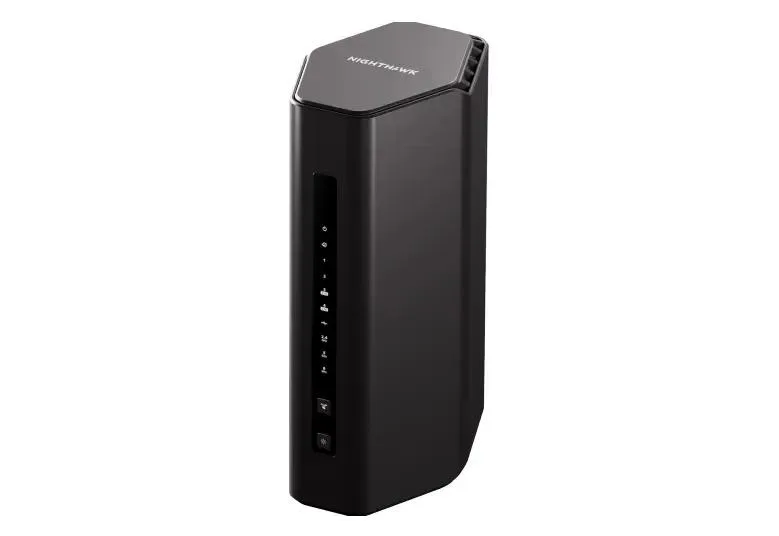
The NETGEAR Nighthawk RS300 is a tri-band BE9300 Wi-Fi 7 router with three 2.5G ports. It performs well — but at ~$330 the TP-Link Archer BE550 undercuts it. Here's the honest breakdown.
✅ Pros
- +Genuine tri-band Wi-Fi 7 with real 6 GHz, MLO (5 + 6 GHz), and 4096-QAM
- +Three 2.5G ports (1 WAN + 2 LAN) — room for multiple multi-gig wired devices
- +Generous 2 GB RAM on a capable quad-core CPU
- +Compact, upright, fanless design that runs silent and low-power
- +Strong, stable performance for modern clients at close-to-medium range
❌ Cons
- −Expensive for what it is — ~25% more than the comparable Archer BE550
- −No mesh support (no EasyMesh, no Orbi) — you can't extend coverage, only replace
- −The best security (NETGEAR Armor) and parental controls sit behind paid subscriptions
- −320 MHz channels weren't enabled at testing, so it underdelivers on the BE9300 label
- −No 10G port; coverage rating (2,500 sq ft) is optimistic vs. ~1,600 sq ft realistic
- −Buggy QoS and no web-based remote management
Verdict: The Nighthawk RS300 is a good tri-band Wi-Fi 7 router that asks you to pay a NETGEAR premium for it. For around $330 you get real 6 GHz, MLO, three 2.5G ports, and a compact, silent, fanless box that performs well in a normal-sized home. Nothing here is bad. The trouble is that a nearly identical experience — same BE9300 class, more 2.5G LAN ports — is available for roughly 25% less in the TP-Link Archer BE550. Add NETGEAR's habit of paywalling the good software, and the RS300 becomes a "buy it on sale" router rather than a full-price recommendation.
Check the current price on Amazon →
Key Specs at a Glance
- Wi-Fi Standard: Wi-Fi 7 (802.11be)
- Class: BE9300 (tri-band)
- Bands: 2.4 GHz (700 Mbps) + 5 GHz (2.9 Gbps) + 6 GHz (5.8 Gbps)
- Aggregate Rate: ~9.3 Gbps
- Wi-Fi 7 Features: MLO (always on), 4096-QAM (4K-QAM)
- 320 MHz Channels: Not enabled at launch/testing
- Streams / Antennas: 2×2 per band, 6 internal antennas
- Ethernet: 1× 2.5G WAN + 2× 2.5G LAN + 2× Gigabit LAN
- 10G Ports: None (step up to RS600/RS700S for 10G)
- USB: 1× USB 3.0
- SoC: Quad-core @ 2.0 GHz
- Memory: 2 GB RAM / 512 MB flash
- Mesh: No — no EasyMesh, no Orbi mesh
- Security: NETGEAR Armor (paid subscription); WPA3
- Coverage: NETGEAR rates it up to 2,500 sq ft; ~1,600 sq ft realistic
- Devices: Up to 100
- Design: Compact tower, fanless (silent)
- Warranty: 1-year hardware (NETGEAR US standard)
- Price: MSRP $329.99; frequently ~$190–$250 on sale
What You Actually Get: Real Tri-Band Wi-Fi 7
Unlike budget "Wi-Fi 7" routers that quietly drop the 6 GHz band, the RS300 is the real thing: a tri-band BE9300 router with a genuine 6 GHz radio rated at 5.8 Gbps, a 2.9 Gbps 5 GHz band, and a 700 Mbps 2.4 GHz band. It runs 4096-QAM on all bands and has MLO (Multi-Link Operation) enabled — here it bonds the 5 GHz and 6 GHz bands, which is the pairing that actually matters for speed and latency.
Two honest caveats on the Wi-Fi 7 story. First, 320 MHz channels — the widest, fastest 6 GHz channels the standard allows — were not enabled during independent testing, so peak throughput lands below what the BE9300 label implies. That may improve with firmware, but buy on what it does today, not on a promise. Second, MLO cannot be disabled, and the router offers relatively few manual Wi-Fi controls, which can trip up older or fussy legacy clients. For a house full of modern phones, laptops, and TVs, none of this matters. For a mixed bag of ten-year-old smart plugs, it occasionally does.
It's a 2×2 router on each band with six internal antennas, packed into a compact, upright, fanless enclosure that runs silently and sips power. If you hate blinking spider-routers, the industrial design is a genuine plus.
The Ports: Three 2.5G, No 10G
The back panel is the RS300's quiet strength. You get one 2.5G WAN port, two 2.5G LAN ports, two Gigabit LAN ports, and a USB 3.0 port. Three multi-gig ports total is more than most routers at this tier and enough to hang a 2.5G NAS and a 2.5G workstation off the router without either dropping to gigabit — an area where the cheaper Archer BE230, with its single 2.5G LAN port, runs out of room.
What you don't get is a 10G port. The WAN caps at 2.5 Gbps, so this is the right router for internet plans up to about 2 Gbps and no faster. If you're on a 5-gig or 10-gig fiber plan, you want a step up to NETGEAR's own RS600 or RS700S — or a competitor with a 10G WAN. For the overwhelming majority of homes still on gigabit or 2-gig service, 2.5G WAN is exactly right and 10G would just be paying for headroom you can't use.
Performance: Good in a Normal House, Oversold on Coverage
In independent testing the RS300 performs the way a competent mid-tier Wi-Fi 7 router should: strong, stable throughput on 6 GHz and 5 GHz for nearby modern clients, easily saturating a gigabit or 2-gig connection at close-to-medium range. As a single-broadcaster router in an apartment or a normal-sized single-story home, it does the job cleanly.
The number to distrust is the coverage rating. NETGEAR claims up to 2,500 sq ft; reviewers found the realistic figure closer to 1,600 sq ft in a home without thick walls, with signal falling off through multiple walls and floors like any compact 2×2 router. And here's the catch that defines the RS300: it has no mesh support at all. There's no EasyMesh, and it doesn't join an Orbi system. When you outgrow its coverage, you can't add a node — you replace the router. That's a real limitation for anyone in a larger or multi-story home, and it's the single biggest reason to consider a mesh system like the Netgear Orbi 970 or TP-Link Deco BE63 instead.
Under the hood it's a quad-core 2.0 GHz CPU with a generous 2 GB of RAM and 512 MB of flash — comfortably enough horsepower for its rated 100 devices, and more memory than most routers in this class.
Setup, Software, and the NETGEAR Armor Catch
Setup runs through the NETGEAR Nighthawk app and is quick and beginner-friendly. The basics — naming your network, guest Wi-Fi, port settings, firmware updates — are all free and straightforward.
Then you hit the NETGEAR subscription wall. NETGEAR Armor, the Bitdefender-powered security suite that provides real-time threat protection and vulnerability scanning, is a paid annual subscription after the trial. Advanced parental controls are similarly a paid add-on. The router works fine without either, but NETGEAR is notably more aggressive about paywalling software than TP-Link is with HomeShield, and far more so than a no-subscription box like the GL.iNet Flint 3. Two more software gripes surfaced in testing: there's no web-based remote management (you're pushed toward the app), and the QoS feature was buggy. Neither is fatal, but for a $330 router you'd expect the software to be a strength, not a list of asterisks.
Who Should Buy the Nighthawk RS300
Buy it if:
- You find it on a deep discount (it regularly drops to ~$190–$250), which flips its value equation entirely.
- You want a genuine tri-band Wi-Fi 7 router with 6 GHz for a single-broadcaster apartment or normal-sized home.
- You need two or more 2.5G wired devices and value three multi-gig ports.
- You want a compact, silent, fanless router that disappears into a shelf.
Skip it if:
- You're paying full MSRP — the TP-Link Archer BE550 is a near-identical BE9300 router with more 2.5G LAN ports for meaningfully less.
- You have a large or multi-story home — the RS300 has no mesh support, so look at the Netgear Orbi 970 or TP-Link Deco BE63.
- You're on multi-gig fiber above 2.5 Gbps — there's no 10G port.
- You want premium security and parental controls without an ongoing subscription.
Pros and Cons
Pros
- Genuine tri-band Wi-Fi 7 with real 6 GHz, MLO (5 + 6 GHz), and 4096-QAM
- Three 2.5G ports (1 WAN + 2 LAN) — room for multiple multi-gig wired devices
- Generous 2 GB RAM on a capable quad-core CPU
- Compact, upright, fanless design that runs silent and low-power
- Strong, stable performance for modern clients at close-to-medium range
Cons
- Expensive for what it is — ~25% more than the comparable Archer BE550
- No mesh support (no EasyMesh, no Orbi) — you can't extend coverage, only replace
- The best security (NETGEAR Armor) and parental controls sit behind paid subscriptions
- 320 MHz channels weren't enabled at testing, so it underdelivers on the BE9300 label
- No 10G port; coverage rating (2,500 sq ft) is optimistic vs. ~1,600 sq ft realistic
- Buggy QoS and no web-based remote management
RS300 vs. Archer BE550 vs. Orbi 970
How the RS300 stacks up against its closest value rival and the mesh step-up:
- Class: RS300 — tri-band BE9300; Archer BE550 — tri-band BE9300; Orbi 970 — tri-band BE27000 mesh
- 6 GHz: all three — yes
- MLO: RS300 — yes (5 + 6 GHz, always on); BE550 — yes (5 + 6 GHz); Orbi 970 — yes
- 2.5G ports: RS300 — 3 (1 WAN + 2 LAN); BE550 — 5 (1 WAN + 4 LAN); Orbi 970 — 2.5G + 10G per unit
- Mesh: RS300 — none; BE550 — EasyMesh; Orbi 970 — full Orbi mesh
- Coverage: RS300 — single home (~1,600 sq ft); BE550 — single home; Orbi 970 — large / multi-story
- Subscriptions: RS300 — NETGEAR Armor (paid); BE550 — HomeShield Pro (optional); Orbi 970 — NETGEAR Armor (paid)
- Price: RS300 — ~$330 (MSRP); BE550 — ~$200; Orbi 970 — ~$1,500 (3-pack)
The read: the RS300 and BE550 are the same class of router, and the BE550 is cheaper with more wired multi-gig ports and mesh expandability — so unless the RS300 is on sale, the BE550 wins on value. Step up to the Orbi 970 only if you have a large home and coverage, not raw speed, is the problem you're solving (and the budget to match).
Bottom Line
The NETGEAR Nighthawk RS300 is a well-built, good-performing tri-band Wi-Fi 7 router. If it were priced against its competition, it would be an easy recommendation: real 6 GHz, MLO, three 2.5G ports, and a silent fanless design cover the bases for a modern single-broadcaster home. But at a $329.99 MSRP it's asking a NETGEAR premium for hardware you can get for less, with fewer strings, from the TP-Link Archer BE550 — which adds more 2.5G ports and mesh support on top.
So the advice is simple: watch the price. The RS300 regularly falls to the $190–$250 range, and at those numbers it's a genuinely good buy for the right home. At full MSRP, it's a fine router that a better-value rival makes hard to justify.
Rating: 3.5 / 5
Our Verdict
The NETGEAR Nighthawk RS300 is a tri-band BE9300 Wi-Fi 7 router with three 2.5G ports. It performs well — but at ~$330 the TP-Link Archer BE550 undercuts it. Here's the honest breakdown.
Ready to buy the NETGEAR Nighthawk RS300?
Buy on Amazon →Affiliate link — we may earn a commission at no extra cost to you.