Subwoofer Crossover Explained: Why 80 Hz Is the Default (and When to Change It)
Published 2026-08-04 · By NetAudioHub Editorial
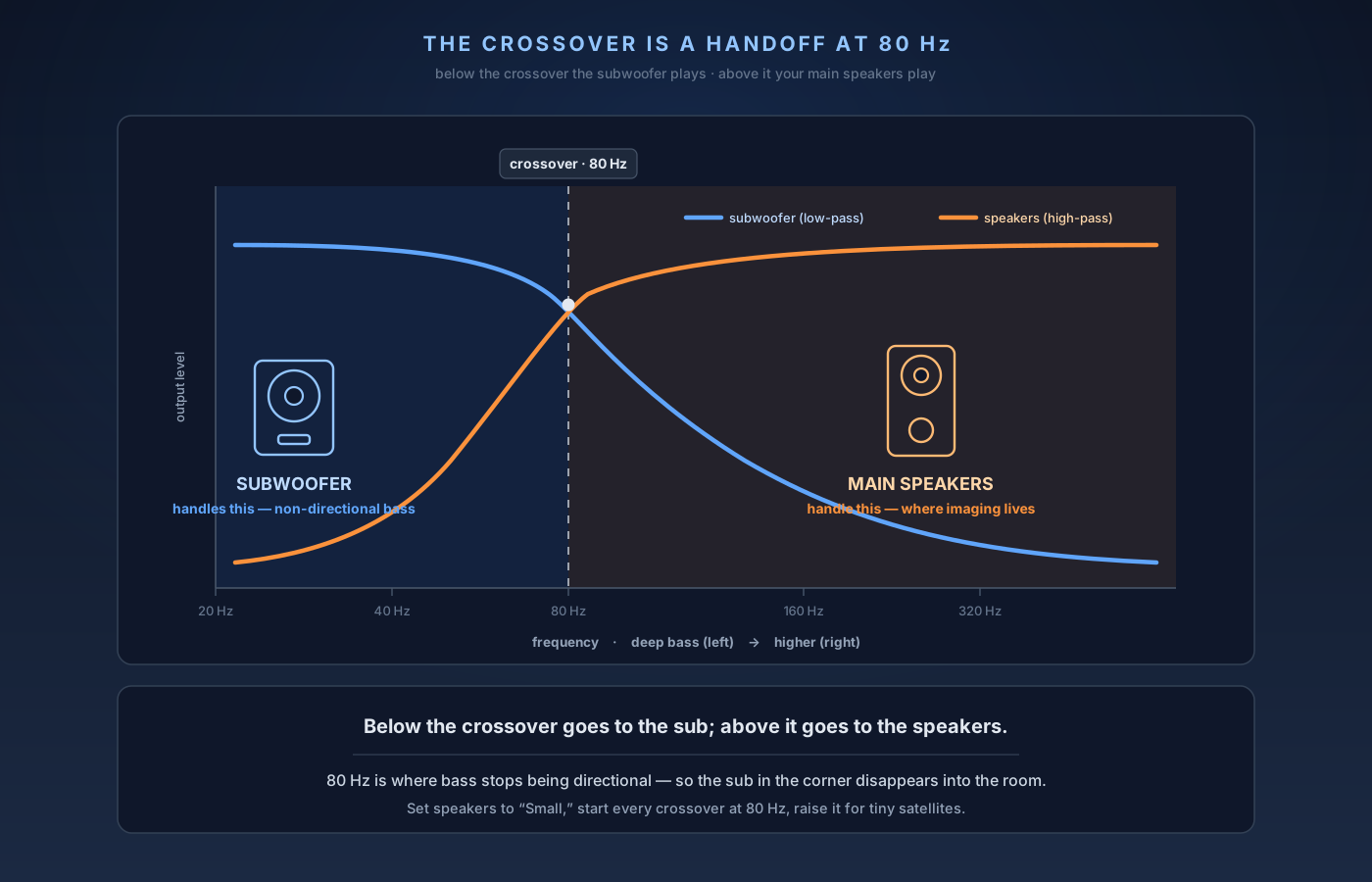
The crossover is the frequency where your AV receiver stops sending bass to your main speakers and hands it to the subwoofer instead — below it the sub does the work, above it your speakers do. 80 Hz is the near-universal default (and the THX recommendation) because below about 80 Hz bass becomes non-directional, so the sub in the corner disappears into the room. Set it much higher and you start to hear the sub as a separate box; set it much lower and small speakers strain on deep bass they can't handle. Here's what the setting really does, why the 'Small' speaker setting makes or breaks it, and how to dial it in for your speakers.
The verdict up front: the crossover is the frequency where your AV receiver stops sending bass to your main speakers and hands it to the subwoofer instead. Below the crossover, the sub does the work; above it, your speakers do. The reason 80 Hz is the near-universal default — and the THX recommendation — is simple: below about 80 Hz, bass becomes non-directional, so your ears can't localize it and the sub in the corner disappears into the room. Set the crossover much higher and you start to hear the sub as a separate box and voices get pulled toward it; set it much lower and small speakers get asked to reproduce deep bass they can't handle cleanly. The single most important companion setting is telling the receiver your speakers are "Small" so bass management actually engages. Start at 80 Hz for every speaker, then raise it for small satellites and lower it only for genuinely full-range towers. Here's what the setting really does and how to dial it in.
What a Crossover Actually Is
Your subwoofer and your main speakers overlap in the low end, and if you let them both play the same deep bass, you get trouble: uneven response, muddy midbass, and a sub you can pinpoint by ear. The crossover is the fix. It's a two-part filter that divides the audio by frequency and routes each part to whatever reproduces it best.
Everything below the crossover frequency gets a low-pass filter and is sent to the subwoofer. Everything above it gets a high-pass filter and stays with your main speakers. The two filters are designed to overlap and sum flat through the transition, so the handoff is seamless — done right, you never hear a seam between "sub" and "speakers." In a modern AV receiver this all happens in the bass management section of the setup menu, and the crossover is set per speaker group (fronts, center, surrounds).
This is separate from the LFE channel — the ".1" in 5.1 or 7.1. LFE is a dedicated low-frequency effects track baked into movie soundtracks, and it always goes straight to the sub no matter what your crossover is set to. The crossover only governs the redirected bass from your regular speaker channels. That distinction matters because it means your sub is doing two jobs at once: playing dedicated LFE effects and covering the bottom end that your main speakers hand off.
Why 80 Hz Is the Magic Number
The 80 Hz default isn't marketing — it comes straight from how human hearing works. Above roughly 80 Hz, your ears can locate where a sound is coming from. Below it, you increasingly can't; the wavelengths get long enough (a 40 Hz tone is about 28 feet long) that the sound loads the whole room rather than arriving from a point. That's the whole trick behind a subwoofer: because deep bass is non-directional, you can shove a big ugly box in the corner and still perceive the bass as coming from the front soundstage.
Set the crossover at 80 Hz and you keep everything directional with the main speakers, where imaging lives, and send only the non-directional stuff to the sub. Push the crossover up to 120 Hz or higher and you start routing frequencies your ears can localize to the subwoofer — so male voices thin out, and you begin to hear the sub as a distinct source off to the side. Drop it too low, say 40 Hz, and you ask your main speakers to reproduce deep bass most of them can't handle without straining, distorting, and stealing amplifier headroom from the frequencies they are good at. 80 Hz is the sweet spot that satisfies both constraints, which is why THX standardized on it and nearly every calibration guide starts there.
The Setting That Makes or Breaks It: "Small" vs "Large"
Before the crossover does anything, your receiver has to know that your speakers need bass management. That's the "Small" / "Large" speaker setting, and it's the single most misunderstood control in home audio. It has nothing to do with the physical size of your speakers.
"Small" tells the receiver: apply the high-pass filter, hold back the deep bass, and send it to the sub. This engages the crossover. "Large" (sometimes called "Full Band" or "Full Range") tells the receiver: this speaker can handle everything, so send it the full signal and don't redirect its bass to the sub. Set your speakers to "Large" and the crossover for that channel is effectively bypassed.
Here's the counterintuitive part: almost everyone should set almost every speaker to "Small," even big floorstanding towers. Reasons: it removes the deepest, most power-hungry bass from your speakers so they play cleaner and louder; it lets your (probably more capable) subwoofer handle the bottom octaves; and — crucially — it lets room correction manage bass properly instead of leaving your towers to fight the room on their own. Leaving speakers on "Large" is the most common cause of thin, uneven, or oddly doubled-up bass in an otherwise good system. If your bass sounds wrong, check this setting first.
The one setting that combines both is "LFE + Main" (or "Double Bass"): it sends bass to both the sub and the mains. It usually creates more problems than it solves — overlapping bass that peaks and cancels unpredictably — so leave it off unless you have a specific reason and you've measured the result.
Matching the Crossover to Your Speakers
80 Hz is the default, not a law. The right number depends on how low your main speakers can actually play. The working rule audio pros use: set the crossover about 10 Hz above the speaker's -3 dB low-frequency rating. A speaker that's flat down to 60 Hz wants a crossover around 70-80 Hz; one that fades at 100 Hz wants 110-120 Hz. You want the sub to pick up before the speaker starts running out of steam, so there's no dip in the handoff.
In practice, that translates to a simple size-based cheat sheet:
Small satellites and cube speakers (3-4" drivers): 120 Hz, sometimes higher. These little speakers have almost no low end, so the sub has to come in early. This is the one case where going well above 80 Hz is not just acceptable but necessary.
Standard bookshelf speakers (5.25-6.5" woofers): 80 Hz is usually perfect, and it's why 80 Hz became the default — it matches the most common speaker type. Some smaller bookshelves do better at 90-100 Hz. If you're weighing bookshelves against towers in the first place, our guide to bookshelf vs. floorstanding speakers covers the trade-offs.
Large bookshelves and compact towers (6.5-8" woofers): 60-80 Hz. Capable enough to reach a bit lower, but still better off letting the sub carry the deepest notes.
Full-size floorstanding towers (dual 8"+ woofers, rated to 40 Hz or below): 40-60 Hz if you want them contributing serious low end — but even here, many people still prefer 80 Hz on "Small" for the cleaner, more even in-room result. Deep bass genuinely reaches lower than the spec sheet in a real room thanks to room gain, which we get into in our sealed vs. ported subwoofers explainer.
A practical tip: it's usually better to set the crossover slightly too high than too low. A crossover 10-20 Hz above ideal is nearly inaudible; one set too low leaves a suck-out where your speakers have quit and the sub hasn't taken over.
Where Room Correction Fits In
Auto-calibration systems — Audyssey, Dirac Live, YPAO, MCACC — measure your speakers with a microphone and set crossovers automatically. They're a great starting point, but they have a well-known habit of getting the crossover wrong, usually by setting it too low because the mic detected a little more low-end output than the speaker can cleanly sustain at volume. A common failure mode is the system setting a tower to "Large" or picking a 40 Hz crossover for a bookshelf that has no business playing 40 Hz.
The fix is to let the system run, then go into the manual settings and override anything below 80 Hz up to at least 80 Hz, and switch any "Large" speakers to "Small" unless you have a deliberate reason not to. This one manual pass after auto-calibration fixes more bass problems than any other tweak. For a full breakdown of how the major systems differ and where each one needs a human's hand, see our Audyssey vs. Dirac vs. YPAO room correction comparison.
Room correction also handles the parts of bass that the crossover can't: the peaks and nulls your room creates. The crossover decides what plays your bass; correction and placement decide how even it sounds seat to seat. The biggest single upgrade on that front is adding a second sub — more on why in our guide to when a second subwoofer is worth it.
A Few Things That Trip People Up
The crossover slope is usually fixed, and that's fine. Most AV receivers use a 24 dB/octave (4th-order) high-pass on the speakers and a 24 dB/octave low-pass on the sub. You don't need to change it. Standalone subwoofers have their own crossover knob — if you're running bass management in the receiver (you should be), set the sub's own knob to bypass/LFE or turn it all the way up so it doesn't filter twice.
Don't filter the bass twice. If your receiver is applying an 80 Hz crossover and your subwoofer's rear-panel dial is also set to 80 Hz, you're stacking two low-pass filters and rolling off the bass too aggressively. Pick one place to set the crossover — the receiver — and defer the sub's own filter.
Phase and distance still matter. A perfectly set crossover can still sound thin if the sub arrives out of phase with your speakers at the crossover frequency. After setting the crossover, check the phase (0/180 switch or continuous dial) for whichever setting gives the most bass at your seat, and make sure the sub's distance/delay is entered in the receiver.
Dialogue problems usually aren't a crossover problem. If voices are hard to follow, the crossover is rarely the culprit — center-channel level, speaker placement, and dynamic-range settings matter far more. We cover the real fixes in why you can't hear movie dialogue.
Bigger speakers don't mean you skip the sub. Even towers benefit from an 80 Hz crossover on "Small" because it frees their amplifier and drivers from the hardest work. How well your amp drives those speakers is its own topic — see speaker impedance and AVR pairing — but the crossover decision is largely independent of it.
The Bottom Line
The crossover is a handoff: below it, the subwoofer plays; above it, your main speakers play. 80 Hz is the default because it sits right at the point where bass stops being directional — high enough to keep everything you can localize with the speakers, low enough to keep everything you can't with the sub. Set your speakers to "Small" so bass management actually engages, start every crossover at 80 Hz, then raise it for small satellites (up to ~120 Hz) and consider lowering it only for genuinely full-range towers. Run your room correction, then override any crossover it set below 80 Hz and switch stray "Large" speakers to "Small." Get those two settings right — "Small" and 80 Hz — and you'll fix the muddy, uneven, corner-boomy bass that plagues most systems, and hear the whole soundstage snap into one seamless source. For the rest of a clean surround setup, our 5.1 surround sound setup guide walks through the whole chain.