Fiber vs. Cable vs. 5G Home Internet: Which Should You Actually Get?
Published 2026-10-17 · By NetAudioHub Editorial
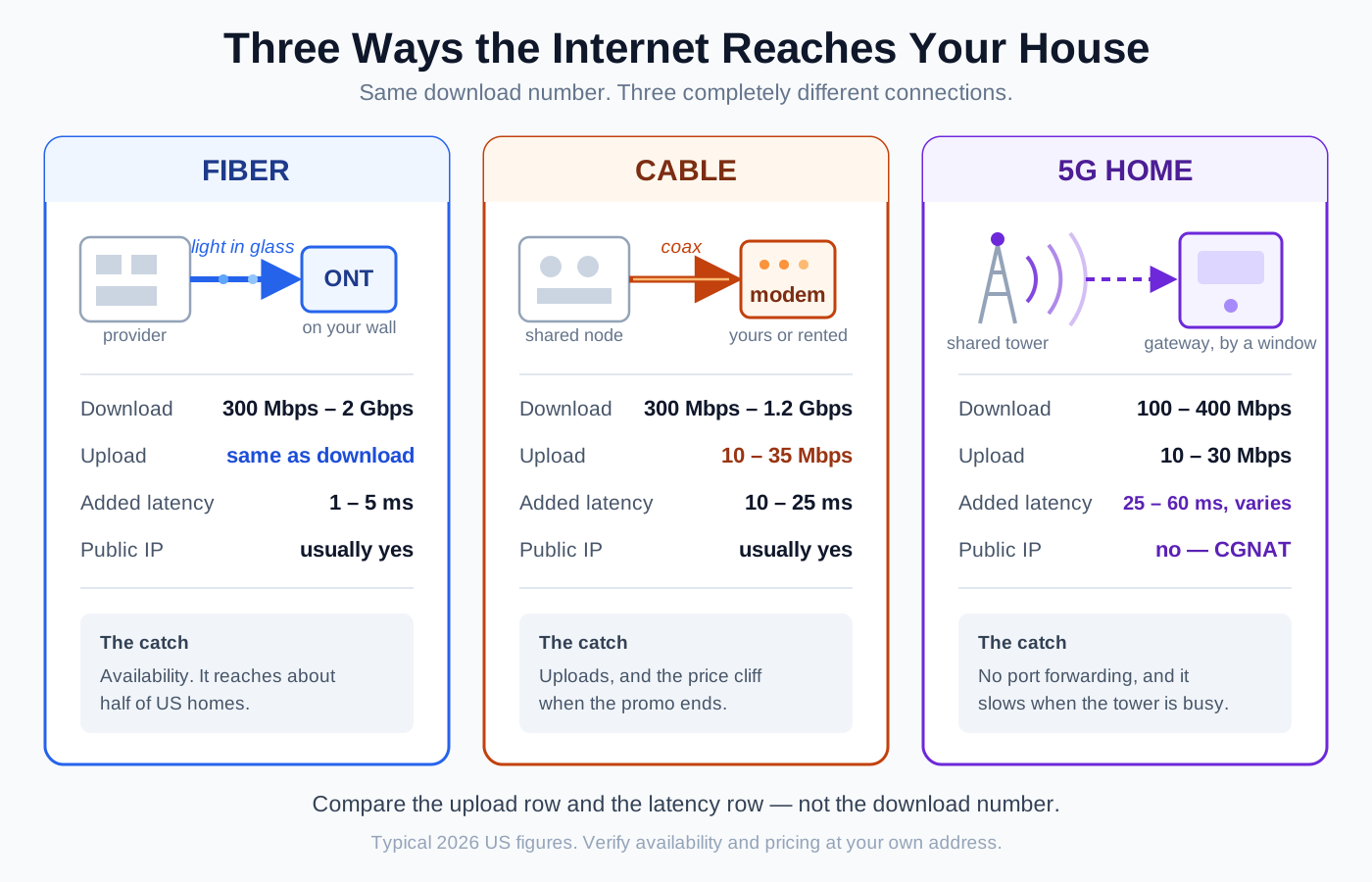
Three providers can all sell you "300 Mbps" and deliver three completely different internet connections. The download number is the one thing they have in common and the least useful thing to compare, because what separates fiber from cable from 5G is everything the ad doesn't mention: upload speed that ranges from 20 Mbps to 300 Mbps, latency that ranges from 2 ms to 60 ms, whether you get a real public IP address or sit behind carrier-grade NAT, and whether your price doubles in thirteen months. This guide explains what each technology physically is, what it's actually like to live with, and gives you a short decision path — including the cases where the cheapest option really is the right one.
The short version: compare uploads and latency, not downloads. Fiber is the best home internet by a wide margin — symmetric speeds, 1 to 5 ms of added latency, and a price that tends to stay put — so if it's available at your address the decision is basically made. Cable is the near-universal fallback: download speeds match fiber, but uploads are typically 10 to 35 Mbps unless your area has been upgraded, latency runs 10 to 25 ms, and the promo price usually jumps hard at month 12 or 24. 5G home internet is the value play: roughly $35 to $60 a month with the equipment and taxes included and no contract, genuinely good enough for streaming and browsing, but it puts you behind carrier-grade NAT, it slows down when the local tower is busy, and the speed you get depends on where the gateway sits in your house. Pick fiber if you can get it, cable if you upload a lot or game competitively and fiber isn't an option, and 5G if you mostly consume content and want to stop overpaying. Here's how to tell which one you are.
What Each One Physically Is
The differences that matter all come from the last mile — the final stretch of infrastructure between the provider and your wall.
- Fiber runs a glass strand to your home and sends light down it. The strand terminates in a box called an ONT (optical network terminal), which hands off Ethernet to your router. Light in glass has enormous capacity and essentially no interference, and the modern standards — GPON, and increasingly XGS-PON — are designed to give you the same speed in both directions.
- Cable reuses the coaxial TV network, with a fiber trunk running to a neighborhood node and coax covering the last few hundred feet. The standard is DOCSIS, currently 3.1 with 4.0 rolling out. Coax has plenty of total capacity, but it was laid out for television: the vast majority of the spectrum was allocated to downstream, which is the single fact behind every cable upload complaint.
- 5G home internet is a cellular modem in a box. It attaches to the same towers your phone uses and relays that connection to your house over Wi-Fi and Ethernet. There is no wire to your home at all, which is both the appeal and the limitation.
One structural difference is worth calling out now: cable and 5G are shared media, fiber mostly isn't. On cable you share the node with your neighborhood; on 5G you share the tower with every phone in range. Fiber's PON architecture splits a strand too, but with so much headroom that congestion is rarely what you notice.
The Comparison That Actually Matters
Treat these as the shape of the market in 2026, then verify at your own address — pricing and available tiers vary enormously by region, and promo terms change constantly.
| Fiber | Cable | 5G home internet | |
|---|---|---|---|
| Typical download | 300 Mbps – 2 Gbps (5 Gbps+ in some markets) | 300 Mbps – 1.2 Gbps | 100 – 400 Mbps |
| Typical upload | Same as download | 10 – 35 Mbps (100 – 300 where upgraded) | 10 – 30 Mbps |
| Added latency | 1 – 5 ms | 10 – 25 ms | 25 – 60 ms, variable |
| Typical monthly price | $50 – $100 | $50 – $110 after promo | $35 – $60, all-in |
| Equipment | ONT provided; router often required | Modem + router, yours or rented | Gateway included |
| Public IP address | Usually yes | Usually yes | Usually no (CGNAT) |
| Data caps | Rare | Common (often 1.2 TB) | Rare, but deprioritization applies |
| Availability | ~half of US homes | ~85% of US homes | Wherever capacity exists |
| Weather / congestion sensitivity | Very low | Low | Moderate |
Two rows in that table decide most arguments. Upload is where fiber wins outright and cable's number looks embarrassing. Latency is where 5G pays for its low price.
Upload Speed: The Row Everyone Skips
For years uploads didn't matter, because home internet was a one-way medium. That stopped being true somewhere around the first work-from-home wave, and the change is permanent.
Here's what your uploads are actually carrying now:
- Video calls. A 1080p call wants 3 to 4 Mbps up, per participant stream. That's small — until three people in the house are on calls simultaneously and one of them is screen-sharing.
- Cloud backup and photo sync. A phone dumping a weekend of 4K video into iCloud or Google Photos will saturate a 20 Mbps uplink for an hour and make everything else in the house feel broken.
- Game updates and console uploads. Modern patches are tens of gigabytes down, but cloud saves, clip uploads, and streaming are all up.
- Security cameras. Every cloud camera streams continuously upward. Four 2K cameras can hold 8 to 12 Mbps up permanently occupied.
- Working from a NAS, live streaming, or sending large files. These are the workloads where 35 Mbps up versus 500 Mbps up is not a nuance, it's an hour versus four minutes.
The reason a 20 Mbps uplink feels worse than the number suggests is that saturating the upload breaks the download too. Acknowledgements for your inbound traffic have to travel upstream; when the uplink is full, they queue, and your 1 Gbps download collapses. That's the mechanism behind the most common "my internet is fast but everything is laggy" complaint, and it's the same queueing problem we cover in bufferbloat explained — which, helpfully, is fixable with smart queue management on your own router regardless of which ISP you use.
The good news for cable customers: providers are actively deploying mid-split and high-split upstream, which moves the frequency dividing line and raises uploads into the 100 to 300 Mbps range, with DOCSIS 4.0 pushing further. The bad news is it's address-by-address, so check what's live at your house rather than what the press release says. If you're buying your own hardware, make sure it supports the upgraded upstream — the trap we flag in should you buy your own modem or rent.
Latency: Why 5G Feels Different
Download speed determines how fast a big file arrives. Latency determines how responsive everything feels — how quickly a page starts loading, whether a video call talks over itself, and whether you lose gunfights you should have won.
Rough idle latency to a nearby server:
| Connection | Typical ping | What it feels like |
|---|---|---|
| Fiber | 3 – 10 ms | Instant. Competitive gaming is a non-issue. |
| Cable | 15 – 30 ms | Fine for everything, including most gaming. |
| 5G home | 30 – 70 ms, with spikes | Fine for streaming and browsing; noticeable in fast-twitch games and occasionally in calls. |
| Satellite (LEO) | 25 – 60 ms | Similar to 5G, with more variability in weather. |
The number to worry about with 5G isn't the average, it's the variance. Cellular networks schedule airtime dynamically, so your latency depends on how many other devices the tower is serving right now. A 40 ms average that occasionally spikes to 200 ms under load is a much worse gaming experience than a steady 30 ms, and averages hide that entirely.
There's a second 5G gotcha that catches gamers specifically: most 5G home internet puts you behind carrier-grade NAT. You share one public IP with many other customers, which means you cannot port-forward, you often can't host a game or a server, and console NAT type typically reports as Moderate or Strict. No router setting fixes this — the extra NAT layer isn't in your house. We cover the symptoms in NAT types explained and the diagnosis in double NAT explained. Some carriers will sell you a public IP as an add-on; many won't offer one at all. If remote access to your home network matters, ask before you sign up.
Price: The Part That Changes After Month 12
Headline prices are not comparable, because the three technologies use different pricing models.
- Cable is built around the promotional cliff. A $50 introductory rate frequently becomes $85 to $110 at month 12 or 24, and then there's equipment rental at $10 to $15, plus broadcast and regional fees that can add $20 or more. Budget for the post-promo number, because that's the price you'll pay for most of the time you're a customer.
- Fiber tends to be priced closer to flat, with the equipment included and fewer junk fees. Several providers advertise multi-year price guarantees. It's often the same or cheaper than cable over a two-year window even when the sticker looks higher.
- 5G home internet is priced as a simple all-in monthly number — typically $35 to $60, taxes and gateway included, no contract, frequently with a multi-year price lock and a further discount if you already have a mobile line with that carrier. What you see is generally what you pay.
Do the honest comparison this way: (post-promo monthly price + equipment rental + fees) × 24. That arithmetic flips a lot of decisions, and it's the same exercise that makes owning your modem such an easy win on cable.
Who Should Pick What
Get fiber if you can. If a fiber provider serves your address and the price is within about $20 a month of the alternatives, stop reading and order it. Symmetric uploads, the lowest latency available, a real public IP, and stable pricing — it wins on every row that matters, and nothing about it degrades when the neighborhood gets busy. The only genuine reason to decline fiber is if the only available plan is a low tier at a high price.
Get cable if fiber isn't available and you do any of the following: competitive gaming, hosting anything, running cloud security cameras, uploading large files regularly, or supporting several simultaneous work-from-home users. Cable's uploads are unimpressive but they're steady, the latency is comfortable, and you get a public IP. Check whether your area has the upstream upgrade — it turns cable's weakest row into a strong one.
Get 5G home internet if your usage is mostly downstream and you want to cut the bill. Streaming, browsing, social, schoolwork, casual gaming, a couple of video calls a day: 5G handles all of it, and saving $40 a month is $480 a year for a connection you may genuinely not be able to distinguish from cable. It's also the best answer when you're renting short-term, moving soon, or want out of a bad provider relationship without a contract — the gateway travels with you.
Look at satellite only when nothing else reaches you. Low-earth-orbit service has made rural internet dramatically better than the old geostationary options, but the hardware costs a few hundred dollars up front and the monthly price is generally the highest of the four. It's the right answer when it's the only answer.
Consider running two. If you work from home and downtime is expensive, a cheap 5G plan as a failover behind a dual-WAN router is a reasonable $35-a-month insurance policy — and the failure modes are genuinely independent, since a backhoe through the neighborhood's coax doesn't touch the cell tower.
Before You Switch: A Short Checklist
- Check what's actually at your address, not your city. Every provider has an availability lookup; use it. Coverage maps are marketing, address lookups are closer to truth.
- Work out the speed you need rather than buying the biggest tier. Most households are well served under 500 Mbps, and the gap between tiers is usually less noticeable than the gap between technologies — see how much internet speed do you need.
- Ask about the upload number specifically. It's frequently absent from the marketing page and it's the row most likely to determine whether you're happy.
- Ask whether you get a public IP if you game, host anything, or use remote access to your home.
- Ask what the price is in month 25, and what the equipment fee is.
- Check the cancellation terms on what you have now, and whether there's an early termination fee.
- Plan the handoff. Keep the old service running for a few days of overlap if you work from home. It costs a few dollars of prorated billing and saves a bad week.
The Hardware Side of the Decision
Whichever you pick, the equipment story differs:
- On fiber, the ONT is the provider's and stays. Some providers require their gateway to authenticate the line; others let you plug your own router into the ONT. If you can use your own, do — you'll get better Wi-Fi and control over your own network. Check the WAN port speed before you buy: a 1 Gb WAN port throws away the over-provisioning most "gigabit" plans actually deliver, which is why the $129 UniFi Cloud Gateway Ultra uses a 2.5 GbE WAN port. Its LAN side is four 1 GbE ports and it has no Wi-Fi radio at all, so it is a gateway to pair with an access point, not a one-box answer. Browse Wi-Fi 6 and Wi-Fi 7 routers.
- On cable, you can nearly always replace the rented gateway with your own modem and router, which pays for itself in under a year. Our reviews of the ARRIS SURFboard S33 and the SURFboard S34 cover the upper end — the S34 is the one to buy if your provider is moving to faster uploads — while the Motorola MB8611 is the value pick at $159.99 and pays off a typical rental fee in 10–12 months. Or browse DOCSIS 3.1 cable modems.
- On 5G, the gateway is included and you generally can't replace it — but you can usually put it in bridge or passthrough mode and run your own router behind it, which is worth doing because carrier gateway Wi-Fi is typically mediocre. Two placement notes: the gateway needs the best cell signal in the house, which usually means an upstairs window, and that is almost never where you want your Wi-Fi radiating from. Bridging to a well-placed router or mesh system solves both problems at once.
Whatever arrives at the wall, the Wi-Fi in your house is a separate problem with a separate solution — and it's the part people most often blame their ISP for. Before concluding a new provider is slow, work through router placement and confirm you're testing over Ethernet. If you're unclear which box does what in your setup, modem vs. router vs. gateway sorts out the roles.
The Bottom Line
Fiber if you can get it, cable if you upload, 5G if you don't. That's the whole decision compressed to a sentence, and it holds for most households.
The reason the three feel so different despite advertising the same download numbers is that the download number is the one thing they've made equivalent. Everything underneath it — upload speed, latency stability, whether you get a real IP address, what the bill looks like in two years — varies by an order of magnitude, and those are the parts you live with every day.
Check your address, find the upload number, and calculate the two-year cost. Fifteen minutes of that beats any amount of comparing headline speeds.
Affiliate disclosure: NetAudioHub links to retailers including Amazon. We earn a small commission on qualifying purchases at no extra cost to you.