Dolby Atmos Speaker Layouts Explained: What 5.1.2, 5.1.4, and 7.1.4 Really Mean
Published 2026-10-02 · By NetAudioHub Editorial
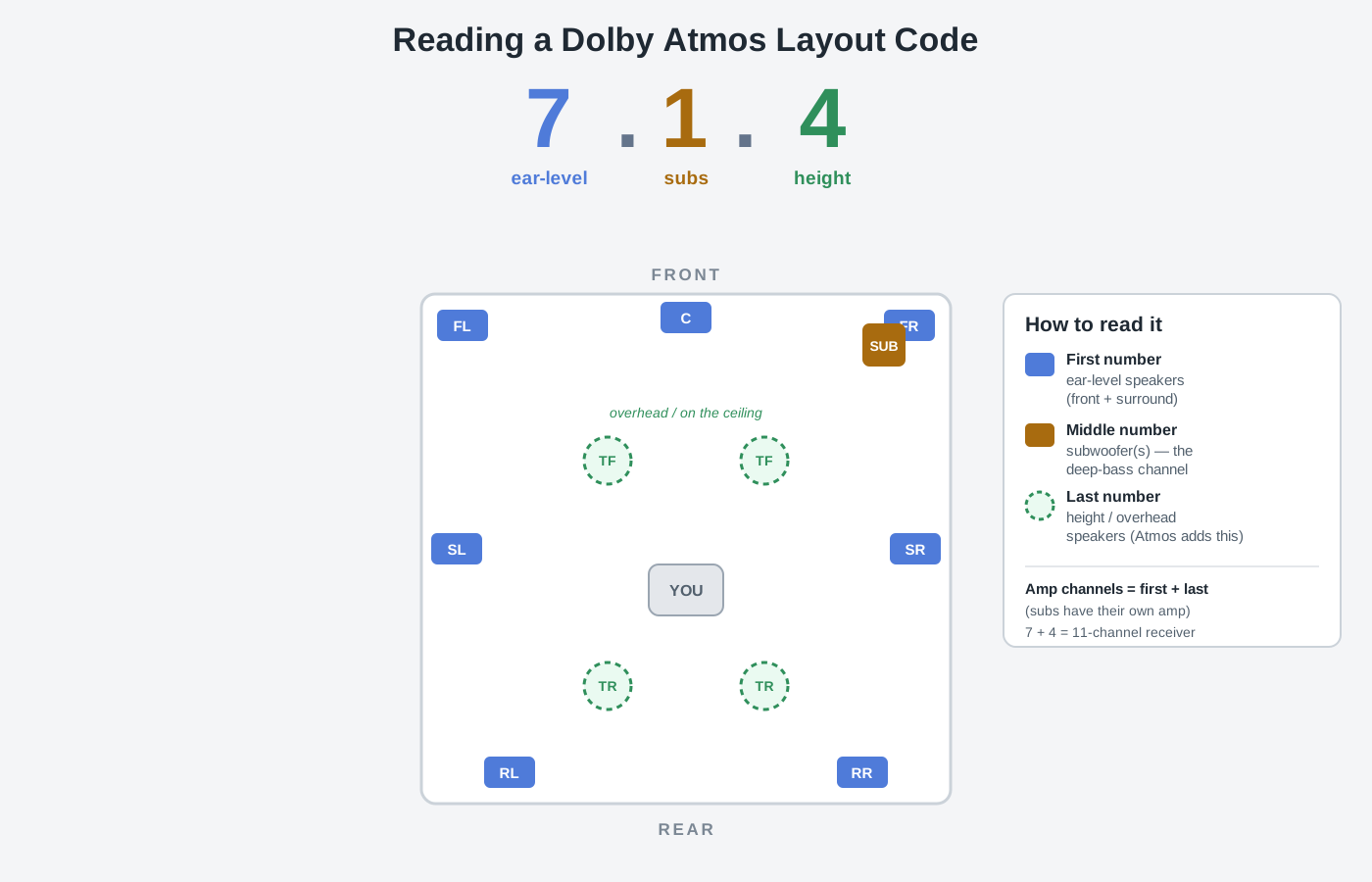
Every Atmos receiver box and speaker bundle is labeled with a cryptic three-number code — 5.1.2, 5.1.4, 7.1.4 — and nobody explains what it means. It's simpler than it looks: the numbers are just a headcount of speakers by type. The first is your ear-level speakers, the middle is your subwoofers, and the third — the one Atmos added — is your overhead or height speakers. This guide decodes the notation, explains why that third number is the whole point of Atmos, shows how many amplifier channels each layout needs, and tells you which layout is genuinely worth it for a small, medium, or large room instead of just buying the biggest number you can afford.
The short version: a Dolby Atmos layout code like 5.1.2 or 7.1.4 is just a headcount of your speakers, split into three groups. The first number is how many ear-level ("bed") speakers you have around the room. The middle number is how many subwoofers. The third number — the one Atmos added to the old surround-sound format — is how many overhead or height speakers put sound above you. So 5.1.2 means five ear-level speakers, one sub, and two height speakers; 7.1.4 means seven ear-level, one sub, and four height. Bigger numbers aren't automatically better — they need a receiver with enough amplifier channels and a room big enough to space the speakers correctly. For most living rooms, 5.1.2 is the honest entry point and 5.1.4 or 7.1.4 is the sweet spot; anything larger is for dedicated theaters. Here's how to read the code and pick the right one.
What the Three Numbers Mean
For years, surround sound used a two-number code: 5.1, 7.1, and so on. Dolby Atmos added a third number, and that third number is the entire reason Atmos exists.
Read the code left to right as a count of speakers by type:
| Position | Example (7.1.4) | What it counts |
|---|---|---|
| First number | 7 | Ear-level speakers around you (front + surround) |
| Middle number | 1 | Subwoofers (the ".1" low-frequency channel) |
| Last number | 4 | Overhead / height speakers above you |
That's the whole system. Once you know the pattern, every product label decodes instantly: 5.1.2 is "five, one, two," 9.1.6 is "nine, one, six," and a plain 5.1 soundbar (no third number) has no height channels at all.
The one thing the code does not tell you is how you get the height channels — whether they're speakers in your ceiling, on your walls, or up-firing modules that bounce sound off the ceiling. That's a separate decision we cover below, and it's covered in depth in our in-ceiling vs. up-firing vs. height-speaker guide.
The First Number: Your Ear-Level Speakers
The first number counts the speakers roughly at ear height when you're seated — the "bed" layer that does most of the work. It breaks down like this:
- 5 = front left, center, front right, plus two side surrounds (to your left and right). This is the classic 5-channel setup.
- 7 = all of the above, plus two rear surrounds behind you. The extra pair adds a more precise sense of things moving behind and around you.
The center channel is part of this number, and it's the most important speaker in the room for movies because it carries almost all the dialogue. If you're deciding whether you truly need one, we make the case in do you need a center channel speaker?.
Going from 5 to 7 ear-level speakers matters most in larger or longer rooms where there's real distance between your seat and the back wall. In a small room with the couch against the rear wall, rear surrounds have nowhere to breathe and the upgrade from 5 to 7 is far less noticeable than adding height speakers.
The Middle Number: Subwoofers
The middle number is the ".1" — the dedicated low-frequency effects (LFE) channel that feeds your subwoofer(s). It handles the deep bass: explosions, rumble, the bottom octave of a score.
- .1 = one subwoofer. Fine for most rooms.
- .2 = two subwoofers. Not louder for the sake of it — two subs placed well even out the bass across the room so every seat gets similar low end, instead of one boomy spot and one thin spot.
Whether a second sub is worth it depends on your room and how many seats you're trying to satisfy; we break down the trade-off in dual subwoofers: when a second sub is worth it. Wherever your subs land, set the crossover correctly so the bass hands off cleanly from your main speakers — see subwoofer crossover: why 80 Hz. And placement matters more than the number: start with where to place a subwoofer.
The Third Number: Height Speakers (This Is the Point of Atmos)
Old surround sound was a flat ring of speakers around you — everything happened on one horizontal plane. Dolby Atmos adds a height dimension: speakers above you that let sound move overhead. A helicopter can pass over the couch, rain can fall from the ceiling, a jet can climb. That vertical layer is what the third number counts, and it's the single upgrade that makes Atmos sound different from a good 5.1 system.
There's a related but separate question — Atmos vs. the competing DTS:X format — that we settle in Dolby Atmos vs. DTS:X. For layout purposes, the height count works the same either way.
How many height speakers?
- .2 (two height speakers) — a single pair, usually mounted or placed slightly in front of and above the seating (or up-firing modules on top of your front speakers). This gives you a convincing "ceiling" of sound and is the most common real-world Atmos setup.
- .4 (four height speakers) — two pairs, one toward the front and one toward the rear of the seating area. This is the meaningful jump: overhead sound can now move front-to-back over your head, not just sit above the front of the room. If you're going to invest in Atmos, going from 2 to 4 height speakers is usually a bigger, more obvious improvement than going from 5 to 7 ear-level speakers.
- .6 (six height speakers) — three pairs. Overkill for anything but a large dedicated theater with multiple rows.
You can get height channels three ways — speakers in the ceiling, speakers on the wall high up, or up-firing "Atmos-enabled" modules that bounce sound off a flat ceiling. Each has real trade-offs in effect and installation difficulty, laid out in our in-ceiling vs. up-firing vs. height-speaker comparison. One quick reality check: up-firing speakers need a flat, hard ceiling around 8 feet high to work. Vaulted, angled, or very high ceilings scatter the reflection and kill the effect — in those rooms, in-ceiling or on-wall height speakers are the only honest option.
Common Layouts, Decoded
Here's how the codes you'll actually see on the shelf translate into speakers and rooms:
| Layout | Ear-level | Subs | Height | Best for |
|---|---|---|---|---|
| 5.1 | 5 | 1 | 0 | Not Atmos — the classic surround baseline |
| 5.1.2 | 5 | 1 | 2 | Small-to-medium rooms; the honest Atmos entry point |
| 5.1.4 | 5 | 1 | 4 | Medium rooms; front-to-back overhead movement |
| 7.1.2 | 7 | 1 | 2 | Larger rooms where rear surrounds have space |
| 7.1.4 | 7 | 1 | 4 | The enthusiast sweet spot — full ring + full overhead |
| 9.1.6 | 9 | 1 | 6 | Large dedicated theaters only |
Notice that 5.1.4 and 7.1.2 both use nine speaker channels — you're choosing where to spend that ninth-and-tenth pair. In most rooms, spending it on a second pair of height speakers (5.1.4) beats spending it on rear surrounds (7.1.2), because the overhead layer is what makes Atmos feel like Atmos.
How Many Amplifier Channels You Need
This is where people get tripped up: your AV receiver has to have an amplifier channel for every ear-level and height speaker. (Subwoofers don't count — they have their own built-in amp and connect via a separate pre-out.) So add the first and third numbers together:
- 5.1.2 → 5 + 2 = 7 channels (a 7-channel receiver)
- 5.1.4 or 7.1.2 → 9 = 9 channels
- 7.1.4 → 11 = 11 channels
- 9.1.6 → 15 = 15 channels (flagship processors and separate amps)
Before you buy speakers, count the channels and check the receiver's spec. A 7-channel receiver cannot drive a 7.1.4 layout no matter how you wire it — it's eleven amps of work and it only has seven. Many mid-range receivers advertise, say, "9.2 channel" processing but only include seven amps, expecting you to add an external amp for the last pair; read the fine print. For a broader look at how receivers, integrated amps, and stereo receivers differ, see AV receiver vs. integrated amp vs. stereo receiver, and when you're ready to shop, this is a good starting point for a Dolby Atmos AV receiver.
Which Layout Should You Actually Get?
Buy for your room and your seating, not for the biggest number:
- Apartment / small living room, one row of seats: 5.1.2. Two height speakers over a modest 5-channel base is a huge step up from a soundbar, and the room isn't big enough for rear surrounds to matter much. Up-firing modules are a reasonable shortcut if the ceiling is flat and ~8 ft.
- Dedicated media room, one row, ceiling you can drill: 5.1.4. The second pair of ceiling speakers gives you real front-to-back overhead motion, and in-ceiling speakers disappear visually. This is the best bang-for-buck "serious Atmos" setup.
- Large room or theater with space behind the seats: 7.1.4. You have room for rear surrounds and a full overhead grid. This is the enthusiast target and where the format fully arrives.
- Multiple rows / very large theater: 9.1.6 and up — but at that point you're doing acoustic treatment and calibration too, not just counting speakers.
Whatever you land on, the placement of each speaker matters as much as how many you have. Get the ear-level layer right first with our speaker placement guide, then let your receiver's room-correction system time-align and level-match everything — a step we compare across systems in Audyssey vs. Dirac vs. YPAO. If you're building the height layer yourself, a set of in-ceiling speakers is the cleanest-looking option for a permanent install.
Common Mistakes
- Chasing the biggest number. A cramped 7.1.4 with speakers crammed into corners sounds worse than a well-placed 5.1.2. Space and placement beat quantity.
- Forgetting the amp-channel math. Buying a 7.1.4 speaker set for a 7-channel receiver leaves four speakers with nothing to drive them.
- Up-firing on the wrong ceiling. Vaulted, angled, textured, or very high ceilings kill the bounce. If that's your room, plan for in-ceiling or on-wall height speakers from the start.
- Skipping calibration. More speakers mean more time-alignment and level-matching work, not less. Run room correction after every layout change.
- Neglecting the center channel. It carries the dialogue. A weak or missing center undercuts the whole system no matter how many height speakers you add.
Bottom Line
A Dolby Atmos layout code is nothing more than a speaker headcount: ear-level . subwoofers . height. The first number sets your surround base, the middle number is your sub(s), and the third number — the height layer — is what makes Atmos worth doing. Match the layout to your room, make sure your receiver has one amplifier channel per ear-level and height speaker, and remember that a modest layout placed and calibrated well will always beat a bigger one crammed in carelessly. For most people, that means 5.1.2 to start and 5.1.4 or 7.1.4 as the target worth building toward.
Affiliate disclosure: NetAudioHub links to retailers including Amazon. We earn a small commission on qualifying purchases at no extra cost to you.