TP-Link Archer TBE550E Review: The Cheap Way to Put Real Wi-Fi 7 in a Desktop
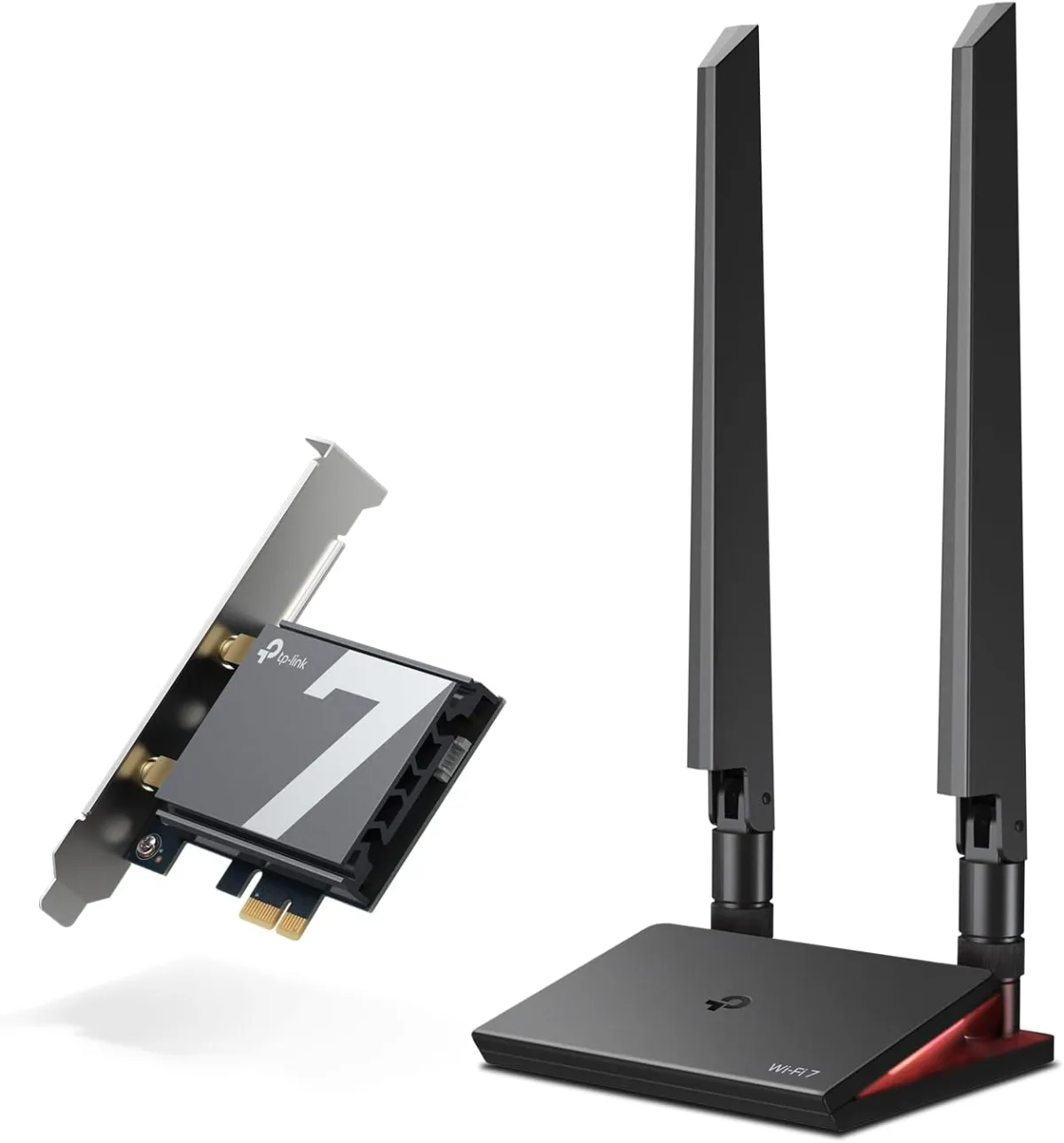
The TP-Link Archer TBE550E (BE9300) is a ~$70 tri-band Wi-Fi 7 PCIe card with 6 GHz, MLO, and Bluetooth 5.4 — the client-side upgrade your Wi-Fi 7 router is waiting for. Here's the catch to know before you buy: it's Windows 11 (64-bit) only.
✅ Pros
- +True tri-band Wi-Fi 7 (2.4 + 5 + 6 GHz) with MLO and 320 MHz channels
- +6 GHz band that most older desktop cards simply don't have
- +Bluetooth 5.4 included on the same card
- +Magnetized antenna base with 1 m extension cable — helps reception out of the case
- +Standard and low-profile brackets fit most desktop cases
- +Very affordable at ~$70 for genuine Wi-Fi 7 client hardware
❌ Cons
- −Windows 11 (64-bit) only — no Windows 10, no Linux drivers
- −2-stream card won't hit a router's headline multi-gig numbers (normal for a client)
- −Bluetooth requires connecting an internal USB header cable
- −TP-Link doesn't disclose the chipset
- −Desktop-only — no help for laptops
- −Pointless unless you already have a 6 GHz-capable (Wi-Fi 6E/7) router
Verdict: The Archer TBE550E is the cheapest sensible way to give a desktop real Wi-Fi 7. For around $70 you get a true tri-band card — 6 GHz band, MLO, 320 MHz channels — plus Bluetooth 5.4, on a standard PCIe x1 slot. It's the client-side upgrade most people skip after buying a Wi-Fi 7 router, and skipping it is why their new router never feels faster. The one thing to know before you click buy: it's Windows 11 (64-bit) only — no Windows 10, no Linux drivers.
Check the current price on Amazon →
Key Specs at a Glance
| Spec | Detail |
|---|---|
| Wi-Fi Standard | Wi-Fi 7 (802.11be) |
| Class | BE9300 (tri-band) |
| Bands | 2.4 GHz (688 Mbps) + 5 GHz (2882 Mbps) + 6 GHz (5764 Mbps) |
| Wi-Fi 7 Features | MLO (Multi-Link Operation), 320 MHz channels, 4K-QAM, 6 GHz band |
| MLO Aggregate | Up to 6452 Mbps combined |
| Antennas | 2× external tri-band, magnetized base with 1 m RF extension cable |
| Bluetooth | Bluetooth 5.4 (via internal header cable) |
| Interface | PCIe x1 (standard + low-profile brackets included) |
| Security | WPA3 |
| OS Support | Windows 11 (64-bit) only — no Windows 10 / Linux |
| Chipset | Not disclosed by TP-Link |
| Dimensions | 95.2 × 120.8 × 21.5 mm (3.7 × 4.8 × 0.8 in) |
| Operating Temp | 0–40 °C |
| Warranty | 2-year limited (TP-Link US standard) |
| Price | ~$65–$75 street (MSRP $69.99) |
What the Archer TBE550E Is For
Here's the gap nobody tells you about: you buy a shiny tri-band Wi-Fi 7 router like the TP-Link Archer BE550, plug in your desktop, and… nothing feels different. That's because your PC is still talking to it over whatever old Wi-Fi card the motherboard shipped with — often Wi-Fi 5 or Wi-Fi 6, with no 6 GHz radio at all. A router can only go as fast as the slowest half of the link, and on a desktop that half is usually the client.
The Archer TBE550E fixes exactly that. It's a BE9300-class tri-band card that adds the 6 GHz band, MLO, and 320 MHz channels to a desktop for about $70 — the same Wi-Fi 7 features your router advertises, finally present on both ends of the connection. It's the unglamorous companion purchase that makes a Wi-Fi 7 router actually deliver.
The Windows 11 Catch — Read This First
Before anything else: the TBE550E supports Windows 11 (64-bit) only. There are no Windows 10 drivers and no Linux drivers. TP-Link states this plainly, and the Amazon listing spells it out too, but it's still the single most common reason people return the card.
That makes the buying decision simple:
- On Windows 11? You're fine — install is a few minutes and driver support is native.
- Still on Windows 10, or running Linux? Do not buy this card. Look at a Wi-Fi 6E PCIe adapter with broader OS support, or wait until you've moved to Windows 11.
With mainstream Windows 10 support having wound down, most desktops this card targets are already on Windows 11 — but if yours isn't, this is a hard stop, not a "figure it out later."
Wi-Fi 7 Performance
The TBE550E is a genuine tri-band BE9300 radio: 688 Mbps on 2.4 GHz, 2882 Mbps on 5 GHz, and 5764 Mbps on 6 GHz. The number that matters is the 6 GHz band — that's the clean, wide spectrum where Wi-Fi 7's 320 MHz channels and 4K-QAM actually stretch their legs, and it's the band most older desktop cards can't reach at all.
Paired with a Wi-Fi 7 router, MLO (Multi-Link Operation) lets the card bond bands together — TP-Link rates the aggregate at up to 6452 Mbps — for steadier throughput and lower latency than a single band gives you. In practice, a desktop a room or two from a decent Wi-Fi 7 router will comfortably saturate a gigabit or multi-gig plan and hold a low, stable ping, which is the real win for gaming and large downloads.
Two things keep expectations honest. First, this is a 2-antenna (2-stream) card, so it won't hit the multi-thousand-Mbps figures a 4-stream router puts on its box — that's normal for a client adapter, and still far beyond what any Wi-Fi 5/6 onboard card manages. Second, Wi-Fi still isn't wired: if your desktop sits next to the router and you care about every last millisecond, the 2.5G Ethernet port on a router like the BE550 will always beat wireless. The TBE550E is for desktops that can't be wired.
Antennas, Bluetooth, and the RGB Base
The two antennas mount on a magnetized base with a 1-meter RF extension cable, so you can lift them out from behind a metal case or a desk cubby and onto a shelf where the signal is cleaner — a genuinely useful touch, since a PCIe card buried inside a steel tower is in about the worst possible spot for reception. The base also carries a multicolor status LED that shifts color when you're connected on a 320 MHz channel; it's cosmetic RGB, but at least the color means something.
You also get Bluetooth 5.4 by way of an internal USB header cable to the motherboard. It's a nice two-for-one — controllers, headphones, and peripherals — but note the cable is required for Bluetooth to work, so budget a free internal USB header. Both a standard and a low-profile bracket are in the box, so the card fits full-size towers and small-form-factor cases alike.
Setup and Software
Installation is the easy part: seat the card in a PCIe x1 (or longer) slot, connect the Bluetooth header cable if you want BT, attach the antenna base, and install TP-Link's driver package on Windows 11. There's no heavyweight utility to babysit — Windows handles the network connection natively, and WPA3 is supported for modern router security.
There's no companion app or subscription here, and there doesn't need to be: a client adapter's job is to disappear once it's working. The only ongoing maintenance is the occasional driver update from TP-Link's support page, which is worth checking after a major Windows 11 feature update.
Who Should Buy the Archer TBE550E
Buy it if:
- You run Windows 11 (64-bit) and want real tri-band Wi-Fi 7 (6 GHz + MLO) on a desktop.
- Your motherboard has old or no built-in Wi-Fi and running Ethernet isn't practical.
- You just bought a Wi-Fi 7 router and want the client side to actually match it.
- Bluetooth 5.4 on the same card is a welcome bonus.
Skip it if:
- You're on Windows 10 or Linux — there are no drivers; this is a dealbreaker.
- Your desktop can be wired — a 2.5G Ethernet run to a router like the Archer BE550 beats any Wi-Fi card.
- You need this for a laptop — this is a desktop PCIe card; laptops need an M.2 module or USB adapter instead.
- You don't own a Wi-Fi 7 (or at least Wi-Fi 6E) router — without a 6 GHz-capable router, you're paying for a band you can't use yet. Start with the router first.
Pros and Cons
Pros
- True tri-band Wi-Fi 7 (2.4 + 5 + 6 GHz) with MLO and 320 MHz channels
- 6 GHz band that most older desktop cards simply don't have
- Bluetooth 5.4 included on the same card
- Magnetized antenna base with 1 m extension cable — helps reception out of the case
- Standard and low-profile brackets fit most desktop cases
- Very affordable at ~$70 for genuine Wi-Fi 7 client hardware
Cons
- Windows 11 (64-bit) only — no Windows 10, no Linux drivers
- 2-stream card won't hit a router's headline multi-gig numbers (normal for a client)
- Bluetooth requires connecting an internal USB header cable
- TP-Link doesn't disclose the chipset
- Desktop-only — no help for laptops
- Pointless unless you already have a 6 GHz-capable (Wi-Fi 6E/7) router
TBE550E vs. Wi-Fi 6E PCIe vs. Motherboard Wi-Fi
| TP-Link Archer TBE550E | Typical Wi-Fi 6E PCIe card | Onboard motherboard Wi-Fi (older) | |
|---|---|---|---|
| Standard | Wi-Fi 7 (802.11be) | Wi-Fi 6E (802.11ax) | Often Wi-Fi 5/6 |
| 6 GHz Band | Yes | Yes | Usually no |
| MLO | Yes | No | No |
| Max Channel Width | 320 MHz | 160 MHz | 80–160 MHz |
| Bluetooth | 5.4 | 5.2–5.3 | Varies |
| OS Support | Windows 11 only | Broader (often Win10/Linux) | Whatever the board supports |
| Price | ~$70 | ~$45–$60 | Included |
The read: if you're on Windows 11 and want the newest standard with MLO and 320 MHz channels, the TBE550E is the pick and the price premium over Wi-Fi 6E is small. If you need Windows 10 or Linux support, a Wi-Fi 6E card is the pragmatic choice today. And if your board's built-in Wi-Fi is only Wi-Fi 5/6 with no 6 GHz, either add-in card is a real upgrade — the TBE550E just future-proofs further.
Bottom Line
The TP-Link Archer TBE550E does one job and does it cheaply: it puts real tri-band Wi-Fi 7 — 6 GHz, MLO, 320 MHz channels — into a desktop for about $70, and throws in Bluetooth 5.4. It's the client-side half of the Wi-Fi 7 upgrade that people forget to buy, and the reason a lot of new Wi-Fi 7 routers underwhelm.
Just clear the one hurdle first: you must be on Windows 11 (64-bit). If you are, and your desktop can't easily be wired, this is the obvious card to pair with a Wi-Fi 7 router. If you're not, buy a Wi-Fi 6E card instead and revisit this when you upgrade Windows.
Rating: 4.0 / 5
Our Verdict
The TP-Link Archer TBE550E (BE9300) is a ~$70 tri-band Wi-Fi 7 PCIe card with 6 GHz, MLO, and Bluetooth 5.4 — the client-side upgrade your Wi-Fi 7 router is waiting for. Here's the catch to know before you buy: it's Windows 11 (64-bit) only.
Ready to buy the TP-Link Archer TBE550E?
Buy on Amazon →Affiliate link — we may earn a commission at no extra cost to you.