Dolby Vision vs HDR10+ vs HDR10: Which HDR Format Actually Matters in 2026
Published 2026-05-18 · By NetAudioHub Editorial
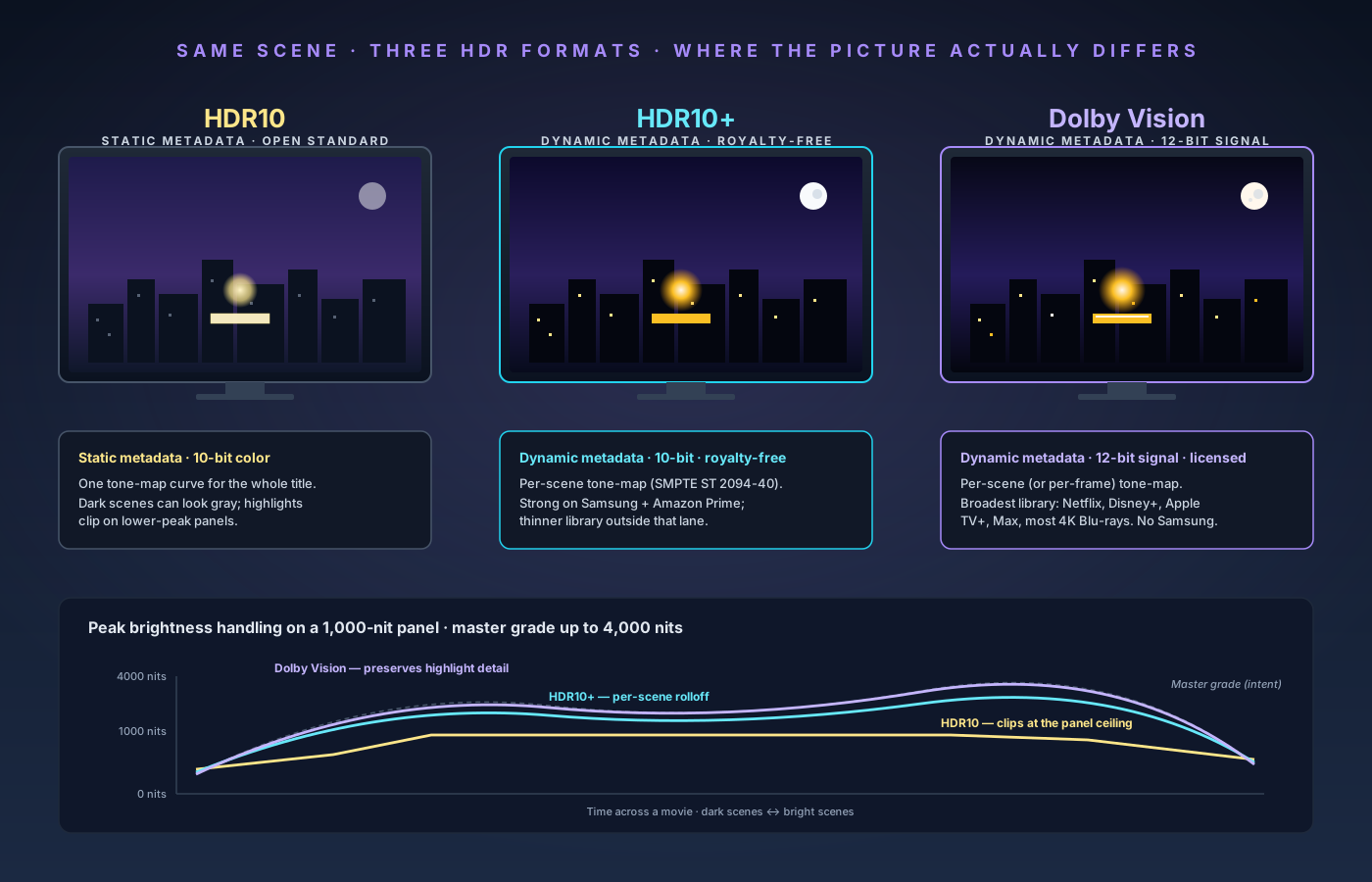
Dolby Vision has the deepest content library and the broadest TV support outside Samsung. HDR10+ is technically excellent but thin on content. HDR10 is the universal floor. Here's what each format actually does and which one to prioritize when buying a TV in 2026.
The verdict up front: HDR10 is the baseline — every HDR TV, every HDR streaming service, every 4K Blu-ray supports it. Dolby Vision is the format that matters most in 2026 because it has the broadest content library (Netflix, Disney+, Apple TV+, Max, most 4K Blu-rays), the deepest TV adoption outside Samsung, and the most consistent tone-mapping across mid-range and premium panels. HDR10+ is technically excellent but has a much thinner content library outside Amazon Prime Video, and the only major TV brand pushing it hard is Samsung. If you are buying a TV, prioritize Dolby Vision support — Sony, LG, TCL, Hisense, and Panasonic all include it; Samsung does not. If you are a Samsung TV owner, HDR10+ is your dynamic-metadata path. For everyone else, Dolby Vision is the format your TV should support, and HDR10+ is a nice-to-have. This guide walks through what each format actually is, where the picture differences show up, and which TVs, services, and discs support which.
What HDR Actually Is (Quickly)
HDR — High Dynamic Range — is a set of standards for video that lets the picture cover a wider range of brightness and color than SDR (Standard Dynamic Range) ever could. SDR video, designed for the CRT era, assumes a maximum brightness of around 100 nits and a color space called Rec. 709. HDR video targets peak brightness up to 10,000 nits in theory, real-world peaks of 1,000–4,000 nits on premium TVs, and the much wider Rec. 2020 color space (often approximated by the DCI-P3 subset used in cinema).
Three pieces of the puzzle make a HDR picture:
- The transfer function. This is the math that maps the encoded video values to actual brightness on screen. HDR uses PQ (Perceptual Quantizer, SMPTE ST 2084) in HDR10, HDR10+, and Dolby Vision. Broadcast HDR uses HLG (Hybrid Log-Gamma), which we'll touch on briefly later.
- The color and bit depth. SDR is 8-bit per channel. HDR is 10-bit minimum (HDR10) and up to 12-bit (Dolby Vision). More bits mean more discrete brightness steps, which prevents banding in gradients like sunsets and dark skies.
- The metadata. Metadata tells the TV how the content was mastered — peak brightness, average brightness, color volume. The TV uses this to tone-map the content onto whatever its panel can actually display. This is where the three formats diverge, and it is the single most important difference between them.
The HDR format wars are almost entirely a fight over metadata.
HDR10: The Baseline Everyone Supports
HDR10 is the open, royalty-free baseline. It was introduced in 2015 by a consortium that included Samsung, Sony, LG, Vizio, and Sharp, and it became the mandatory HDR format for the Ultra HD Blu-ray spec. Every HDR TV, every HDR-capable streaming service, every UHD Blu-ray supports HDR10 as a fallback or as the primary format.
The spec is straightforward:
- PQ transfer function (ST 2084).
- 10-bit color depth per channel.
- Rec. 2020 color container (most content is graded inside the DCI-P3 subset of Rec. 2020).
- Static metadata carried in a SMPTE ST 2086 mastering display block: the TV gets one set of values for the entire title — peak brightness during mastering (MaxCLL — Maximum Content Light Level), and average brightness (MaxFALL — Maximum Frame-Average Light Level). That's it. The same metadata applies to a dim cave scene and a sun-blasted desert scene in the same movie.
The static-metadata limitation is the part that matters. When a movie is mastered at, say, a 4,000-nit peak but contains a scene whose brightest pixel only hits 800 nits, an HDR10 TV doesn't know that. It just sees "this title was mastered at 4,000 nits, and my panel only hits 1,000 nits, so I need to compress everything from 0–4,000 nits down into 0–1,000 nits." That compression is uniform across the entire movie. Dark scenes can look gray because the tone-map curve was set for the brightest possible scene.
A TV with good static-HDR10 tone-mapping — Sony's X1 Ultimate–era processing, LG's α9 generations, recent Bravia 9, Hisense ULED — can get around a lot of this by using its own analysis of incoming frames to dynamically adjust the curve regardless of what the metadata says. This is called dynamic tone mapping in the TV's menus and is the reason HDR10 looks dramatically better on a 2025 OLED than it did on a 2017 plasma. But it's a per-TV feature, not a content-format guarantee.
Where you get HDR10:
- All 4K UHD Blu-ray discs.
- All HDR streaming sources as a fallback (Netflix, Disney+, Max, Apple TV+, Hulu, YouTube, Plex, etc.).
- Game consoles: PS5, Xbox Series X/S, Switch 2, all HDR-capable PCs.
- The HDR mode on every HDR TV ever made.
If a piece of HDR content exists, it almost certainly has an HDR10 version. HDR10 is the floor.
Dolby Vision: The Dominant Premium Format
Dolby Vision is Dolby's proprietary HDR format. Unlike HDR10, it requires licensing — content creators license the mastering tools, TV manufacturers license a Dolby Vision decoder, and Dolby collects fees on both ends. That licensing is the reason Samsung has refused to support it for a decade, and it's the reason Dolby Vision content is consistently graded with more attention than HDR10 content: studios pay for the Dolby Vision pipeline, so they use it.
The technical spec where it matters:
- PQ transfer function, same as HDR10.
- 12-bit color depth in the master signal. The actual delivery is usually a 10-bit base layer plus a separate enhancement layer or metadata stream that reconstructs 12-bit, but the practical effect is that Dolby Vision has 4,096 brightness steps per channel versus HDR10's 1,024, which eliminates the last visible banding in dark gradients.
- Dynamic metadata. This is the headline feature. Dolby Vision carries metadata at the scene level — and on some profiles at the frame level — telling the TV exactly how each scene was graded and how to tone-map it. The TV doesn't have to guess. The metadata is generated during mastering by a colorist working in Dolby Vision software, who effectively creates two grades: one for a reference 4,000-nit display (or higher), and one for the target TV's actual capability.
- Up to 10,000 nits peak brightness in the spec; real-world Dolby Vision masters target 1,000, 2,000, or 4,000 nits.
The dynamic metadata is what makes Dolby Vision visibly better than HDR10 on the same panel, especially on mid-range TVs. On a 700-nit-peak mid-range LCD, HDR10 forces the TV to compress an entire movie's brightness range into its limited capability with one curve. Dolby Vision lets the TV redraw the curve scene by scene: maximum dynamic range in dark scenes, careful tone-mapping in bright scenes, and the colorist's intent preserved at both ends.
Dolby Vision Profiles
Worth knowing because the same "Dolby Vision" label covers very different delivery formats:
- Profile 5. Single-layer 10-bit base, no HDR10 fallback. Common on streaming (Netflix, Disney+ use Profile 5 variants). Cannot be played on an HDR10-only display.
- Profile 7. Dual-layer used on 4K Ultra HD Blu-ray discs: a 10-bit HDR10 base layer (so HDR10-only players still get HDR), plus a Dolby Vision enhancement layer. The presence of the HDR10 base layer is why every Dolby Vision Blu-ray also plays as HDR10.
- Profile 8.1, 8.2, 8.4. Single-layer Dolby Vision over an HDR10 (8.1) or SDR (8.2) base, used for streaming with backward compatibility. Most current streaming Dolby Vision is Profile 5 or 8.1.
You almost never need to think about profiles unless you're configuring a media server (Plex, Jellyfin) or buying a region-specific player. For everyday viewing, your TV negotiates the profile with the source automatically.
Dolby Vision IQ
A subset of Dolby Vision that adds ambient light adjustment. The TV's light sensor reports the room's brightness, and the Dolby Vision decoder adjusts the tone curve to keep shadows visible in a bright room without blowing out highlights in a dark room. LG, TCL, Hisense, and Philips include Dolby Vision IQ on most of their Dolby Vision–capable models. Sony's equivalent is called Bravia Core Calibrated Mode for content from the Bravia Core service; the underlying ambient-aware processing is similar.
In a treated home theater with controlled lighting, Dolby Vision IQ is unnecessary and you'd typically disable it (often labeled "Auto Brightness" or "Light Sensor"). In a living room with windows, it materially improves daytime HDR viewing.
Where you get Dolby Vision:
- Streaming. Netflix, Disney+, Apple TV+, Max, Hulu, Paramount+, and Peacock all carry significant Dolby Vision libraries. Apple TV+ is essentially all Dolby Vision. Netflix has the largest single Dolby Vision library on streaming.
- Discs. Most 4K UHD Blu-rays from Warner Bros., Disney, Universal, Sony Pictures, and Paramount ship with Dolby Vision Profile 7. (Some independent labels and earlier UHD releases are HDR10 only.)
- Game consoles. Xbox Series X/S supports Dolby Vision for both video apps and Dolby Vision–enabled games — currently the only console with Dolby Vision gaming. PS5 supports HDR10 only. Switch 2 supports HDR10 only.
- Apple TV 4K. Full Dolby Vision support across apps. The Apple TV 4K (3rd gen) at $149 on Amazon is the best-supported Dolby Vision source device for streaming.
- Roku Ultra, NVIDIA Shield TV Pro, Chromecast with Google TV (4K). All support Dolby Vision for compatible apps.
TVs that support Dolby Vision:
- LG (all OLED and most premium LCD/QNED).
- Sony (all OLED and Mini-LED Bravia models).
- TCL (most QLED and Mini-LED models).
- Hisense (most ULED models).
- Vizio (most current QLED and OLED).
- Panasonic (all OLED).
- Philips (all OLED in EU markets).
TVs that do not support Dolby Vision:
- Samsung. Every Samsung TV. Including the QN95, QN900, S95 OLED, S90 OLED — all of them. This is a long-standing strategic decision and shows no signs of changing.
This is the single most important fact when buying a TV in 2026: if you want Dolby Vision, you cannot buy a Samsung. If you want a Samsung, you accept HDR10 and HDR10+ as your only dynamic-metadata path.
HDR10+: The Open Dynamic-Metadata Alternative
HDR10+ was announced in 2017 by Samsung, 20th Century Fox (now part of Disney), and Panasonic, with Amazon joining the founding consortium. The goal was explicit: build an open, royalty-free competitor to Dolby Vision that delivers most of the same benefits without Dolby's licensing fees.
The spec:
- PQ transfer function, same as HDR10 and Dolby Vision.
- 10-bit color depth — same as HDR10, not 12-bit like Dolby Vision.
- Dynamic metadata. Carried in SMPTE ST 2094-40 messages, at the scene level. This is the core HDR10+ feature: per-scene tone-mapping instructions, the same conceptual advantage Dolby Vision offers.
- Royalty-free to content creators and TV manufacturers (a small annual administrative fee, much less than Dolby Vision's licensing model).
On a TV that supports both, an HDR10+ master will look better than the same content's HDR10 master, often nearly indistinguishable from the Dolby Vision version. The 10-bit vs 12-bit gap is real but rarely visible at typical living-room viewing distances on current consumer panels. The real-world picture quality of HDR10+ and Dolby Vision, when both are well-mastered, is very close.
The HDR10+ Content Problem
The format's weakness is library size. Outside Amazon Prime Video, HDR10+ content is sparse:
- Amazon Prime Video. Strong HDR10+ catalog, including most Amazon Studios originals. The flagship platform for HDR10+ on streaming.
- Apple TV+, Disney+, Max, Hulu, Paramount+, Peacock. No HDR10+. They use Dolby Vision and HDR10 only.
- Netflix. No HDR10+. Netflix invested in Dolby Vision early and has not added HDR10+.
- YouTube. No HDR10+. Supports HDR10 and HLG.
- 4K UHD Blu-ray discs. A growing but still minority subset of 4K Blu-rays include HDR10+. Universal, Warner Bros., and Paramount are the strongest HDR10+ supporters on disc. Disney and Sony Pictures discs are typically Dolby Vision + HDR10 with no HDR10+ layer.
For most viewers, the practical Dolby Vision library is roughly 10× larger than the practical HDR10+ library. If you stream mostly Netflix and Disney+, HDR10+ never plays. If you stream mostly Amazon Prime Video, HDR10+ is the upgrade path that matters.
HDR10+ Adaptive
Samsung's equivalent of Dolby Vision IQ. Adjusts the HDR10+ tone curve based on ambient light sensor data. Available on most 2022+ Samsung TVs that support HDR10+. Conceptually identical to Dolby Vision IQ.
HDR10+ Gaming
Worth noting: HDR10+ Gaming was announced in 2021 with low-latency dynamic metadata. Adoption is limited — primarily Samsung TVs and a handful of PC titles. It's not a meaningful factor in HDR10+ adoption today.
TVs that support HDR10+:
- All Samsung HDR TVs (since 2017).
- All Panasonic OLED.
- Most Hisense ULED.
- Most TCL high-end models.
- Some Philips OLED.
TVs that do not support HDR10+:
- LG. Every LG TV. LG, like Samsung's stance on Dolby Vision, has chosen not to support its rival's dynamic-metadata format.
- Sony. Sony's HDR strategy is Dolby Vision + HDR10. No HDR10+ on Bravia.
So the asymmetry runs both directions: Samsung supports HDR10+ but not Dolby Vision; LG and Sony support Dolby Vision but not HDR10+. The only mainstream TV brands that support both are Panasonic, Hisense, TCL, and Philips.
HLG: The Broadcast HDR Format You Can Mostly Ignore
Hybrid Log-Gamma (HLG), developed jointly by the BBC and Japan's NHK, is the fourth HDR format you might see mentioned. It uses a different transfer function — a hybrid of gamma (for the SDR portion) and logarithmic (for the HDR portion) — designed to be backward-compatible: an HLG signal displays acceptably on an SDR TV without metadata gymnastics, and lights up on an HLG-aware TV.
You'll encounter HLG in three places:
- Broadcast TV. BBC iPlayer (in the UK) and a handful of European, Japanese, and Australian broadcasters use HLG for live HDR sports and nature documentaries.
- YouTube. YouTube's HDR mode supports both HDR10 and HLG; many camera makers (Sony, Panasonic, Fujifilm) record HLG video natively.
- Personal video. Recent iPhone (Dolby Vision HDR) and Android camera HDR modes have shifted away from HLG, but Sony mirrorless and high-end camcorders still use it.
HLG has no metadata at all — it's a single transfer function, no per-scene anything. The tone-mapping advantages of Dolby Vision and HDR10+ don't apply. For watching movies and shows, HLG is irrelevant. If your TV supports it, great; if not, you're not missing meaningful content.
The Picture Difference, Honestly
You will read reviewers claim Dolby Vision is "transformative" or "night and day better" than HDR10. That's not true in 2026 on a well-tone-mapped TV. The real, observable differences:
- On a low-end HDR TV (under 600-nit peak, basic processing): Dolby Vision and HDR10+ produce noticeably better dark-scene detail and less highlight clipping than HDR10. The dynamic metadata gives the limited panel a fighting chance. This is where the formats matter most.
- On a mid-range HDR TV (700–1,200 nits, decent processor): Dolby Vision and HDR10+ are visibly better than HDR10 in scenes with extreme brightness contrast (a campfire in a dark room, fireworks at night). Average scene differences are subtle.
- On a high-end OLED or premium Mini-LED (1,500+ nits peak, top-tier processor): Dolby Vision and HDR10+ are marginally better than HDR10 because the TV's own dynamic tone-mapping is already excellent. Side-by-side you can see it, especially in highlight rolloff; alone, you wouldn't notice the format on a content-by-content basis.
The other variable is mastering quality. A poorly mastered Dolby Vision title looks worse than a carefully mastered HDR10 title. The format is a tool, not a guarantee. Studios that take Dolby Vision mastering seriously — Disney, Pixar, Apple TV+ originals, most Warner Bros. theatrical releases — produce consistently better HDR than the median streaming HDR10 stream.
Bottom line: the format hierarchy of Dolby Vision > HDR10+ > HDR10 is real but smaller in 2026 than it was five years ago. The single biggest factor in HDR picture quality is still the TV's panel and processing, not the metadata format.
How to Decide When Buying a TV
The decision tree is short:
- Do you watch any meaningful amount of streaming, or own any 4K Blu-rays? If yes, prioritize Dolby Vision. The content library is broader and growing faster than HDR10+'s.
- Do you own a Samsung TV or are you committed to buying one? Then HDR10+ is your dynamic-metadata format. Make sure your sources (Apple TV 4K, Roku Ultra, Amazon Prime Video) can output HDR10+ — most can.
- Do you want the broadest possible format support? Buy a Hisense ULED, TCL Mini-LED, Panasonic OLED, or Philips OLED. These brands support both Dolby Vision and HDR10+, plus HDR10 and HLG. You'll never see a "this content's HDR isn't supported" prompt.
- Do you watch primarily Amazon Prime Video, or own a lot of Universal/Warner Bros 4K Blu-rays? HDR10+ matters more than usual; weight it accordingly in TV shopping.
For specific recommendations, the Sony Bravia 8 II OLED and LG G5 OLED are the strongest Dolby Vision options at the premium tier. The Samsung S95F OLED is the strongest HDR10+ premium option (and remains the most-rejected Dolby Vision-less TV in our recommendations). At the mid-range, the Hisense U8QG and TCL QM8K both support Dolby Vision and HDR10+, and deliver real HDR brightness over 2,000 nits at well under premium-OLED prices.
How to Decide What Source to Buy
If your TV supports Dolby Vision, you want your streaming box, console, or disc player to pass Dolby Vision through:
- Apple TV 4K (3rd gen). Most consistent Dolby Vision streaming source, and one of the few boxes that handles Dolby Vision, HDR10+, Dolby Atmos and DTS:X alike. Single best HDR streaming box.
- NVIDIA Shield TV Pro. Strong Dolby Vision support, and the one to pick for a Plex or Jellyfin library — it is the only mainstream streamer that can host a Plex Media Server rather than just play from one. It passes Dolby Vision, HDR10, HDR10+ and HLG correctly.
- Roku Ultra (2024+). Dolby Vision support across major apps.
- Xbox Series X. Dolby Vision for video and games. The console for serious HDR gaming.
- PS5. HDR10 only for games (no Dolby Vision gaming). Apps inherit the platform; most streaming apps on PS5 do not pass through Dolby Vision — they fall back to HDR10.
- 4K UHD Blu-ray players (Panasonic UB420/UB820, Sony UBP-X800M2): pass through Dolby Vision Profile 7 to TVs that decode it. If you are choosing one specifically because of this article, the Panasonic DP-UB820 plays both Dolby Vision and HDR10+ from the same deck, which almost nothing else does — it is the one player that does not make you pick a side in this argument. Its HDR Optimizer tone mapping is also the reason it is the default recommendation for projectors and lower-nit displays.
For an HDR10+ workflow on a Samsung TV: the Samsung TV's built-in Amazon Prime Video and Tizen apps handle HDR10+ natively. Most external boxes (Apple TV, Roku) pass HDR10+ from compatible services; verify per-device support if it matters.
What About Your AV Receiver?
HDR formats are video metadata, and your AV receiver is in the video path between the source and the TV. For Dolby Vision and HDR10+ to work, the AVR needs to pass through the format unchanged. Any modern HDMI 2.1 AVR (Denon, Marantz, Yamaha, Onkyo, Sony, Anthem) handles Dolby Vision and HDR10+ pass-through correctly. Some older HDMI 2.0 AVRs from 2017–2019 mangle Dolby Vision Profile 7 (the dual-layer Blu-ray profile). If you're buying a UHD Blu-ray player and an AVR, check that the AVR is on the player manufacturer's compatible list.
eARC and Dolby Vision are independent — eARC is for audio return from TV to soundbar/AVR, Dolby Vision is for video from source to TV. We covered eARC and ARC in detail in our eARC vs ARC explainer and the broader HDMI 2.1 feature set in HDMI 2.1 Explained; both are worth reading if you're building out a full home theater chain.
The Streaming Bitrate Footnote
A separate issue worth knowing: HDR formats are only as good as the bitrate the service delivers. Netflix's 4K HDR stream tops out around 15–17 Mbps for most content. A 4K UHD Blu-ray runs at 80–128 Mbps for the same content. The difference is dramatic — discs preserve fine HDR detail (film grain, shadow gradation, specular highlights) that streaming compresses away regardless of which HDR format is in use.
If HDR picture quality is something you genuinely care about, 4K UHD Blu-rays remain the best HDR delivery format, full stop. Streaming with Dolby Vision is good. A Dolby Vision UHD Blu-ray is meaningfully better.
A reasonable HDR-priority setup in 2026:
- A Dolby Vision–supporting TV (or a dual-support Hisense/TCL/Panasonic).
- The Panasonic DP-UB820 UHD Blu-ray player for disc playback with Dolby Vision Profile 7 support.
- An Apple TV 4K for streaming HDR.
- An HDMI 2.1 AVR with proper pass-through, connected with Ultra High Speed HDMI cables.
That chain delivers every HDR format on every source the consumer market currently produces.
TL;DR
- HDR10 — universal, static metadata, 10-bit. The floor everyone supports. Fine on a well-processed TV; visibly worse than dynamic formats on a low-end TV.
- Dolby Vision — proprietary, dynamic metadata, 12-bit signal. Best content library (Netflix, Disney+, Apple TV+, Max, most 4K Blu-rays). On every premium TV brand except Samsung. The HDR format to prioritize when buying a TV in 2026.
- HDR10+ — open, dynamic metadata, 10-bit. Picture quality roughly equal to Dolby Vision on the same panel. Thin content library outside Amazon Prime Video and select Universal/Warner Bros 4K Blu-rays. Essential only for Samsung TV owners.
- HLG — broadcast HDR, no metadata. Niche; mostly broadcast TV and YouTube. Ignorable for movie/show viewers.
Buy a TV with Dolby Vision. If you can get HDR10+ too — Hisense, TCL, Panasonic, Philips — even better. Skip Samsung if Dolby Vision matters to you. Get a UHD Blu-ray player and an Apple TV 4K for the best HDR sources. The metadata war is settled for 2026: Dolby Vision won the content side, HDR10+ won Samsung, and HDR10 is the universal fallback underneath both.
Related Reading
Affiliate disclosure: NetAudioHub links to retailers including Amazon. We earn a small commission on qualifying purchases at no extra cost to you.