eARC vs ARC: What You Actually Need to Pass Atmos from TV to Soundbar
Published 2026-05-11 · By NetAudioHub Editorial
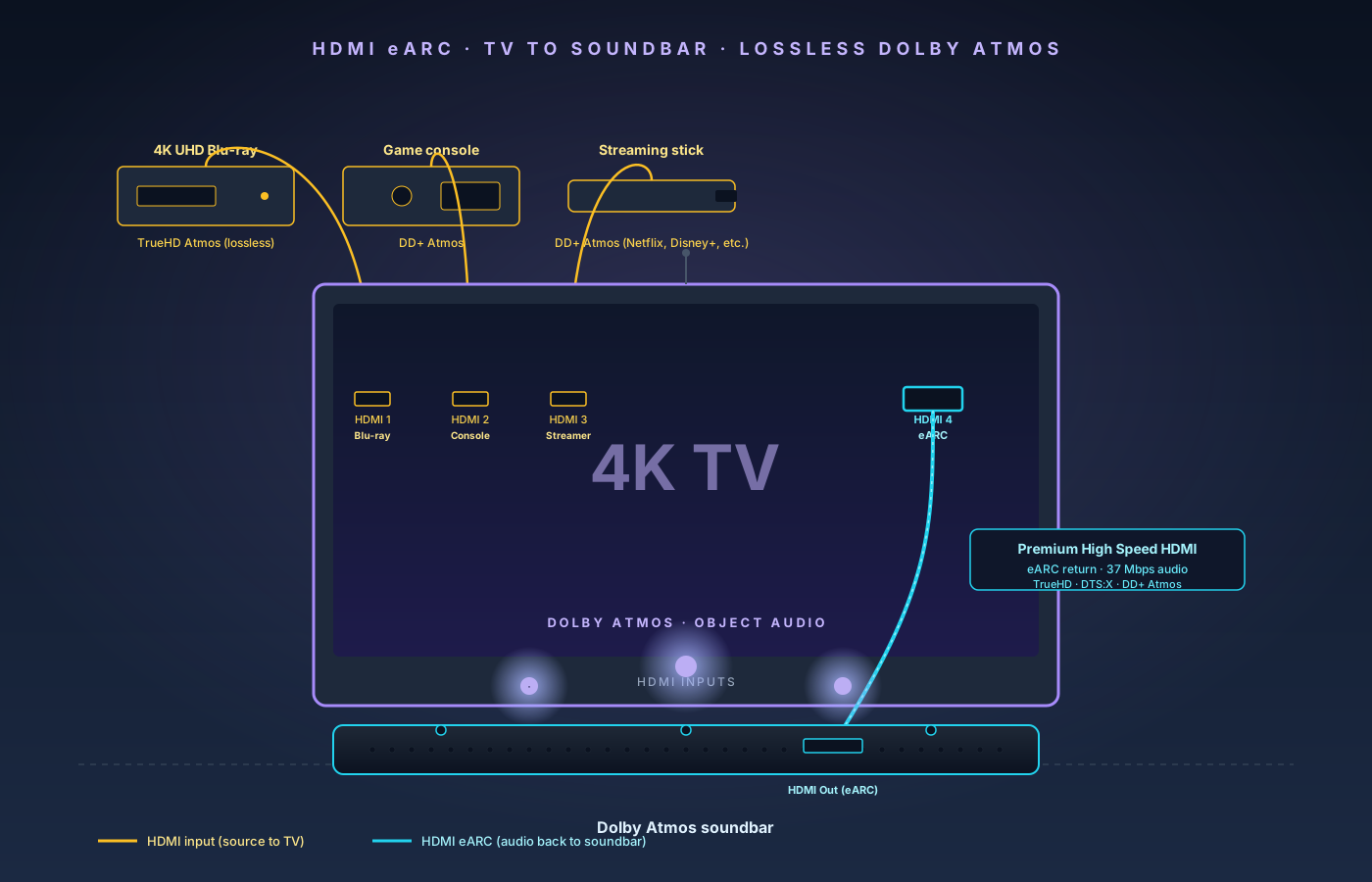
ARC was designed for stereo and Dolby Digital 5.1; eARC is the only HDMI return-channel spec that carries lossless TrueHD Atmos and DTS:X from a modern TV back to a soundbar or AVR. Here's exactly what each one passes, what you need on both ends, and the cable + format settings that account for most failed installs.
The verdict up front: ARC is good enough for stereo and compressed 5.1 surround. eARC is the only HDMI return-channel spec that can carry lossless Dolby TrueHD Atmos and DTS:X Master Audio from your TV back to a soundbar or AVR. If you bought a Dolby Atmos soundbar in the last three years, or you stream Atmos content from Netflix, Disney+, or Apple TV+, you want eARC — and a 2018-or-newer TV that supports it. The other catches are mostly cable-related: you need a Premium High Speed or Ultra High Speed HDMI cable on the eARC link, both ends must use the labeled "eARC" or "ARC/eARC" port, and CEC has to be on. This guide covers exactly which combinations work, which don't, and how to tell at a glance.
What ARC and eARC Actually Are
Audio Return Channel (ARC) is a feature of HDMI 1.4 — ratified in 2009 — that lets a TV send audio back up the HDMI cable to a connected soundbar or AV receiver. Before ARC, you needed a separate optical (TOSLINK) or coax cable to get the TV's built-in tuner or smart apps to play through external speakers. ARC eliminated that second cable. One HDMI cable from your soundbar to the TV's "HDMI ARC" port handles both video going to the TV (from a Blu-ray player connected through the soundbar, for example) and audio coming back from the TV's apps.
Enhanced Audio Return Channel (eARC) is the HDMI 2.1 version of the same idea, ratified in 2017 and broadly available on TVs starting in 2018–2019. The "enhanced" part is bandwidth: ARC's audio data channel maxes out around 1 Mbps of compressed audio. eARC's channel pushes 37 Mbps — enough headroom to carry every audio format that exists in consumer media today, including lossless Dolby TrueHD with Atmos object metadata and DTS-HD Master Audio with DTS:X.
The shorthand version:
| Feature | ARC (HDMI 1.4) | eARC (HDMI 2.1) |
|---|---|---|
| Max bandwidth | ~1 Mbps | 37 Mbps |
| Dolby Atmos | Only via Dolby Digital Plus (lossy) | Yes, including lossless TrueHD Atmos |
| DTS:X | No | Yes (including DTS-HD MA + DTS:X) |
| Lossless multichannel PCM | No (2.0 max) | Yes, up to 8 channels 24-bit/192 kHz |
| Lip-sync correction | Optional | Mandatory in spec |
| CEC required for handshake | Yes | No (but most devices still rely on it) |
| Year first widely available | 2010 (HDMI 1.4 TVs) | 2018–2019 (HDMI 2.1 TVs) |
That bandwidth gap is the whole story. ARC can carry Atmos only when it's wrapped inside the lossy Dolby Digital Plus codec, which is what every streaming service uses for Atmos delivery. eARC can carry the same DD+ Atmos plus the lossless TrueHD Atmos that ships on 4K UHD Blu-rays.
Why You Care in 2026
Three reasons this matters more now than it did three years ago.
1. Streaming Atmos is everywhere. Netflix, Disney+, Apple TV+, Max, Amazon Prime Video, and Paramount+ all deliver Dolby Atmos on their flagship tiers. The audio reaches your TV as Dolby Digital Plus with embedded Atmos object metadata. To send that signal from the TV's app out to your soundbar, you need at least ARC (which can pass DD+ Atmos) and ideally eARC (which handles it cleanly with no compatibility quirks). A TV from 2017 with only ARC will play stereo through your soundbar from a streaming app even when the source is Atmos — the bandwidth headroom isn't there.
2. Atmos soundbars went mainstream. The Sonos Arc Ultra, the Samsung HW-Q990D and its HW-Q990F successor, LG S95TR, Bose Smart Ultra Soundbar, and Sony Bravia Theater Bar 9 are all Atmos-capable, all 2024–2026 models, and all expect eARC at the TV end. Spending $999 on the Arc Ultra's height channels or $1,500 on the Q990D's 11.1.4 array and then feeding it over ARC is the most expensive version of this mistake. If you bought one of these and you're hearing 5.1 instead of 5.1.2 or 7.1.4, the link between TV and soundbar is the most likely culprit.
3. The HDMI switcher is moving back into the TV. A decade ago, an AVR was the center of a home theater — every source plugged into the AVR, and a single HDMI cable ran from AVR to TV. Today, with smart-TV apps as the primary source for most households, the topology has flipped: sources plug into the TV, and a single eARC link sends audio back to the soundbar. That only works if eARC is reliable. ARC's limitations were tolerable in 2015. They are deal-breakers now.
If you fit any of these patterns, eARC matters to you:
- You bought a Dolby Atmos soundbar and you want it to actually play Atmos.
- You stream Atmos content from a major service and the soundbar's Atmos indicator stays dark.
- You own 4K UHD Blu-rays and want the lossless TrueHD Atmos track, not the lossy DD+ fallback.
- You're building a 5.1 or 5.1.2 surround system around an AVR — a 7.2-channel receiver like the Denon AVR-X2800H at $649 is the usual starting point — and want every source connected to the TV instead of the receiver.
If you only use the TV speakers, or your soundbar is stereo / 2.1, ARC is fine and you can ignore everything below.
What eARC Actually Carries vs ARC
The bandwidth gap shows up in real formats. Here's what each spec can pass cleanly, end-to-end, from TV to soundbar:
| Format | Where you find it | ARC | eARC |
|---|---|---|---|
| 2.0 stereo PCM | All sources | Yes | Yes |
| Dolby Digital 5.1 (AC-3) | DVDs, broadcast TV, some streaming | Yes | Yes |
| DTS 5.1 (DTS Core) | DVDs, Blu-rays | Yes | Yes |
| Dolby Digital Plus 5.1/7.1 | Streaming (Netflix, Disney+, etc.) | Yes | Yes |
| Dolby Digital Plus with Atmos | Streaming Atmos titles | Sometimes* | Yes |
| Dolby TrueHD 5.1/7.1 (lossless) | Blu-rays, 4K UHD discs | No | Yes |
| Dolby TrueHD with Atmos (lossless) | 4K UHD Blu-rays | No | Yes |
| DTS-HD High Resolution | Blu-rays | No | Yes |
| DTS-HD Master Audio (lossless) | Blu-rays, 4K UHD discs | No | Yes |
| DTS:X | Blu-rays, 4K UHD discs | No | Yes |
| Multichannel PCM up to 8ch / 192 kHz | High-res audio, gaming consoles | No | Yes |
*The asterisk on DD+ Atmos over ARC: the spec technically allows it, and many TV/soundbar combinations make it work in practice, but a meaningful number of older TVs and soundbars handshake at DD+ 5.1 (no Atmos metadata) over ARC even when the source is Atmos. Some of this is bandwidth allocation in firmware, some is just buggy implementations. The reliable, no-asterisk answer is eARC.
The tier most people care about is the bottom block — TrueHD Atmos and DTS-HD MA / DTS:X are exclusively eARC. If you own a UHD Blu-ray player and a proper 5.1.2 setup, this is the difference between hearing lossless 24-bit audio with discrete height-channel mixing and hearing a downconverted compressed approximation.
What You Need Before You Set It Up
Three things have to be true on both ends and on the cable. Verify all three before troubleshooting anything else.
1. Both TV and soundbar must support eARC
eARC requires HDMI 2.1 silicon on both ends. Most TV manufacturers added it in their 2019 model years; a handful of 2018 models support it via firmware update. Check the product spec sheet or the back-panel labeling on the HDMI ports themselves — the eARC port is always labeled, usually as "HDMI eARC" or "HDMI ARC/eARC." If your TV only labels the port "HDMI ARC," it's ARC-only and you cannot upgrade it with a firmware update.
On the soundbar side, every flagship Atmos soundbar shipped in the last five years supports eARC. The label is usually on the soundbar's "HDMI Out (TV)" port or in the manual. If the soundbar only has an "HDMI ARC" output, you're locked to ARC regardless of what the TV supports.
Examples of current eARC-capable hardware:
- TVs: Any 2019+ LG OLED (C9 onward), 2019+ Sony Bravia, 2019+ Samsung QLED (Q70R onward), all 2020+ TCL 6-Series, all Hisense U7/U8 models 2020+, all 2020+ Vizio M-series and P-series.
- Soundbars: Sonos Arc / Arc Ultra, Samsung HW-Q800/Q900/Q990 series, LG S95/SP series, Bose Smart Ultra Soundbar / Bose 900, Sony HT-A5000 / HT-A7000 / Bravia Theater Bar 9, Sennheiser Ambeo Soundbar, Yamaha YAS-209 (eARC via firmware), Vizio M-series Elevate.
If you have one of those soundbars but a 2017 or older TV, the soundbar is fine — the TV is the bottleneck.
2. Use the labeled port on each end
This trips up more people than any other step. A modern TV has 4 HDMI inputs. Only one of them is eARC-capable — usually labeled "HDMI 2 (eARC)" or "HDMI 3 (eARC)." Plugging into any other port disables the return channel entirely.
Same story on the soundbar: the HDMI port you connect to the TV must be the dedicated "HDMI Out (TV ARC/eARC)" port, not one of the soundbar's HDMI inputs used for passthrough. Mixing them up is the most common reason a freshly-installed Atmos soundbar plays nothing.
3. The HDMI cable matters — but not as much as people think
eARC's audio data uses the HDMI cable's data channels and requires roughly the equivalent of a Premium High Speed cable (18 Gbps) to operate reliably. The good news: any HDMI cable made in the last decade is likely to work. The bad news: cables sold a decade ago without an HDMI Forum certification often barely meet the spec, and a marginal cable can cause intermittent dropouts that look like a software bug.
What to buy:
- Premium High Speed HDMI (18 Gbps) — minimum spec for eARC, more than enough for the audio bandwidth.
- Ultra High Speed HDMI (48 Gbps) — required if you also want 4K120 video passthrough on the same cable, but not needed just for eARC.
Skip anything labeled "High Speed HDMI" (without "Premium"), generic cables without certification, and any cable longer than 25 feet without active signal extension — eARC handshakes get flaky on long passive runs.
For the TV-to-soundbar link, a 3- to 6-foot Premium High Speed cable for under $15 is plenty. We use the Monoprice Certified Premium High Speed HDMI Cable — it carries HDMI Forum Premium certification, ships in a range of lengths, and costs a fraction of name-brand alternatives.
Setup: Getting eARC Actually Working
Once you have an eARC-capable TV, an eARC-capable soundbar, and a Premium High Speed HDMI cable, the install is short. The catch is that out-of-the-box defaults are wrong on roughly half of TVs.
- Plug the cable into the eARC port on both ends. TV's "HDMI eARC" or "HDMI ARC/eARC" labeled port to the soundbar's "HDMI Out (TV)" port. Double-check both labels — wrong port is the #1 setup mistake.
- Enable CEC on both devices. The trade names vary: LG calls it "Simplink," Samsung calls it "Anynet+," Sony calls it "Bravia Sync," Vizio calls it "CEC." Find it in the TV's general settings and turn it on. Do the same on the soundbar (usually in the audio settings menu). eARC technically does not require CEC for the audio link, but every consumer device uses CEC for the handshake that establishes which port is being used as the return channel. If CEC is off, the link silently falls back to ARC or no audio at all.
- Set the TV's audio output to "HDMI eARC" or "Soundbar." This is the step most TVs get wrong by default. The TV's audio output should not be "TV speakers" or "Optical" — it should explicitly route to the HDMI eARC port. Look in Settings → Sound → Output on most TVs.
- Set the audio format to "Pass-through" or "Bitstream." This is the second step most TVs get wrong. By default, many TVs are set to "PCM" or "Auto" — which can quietly re-encode Atmos content to stereo. Change it to "Pass-through," "Bitstream," "Dolby Atmos," or whatever your TV's label is for "send the audio out unmodified." On Samsung this is "Auto" in the digital output section but with "Dolby Atmos compatibility" turned on. On LG it's "Pass-through." On Sony it's labeled "Auto" with a separate Dolby Atmos toggle.
- Verify the soundbar shows the right format. Play an Atmos title — the Disney+ Dolby Atmos trailer is a clean test — and watch the soundbar's display. It should read "Atmos," "Dolby Atmos," or show the Atmos logo. If it reads "Dolby Digital" or "PCM 2.0," one of the previous steps is misconfigured.
A correctly set up eARC link should give you Atmos within five minutes. If it doesn't, the audio-format setting in step 4 is the cause about 80% of the time.
Common Gotchas
A few patterns that account for most "eARC isn't working" support threads:
The TV's apps play Atmos but external devices don't. This usually means the TV is set to re-encode the HDMI input audio before passing it to eARC. Look for a setting like "Dolby Digital Plus pass-through" or "HDMI audio format" and make sure it's set to pass-through, not "PCM." This is a per-input setting on some TVs.
External Blu-ray player works but the streaming apps don't, or vice versa. Almost always a format-setting mismatch. Streaming apps deliver DD+ Atmos; UHD Blu-rays deliver TrueHD Atmos. Some TVs have separate output settings for "internal apps" versus "HDMI inputs." Verify both routes use pass-through.
Soundbar plays audio for a few minutes, then drops. Marginal HDMI cable. eARC's handshake re-establishes periodically, and a barely-passing cable will fail one of these cycles eventually. Swap in a known-good Premium High Speed cable.
Lip-sync is off by 100–200 ms. eARC's spec mandates lip-sync correction — but only when the TV reports the video delay correctly. If yours doesn't, the soundbar will be slightly ahead of the picture. Almost every soundbar has a manual "audio delay" adjustment to compensate. Aim for the picture and audio to align exactly during dialogue.
Atmos works only on certain inputs. A common failure pattern on cheaper TVs: only one of the four HDMI inputs supports full 18 Gbps bandwidth. If your 4K UHD Blu-ray player is plugged into a 10.2 Gbps input, the disc can't deliver TrueHD Atmos to the TV in the first place — what reaches the soundbar will be downconverted. Check the TV's spec sheet for which HDMI input is the full-bandwidth one and put your Blu-ray player there.
Sonos Arc / Arc Ultra dialogue feels thin or surround is missing. Sonos's HDMI handling has historically been more conservative than competitors. Make sure CEC is on, the TV is set to pass-through, and "Trueplay" room calibration has been run. The original Sonos Arc launched as eARC-capable in firmware updates; if you're on an early model, check that firmware is current.
Game console sounds wrong on a connected soundbar. Atmos in games is delivered as DD+ Atmos over HDMI. If you plug the console into the TV and use eARC back to the soundbar, the TV must be set to pass-through. Some TVs also have a "Game Mode" that disables certain audio features — verify both Game Mode and pass-through can be on simultaneously.
Frequently Asked Questions
Do I need a new TV just for eARC?
If your current TV is 2018 or older and only labels its port "HDMI ARC," yes. There's no firmware path from ARC to eARC — it's a hardware spec. A 2019+ TV with an "eARC" labeled port is the cheapest path.
Is eARC required for Dolby Atmos to work from a streaming app?
Strictly speaking, no — streaming Atmos uses Dolby Digital Plus, which ARC can pass. In practice, ARC's handling of DD+ Atmos is inconsistent across TV/soundbar pairings, and a meaningful number of ARC-only setups end up playing 5.1 from an Atmos source. eARC eliminates this ambiguity.
Does the HDMI cable type really matter?
Yes, but the bar is lower than the marketing suggests. Any Premium High Speed HDMI cable (18 Gbps) handles eARC fine. You only need an Ultra High Speed cable (48 Gbps) if the same cable is also carrying 4K120 video, which isn't relevant on the TV-to-soundbar link.
Can I daisy-chain eARC through an HDMI switch?
Not reliably. eARC is a direct point-to-point feature between the source-side device (TV) and sink-side device (soundbar or AVR). Most HDMI switches don't pass eARC, and the ones that claim to often have compatibility issues. Keep the eARC link direct, and use the TV as the switcher for your other sources.
Will eARC ever do object-based audio better than today?
eARC's 37 Mbps headroom is already enough for every commercial audio format. The next-generation HDMI 2.1a / HDMI 2.2 specs focus on video bandwidth — there's no eARC successor planned because eARC isn't the bottleneck anymore.
What if my AVR is older than my soundbar / TV?
If you have a dedicated AVR with HDMI inputs, the topology can flip back to AVR-as-switcher: every source plugs into the AVR, and a single HDMI cable runs from the AVR to the TV. In that case, eARC handles only the TV's internal app audio going back to the AVR — your Blu-ray and console audio reach the AVR directly and skip the return channel entirely. An older AVR with only ARC will still play streaming Atmos via DD+ but will not get lossless TrueHD Atmos from the TV's apps. Most users in this position just plug the UHD Blu-ray player straight into the AVR's HDMI input and let the AVR handle TrueHD natively.
What about optical TOSLINK — can it do Atmos?
No. Optical's bandwidth caps at compressed 5.1 (Dolby Digital or DTS) and cannot carry Dolby Digital Plus, Atmos, TrueHD, or DTS:X. Optical is fine for stereo or basic 5.1 from a TV without eARC; everything beyond that requires HDMI.
The Bottom Line
eARC isn't a luxury feature — it's the only HDMI return-channel spec that handles the audio formats actually shipping on streaming services and 4K Blu-rays today. ARC was designed for an era when stereo and Dolby Digital 5.1 were the formats that mattered. That era ended around 2018.
If you have an Atmos-capable soundbar or AVR and you're not getting Atmos, the link between TV and soundbar is where to start. Confirm both ends are eARC-capable. Use the labeled eARC port on each. Run a Premium High Speed HDMI cable. Turn CEC on. Set the TV's audio output to pass-through. That's the whole recipe — and it gets you Dolby Atmos from every modern source, from a Netflix stream to a UHD Blu-ray, with no second cable.
If your TV predates eARC and you bought a new soundbar specifically for Atmos, a new TV is the upgrade. The soundbar's potential is locked behind the spec.
Affiliate disclosure: Links in this article use the tag `webstore0fd1-20`. NetAudioHub earns a commission on qualifying purchases at no extra cost to you.