HDMI 2.1 Explained: What 48Gbps, 4K120, VRR, and ALLM Actually Mean (and When You're Not Really Getting Them)
Published 2026-05-13 · By NetAudioHub Editorial
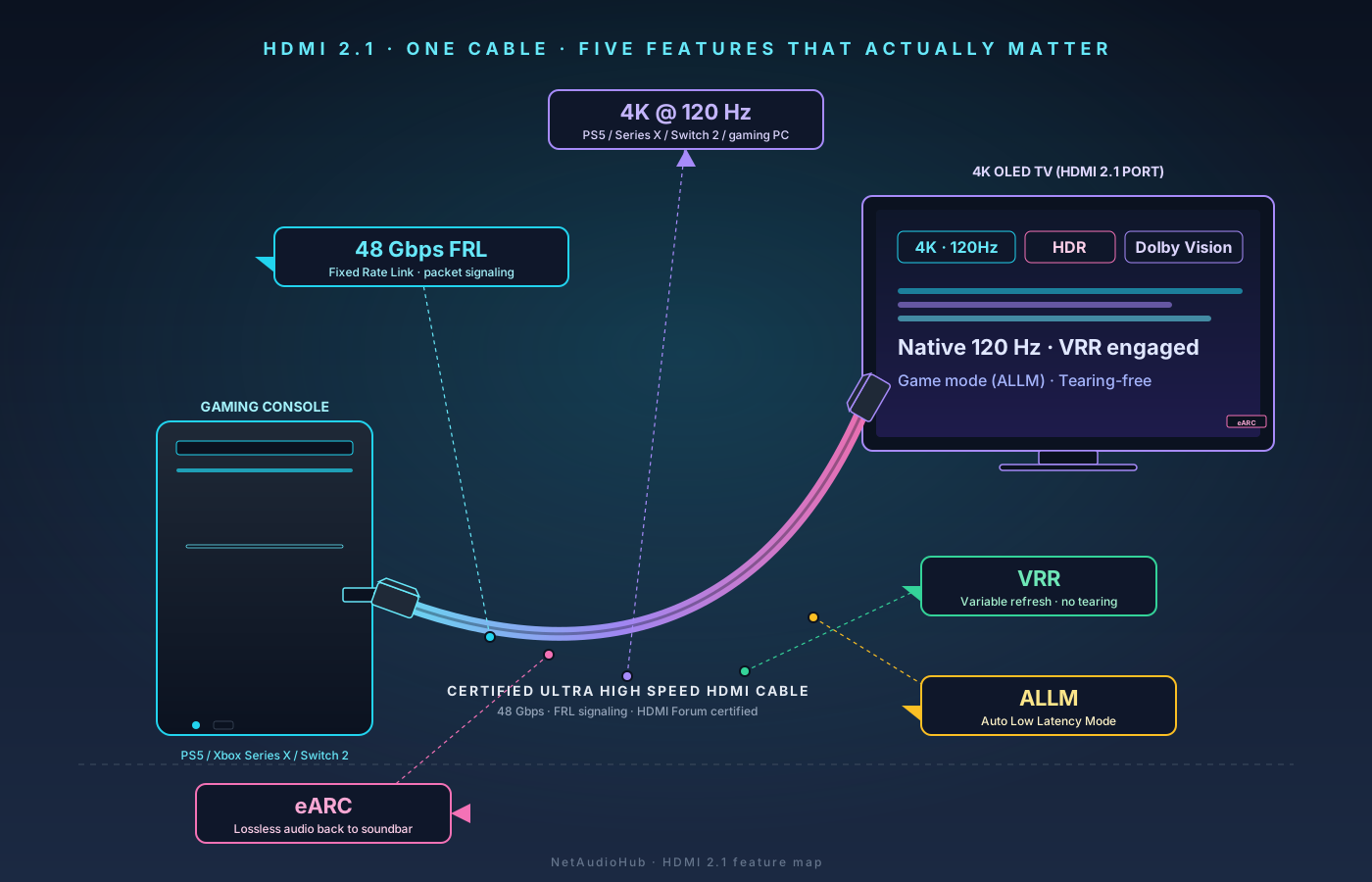
"HDMI 2.1" on a spec sheet is no longer a guarantee — the label can ship on a port that implements as little as a single feature. Here's what FRL signaling, 4K120, VRR, ALLM, QMS, dynamic HDR pass-through, and eARC actually require on both ends of the cable, which 2024–2026 TVs and consoles deliver them, and how to verify your link is really negotiating 4K120.
The verdict up front: "HDMI 2.1" on a spec sheet is no longer a guarantee. The HDMI Forum allows manufacturers to label a port "HDMI 2.1" as long as it implements any HDMI 2.1 feature — even a single one. The features that actually matter for a home theater or gaming setup are FRL signaling (the new physical layer that unlocks 4K120 and higher), 4K at 120 Hz, Variable Refresh Rate (VRR), Auto Low Latency Mode (ALLM), Quick Media Switching (QMS), Dynamic HDR pass-through, and eARC. To get the full bandwidth — 48 Gbps — you also need an Ultra High Speed certified cable, which is the only HDMI cable spec the HDMI Forum will let manufacturers physically test and certify. This guide walks through each feature, what it actually requires on both ends of the cable, and which 2024–2026 TVs, consoles, and AVRs deliver it.
Why HDMI 2.1 Is Confusing
HDMI 2.0, released in 2013, topped out at 18 Gbps. That was enough for 4K at 60 Hz with HDR, and for almost a decade it was the ceiling every TV, AVR, and console hit. HDMI 2.1, ratified in 2017 but only meaningfully present in consumer gear from late 2019 onward, raised the ceiling to 48 Gbps — a nearly 3x jump.
The bandwidth alone isn't the interesting part. HDMI 2.1 also changed how data moves down the cable: from the older TMDS (Transition Minimized Differential Signaling) used since HDMI 1.0, to a packet-based system called FRL (Fixed Rate Link). FRL is what makes the big features possible. It allows the link to negotiate different speeds (6, 8, 10, or 12 Gbps per lane, across 3 or 4 lanes), it carries audio and video on the same physical channels instead of separate ones, and it adds forward error correction. Any HDMI 2.1 feature beyond what HDMI 2.0 could already do requires FRL.
Here's the headache: in late 2021 the HDMI Forum quietly retired the "HDMI 2.0" label and folded it into the HDMI 2.1 spec. From that point forward, a manufacturer could put an 18 Gbps TMDS-only port on a TV — a port that is functionally indistinguishable from HDMI 2.0 — and label it "HDMI 2.1" as long as it claimed support for at least one HDMI 2.1 feature, like ALLM. The HDMI Forum's guidance is that the label requires a feature list. In practice, that list lives in fine print and most buyers never see it.
So when you see "HDMI 2.1" on a TV, soundbar, or AVR, the question isn't whether it's HDMI 2.1. The question is which HDMI 2.1 features it actually implements, and at what bandwidth.
The Features That Matter
FRL and the 48 Gbps Ceiling
FRL is the new signaling mode. Without it, you cannot do 4K at 120 Hz, 8K at 60 Hz, VRR at high refresh rates, or any of the other headline features. A port is FRL-capable or it isn't.
The 48 Gbps figure is the maximum FRL link rate: 12 Gbps per lane across 4 lanes. Plenty of "HDMI 2.1" ports on entry-level TVs only do FRL at 24 Gbps or 32 Gbps. That's still enough for 4K120 with 4:2:0 chroma and 10-bit HDR, which is what consoles output, so for most buyers it doesn't matter. But if you're feeding a high-end TV from a gaming PC that pushes 4K120 RGB with HDR, 48 Gbps is the only configuration that carries it uncompressed.
If a TV's spec sheet lists "HDMI 2.1 — 40 Gbps" or "HDMI 2.1 — 24 Gbps," that's the FRL link rate. Treat 40 Gbps and 48 Gbps ports as fully capable for any consumer signal; treat lower-bandwidth FRL ports as good-enough-for-consoles.
4K at 120 Hz
This is the single feature most people buy HDMI 2.1 for. A 4K resolution (3840×2160) at 120 Hz with 10-bit HDR is roughly 32 Gbps of raw video data — well over HDMI 2.0's 18 Gbps ceiling. Without FRL, you cannot send it down a cable.
Why you'd want it:
- Gaming. The PS5 and Xbox Series X both output 4K at 120 Hz in supported games. The Nintendo Switch 2 (launched 2024) outputs up to 4K at 120 Hz in docked mode with DLSS. A high-end gaming PC pushes 4K120 in countless titles.
- Motion clarity. Even outside gaming, 120 Hz panels with interpolation produce noticeably smoother sports and action content. The TV does the interpolation locally; the source signal can stay at 24p or 60p. But "native" 120 Hz playback (from a console or PC) requires the full HDMI 2.1 pipeline.
What you don't need it for: 4K Blu-ray. Every 4K UHD Blu-ray ships at 24p (or, very rarely, 60p for documentaries). HDMI 2.0 carries that fine.
Variable Refresh Rate (VRR)
VRR lets the display's refresh rate vary in lockstep with the source's frame rate. When your console renders 47 frames per second, the TV redraws 47 times per second instead of holding stale frames or duplicating them. The visual benefit is the elimination of two artifacts: screen tearing (a horizontal line where two frames are visible at once) and stuttering (jerky motion when frame rate dips below the display's fixed refresh rate).
There are three VRR flavors that an "HDMI 2.1" TV might support:
- HDMI VRR. Native to the HDMI 2.1 spec. Supported by PS5, Xbox Series X/S, and most modern AVRs that pass video.
- FreeSync (AMD). Originally a DisplayPort feature; FreeSync over HDMI works on many TVs and AMD-equipped PCs.
- G-SYNC Compatible (NVIDIA). NVIDIA's certification for VRR-capable displays. Works with NVIDIA GPUs over HDMI 2.1.
Most 2023+ OLED and high-end LCD TVs support all three. Mid-range LCDs from 2024–2026 typically support HDMI VRR only. If you're a console gamer, HDMI VRR is the box you need checked.
The VRR range matters too. A TV that supports VRR from 48–120 Hz handles most games. A TV that only supports VRR from 60–120 Hz won't help in slower-paced games where frame rate dips into the 40s.
Auto Low Latency Mode (ALLM)
ALLM is small but useful. When a source (a console, an AppleTV, an NVIDIA Shield) sends an ALLM flag, the TV automatically switches into its "game mode" — the picture mode that disables motion smoothing and minimizes the input-lag pipeline. Without ALLM, you'd have to switch picture modes manually every time you went from streaming Netflix to playing a game.
ALLM is the one HDMI 2.1 feature that doesn't require FRL. A TV can implement ALLM on an HDMI 2.0-class port and still call it "HDMI 2.1." This is the loophole the marketing teams use. Don't trust "HDMI 2.1 with ALLM" as a sign the port can do anything else.
Quick Media Switching (QMS)
When you switch between content of different frame rates — say, your AppleTV jumps from a 24p movie back to its 60p home screen — the HDMI link has to renegotiate. On HDMI 2.0, this produces the familiar 2–3 second black screen while the TV resyncs. QMS uses VRR to change the source frame rate without renegotiating, so the transition is instant.
QMS shipped on the AppleTV 4K (2022) and is supported on most 2022+ LG OLEDs, Sony Bravias, and Samsung QD-OLEDs. Roku and Fire TV added it gradually through 2024. It's a quality-of-life feature, not a deal-breaker — but once you live with it, going back is annoying.
Dynamic HDR Pass-through
Dynamic HDR formats — Dolby Vision and HDR10+ — encode scene-by-scene metadata that tells the TV how to tone-map each frame. HDMI 2.0 could pass dynamic HDR fine for most content. The HDMI 2.1 spec formalized "dynamic HDR" as a feature, which mostly means dynamic HDR over higher-bandwidth signals — for instance, Dolby Vision at 4K120, which a 2.0 port cannot carry.
If you're using an AVR as a video switcher (Blu-ray player → AVR → TV), this is the feature you care about. An older HDMI 2.0 AVR will pass 4K60 Dolby Vision, but if you eventually run a PS5 in 4K120 Dolby Vision mode through that AVR, you need HDMI 2.1 on the AVR's inputs and output.
eARC
eARC is the HDMI 2.1 version of the Audio Return Channel — the feature that lets your TV send audio back to a soundbar or AVR over the same HDMI cable. It's the only HDMI return-channel spec that carries lossless Dolby TrueHD Atmos and DTS-HD MA with DTS:X. We covered this in detail in eARC vs ARC: What You Actually Need to Pass Atmos. eARC is bandwidth-cheap relative to the rest of HDMI 2.1, so virtually every "HDMI 2.1" port supports it on at least one HDMI input — usually labeled "HDMI eARC."
The Cable Problem
HDMI cables aren't all the same, and "HDMI 2.1" is not an HDMI Forum-recognized cable label. There are only three official cable certifications:
| Cable name | Max bandwidth | Features that require it |
|---|---|---|
| High Speed HDMI | ~10 Gbps | 1080p, 4K30 |
| Premium High Speed HDMI | 18 Gbps | 4K60 HDR, all of HDMI 2.0 |
| Ultra High Speed HDMI | 48 Gbps | Everything HDMI 2.1: 4K120, 8K60, VRR at high refresh, full FRL |
If a cable is marketed as "8K," "48Gbps," "HDMI 2.1," or "Ultra High Speed," only one of those is actually a certification: Ultra High Speed HDMI. The HDMI Forum tests cables, issues a holographic certification label, and provides a QR-code scanner app so you can verify the certification yourself. Cables without that label may still work — most do — but they aren't certified to carry 48 Gbps reliably over their full length.
Length matters more than it used to. With FRL pushing 48 Gbps, passive copper Ultra High Speed cables get unreliable past 3 m (about 10 ft). For runs of 5 m or longer, you need an active optical Ultra High Speed cable — these have fiber optic conductors with electronics in the connectors, and they're directional (a "source" end and a "display" end). They're $30–$80 for a 5–10 m run from brands like Monoprice, Cable Matters, and Zeskit.
What we recommend for new builds:
- Under 2 m: Any certified Ultra High Speed HDMI cable. A certified Ultra High Speed HDMI cable from Monoprice or Cable Matters is a solid sub-$20 option — verify the holographic cert label.
- 2–5 m: Certified Ultra High Speed HDMI, passive copper. Verify the cert label.
- 5+ m: Active optical Ultra High Speed HDMI. The Cable Matters 48Gbps Active Optical line is widely deployed.
Don't bother with $200 "audiophile" cables. The signal is digital. It either negotiates 48 Gbps and works, or it doesn't.
What's Actually 2.1 on Your Gear
Most consumer questions boil down to: does the gear I own (or am about to buy) actually do 4K120 and VRR? Here's a quick reality check by category.
TVs (2024–2026)
- LG OLED (B4, C4, G4, M4, B5, C5, G5): Full HDMI 2.1 at 48 Gbps on all 4 ports. 4K120, VRR (HDMI VRR + FreeSync + G-SYNC), ALLM, QMS, Dolby Vision at 4K120.
- Sony Bravia XR A95L, A95M, Bravia 9, Bravia 8: HDMI 2.1 at 48 Gbps on 2 of 4 ports (the other 2 are HDMI 2.0). 4K120, HDMI VRR, ALLM. No FreeSync.
- Samsung S95D, S95F, QN90D, QN95D: Full HDMI 2.1 at 48 Gbps on all 4 ports. 4K120, all three VRR flavors, ALLM, QMS. No Dolby Vision (Samsung uses HDR10+).
- Hisense U8K, U8N, U8Q (2024–2026): HDMI 2.1 at 48 Gbps on 2 of 4 ports. 4K120, HDMI VRR + FreeSync, ALLM, Dolby Vision.
- TCL QM7, QM8 (2024–2026): HDMI 2.1 at 48 Gbps on 2 of 4 ports. 4K144 on PC inputs. HDMI VRR, ALLM, Dolby Vision.
Always check which ports are 2.1. Plugging your console into the wrong port is one of the most common reasons 4K120 silently falls back to 4K60.
Consoles
- PlayStation 5 / PS5 Slim / PS5 Pro: 4K120, HDMI VRR, ALLM, Dolby Vision (PS5 Pro adds Dolby Vision in PS5 Pro Enhanced games). Output is 4:2:0 chroma at 120 Hz, which sits comfortably under 32 Gbps.
- Xbox Series X: 4K120, HDMI VRR, ALLM, Dolby Vision, Auto HDR. Same bandwidth profile as PS5.
- Xbox Series S: 1440p120 max, with limited 4K60 game support. ALLM, VRR. Doesn't need full HDMI 2.1 bandwidth.
- Nintendo Switch 2 (2024): Up to 4K120 docked with DLSS. HDMI VRR, ALLM.
- AppleTV 4K (2022) / AppleTV 4K (2024): 4K60 max. ALLM, QMS, Dolby Vision. No 4K120 (no use case — there's no 120 Hz movie or TV content).
- NVIDIA Shield TV Pro: HDMI 2.0b, so no 4K120 and no VRR. Same reasoning applies — there is nothing to stream at 120 Hz — but it does mean a Shield is not the device to test a 4K120 chain with. See our full review.
AVRs
This is where most home theater builds get tripped up. An HDMI 2.1 AVR sitting between a console and a 2.1 TV needs to pass 4K120 and VRR cleanly, and several mid-2020 AVRs from Denon, Marantz, and Yamaha shipped with a known HDMI 2.1 chipset bug that mangled 4K120 from the Xbox Series X. The affected models had board replacements available through 2023, but used-market units may still have the bug.
If you're shopping for an AVR in 2026, look for HDMI 2.1 on all inputs and outputs (most AVRs only have 2.1 on 2–3 inputs), 48 Gbps support, and VRR/ALLM/QMS pass-through. The Denon AVR-X3800H, Marantz Cinema 50/40, and Yamaha RX-A4A all meet that bar on 2024+ stock — though "all inputs" is worth reading literally even at that level, since the X3800H has HDMI 2.1 on six of its seven inputs and not the seventh. Further down the range the gap is wider: the Onkyo TX-NR6100 at around $649 carries full HDMI 2.1 with 8K/60 and 4K/120 on three of its six inputs, which is typical for the price and fine as long as you know which three.
How to Tell If 4K120 Is Actually Working
You bought the HDMI 2.1 TV, the HDMI 2.1 console, the Ultra High Speed cable, and you plugged into the right port. Now confirm the link is actually negotiating 4K120.
On Xbox Series X: Settings → General → TV & display options → 4K TV details. The screen lists every signal type the link can carry. If "4K 120Hz" is checked, the link is good. If "Auto HDR Game" or "Dolby Vision Game" is checked, you have ALLM/Dolby Vision pass-through working.
On PS5: Settings → Screen and Video → Video Output → Video Output Information. The page lists current resolution, frame rate, and HDR mode. Start a 120 Hz–supported game (Fortnite, Call of Duty Modern Warfare III, Spider-Man 2 in performance mode) and check that the "Refresh Rate" line shows 120 Hz.
On PC: Nvidia Control Panel → Change Resolution. Set 3840×2160 at 120 Hz with the appropriate color depth. If the option doesn't appear, the link is in HDMI 2.0 mode — check the cable and TV port.
On the TV: Most TVs include an info overlay (LG: green button on the remote → "Source Info"; Sony: Action Menu → Display info; Samsung: Tools → Status). Confirm the input signal shows the resolution and refresh rate you expect.
If the TV reports 4K60 when the console insists it's outputting 4K120, the bottleneck is almost always: wrong HDMI port (try a different one labeled 2.1), wrong cable (swap in a known-certified Ultra High Speed), or the TV's "HDMI Enhanced" / "HDMI Deep Color" / "HDMI UHD Color" setting is off for that port. That last one is a per-port toggle on most TVs.
FAQ
Do I need HDMI 2.1 for 4K Blu-ray? No. 4K UHD Blu-ray ships at 24p with HDR — well under HDMI 2.0's 18 Gbps ceiling. Use a Premium High Speed cable.
Will an old HDMI 2.0 cable work for 4K120? Probably not reliably. 4K120 at 4:2:0 needs ~24 Gbps, which is over the 18 Gbps Premium High Speed spec. A Premium High Speed cable might negotiate it on short runs, but it'll drop out under load. Buy a certified Ultra High Speed cable.
Is HDMI 2.2 here yet? The HDMI Forum announced HDMI 2.2 (96 Gbps, "Ultra96" cable certification) in January 2025. Consumer gear is rolling out gradually through 2026 — mostly in flagship TVs and gaming PCs that target 4K240 and 8K120. For 2026 home theater purchases, HDMI 2.1 at 48 Gbps is still the right target. There's no consumer content that needs more.
What about gaming monitors? HDMI 2.1 on monitors is common from 2022 forward, and a 4K monitor at 144 Hz needs the full FRL pipeline. Treat the cable and port requirements identically to a TV.
Does HDMI 2.1 fix audio dropouts on my Atmos soundbar? Indirectly. Most "Atmos drops to PCM stereo" complaints trace to ARC/eARC misconfiguration, not 2.1 features. See eARC vs ARC for the full diagnostic.
Can a long HDMI 2.1 cable cause artifacts? Yes. Passive Ultra High Speed cables longer than 3 m start to lose margin. If you see sparkles, dropouts, or sync loss intermittently — especially in HDR or at 4K120 — swap to an active optical cable.
Related Reading
Affiliate disclosure: NetAudioHub links to retailers including Amazon. We earn a small commission on qualifying purchases at no extra cost to you.